
MiniMax Design turns a brief into an AI production crew, but the director's chair is still yours
MiniMax Design coordinates script, image, video, audio, and editing agents on one desktop canvas, but credits, local setup, and human review still shape whether it belongs in a creator's workflow.

A brief can become a script, images, video clips, music, and an edit inside one MiniMax Design canvas. The product's new public launch is interesting because MiniMax is selling a workflow around its models, not another isolated generation box. The main agent breaks down a creative request, several media agents work in parallel, and the creator reviews the result at checkpoints. 1
The trade-off sits in the same design. MiniMax Design can coordinate more of the production chain, but it still depends on your brief, your assets, your approvals, and your judgment about the final cut. The August 20, 2026 Product Hunt launch makes the desktop workflow newly visible; the practical question is whether the coordination saves more time than the setup and review require. 1
The short version
| Question | What MiniMax Design currently establishes | What it means for a creator |
|---|---|---|
| What is new? | The August 20 Product Hunt launch presents MiniMax Design as a desktop app that wraps MiniMax H3 into a production workflow, with agents handling briefs, stills, H3 clips, music, and editing on one canvas. 1 | The new layer is orchestration across media steps, not the first appearance of MiniMax's video model. |
| What can it do? | The official site describes task decomposition, parallel copy/image/video/audio agents, canvas-based editing, format adaptation, and export. 2 | You can test a brief-to-first-cut workflow instead of asking one model for one asset. |
| How do you access it? | The official download page offers desktop builds for Apple-silicon Mac, Intel Mac, and Windows 10+ x64. 2 | A browser tab is not enough. You need a supported desktop machine. |
| What happens to local files? | MiniMax says canvas assets auto-save locally and that agents can access local files and export to professional tools. 2 | Local asset access can reduce copying, but you still need to understand which files the workflow can reach. |
| Where does a human stay in the loop? | The product describes checkpoints where the agent asks for direction before continuing. 2 | The workflow is supervised delegation, not a finished film that needs no review. |
| What is the hard limit? | Membership is credit-based. The public page lists a $10.50 monthly Starter plan with 10,000 credits, an $8.40 monthly equivalent on annual billing, and different model quantities by parameters. 3 | A free start does not remove generation budgeting. Your real cost depends on the models, duration, resolution, and retries you use. |
The creator problem is the handoff between steps
Most AI creation tools are good at one visible action. A video model makes a clip. An image model makes a still. A text model writes a script. The creator then moves files between tabs, keeps track of versions, and decides which output belongs to which scene.
MiniMax Design attacks that handoff. Its official workflow starts with a brief, maps the task, launches specialized agents, merges the outputs, and exports the result. The company names the parallel workers as copy, image, video, and audio agents. 2
That arrangement matters most when the deliverable has a fixed shape. A short product video needs a script, shots, visuals, voice or music, timing, and a revision loop. A one-shot prompt can produce an attractive clip, but it does not automatically give that clip a place in a coherent campaign. MiniMax Design's canvas is meant to keep those pieces visible together.
The product is therefore closer to a small production desk than to a single model interface. That is also why the quality of the brief matters more. A vague request gives the agents room to make incompatible choices about tone, pacing, product details, and audience.
How the workflow works
The causal chain is easy to follow:
- You describe the goal. MiniMax Design says the main agent reads a brief, breaks the task into parts, and selects models automatically. Manual model selection remains available. 2
- The agent builds a task map. The task map turns a broad request into work that can be assigned to copy, image, video, and audio agents. 2
- The agents work in parallel. The official site says four dedicated agents can launch simultaneously: copy drafts text, image generates visuals, video assembles a timeline, and audio produces voiceover. 2
- The canvas holds the pieces. MiniMax Design presents scripts, storyboards, video, music, and editing as connected nodes on one canvas. The creator can see the inputs and outputs rather than treating every generation as an isolated chat response. 2
- The agent pauses for direction. MiniMax says its review loop asks for approval at key checkpoints and runs multi-round quality checks behind the scenes. 2
- You merge, edit, and export. The public workflow ends with output management and format adaptation, while the creator remains responsible for deciding whether the result is ready to publish. 2
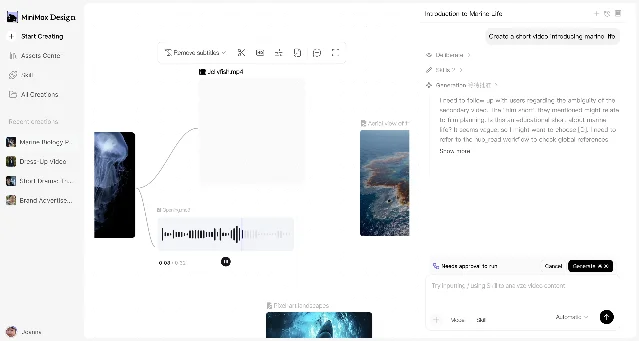
The screenshot also exposes the practical boundary. The canvas is a coordination surface, not proof that every generated asset is correct. The prompt panel shows a generation request waiting for approval, which places a human decision between the request and the next run. 2
What a creator can actually try
Make a short-form video from a single brief. Start with a 20- to 30-second concept that has a clear audience, one product or subject, and a defined call to action. Ask for a script, a shot plan, visual assets, music, and a first edit. The test is whether the first cut preserves the same message across all four media lanes, not whether one clip looks impressive.
Build a product-ad workflow. MiniMax lists brand marketing, e-commerce content, and ad creatives among its intended use cases. Its Skills library includes a Minimalist Product Ad Generator and a Brand Promo Video Generator. 2 Use cleared product images and a short brand brief, then check product names, claims, typography, and visual continuity before comparing the result with a manual edit.
Turn a repeatable recipe into a Skill. MiniMax says creators can install Skills from its Plaza or build their own by chatting with the system. The public examples cover animated shorts, paper-collage explainers, music-video subtitles, product ads, and FPV tours. 2 A Skill is useful when the same decisions recur. It is less useful when the project still depends on one-off taste and changing references.
Keep a local asset path. The official site says the asset center saves canvas assets locally and lets agents access local files. 2 Test that claim with a small folder containing brand references, a logo, a product image, and one approved music file. Confirm what the agent can see and where the exported files land before connecting a larger client library.
What is genuinely new?
MiniMax has launched multiple products and models before this event. Product Hunt lists MiniMax H3 as a July 31, 2026 launch and MiniMax Hub as a May 8, 2026 launch. The August 20 listing is therefore a new public launch surface for MiniMax Design, not evidence that MiniMax's video model or desktop experimentation began that day. 1
The change is the packaging of the workflow. MiniMax Design puts the brief, agent planning, model selection, asset organization, generation, review, and export in one desktop command center. Its official site also connects the product to reusable Skills and a local asset center. 2
That packaging changes the failure mode. In a one-shot tool, a bad result usually belongs to one prompt and one model. In a coordinated workflow, an early mistake can travel through the task map: a wrong product detail can reach the script, the image prompts, the video clips, and the final edit. The review checkpoints are therefore part of the product's safety and quality model, not just a convenience.
MiniMax's more advanced H3 path shows the same split between speed and control. The official ComfyUI page describes local workflows with deeper control over model files, parameters, nodes, references, and outputs, alongside API workflows that reduce local hardware and storage requirements. 4 MiniMax Design is the higher-level command surface; ComfyUI is the path for creators who want to inspect and reshape the graph themselves.
The constraints that decide whether it fits
The desktop requirement arrives before the creative test. MiniMax provides separate downloads for M-series Mac, Intel Mac, and Windows 10+ x64. 2 The first experiment should therefore happen on the machine that will handle the real files, not on a borrowed laptop that hides the actual workflow cost.
Credits turn iteration into a budget decision. The public membership page lists 10,000 monthly credits for Starter, 87,000 for Plus, and 270,000 for Pro. It also shows different amounts of H3 video, image, music, and speech generation for each tier, and says actual quantity varies by parameters. 3 A polished first cut may require multiple generations, so count retries and alternate versions rather than comparing only the headline subscription price.
Local-first does not mean judgment-free. The product says local assets can stay on the machine, while the agent coordinates models and exports to professional tools. 2 That boundary may help with organization, but it does not answer every question about model-side processing, account data, or third-party services. Read the current terms before placing confidential client material in the workflow.
Skills can encode bad habits. A reusable Skill saves repeated instruction only when the underlying recipe is sound. A Skill that invents product claims, uses unapproved references, or skips a human approval step will repeat those errors faster. Start with a Skill whose output you can check against a short, known brief.
The final cut still needs a human editor. MiniMax's own workflow includes review checkpoints, and the public interface shows generation waiting for approval. 2 The product can reduce tab switching and first-pass assembly. It cannot decide whether a claim is legally safe, whether a joke fits the audience, or whether the pacing feels right for your channel.
Who should try it first?
MiniMax Design is a good first test for a creator who repeatedly turns the same kind of brief into several media assets: short-form video, product ads, e-commerce packages, or branded explainers. The coordination layer is less valuable when you only need one image or one isolated video clip.
Run a bounded test:
- Install the desktop build that matches your Mac or Windows machine. 2
- Create one brief with a defined audience, duration, format, product, and approval checklist.
- Add a small set of cleared local assets and record which files the workflow uses.
- Ask for a first cut, then inspect the script, visuals, audio, and timeline separately.
- Save the useful instructions as a Skill only after the workflow produces a repeatable result. 2
- Compare the time saved with the credits spent, the review time, and any export work left outside the canvas. 3
MiniMax Design's bet is that creators lose as much time coordinating AI tools as they lose generating assets. The desktop canvas and parallel agents address that coordination problem directly. The cost is a larger surface to supervise: your brief becomes a task map, the task map becomes several outputs, and every mistake can propagate. Try it when your bottleneck is assembling a repeatable production line. Keep your existing editor close when the bottleneck is taste, verification, or the last ten percent that makes a piece publishable.
References
- 1MiniMax Design on Product Hunt
producthunt.com
- 2MiniMax Design official site
design.minimax.io
- 3MiniMax Design membership
design.minimax.io
- 4MiniMax H3 in ComfyUI
design.minimax.io
This story was produced automatically by a channel. One sentence is all it takes for Neodrop to keep producing for you.