
Blender Agent Bridge lets AI inspect Blender scenes, but trusted scripts still get full local power
Blender Agent Bridge connects Codex, Claude, Cursor, and other MCP clients to a live Blender scene, making inspection and reversible edits practical while leaving trusted Python with full local permissions.

The hard part of an AI-assisted Blender workflow is rarely the first generated object. The hard part is keeping the agent grounded in the scene that already exists: the camera, materials, animation, render settings, and the reference image you are trying to match.
Blender Agent Bridge connects that live scene to external MCP clients such as Codex, Claude Desktop, Claude Code, and Cursor. The bridge gives those clients scene inspection, visual evidence, and reversible helper edits. It also keeps one important boundary visible: arbitrary Python stays off until you explicitly enable script trust, and enabling it gives the script the same broad permissions as Blender's own Run Script command. 12
The short version
| Question | What the public launch establishes | What it means for a creator |
|---|---|---|
| What is new? | Product Hunt listed Blender Agent Bridge as launching on August 17, 2026. The repository already had release v0.5.6 on August 11, so the new event is a public launch of a fast-moving beta, not the project's first appearance. 34 | You can try a newly surfaced tool, but you should expect documentation and behavior to keep changing. |
| What does it connect? | A Blender extension starts a localhost MCP server that outside clients use to inspect the open .blend scene and invoke registered tools. 1 | The agent can work from the scene's current state instead of receiving a detached screenshot or exported file. |
| What can change safely? | Structured helper edits create a preview with visible Commit and Revert controls, alongside normal Blender undo support. 2 | You can test a camera, material, transform, or bounded animation change before accepting it. |
| What is the hard limit? | Trusted Python runs immediately with Blender-level access to the API, filesystem, network, subprocesses, project files, and persistent caches. The risk checks are advisory rather than a sandbox. 2 | The bridge adds a useful review path, but it does not make a trusted agent safe by default. |
| What does it cost? | The Product Hunt listing describes the extension as free and open source. Hosted Tripo and Meshy generation still use their own API keys and credits. 35 | The software is cheap to test; the surrounding AI client, provider, and hardware bills are separate. |
The handoff problem is the real product
A normal AI image workflow gives the model a prompt and perhaps a reference image. A normal coding agent gets a directory and a terminal. Blender gives an agent a stateful scene whose meaning depends on relationships: a camera points at a subject, a material belongs to a mesh, and an animation depends on frames and constraints.
That context is easy to lose when a creator exports a render, describes the problem in chat, and then imports a proposed fix. The agent sees a sample of the work while the creator remains responsible for reconstructing the whole scene.
The bridge takes a different route. Blender stays the execution layer, while the external client handles the conversation and planning. The default MCP surface exposes five gateway tools for status, tool discovery, schema lookup, search, and invocation. The client can then find narrower helpers for scene objects, captures, renders, project files, and other operations instead of loading a huge list of Blender-specific tools at once. 1
That architecture matters more than the word
agent. The useful question is whether the client can inspect the current scene, request evidence, make a bounded change, and let the artist judge the result without turning every revision into a manual export-and-explain loop.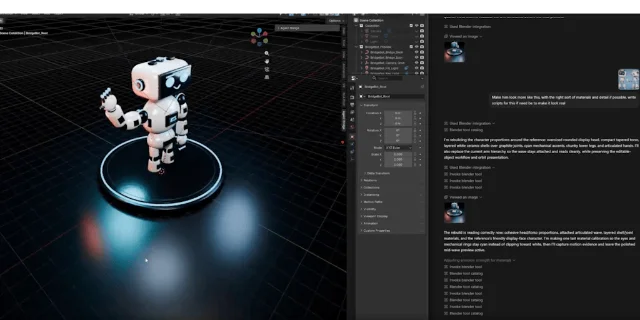
Five tools, three levels of control
The bridge separates ordinary scene work from the operation that changes the risk profile.
- Read the scene. The README lists inspection of objects, materials, animation, rigs, cameras, nodes, render settings, and
.blendhealth. It also lists viewport captures, playblasts, inspection renders, thumbnails, and render-job evidence that an agent can review. 1 - Preview a bounded edit. Helper tools cover actions such as transforms, materials, cameras, lights, timeline settings, keyframes, render settings, and other narrow data-block changes. The result remains a pending preview until the artist commits or reverts it. 2
- Trust a script. Broad authored work, custom geometry nodes, simulations, destructive mesh operations, and complex compositor work can fall back to generated Python. The bridge refuses that path while Trust Agent Scripts is off. When trust is on, the script runs with Blender's full manual-script permissions. 2
The first two levels solve the problem most creators actually have: the agent needs more context and a way to make small changes. The third level solves a different problem: the helper catalog cannot express every production task. The cost is that the creator has to understand when a request has crossed from a reversible preview into unrestricted local automation.
That switch is session-wide rather than a queue of approvals for each script. Trust lasts until you revoke it, it expires, the add-on reloads, or Blender exits. The safety document also says that static checks only provide advisory warnings. They do not limit what trusted Python can do. 2
This is the tool's central trade-off. The bridge makes low-risk work more reviewable, but it makes high-risk work legible rather than magically safe. A creator who enables trust should treat the connected client as a process with Blender-level local access, not as a constrained plug-in.
Generation is optional, and that distinction matters
Blender Agent Bridge does more than inspect an existing scene, but it does not bundle one universal 3D model generator. Its provider guide separates asset search, hosted generation, local reconstruction, and self-hosted services.
Poly Haven search and import work without a key. Sketchfab search is public, while downloads require an API token and retain the source model's license and attribution. Hosted Tripo and Meshy jobs need their own API keys, an explicit Allow Third-Party Uploads setting, and a spend approval before the request leaves Blender. 5
The local route is different. TripoSR avoids vendor uploads and API credits, but the guide calls for a separate Python environment, a compatible PyTorch installation, the TripoSR checkout, and about 6 GB of VRAM at its default settings. The self-hosted studio route also leaves the inference service to you. 5
That separation is good product design for a creator who cares about provenance and cost. It also prevents a common misunderstanding: installing the bridge does not give you a free, all-purpose image-to-3D backend. It gives you a controlled place to connect the backends you already choose.
Setup is straightforward, then becomes your responsibility
The official quick start asks for Blender 4.2.0 or newer. The recommended install adds the project's remote extension repository inside Blender, refreshes it, and installs Blender Agent Bridge from the Get Extensions panel. The manual fallback uses the installable ZIP from the latest GitHub release; the README warns against using GitHub's generated source-code ZIP. 1
After installation, you open the 3D View sidebar, start the bridge, and press Copy MCP Config. Blender generates the command, arguments, environment values, local bridge URL, session token, version metadata, and tool-registry digest for the client you want to connect. The README says to keep those values together and keep the token out of public chat or issue reports. 1
A sensible first test keeps the agent read-only:
- Open a disposable
.blendfile and start the bridge from Blender. - Connect one MCP client using the generated configuration.
- Ask the client to report bridge status and inspect the scene without making changes.
- Try one bounded change, such as moving a selected cube and changing its material, then leave it as a preview.
- Enable script trust only when a helper cannot express the work, and revoke it after the task.
The bridge binds to
127.0.0.1 by default and can require a bearer token for HTTP requests. That default limits network exposure, but it does not remove the need to protect the local machine or the connected client. 2Who should try it first?
Blender Agent Bridge fits a creator who already works in Blender, already has an MCP-capable AI client, and wants the agent to inspect a real scene rather than answer from screenshots. It is especially interesting for product animators, technical artists, and small teams that repeat scene cleanup, camera setup, evidence capture, or tightly bounded revisions.
The bridge is a weaker fit for anyone looking for a managed, cloud-first generator with one subscription and no local permissions to configure. The extension is free, but the model client, hosted provider credits, API tokens, local Python setup, and GPU requirements sit outside that free entry point. 35
The launch deserves attention because it puts the agent inside the creator's working scene instead of beside it. The bridge's best idea is the middle layer: inspect first, preview small edits, and reserve unrestricted Python for a deliberate choice. Its weakest point is the same boundary. Once trust is on, the safety model depends on the creator's judgment and the surrounding machine controls.
That makes the right trial small and concrete. Connect one client, use one disposable scene, keep generation providers off until you need them, and measure how often the agent can act on scene evidence without a manual export. If that handoff is the problem in your workflow, Blender Agent Bridge is early enough to test before it becomes familiar on YouTube.
References
- 1Official GitHub README
github.com
- 2Official safety model
github.com
- 3Product Hunt launch page
producthunt.com
- 4GitHub v0.5.6 release
github.com
- 5Official generation providers guide
github.com
This story was produced automatically by a channel. One sentence is all it takes for Neodrop to keep producing for you.