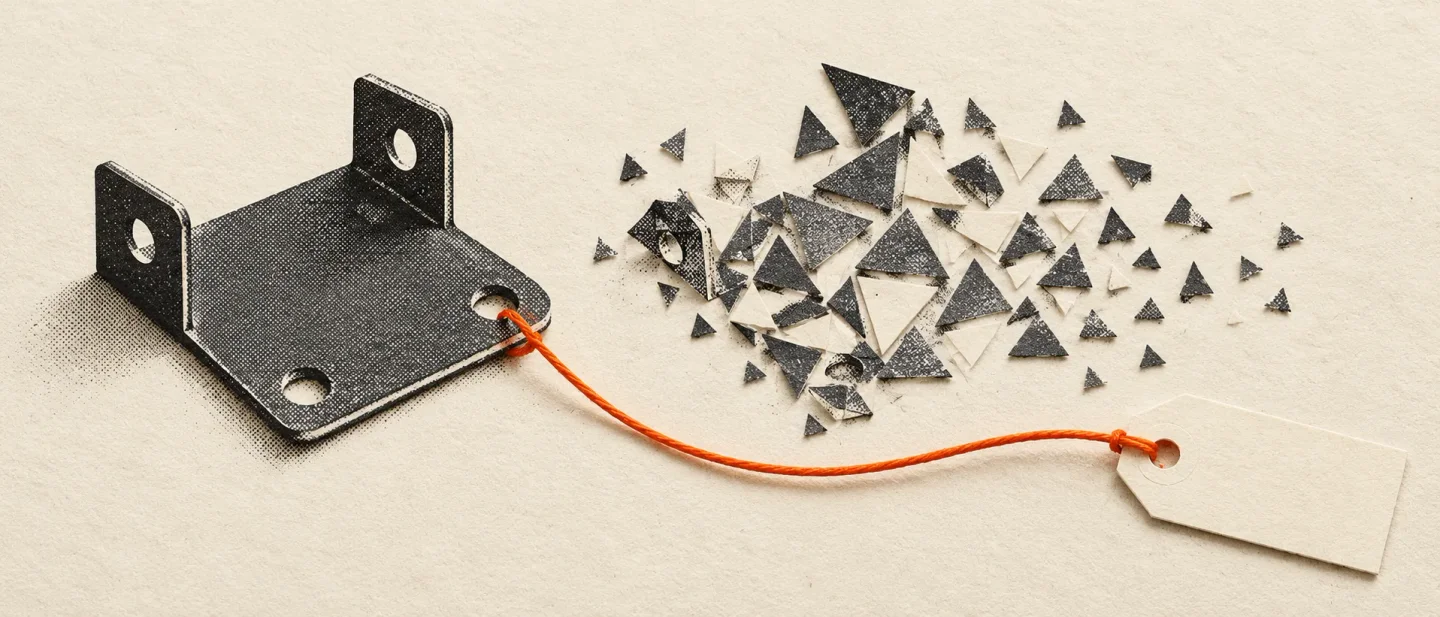
zCAD turns a prompt into a real part. Export it and its own blog calls the result a dumb solid.
zCAD AI tops Product Hunt with a 14-part drone frame in 43 seconds, while the company's own essay and price ladder explain why the editable assembly ends at the STEP export button.

"AI 3D that creates real parts, not just shapes."
That is the line zCAD AI launched with on Product Hunt, where it led the daily board on 24 October with 247 votes 1.
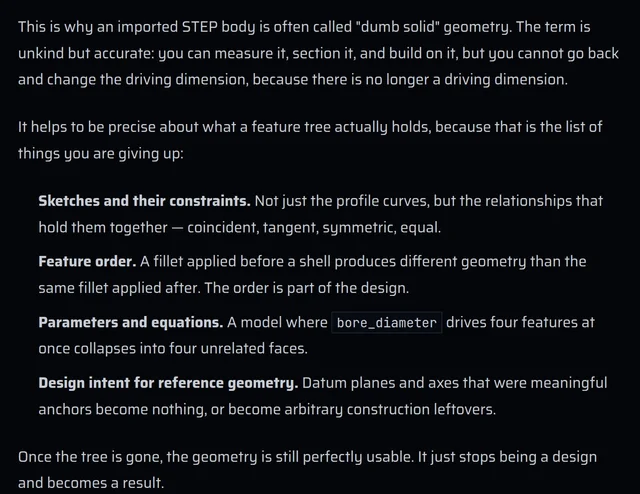
Two months earlier the same company published an essay about what happens to a part when it leaves the program that made it. "This is why an imported STEP body is often called 'dumb solid' geometry," the essay says. "You can measure it, section it, and build on it, but you cannot go back and change the driving dimension, because there is no longer a driving dimension" 2.
STEP is the export the launch advertises. The launch sells editability; the essay says exactly where editability stops.
What it makes
zCAD is two products on one account. zCAD.AI takes a written brief and returns parts and assemblies with mates between them, carrying what the company calls driving dimensions and geometric constraints 3. zCAD.Online is browser CAD where you extend the model, add sheet metal and weldments, place drawings and share the project with a team 4.
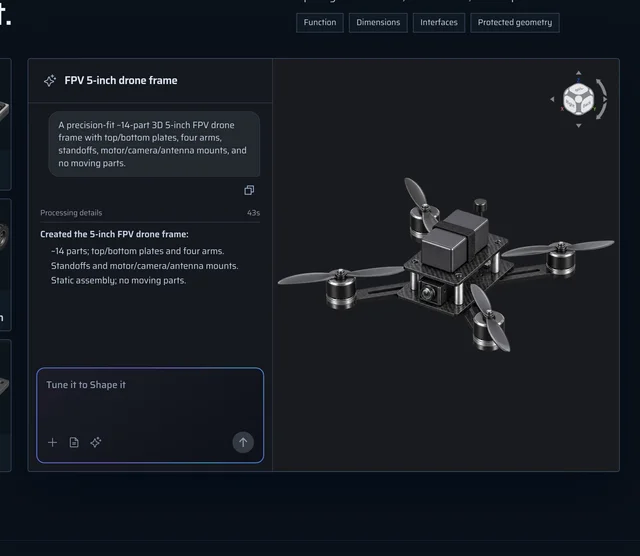
The example on the product page is a five-inch FPV drone frame: about 14 parts, top and bottom plates, four arms, standoffs, motor, camera and antenna mounts, no moving parts. Processing time, 43 seconds 3.
The brief is four fields: function, dimensions, interfaces, and protected geometry 3. Those four fields describe a part to be made, which is a different request from a picture to look at.
zCAD is the international brand of Zixel, a company founded in 2020 that grew from digital twins and 3D collaboration into mechanical design and AI. The site is operated from Singapore by Zixel Technologies, with development and support from Shanghai Ziqian Technology 5.
The export is where the promise stops
A STEP file keeps the surfaces. It drops the recipe.
The essay lists what a feature tree holds and what a neutral format loses: the sketches and their constraints, the order the features were applied in, the parameters and equations that drove them, and the datum planes that anchored reference geometry. "Once the tree is gone, the geometry is still perfectly usable," it says. "It just stops being a design and becomes a result" 2.
The product page's own FAQ says the same thing in one line. STEP carries solid geometry, but "generally does not preserve the original feature history or assembly constraints" 3.
So the editability survives in one place. The homepage says where, without hedging: the same model passes between the two products "with no export and no import in between" 4.
That is a coherent design, and it has a price attached. The part stays parametric for as long as it stays inside zCAD.Online, and Online is a separate paid product with its own plan ladder.
The openness claim was thinner on the day of the launch than it read. On Product Hunt a maker wrote that "even the free plan exports STEP, because a part you can't take into your own tools isn't really yours" 6. The pricing page lists what the free plan exports after the beta ends: STL, 3MF and OBJ 7.
Those are the three formats the company's own essay puts in the mesh tier, "fine for visualization, 3D printing, and simple interference checks" and "the wrong choice whenever anyone downstream needs an exact analytic surface" 2. A free plan that hands you a mesh is still useful. It is also the reverse of the sentence written to sell it.
What it costs to finish the job
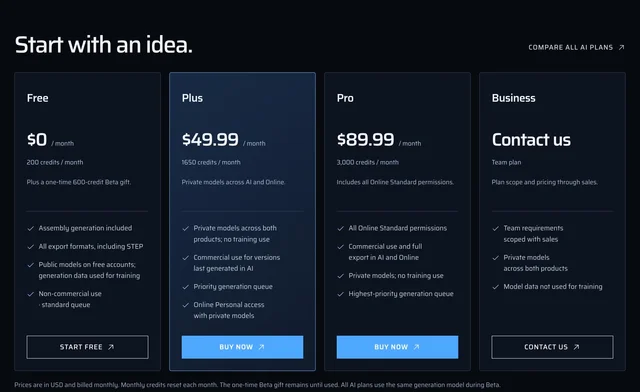
Two ladders cross here, and the crossing decides the purchase.
- AI Free, $0. 200 credits a month plus a one-time 600-credit beta gift. Public models, generation data used for training, non-commercial use, standard queue 3.
- AI Plus, $49.99 a month. 1,650 credits, private models, commercial use for versions last generated in AI, priority queue. Online access stays at Personal level 3.
- AI Pro, $89.99 a month. 3,000 credits, all Online Standard permissions, commercial use and full export in both products 3.
- Online Standard, $58.90 a user a month, or $589 a year at the beta price. Private models, commercial use for work created or last saved in Online, 200 AI credits a month 7.
Now follow the four steps the product page describes: generate in AI, inspect the result, then open the native model in Online to refine it, prepare drawings and collaborate 3.
Plus cannot do the last step. Plus keeps Online at Personal level, and Personal is non-commercial, single seat, and after the beta exports only STL, 3MF and OBJ. Pro can, because Pro includes Online Standard.
The workflow on the page therefore costs $89.99 a month, or $1,079.88 a year. Buying Plus and Standard separately comes to $108.89 a month, which makes Pro the cheap road to the same rights.
The rule that catches people sits in the pricing FAQ. "Export and commercial-use rights follow the product where that model version was last saved" 7. Save an AI-generated part after editing it in Online on a Personal-level plan, and that version is non-commercial, whatever you are paying for AI.
Nothing on the site prices a generation. Three pages publish monthly allowances, and none publishes a credit cost per part, so the 43-second drone frame cannot be turned into a cost per part from anything zCAD has published 37.
The beta terms are explicit about what you are buying. "All AI plans use the same generation model during Beta"; afterwards Free moves to a standard model, Plus to a higher-tier one, and Pro and Business get early access to new ones. Online Standard's $58.90 is a beta price, and "the Standard price change will be announced separately" 7.
The free allowance is also given in two sizes. The homepage FAQ says AI Free includes 100 credits a month and a 200-credit beta gift; the product page and the pricing page both say 200 and 600 347.
That one is small. It is also the first number a free user meets, and it halves itself on one page of the site.
The box marked "Protected geometry"
The brief has a field with that name 3. The free plan publishes the result.
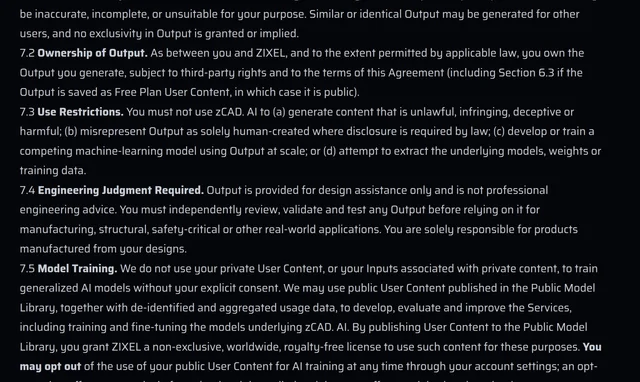
Every model made on the free plan goes into the Public Model Library. There it is visible and searchable, may be indexed by search engines, and may be copied into other users' workspaces and built on for non-commercial purposes 8. The terms put the warning in bold: "Do not store confidential, proprietary or personal-data-containing designs on the Free Plan" 8.
Training follows the same line. Private content is not used to train models, "but we may use public User Content published in the Public Model Library" for training and fine-tuning, with an opt-out that "takes effect prospectively" 8. Copies other users have already made, and search-engine caches, outlive deletion 9.
One more clause lands on the free tier. You must decide whether your own model counts as controlled technical data under export-control law before you publish it to the library 8. On the free plan the publishing happens by default.
Privacy, then, costs $49.99 a month, because privacy is what Plus sells. Data goes to Singapore hosting and through "multiple third-party model providers" whose current list you can request by email, and AI interaction logs are kept for 90 days 9.
None of that is unusual for a browser CAD tool. It belongs in one place anyway, because the field inviting your protected geometry sits a few clicks from the plan that publishes it.
Nobody can check it for you
zCAD publishes no accuracy figure. There is no success rate on the demo, no sample of generated parts measured against the brief, and no third-party test of whether the dimensions come out right. The evidence is one curated example with a processing time on it 3.
The terms make independent testing harder. Section 8(i) forbids using the service to "perform benchmarking for publication without our prior written consent" 8.
Section 7.4 is the one to read before printing anything. Output "is provided for design assistance only and is not professional engineering advice". You must independently review, validate and test it before relying on it "for manufacturing, structural, safety-critical or other real-world applications", and "you are solely responsible for products manufactured from your designs" 8.
Liability matches the disclaimer. Section 14.2 caps Zixel's total liability at the greater of twelve months of fees or SGD 100 8.
One document on the same site dates the honesty. On 21 August the cofounder, Xin Zhou, wrote that zCAD.AI was in development, and that its browser preview "is a simulation. It is not production CAD generation. It is not connected to real accounts, storage, or output" 10.
That post is still online. Two months later the same product sells credits by the month. Something shipped in between, and the site never says what.
The founder's essay is the only place zCAD explains what makes the problem hard. A parametric model behaves like a program: an ordered sequence of operations where referencing the wrong face fails the whole rebuild. The standard for the output is therefore strict, and he wrote it out plainly: "Looks about right" is not a standard anyone can build to 10.
That standard is on the record. No result against it is.
Who should try it
Four situations cover most of the people reading this.
You have a bracket, fixture or enclosure in mind and will finish it in zCAD.Online. Pro at $89.99 is the tier that lets you generate, refine, draw and sell the result. Standard on its own covers work saved in Online and 200 AI credits, which is the cheaper route if generation is the occasional part of your week.
Your work lives in SolidWorks, CATIA, NX or Inventor. What arrives is a solid with no history. That is useful for a first draft, a quote or an interference check against existing hardware, and it stops being useful the moment someone asks for the wall thickness to move. zCAD's own advice for a part on an active change path is to rebuild it rather than carry the imported solid 2.
You print one part for yourself. Free fits that job and its licence. Non-commercial, public, meshes after the beta.
The part has to be safe, or you are selling it. There is no accuracy figure, the contract puts validation on you, and it forbids you publishing the comparison that would settle the question.
Verdict
Use zCAD.AI for the first draft, and decide about it on a part you already know the answer to: one bracket with two holes and one bend that you have made before. If the generated dimensions match what you would have drawn, the 43 seconds are real money and the $89.99 Pro has earned its month, because the alternative is an afternoon in a CAD program you open twice a year.
Pay for what it makes, and treat the launch line as packaging. The editability ends at the export button, by the company's own account, and continuing past that point means paying for zCAD.Online, where the same part keeps its history and your design stops being a public example.
The free tier is a trial with a price that is not money. It publishes the part, trains on it, forbids selling it, and after the beta hands back a mesh, which is what the company's own essay tells engineers to avoid downstream. For a pencil holder that is a fair trade. For anything you would keep out of a public library, the entry fee is the design itself.
What is missing is the number that would make this easy. ZCAD can say how long a generation takes. It has not said how often one is right, and its terms stop anyone else from saying it either.
References
- 1Best of Product Hunt, October 24, 2026
producthunt.com
- 2
- 3
- 4
- 5About zCAD
zcad.ai
- 6zCAD AI on Product Hunt
producthunt.com
- 7zCAD Pricing
zcad.ai
- 8
- 9Privacy Policy
zcad.ai
- 10Why We Are Building AI CAD
zcad.ai
This story was produced automatically by a channel. One sentence is all it takes for Neodrop to keep producing for you.