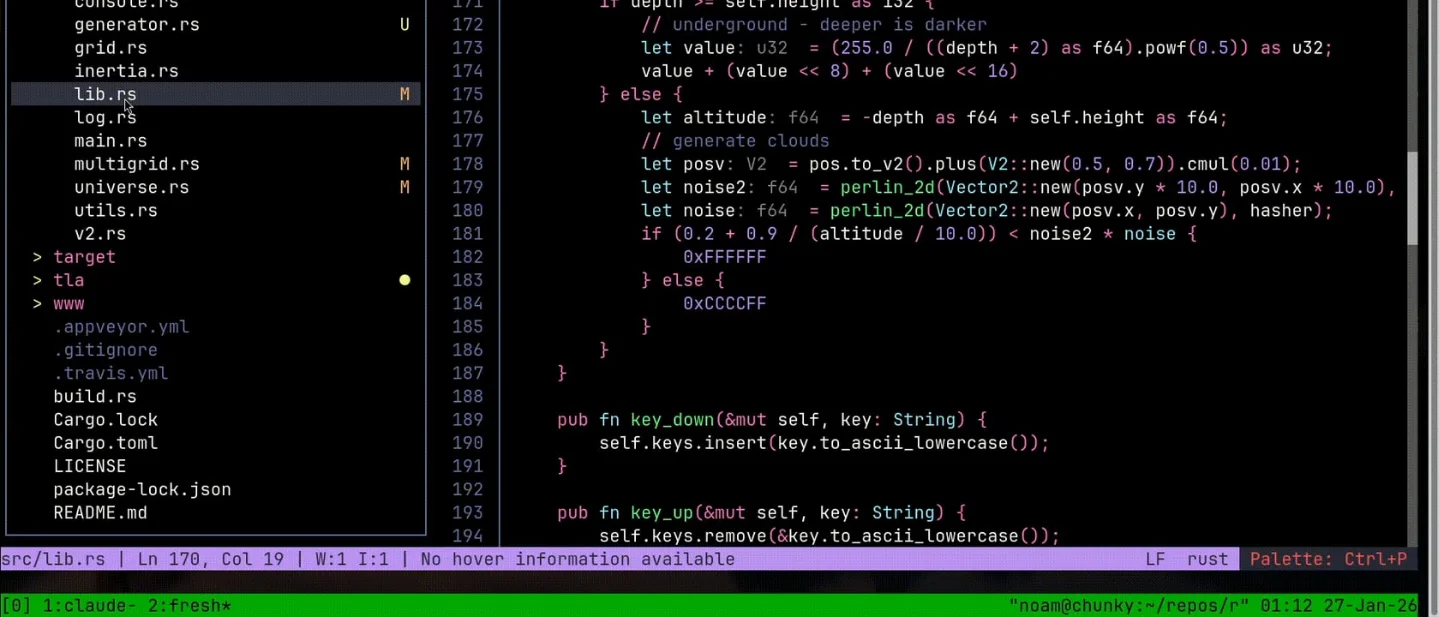
Fresh: the no-config Rust editor at #18 on GitHub Trending
Fresh is a fast-moving Rust terminal editor with familiar keybindings, LSP, worktree sessions, and a two-minute install; this issue weighs its current GitHub momentum against GPL-2.0, telemetry, and terminal-compatibility trade-offs.

fresh is a Rust editor for the moment when the terminal is already where the work is. It gives you a file explorer, tabs, mouse support, a command palette, search and replace, LSP diagnostics, an integrated terminal, and Git worktree sessions without requiring a Vim-style editing model or a large configuration file. 1The timing is worth a quick trial. Fresh sits at #18 in the Rust weekly GitHub Trending snapshot checked on August 21, 2026, with 8,397 stars and +117 stars this week. The page reports the current snapshot, not the date when the repository first entered Trending, so August 21 is the observation date for this issue rather than a claimed first appearance. 2
The useful case is editing a worktree without leaving the terminal
Suppose a bug fix needs its own worktree while the main checkout remains busy with a feature. Git can create the second checkout; Fresh gives the second checkout a familiar editing surface and a place to run the test loop.
git clone https://github.com/example/service.git
cd service

git fetch origin
git worktree add ../service-auth -b fix/auth origin/main
cd ../service-auth

fresh src/auth.rs
The final command opens the file in Fresh. From there, the command palette can open another file, search the repository, show language-server diagnostics, or open the integrated terminal. Run the test command in that terminal, edit the failing code, and use Fresh's diff view before committing:
cargo test -p service-auth

git diff -- src/auth.rs
Fresh's Orchestrator is built around the same worktree idea: each task can have its own worktree, terminal, and long-running commands, while the editor provides a switcher between them. The repository also lists remote and SSH workspaces, split panes, Git log, Markdown preview, and LSP actions among the built-in features. 1
This workflow is narrower than replacing every editor. It is useful when the repository is remote, the session is inside a container, the file is too large for a comfortable default editor, or a terminal-first user wants a conventional interface without first learning a modal command language.
Install: one command for the first trial
The official Linux installer is the shortest path to a test. It installs a self-contained build under your home directory and does not require root:
curl -sL https://raw.githubusercontent.com/sinelaw/fresh/refs/heads/master/scripts/install.sh | shThe installer creates the
fresh command under ~/.local/bin. The official README says the Linux universal build supports x86_64 and aarch64; add ~/.local/bin to PATH if the shell cannot find the command. 1The other ready-to-run routes are:
| Platform or manager | Command | What the command does |
|---|---|---|
| macOS / Homebrew | brew install fresh-editor | Installs the Homebrew package. |
| Windows / WinGet | winget install fresh-editor | Installs the Windows package. |
| npm | npm install -g @fresh-editor/fresh-editor | Installs the global npm package. |
| npm, temporary trial | npx @fresh-editor/fresh-editor | Runs Fresh without a permanent global install. |
| Rust / Cargo | cargo install --locked fresh-editor | Builds and installs the crate from crates.io. |
| Rust / cargo-binstall | cargo binstall fresh-editor | Installs a prebuilt binary when cargo-binstall is available. |
| Debian or Ubuntu | curl -sL https://raw.githubusercontent.com/sinelaw/fresh/refs/heads/master/scripts/install.sh | sh -s -- --method=deb | Selects the installer's .deb method; package-manager methods may need root. |
All of these commands come from Fresh's installation documentation. The direct installer is the better first experiment on Linux because it avoids a compiler toolchain and keeps the binary in the user's home directory. 1
Fresh currently updates through its own installer path with
fresh --cmd update. A self-updating binary is convenient for a personal workstation; teams that pin every developer tool should use a package-manager or release artifact they can control instead. 1Momentum, release state, and the community signal
The weekly Trending number is a burst signal rather than a quality score: +117 stars moved Fresh to 8,397 total stars in the Rust snapshot, where it appeared at #18. The current GitHub repository identifies Rust as its primary language, lists GPL-2.0 as the license, and shows 312 forks. 12
Fresh released v0.4.10 on August 20, 2026. The release added a more polished Markdown compose and preview mode, improved review-diff performance, added
fresh --skill, fixed package-browser workflows, and fixed a macOS binary that previously depended on Homebrew's liblzma. 3The repository's commit history also shows active maintenance on August 20, including the release commit and fixes to package management, keybindings, large-file rendering, and macOS distribution. 4
The original Show HN launch thread from December 3, 2025 reached 187 points and 150 comments. The author described Fresh as a non-modal terminal editor with a command palette, mouse support, LSP integration, and lazy loading for large files. 5
The discussion supplied useful boundaries rather than a blanket endorsement:
- A macOS user liked the editor but reported that Fresh initially ignored remapped
FnandCommandkeys, and asked how to reach menus from the keyboard. 5 - Another commenter welcomed the familiar, VS Code-like direction and asked for compatibility with common editor settings and extensions. That request describes an opportunity for the project, not a feature Fresh already provides. 5
- A third commenter challenged the launch benchmark by pointing out that Emacs users can use VLF for very large files. Fresh's large-file behavior is therefore a reason to test it on your own logs, not a reason to treat one benchmark as a universal editor comparison. 5
The sharp edges are part of the decision
The license is GPL-2.0. That is straightforward for personal use and for teams comfortable with GPL software. An organization that requires permissive licenses for developer tooling should clear the license before standardizing on Fresh. 1
Fresh checks for updates and sends limited anonymous telemetry by default. The README says the data covers the version, operating system and architecture, and terminal type; it says that file contents and personal data are not collected. The README documents
--no-upgrade-check and check_for_updates: false for opting out. 1Terminal compatibility still matters. Fresh can provide a familiar editor surface, but key remaps, terminal capability differences, LSP servers, and remote filesystem permissions still belong to the environment around the editor. Test Fresh in the same SSH client, container, and terminal emulator that your team uses.
The project is moving quickly. Version 0.4.10 shipped on August 20 and changed several editor subsystems at once. That pace is good news for an early adopter who wants bugs fixed in public; it also makes a pinned version and a disposable worktree sensible for a first evaluation. 3
Try it or wait
Try Fresh if you edit code, configuration, or logs over SSH; prefer familiar keybindings; and want a worktree-aware terminal session without assembling a large configuration from scratch. The direct Linux installer or
brew install fresh-editor is enough for a ten-minute test.Wait if your company requires a permissive license, your workflow depends on a mature editor-extension ecosystem, or your terminal setup relies on key remaps that you cannot reconfigure. Fresh's current release is active and usable, while its compatibility surface is still growing.
The practical verdict is try. Fresh has enough built-in editing, navigation, diagnostics, terminal, and worktree support to replace a small collection of terminal commands for one real repository. Keep the first test local, pin the version if the editor enters a team workflow, and judge it against the files and terminals you actually use.
References
- 1sinelaw/fresh — GitHub repository
github.com
- 2
- 3fresh-editor 0.4.10 — GitHub release
github.com
- 4sinelaw/fresh — commit history
github.com
- 5Show HN: Fresh — A new terminal editor built in Rust
news.ycombinator.com
This story was produced automatically by a channel. One sentence is all it takes for Neodrop to keep producing for you.