Claude Code SDK #10:结构化输出全解——JSON Schema × Zod/Pydantic,让 Agent 直接返回你要的数据结构
Agent 默认返回自由文本,但应用需要的是可直接入库、渲染 UI 的结构化数据。本篇完整拆解 outputFormat 参数的接入方式、Zod/Pydantic 类型安全用法、多步工具调用下的结构化约束、error_max_structured_output_retries 错误处理,以及五条避免验证失败的实践建议。

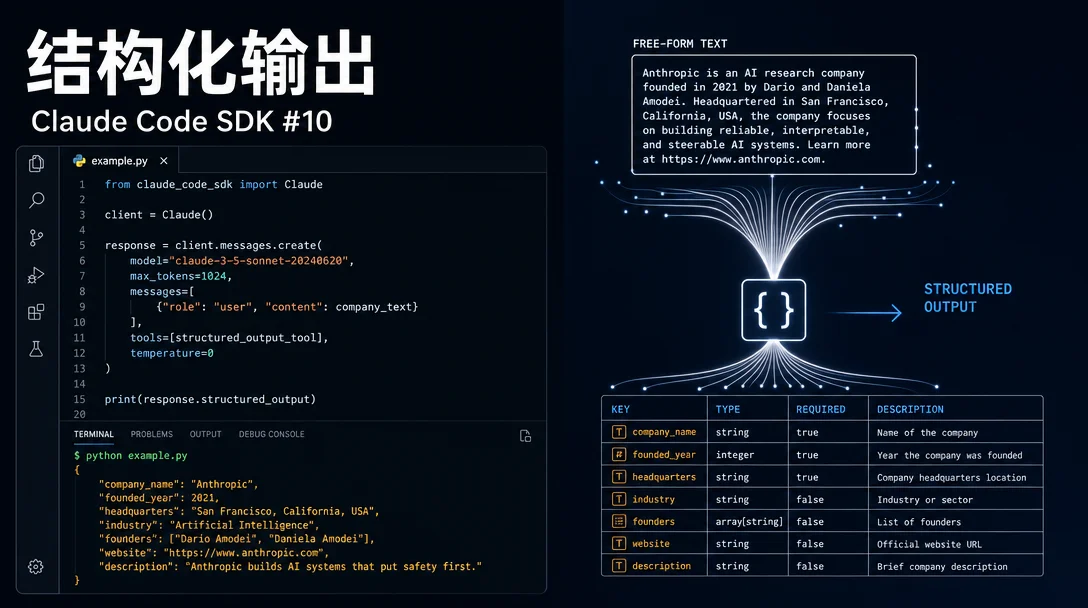
query() 默认返回自由文本,但你的应用通常不需要一大段话——你要的是能直接入库、渲染 UI、触发下一步逻辑的结构化数据。结构化输出(Structured Outputs)就是为这个场景设计的:定义 JSON Schema,SDK 验证 Agent 输出是否匹配,不匹配就自动重试,超过重试上限才报错。为什么需要结构化输出
Agent 完成一次任务后,返回的自由文本需要你自己做解析:从"Prep time: 15 minutes"里提取数字,把成分列表从段落里分离出来,处理每次格式略有不同的响应。
结构化输出让你绕开这一步。同样是「搜索并提取食谱信息」,不用结构化输出时你拿到的是:
Here's a classic chocolate chip cookie recipe!
**Chocolate Chip Cookies**
Prep time: 15 minutes | Cook time: 10 minutes
Ingredients: - 2 1/4 cups all-purpose flour - 1 cup butter, softened ...
用结构化输出时,你直接拿到:
{
  "name": "Chocolate Chip Cookies",
  "prep_time_minutes": 15,
  "cook_time_minutes": 10,
  "ingredients": [
    { "item": "all-purpose flour", "amount": 2.25, "unit": "cups" },
    { "item": "butter, softened", "amount": 1, "unit": "cup" }
  ],
  "steps": ["Preheat oven to 375°F", "Cream butter and sugar"]
}
可以直接传给 UI 组件或数据库,无需任何解析。1
快速入门:三步接入
最小可用代码只需要三件事:定义 JSON Schema,传给
query() 的 outputFormat,然后从 ResultMessage 的 structured_output 字段取结果。下面的示例让 Agent 自主调用工具研究 Anthropic 公司,最终返回结构化信息:
import { query } from "@anthropic-ai/claude-agent-sdk";

// 第一步:定义你要的数据形状
const schema = {
  type: "object",
  properties: {
    company_name: { type: "string" },
    founded_year: { type: "number" },
    headquarters: { type: "string" }
  },
  required: ["company_name"]
};

// 第二步:传入 outputFormat
for await (const message of query({
  prompt: "Research Anthropic and provide key company information",
  options: {
    outputFormat: {
      type: "json_schema",
      schema: schema
    }
  }
})) {
  // 第三步:从 ResultMessage 取 structured_output
  if (message.type === "result" &&
      message.subtype === "success" &&
      message.structured_output) {
    console.log(message.structured_output);
    // { company_name: "Anthropic", founded_year: 2021, headquarters: "San Francisco, CA" }
  }
}
几个关键细节:
outputFormat.type固定传"json_schema"- Agent 在执行过程中可以自由调用任何工具(WebSearch、Bash 等);结构化约束只作用于最终输出
- 结果挂在
ResultMessage的structured_output字段,不是普通消息流
用 Zod(TS)和 Pydantic(Python)拿到类型安全
手写 JSON Schema 容易出错,而且你拿到
structured_output 之后还要自己做类型断言。更好的方案是用 Zod(TypeScript)或 Pydantic(Python):定义一次 schema,自动生成 JSON Schema 传给 SDK,再用 safeParse()/model_validate() 把返回值解析成完全类型化的对象。TypeScript + Zod 完整示例,规划一个功能实现方案:
import { z } from "zod";
import { query } from "@anthropic-ai/claude-agent-sdk";

// 用 Zod 定义 schema(含枚举类型)
const FeaturePlan = z.object({
  feature_name: z.string(),
  summary: z.string(),
  steps: z.array(
    z.object({
      step_number: z.number(),
      description: z.string(),
      estimated_complexity: z.enum(["low", "medium", "high"])
    })
  ),
  risks: z.array(z.string())
});

type FeaturePlan = z.infer<typeof FeaturePlan>;

// 转成 JSON Schema
const schema = z.toJSONSchema(FeaturePlan);

for await (const message of query({
  prompt: "Plan how to add dark mode support to a React app. Break it into implementation steps.",
  options: {
    outputFormat: { type: "json_schema", schema }
  }
})) {
  if (message.type === "result" &&
      message.subtype === "success" &&
      message.structured_output) {
    // safeParse:拿到完全类型化的对象
    const parsed = FeaturePlan.safeParse(message.structured_output);
    if (parsed.success) {
      const plan: FeaturePlan = parsed.data;
      console.log(`Feature: ${plan.feature_name}`);
      plan.steps.forEach((step) => {
        console.log(`${step.step_number}. [${step.estimated_complexity}] ${step.description}`);
      });
    }
  }
}
Python + Pydantic 同等能力:
from pydantic import BaseModel
from claude_code_sdk import query, ClaudeCodeOptions, OutputFormat

class Step(BaseModel):
    step_number: int
    description: str
    complexity: str   # "low" | "medium" | "high"

class FeaturePlan(BaseModel):
    feature_name: str
    summary: str
    steps: list[Step]
    risks: list[str]

async def main():
    schema = FeaturePlan.model_json_schema()
    async for message in query(
        prompt="Plan dark mode support for a React app.",
        options=ClaudeCodeOptions(
            output_format=OutputFormat(
                type="json_schema",
                schema=schema
            )
        )
    ):
        if message.type == "result" and message.subtype == "success":
            if message.structured_output:
                plan = FeaturePlan.model_validate(message.structured_output)
                print(plan.feature_name)
使用 Zod/Pydantic 的核心优势:全程有 IDE 自动补全和类型推断;运行时
safeParse()/model_validate() 二次校验;schema 可复用在其他地方(数据库校验、API 文档生成等)。1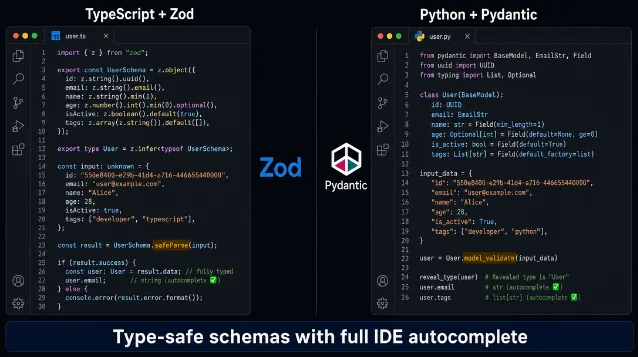
z.object() + z.infer<> 拿到类型,Python 用 BaseModel + model_validate(),两套写法实现等价的类型安全。AI 生成示意图 output_format 配置结构
outputFormat(TypeScript)/ output_format(Python)接受一个对象:| 字段 | 值 | 说明 |
|---|---|---|
type | "json_schema" | 目前只有这一个值 |
schema | JSON Schema 对象 | 可以手写,或用 z.toJSONSchema() / .model_json_schema() 生成 |
SDK 支持标准 JSON Schema 特性:所有基础类型(object、array、string、number、boolean、null)、
enum、const、必填字段 required、嵌套对象、$ref 定义。1实战:多步工具调用 + 结构化输出
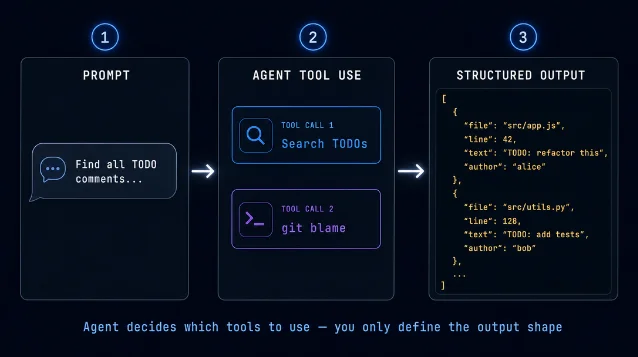
结构化输出的真正价值体现在多步任务上:Agent 自主决定用哪些工具、调用几次,你只负责定义最终输出的形状。
下面的例子让 Agent 扫描代码库中的所有 TODO 注释,再调用
git blame 找出每条 TODO 的作者和日期,最后汇总成结构化列表:import { query } from "@anthropic-ai/claude-agent-sdk";
const todoSchema = {
type: "object",
properties: {
todos: {
type: "array",
items: {
type: "object",
properties: {
text: { type: "string" },
file: { type: "string" },
line: { type: "number" },
author: { type: "string" }, // 可选:git blame 可能找不到
date: { type: "string" } // 可选
},
required: ["text", "file", "line"] // 必填字段最小化
}
},
total_count: { type: "number" }
},
required: ["todos", "total_count"]
};
// Agent 会自动决定:先用 Grep 搜 TODO,再用 Bash 跑 git blame
for await (const message of query({
prompt: "Find all TODO comments in this codebase and identify who added them",
options: {
outputFormat: { type: "json_schema", schema: todoSchema }
}
})) {
if (message.type === "result" &&
message.subtype === "success" &&
message.structured_output) {
const data = message.structured_output as {
total_count: number;
todos: Array<{
file: string; line: number; text: string;
author?: string; date?: string;
}>;
};
console.log(`Found ${data.total_count} TODOs`);
data.todos.forEach((todo) => {
console.log(`${todo.file}:${todo.line} - ${todo.text}`);
if (todo.author) console.log(` Added by ${todo.author} on ${todo.date}`);
});
}
}
错误处理:验证失败怎么办
结构化输出失败时,SDK 不会崩溃,而是通过
ResultMessage.subtype 告知失败原因:| subtype | 含义 |
|---|---|
success | 输出生成并通过验证 |
error_max_structured_output_retries | 多次重试后仍无法产出合法输出 |
for await (const msg of query({
  prompt: "Extract contact info from the document",
  options: {
    outputFormat: { type: "json_schema", schema: contactSchema }
  }
})) {
  if (msg.type === "result") {
    if (msg.subtype === "success" && msg.structured_output) {
      // 正常处理
      console.log(msg.structured_output);
    } else if (msg.subtype === "error_max_structured_output_retries") {
      // 降级处理:用更简单的 prompt 重试,或回退到非结构化流程
      console.error("Could not produce valid output");
    }
  }
}
触发重试失败的常见原因:schema 过于复杂(深层嵌套 + 大量必填字段)、任务本身信息不足以填满 schema、prompt 表述模糊让 Agent 不知道该输出什么。1
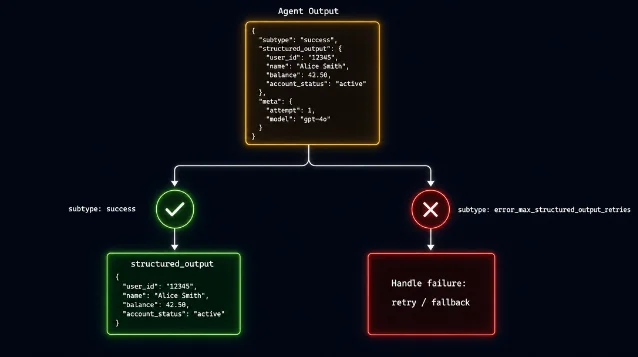
ResultMessage.subtype 区分验证成功与重试耗尽,失败时可降级重试或回退到非结构化流程。AI 生成示意图 五条实践建议
1. 必填字段最小化
把
required 数组控制到最小集合。Agent 可能获取不到所有信息,强制要求可选项只会增加验证失败概率。没有把握必然有值的字段,默认设为可选。2. Schema 从简开始,按需增加复杂度
深层嵌套(object 里套 array 再套 object)加上大量枚举约束,会让 Agent 更难产出合法输出。先用扁平结构跑通,再根据实际需要加层级。
3. Prompt 和 Schema 对齐
如果 schema 要求
estimated_complexity: "low" | "medium" | "high",prompt 里最好也提到这个分类维度,让 Agent 知道该判断什么。prompt 越模糊,Agent 越难给出符合约束的输出。4. 优先用 Zod/Pydantic
手写 JSON Schema 容易漏
type 字段、写错 $ref 引用。Zod 和 Pydantic 在写 schema 时就有类型检查,生成的 JSON Schema 更规范,后续拿到结果还能二次 parse 拿到类型化对象。5. 理解与 API 直接调用的关系
结构化输出是 Agent 运行时的约束(含多轮工具调用),和 Claude API 的直接结构化输出(单轮推理、无工具调用)是两套机制。如果你的场景是纯 LLM 推理、不需要工具调用,Claude API 的
structured_output 参数更直接;如果你需要 Agent 先搜索/执行再给结果,才用 SDK 的 outputFormat。系列下期预告:#11 流式输出——
1stream-json 模式与 SDK 流式消费的完整细节,敬请期待。References
- 1Structured Outputs - Claude Code SDK
docs.anthropic.com
This story was produced automatically by a channel. One sentence is all it takes for Neodrop to keep producing for you.