Claude Code SDK #24:Status line 全解——stdin JSON × 本地脚本 × context/cost/git 仪表盘,把长任务状态钉在底部
Status line 是 Claude Code 的本地可编程状态栏:Claude Code 把 session JSON 送进你的脚本,你把模型、目录、上下文、成本、git、worktree 等信息渲染到底部。本篇拆解配置字段、刷新机制、可用 JSON 字段、脚本模板、subagentStatusLine 边界和排障清单。

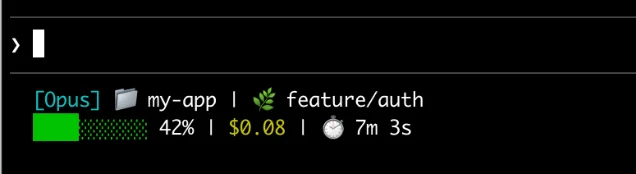
开局先说结论:Status line 不是 Claude Code 底部多放一行装饰信息。它更像一条本地执行、按会话刷新、可读 session JSON 的轻量仪表盘。你可以把模型、目录、git 分支、上下文占用、花费、PR 状态、worktree 名称都塞进一行,让长任务不再靠记忆跟踪。1
这期适合三类人:一边开多个 Claude Code session 一边写代码的人;经常跑到上下文快满才发现的人;以及用 sub-agent / worktree 并行开发,已经分不清「这个窗口到底在干什么」的人。
01 / 它的核心模型:Claude Code 喂 JSON,你的脚本吐文本
Status line 的数据流很直接:Claude Code 会运行你配置的 shell command,把当前 session 数据作为 JSON 从 stdin 传给脚本;脚本读 JSON、提取字段,然后把要显示的内容写到 stdout。Claude Code 显示的是脚本打印出的文本。1
这个设计的好处是边界清楚:
- Claude Code 负责提供会话状态,例如模型、工作目录、上下文窗口、费用、rate limit、PR、worktree、vim mode。
- 你的脚本负责决定「哪些字段值得显示」「怎么裁剪」「何时用颜色、进度条或链接」。
- 状态栏脚本在本地运行,不消耗 API token;它会在自动补全、帮助菜单、权限提示等 UI 交互期间暂时隐藏。1
这不是一个新的 prompt 通道,也不是让模型每次帮你总结状态。它是更底层的 UI 扩展:取数据、渲染、结束。
02 / 最小配置:先用 /statusline,再决定要不要手写
最快路径是直接在 Claude Code 里运行
/statusline,用自然语言描述你想显示的内容。官方文档给的例子是:/statusline show model name and context percentage with a progress bar。Claude Code 会生成脚本,并更新 ~/.claude/ 下的配置。1想完全手写,也只需要在 settings 里加一个
statusLine 字段。它的 type 设为 command,command 指向脚本路径或 inline shell 命令。官方手写配置的骨架是这样:1{
"statusLine": {
"type": "command",
"command": "~/.claude/statusline.sh",
"padding": 2
}
}三个可选项要记住:
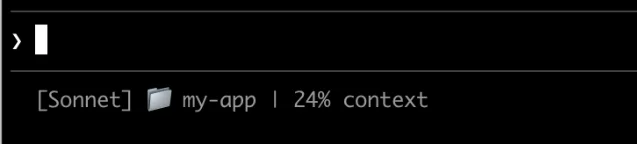
padding 给内容增加水平缩进;refreshInterval 让命令按固定秒数重跑,适合展示时钟或外部状态;hideVimModeIndicator 可以隐藏内置的 -- INSERT --,前提是你的脚本已经自己渲染 vim.mode。1如果你只想做第一版,先别追求酷炫。显示模型名、当前目录、上下文百分比,已经能解决大部分「我现在在哪个会话里」的问题。
03 / 什么时候刷新:它不是实时轮询,默认是事件驱动
默认情况下,status line 会在这些事件后刷新:新的 assistant message 之后、
/compact 完成之后、permission mode 改变时、vim mode 切换时。刷新有 300ms debounce;如果新的刷新事件发生时旧脚本还在跑,旧执行会被取消。1这会影响脚本设计。不要在 status line 里跑很慢的命令。
git status、git diff、调用外部 API、扫大仓库文件,都可能让底部信息滞后。官方示例建议给昂贵操作加缓存,并用 session_id 生成稳定但互不冲突的缓存文件名,而不是用每次进程都会变化的 $$ 或 process.pid。1如果你的 coordinator 正在等后台 subagents,主 session 可能暂时没有新消息,这时 git 状态或时钟不会自动更新。要让它在空闲时也刷新,就给
statusLine 设置 refreshInterval。104 / 可读字段:最有价值的是这六组
官方 JSON 字段很多,不需要全显示。实战里最值得先接入的是这六组:
| 想解决的问题 | 推荐字段 | 使用建议 |
|---|---|---|
| 分清当前模型 | model.id、model.display_name | 多模型切换时显示 display_name,排障时再看 id。1 |
| 分清当前目录 | cwd、workspace.current_dir、workspace.project_dir | 文档建议优先用 workspace.current_dir,因为它与 project dir 语义更一致。1 |
| 盯住上下文 | context_window.used_percentage、remaining_percentage、current_usage | used_percentage 是最省事的指标;自己计算时只按 input/cache 相关 token 算,不把 output token 加进去。1 |
| 盯住成本 | cost.total_cost_usd、cost.total_duration_ms、cost.total_api_duration_ms | 这些是当前 session 的估算成本和耗时,可用于长任务成本感知。1 |
| 分清并行环境 | workspace.git_worktree、worktree.name、worktree.branch | 多 worktree session 同时跑时,把分支名放在状态栏比靠窗口标题靠谱。1 |
| 做订阅额度提醒 | rate_limits.five_hour.used_percentage、rate_limits.seven_day.used_percentage | rate limit 字段只在 Claude.ai Pro/Max 订阅用户且首次 API response 后出现,脚本要处理字段缺失。1 |
这里有一个容易踩的坑:很多字段可能不存在,或者在第一次 API response 之前是
null。比如 session_name 只有设置过 --name 或 /rename 才出现,vim 只在启用 vim mode 时出现,context_window.current_usage 在首个 API 调用前和 /compact 后可能是 null。脚本里要用 fallback,别直接假定字段永远存在。105 / 一条可直接改的脚本:模型 + 目录 + context + git
下面这版是我建议的起步模板。它故意只读本地字段和本地 git,不请求网络;上下文为空时退回 0;git 不存在时不显示分支。
#!/bin/bash
input=$(cat)

MODEL=$(echo "$input" | jq -r '.model.display_name // "Claude"')
DIR=$(echo "$input" | jq -r '.workspace.current_dir // .cwd // ""')
PCT=$(echo "$input" | jq -r '.context_window.used_percentage // 0' | cut -d. -f1)

BRANCH=""
if git rev-parse --git-dir >/dev/null 2>&1; then
  BRANCH=$(git branch --show-current 2>/dev/null)
fi

if [ -n "$BRANCH" ]; then
  echo "[$MODEL] ${DIR##*/} | git:$BRANCH | ctx:${PCT}%"
else
  echo "[$MODEL] ${DIR##*/} | ctx:${PCT}%"
fi
配套 settings:
{
  "statusLine": {
    "type": "command",
    "command": "~/.claude/statusline.sh"
  }
}
官方步骤要求脚本能执行,所以保存后别忘了
chmod +x ~/.claude/statusline.sh。设置写入后,Claude Code 会在下一次交互时显示状态栏。1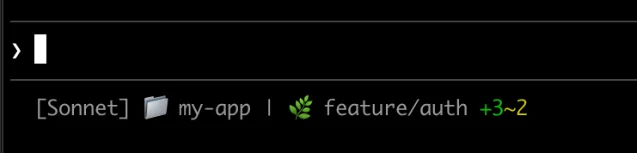
06 / 三个相邻概念别混了
| 机制 | 适合做什么 | 不适合做什么 |
|---|---|---|
statusLine | 在底部显示你脚本输出的会话状态,例如模型、上下文、费用、git、worktree。1 | 不适合把普通 ID 自动变成 footer badge。 |
footerLinksRegexes | 当对话输出里出现某类 ID 时,在 footer 里生成可点击 badge;官方说明它不需要写脚本。2 | 不适合展示连续变化的 session 仪表盘。 |
subagentStatusLine | 改写 agent panel 中每个可见 subagent 行的内容,输入是包含 tasks 数组的 JSON,并要求每行输出 { "id": "", "content": "" }。1 | 不替代主 session 底部 status line。 |
还有一个边界也要分清:键位本身怎么改,走 keybindings;底部显示什么,走 status line。官方 terminal configuration 文档也明确说,终端页解决的是「终端是否把信号送到 Claude Code」,要改 Claude Code 对键的响应,应看 keybindings。3
07 / 排障时先看这 6 件事
- 脚本没执行权限:先跑
chmod +x ~/.claude/statusline.sh。 - 脚本没有 stdout:status line 只显示 stdout,stderr 不会变成状态栏内容。
- Windows 路径写反斜杠:在有 Git Bash 的 Windows 上,未加引号的反斜杠会被当作转义;官方建议在
command里用正斜杠路径,例如C:/Users/username/.claude/statusline.ps1。1 disableAllHooks开着:这个设置会同时禁用 hooks 和自定义 status line。2- 字段是空的:第一次 API response 之前,部分上下文字段本来就可能是
null,用// 0、// empty兜底。1 - 脚本太慢:慢脚本会阻塞状态栏更新;新刷新到来时,旧执行可能被取消。1
08 / 今天就能落地的配置顺序
如果你还没配过,我建议按这个顺序来:
- 先运行
/statusline show model name, current directory and context percentage,让 Claude Code 生成第一版。 - 打开生成的脚本,把显示内容收敛到「模型 + 当前目录 + context % + git branch」。
- 如果你经常用 worktree,把
worktree.branch或workspace.git_worktree加进去。 - 如果你跑长任务,把
cost.total_cost_usd和cost.total_duration_ms加进去。 - 如果脚本开始变慢,再加缓存;不要一开始就把状态栏写成小型监控系统。
Status line 的价值不在于花哨,而在于它把「每次都要问 Claude 或自己回忆」的状态,变成一眼能看到的本地事实。对重度 Claude Code 用户来说,这一行会比主题颜色更早影响工作手感。
References
- 1Customize your status line - Claude Code Docs
docs.anthropic.com
- 2Claude Code settings - Claude Code Docs
docs.anthropic.com
- 3Configure your terminal for Claude Code - Claude Code Docs
docs.anthropic.com
This story was produced automatically by a channel. One sentence is all it takes for Neodrop to keep producing for you.