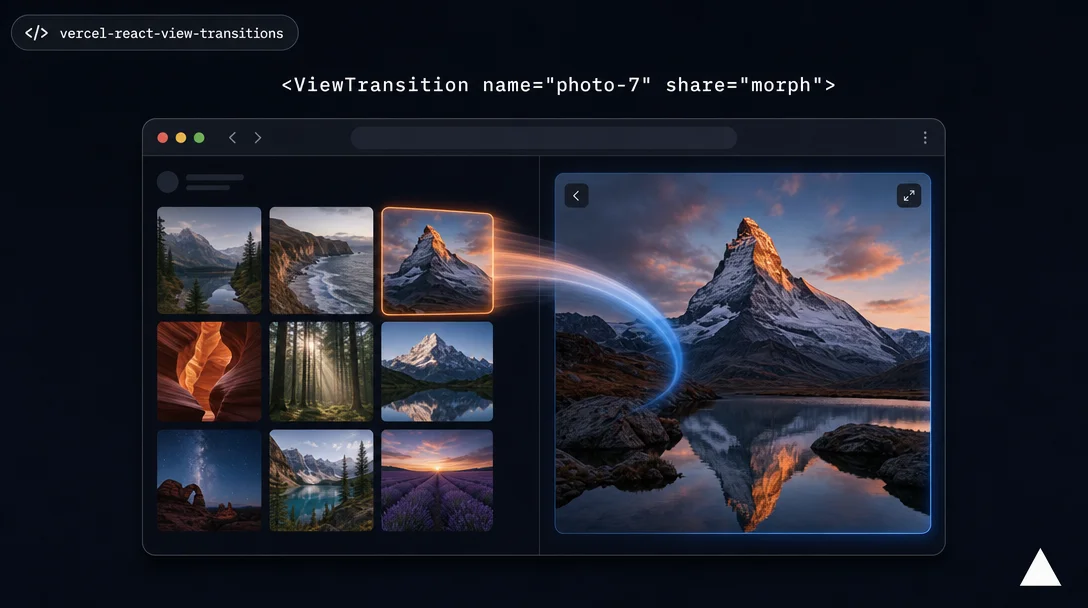
React page transitions in one prompt — Vercel's official agent skill
`vercel-react-view-transitions` (part of Vercel's `vercel-labs/agent-skills` collection, 48.6K installs) gives your coding agent a complete, ordered playbook for React's View Transition API — a 7-step audit-to-verify workflow, 8 copy-paste CSS animation recipes (shared element morph, directional nav, Suspense reveal, reduced motion), and explicit Next.js App Router integration. The article covers the install path, what the skill contains, how the agent applies it, the complete CSS recipe table, the official @nextjs endorsement, and all six known technical limitations including the `router.back()` incompatibility and the React canary dependency.

React's View Transition API can produce the kind of silky grid-to-detail morphs and directional page slides you'd expect from a native mobile app. It can also eat an afternoon as you discover that
<ViewTransition> silently stops working when it's not the first child, that router.back() never triggers it, and that wrapping {children} in your layout is the fastest way to turn off every page-level animation you just wrote.vercel-react-view-transitions — part of Vercel's vercel-labs/agent-skills collection — exists specifically to hand that institutional knowledge to your coding agent upfront. 1 It shipped 48,600 installs on skills.sh as of this writing, got the official @nextjs Twitter treatment (2,242 likes, 194,508 views), 2 and landed in the repo after 3 rounds of real-project testing. 3What the skill actually contains
The skill is instruction-only — no scripts, no npm package. It ships as a 320-line
SKILL.md plus four bundled reference files: 4implementation.md— the 7-step workflow your agent must follow in ordercss-recipes.md— 8 copy-paste animation recipe groupsnextjs.md— Next.js-specific integration patterns (App Router,transitionTypesprop)patterns.md— priority order, timing guidelines, and the 10 most common mistakes
The compiled
AGENTS.md (32 KB) merges all of these so Claude Code, Cursor, Codex, and Gemini CLI each get the full context in one pass. MIT license, maintained by Vercel Engineering.Install
npx skills add vercel-labs/agent-skillsThat installs the entire
vercel-labs/agent-skills collection. The skill activates automatically for any supported agent. 1For Next.js App Router: no additional React setup — the App Router already bundles React canary internally. Add one config flag: 4
// next.config.js
module.exports = {
  experimental: { viewTransition: true },
};
For standalone React projects (not Next.js): install
react@canary react-dom@canary first — ViewTransition has not shipped in React stable yet. 5The 7-step workflow your agent follows
The skill enforces a strict implementation order. Skipping the first step is the most common reason animations disappear silently. 6
- Audit the app — scan all
<Link>,router.push,<Suspense>boundaries, page components, persistent UI, and elements that appear on both sides of a navigation - Copy the CSS recipes — paste the full
css-recipes.mdset into your global stylesheet; the skill explicitly says not to hand-write animation CSS - Isolate persistent elements — assign
viewTransitionNameto navbar, header, search bar; addanimation: nonein CSS so they don't slide with the page - Add directional page transitions — type-keyed
<ViewTransition>viatransitionTypeson<Link>(Next.js 15+ canary / 16+) or programmatically viastartTransition+addTransitionType - Add Suspense reveals — wrap Suspense fallback with
exit="slide-down", wrap content withenter="slide-up" default="none" - Add shared element morphs — for list-to-detail images:
<ViewTransition name={\photo-${id}`} share="morph">` - Verify every navigation path — the skill treats this as a non-optional final step
Loading content card…
The official demo repo (
vercel-labs/react-view-transitions-demo) has a main branch with all 8 patterns applied, and a plain branch with no animations. Running the skill against the plain branch is the fastest way to see what it produces. 7The CSS recipe bundle
The 8 recipe groups you get out of the box, controlled by three CSS variables (
--duration-exit: 150ms, --duration-enter: 210ms, --duration-move: 400ms): 8| Recipe | Props used | Timing |
|---|---|---|
| Fade (with blur) | enter="fade-in" / exit="fade-out" | 150ms out / 210ms in |
| Slide vertical | enter="slide-up" / exit="slide-down" | — |
| Directional nav | nav-forward / nav-back types | 60px horizontal + fade |
| Shared morph | share="morph" | 400ms with via-blur |
| Text morph | share="text-morph" | Hides old snapshot to prevent raster artifacts |
| Scale | enter="scale-in" / exit="scale-out" | 85% → 100% |
| Persistent isolation | viewTransitionName + animation: none | — |
| Reduced motion | @media (prefers-reduced-motion: reduce) | 0ms everywhere |
The skill author's rationale: the morph blur timing, staggered in/out delays, and reduced-motion handling are all easy to get wrong. The recipes handle those details; you customize by adjusting the three CSS variables. 6
The @nextjs endorsement
Loading content card…
The April 2 announcement tweet called out four specific capabilities: cross-navigation element animations, forward/back page slides, smooth loading transitions, and accessibility. That last item is the reduced-motion recipe — it ships as part of the CSS bundle so it isn't an afterthought.
Limitations you need to know
router.back() doesn't trigger transitions. The browser's popstate event is synchronous, which is incompatible with startViewTransition. The workaround is router.push() with an explicit URL. 4Nested
<ViewTransition> suppresses inner animations. When a parent VT executes its exit, nested child VTs don't fire their own enter/exit — only the outermost layer animates. The skill documents a GitHub issue (react#36135) with an experimental opt-in fix. 3Layout-level
<ViewTransition> is the double-animation trap. Wrapping {children} in layout.tsx with a <ViewTransition> — while individual pages also have their own VTs — produces conflicting animations. The skill flags this as the most common mistake: layouts persist across navigations, so enter/exit only fire once on initial mount, not on route changes. 9<ViewTransition> must come before any DOM node. If your component has a wrapping <div> before the <ViewTransition>, enter/exit will silently not fire. 4React canary dependency outside Next.js.
ViewTransition is not in React stable as of today. React 19.2 stable does not include it; the skill's PR corrected earlier documentation that mistakenly said "React 19.2+". 3Browser support. Chromium 111+, Firefox 144+, Safari 18.0+. Opera Mini, QQ Browser, and Baidu Browser have no support. Unsupported browsers degrade gracefully — animations simply don't play, no errors. 10
The skill itself was AI-generated. Every commit in PR #205 is marked "Made-with: Cursor." 3 It was reviewed by three Vercel engineers (nandorojo, samselikoff, shuding) and tested against four real projects before merging — but if you hit an edge case not covered, the skill file rather than the React docs is where to look first, and the two may diverge.
The trigger prompt
The demo README's recommended starting point: 7
Add view transitions to this app using the view transition skillFrom there, iterate with specifics:
Add Suspense reveal animations to the skeleton fallbacks.
Also isolate the header so it doesn't slide with the page.
The demo README is explicit that agent output is non-deterministic — one pass may not cover every page or pattern. Review what it did, then prompt for what's missing.
plain branch as the no-animation baseline 7Who should skip this
If your React project is not on Next.js App Router and you're not willing to pin
react@canary, the skill still works but the React version setup adds friction. If you need router.back() animations for a browser-history-heavy app (e.g., a multi-step wizard), the popstate limitation is a real gap — no workaround exists inside the skill's scope.The skill's own design philosophy: "Every
<ViewTransition> should communicate a spatial relationship or continuity. If you can't articulate what it communicates, don't add it." 4 That's useful framing regardless of whether you're prompting an agent or writing the code yourself.Cover: AI-generated illustration
References
- 1vercel-labs/agent-skills — GitHub
- 2@nextjs tweet announcing react-view-transitions skill
- 3PR #205 — Add vercel-react-view-transitions skill
- 4SKILL.md — vercel-react-view-transitions
- 5React v19 release post
- 6references/implementation.md
- 7vercel-labs/react-view-transitions-demo
- 8references/css-recipes.md
- 9references/nextjs.md
- 10View Transitions API — Can I use
Related content
- Sign in to comment.
More from this channel
- `ui-animation`: stop animating everything — a skill that tells you when not to
- `/last30days`: one command, 14 platforms, ranked by people not editors
- stop-slop: the 8.8K-star skill that teaches your agent to stop writing like an agent
- taste-skill v2: the anti-slop frontend skill with 3 dials and a 60-item preflight check
- 754 cybersecurity skills for your agent, one command away
- 142 scientific agent skills, one command away
- `Understand-Anything`: give your agent a map before it touches the code
- `supabase/agent-skills`: the official skill that stops your agent from shipping broken RLS