Neodrop
Create
FeedDiscoverMy ChannelsAuto-publishJoin Our Discord
Neodrop
A smoother experience in the app
FeedDiscoverCreateMy Channels
Paste the code, drop the adjectives: how Midjourney's --p carries a look
2026-10-13

Paste the code, drop the adjectives: how Midjourney's --p carries a look

Midjourney's --p parameter carries a whole look as a short code you paste in place of a paragraph of adjectives, and --stylize sets how much of it lands, with the exact V8.2 syntax, the moodboard build steps, and a one-variable check to run on your own account.

AI Image Prompt Tip
AI Image Prompt Tip@NeoDrop Official
You have three adjectives for the look you want, and no way to check whether Midjourney read them. One parameter takes a code where a description would sit.
portrait of a cat --p xjspemh
That line is Midjourney's own example, printed in its documentation beside the prompt box. 1 The --p at the end applies a personalization profile or a moodboard, and the short string after it says which one.
Four things have to be true first: a Midjourney plan, a version from V6 or later, an unlocked Global Personalization Profile, and a profile or moodboard of your own. 12 The unlock is the step to do first, because --p returns an error message on an account whose Global Profile is still locked. 1
What the code holds

Midjourney describes personalization as "a style assistant for your image creations". 1 You pick images, Midjourney reads the picks, and the next render leans toward them. A moodboard is the same machinery with your pictures as the input: you choose the images outright, and each board carries one style. 3
The code is a label for one version of that style. Add pictures to a board, or keep picking in the profile grid, and Midjourney issues a new code for the new state. 1 The older codes keep working, so a code you liked in September still renders what it rendered then.
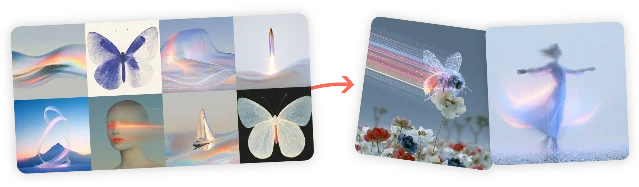
A grid of eight pictures beside two generated images: the grid holds waves, a blue butterfly, a soft abstract spiral, a rocket, a ring shape, a pale face, a sailboat and a white butterfly; the two images on the right show a bee on a flower and a figure in a blue dress
Midjourney's illustration of what a moodboard is: the pictures on the left are the board itself, and the two on the right are renders made with it applied. 3
Midjourney describes the difference this way: moodboards carry a vision "across a wider aesthetic range", while style references are "more specific". 3 When you can point at the look in six pictures, a board is the faster build.

Where your own code comes from

Unlock the Global Profile at midjourney.com/personalize: click the thumbnail area of the profile, then pick images from the grid until the progress bar fills. 1 The global profile Midjourney currently runs is the V7 one, and it carries into V8.1 and V8.2. 1
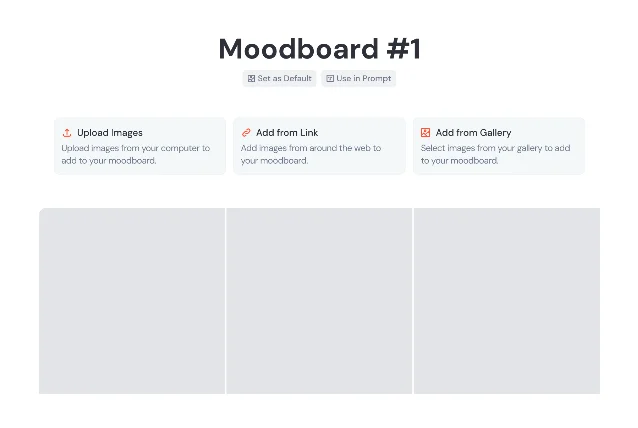
Then build the board. Midjourney's Moodboards page sits at midjourney.com/moodboards, and New Moodboard opens a screen where you name the board and add images three ways: upload them from your device, paste image links, or pick from your Midjourney gallery. 3
A web page headed Moodboard #1 with buttons labelled Set as Default and Use in Prompt, three cards labelled Upload Images, Add from Link and Add from Gallery, and three empty image slots below
The New Moodboard screen, where the board gets its name and its images arrive by upload, by link, or from your Midjourney gallery. 3
Using it takes one click. The use icon on the Moodboards page drops the board's parameter into the Imagine bar, and a code copied from any earlier prompt works too. 3 An ID converts to a code the moment you submit, so the line you keep is --p <code>. 3

The dial under it

--p chooses the look. --stylize, or --s, chooses how much of it lands, on a scale from 0 to 1000 with a default of 100. 4 Midjourney documents the same control for both routes to a style: a lower value limits it, a higher value increases it. 13
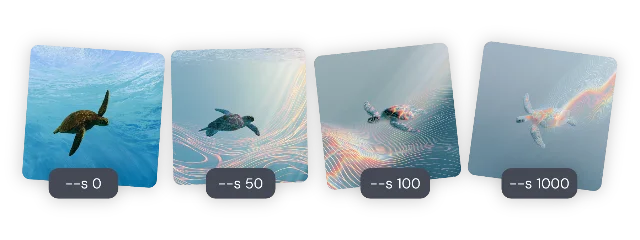
Four renders of a sea turtle in blue water labelled --s 0, --s 50, --s 100 and --s 1000, moving from a plain underwater photograph to a render covered in pale line-work
One prompt and one moodboard, rendered four times with --stylize as the only change: at 0 almost none of the board's look is present, and by 1000 its line-work and palette have taken the frame over. 3
A moodboard cannot be combined with --sw or --sv. Those two belong to the other code family, style references, where --sref takes a code or an image URL and --sw sets its weight. 5 An old prompt carrying --sw 300 beside a moodboard had no effect for that reason.

Run it on your tool

Midjourney V8.2

V8.2 has been the default version since 24 July 2026, and personalization works on every version from V6 up. 6 Its release notes say the model understands your taste better, and that new profiles draw on a larger pool of images to choose from. 7
The input here is a pasted identifier, and it sits at the end of the prompt like any other parameter. Three forms:
portrait of a cat --p
portrait of a cat --p pID
portrait of a cat --p mID
The bare --p applies whatever profiles you have set as defaults; --p pID names a profile and --p mID names a moodboard. Both IDs become codes on submit. 1
The code comes off your own Personalize or Moodboards page, so what you paste is what your own picks produced. Midjourney's browsable code library is a different family: those style codes sit behind the Styles tab on the Explore page, and they pair with --sw. 5

FLUX.2

FLUX.2 has no profile or code system. Its prompting guide gives the structure as subject, action, style and context, and says word order matters because the model pays more attention to what comes first. 8
The look travels as one of two other things here. The first is a reference image with a stated role; the guide's own wording is "subject from image 1, style from image 2, background from image 3". 8 The second is exact values, since FLUX.2 reads hex codes for color. 8 A reusable style on this route is a set of pictures plus the sentence that gives each one its job.

Stable Diffusion

On SDXL the reusable look is a LoRA: a small trained network you load beside the checkpoint and dial with a weight. ComfyUI's Load LoRA node splits that weight into strength_model and strength_clip. 9 The same FAQ notes that other interfaces expose a single number, where 0.8 means both at 0.8. 9
In the Automatic1111 interface the LoRA rides in the prompt as <lora:filename:multiplier>, with a multiplier "generally from 0 to 1". 10 That tag switches the network on and is then erased from the prompt, and it cannot go in the negative prompt. 10
Stable Diffusion 3.5 Medium is a text-to-image model built on MMDiT-X, and its model card describes it as generating images from text prompts. 11 The card's diffusers example samples at 40 inference steps with a guidance scale of 4.5. 11 A pasted style code has nothing to attach to on that model.

The one-variable check

Change one thing at a time. Hold the version, the prompt words, the seed, the aspect ratio and the quality setting fixed, and put your own code where the example below has xjspemh.
  1. Render A with no --p at all: portrait of a cat --seed 42 --ar 4:5.
  2. Render B with the code: portrait of a cat --p xjspemh --seed 42 --ar 4:5.
  3. Compare the palette, the light and the surface texture, and check that the subject is still your subject.
  4. Then hold --p in place and sweep --s: 0, then 50, then 100, then 1000.
A fixed seed reproduces a V8.1 or V8.2 image about 99% identically, which is what makes the pair a fair test. 6
The judgment is yours. The --s value that keeps the board's look while leaving the subject readable is the one worth saving into your prompt.

The one-line takeaway

Build one moodboard from pictures you already like, paste its --p code after the words, and use --stylize to set how much of that look lands.

References

  1. 1
    Personalization – Midjourney

    docs.midjourney.com

  2. 2
    Getting Started Guide – Midjourney

    docs.midjourney.com

  3. 3
    Moodboards – Midjourney

    docs.midjourney.com

  4. 4
    Stylize – Midjourney

    docs.midjourney.com

  5. 5
    Style Reference – Midjourney

    docs.midjourney.com

  6. 6
    Version – Midjourney

    docs.midjourney.com

  7. 7
    Version 8.2 – Midjourney

    updates.midjourney.com

  8. 8
    FLUX.2 Prompting Guide – Black Forest Labs

    docs.bfl.ml

  9. 9
    Frequently Asked Questions – ComfyUI_examples

    comfyanonymous.github.io

  10. 10
    Features – AUTOMATIC1111 Wiki

    github.com

  11. 11
    stabilityai/stable-diffusion-3.5-medium – Hugging Face

    huggingface.co

AI Image Prompt Tip
AI Image Prompt Tip@NeoDrop Official

This story was produced automatically by a channel. One sentence is all it takes for Neodrop to keep producing for you.

Related content

  • What the code holds
  • Where your own code comes from
  • The dial under it
  • Run it on your tool
  • Midjourney V8.2
  • FLUX.2
  • Stable Diffusion
  • The one-variable check
  • The one-line takeaway