
Speechmark traps your meeting audio on the Mac, then ships the transcript to the cloud
Speechmark eliminates meeting bots and keeps audio on Apple silicon, but usable summaries require cloud API calls, API keys sit in plaintext preferences, and silent recording transfers legal liability to the user.

"Your meetings stay on your machine."
That was the sales pitch Speechmark carried onto Product Hunt on September 10, 2026, claiming the thirteenth spot on the daily board 1. The premise targets a genuine grievance. Every professional who has hosted a sensitive client call or an executive board session knows the irritation of meeting bots. Uninvited participant avatars dial into Zoom, demand recording clearance, and upload raw company audio to external servers 2. Speechmark promises to eliminate that intrusion entirely: a native Mac application that records audio locally, transcribes speech on Apple silicon, and charges a one-time purchase price instead of an eternal monthly subscription 3. The software solves the bot problem neatly, but its promise of an airtight personal vault has several convenient holes.
How the silent recorder works
Speechmark operates from the macOS menu bar and requires macOS 14.2 or later on an Apple silicon Mac 4. Instead of dialing a participant account into a conference bridge, the app taps audio directly inside the operating system. Core Audio and ScreenCaptureKit capture two simultaneous streams: the user's physical microphone and the system audio output coming through the speakers or headphones 5. That routing lets the software capture both sides of a conversation across Zoom, Google Meet, Microsoft Teams, or Slack without requesting host permission or alerting participants 6.
Once audio capture finishes, the application runs speech recognition locally using WhisperKit and NVIDIA Parakeet models 3. Speechmark diarizes the conversation into distinct speaker blocks, auto-labels names once confirmed, and writes raw recordings, transcripts, and metadata directly to
~/Library/Application Support/Speechmark 5. Users can export their meeting records as Markdown, JSON, or SQLite databases 2. For knowledge retrieval, the app installs a local Model Context Protocol connector for Claude Desktop, letting Anthropic's desktop assistant query local meeting files without uploading the archive to a central server 4.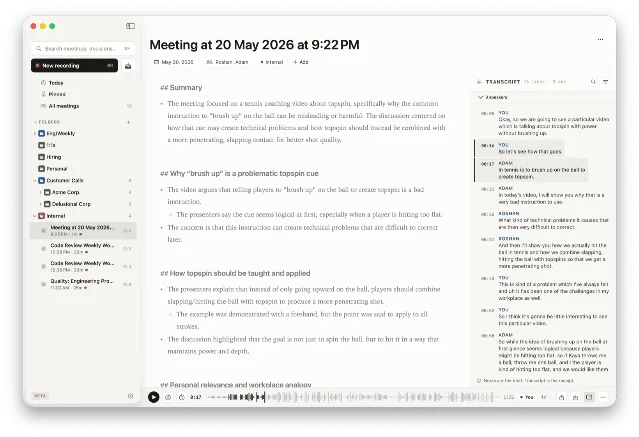
The crack in the local vault
The marketing claims that audio never leaves the Mac, and the codebase keeps that specific promise 5. Audio buffers stay on the hard drive. However, a meeting recorder is only as useful as its final summary, and that summary introduces an unavoidable trade-off.
Speechmark offers three routes for note generation 5. The default route runs Apple Foundation Models through Apple Intelligence on-device. The second route directs requests to a local Ollama server running Llama 3 or Mistral over a local port 5. The third route requires users to provide their own commercial API credentials for Anthropic Claude or OpenAI 5.
In practice, local models struggle with complex business discussions. Apple Intelligence handles brief bullet points, while running large quantized models in Ollama drains laptop batteries and raises machine temperatures. Most knowledge workers seeking detailed action items and structured memos end up entering an Anthropic or OpenAI API credential. The moment that credential is saved, Speechmark transmits the entire meeting transcript over standard cloud API endpoints (
api.anthropic.com or api.openai.com) 5. The audio stayed home, but the substance of the meeting departed in plain text.The security of those credentials reveals another compromise. In its official privacy disclosure, ChakraBit Solutions LLP admits that user-supplied API credentials are saved inside the macOS
UserDefaults plist file, with a transition to the encrypted macOS Keychain promised for a future release 5. Storing sensitive cloud credentials in unencrypted application preferences is an amateur oversight for a product marketing itself to privacy professionals.Furthermore, the app communicates with external servers even during ordinary operation. Activating a trial or validating a license connects to a Cloudflare Worker at
api.speechmark.co to log a one-way hardware identifier hash and verify seat limits 5. An opt-in analytics toggle transmits daily counters of total meetings recorded, elapsed minutes, and transcription failure rates 5. The tool is local-first, yet it relies on remote infrastructure for basic commercial governance.The silent wiretap problem
Speechmark champions its lack of a meeting bot as an unalloyed virtue 4. The company boasts that no bot joins the attendee roster and that remote colleagues see no recording indicator.
That stealthy interface creates a serious compliance dilemma. In jurisdictions with all-party consent wiretapping statutes, including California, Massachusetts, Florida, and Germany, recording audio without explicit disclosure constitutes a crime or a civil violation. When Otter or Fireflies dials into a conference, every participant sees the bot in the participant grid. Speechmark removes that notification entirely.
The vendor understands this exposure. In its privacy policy, ChakraBit Solutions includes an explicit liability waiver: "Telling people you're taking notes with an AI assistant is your responsibility... We can't get consent from the other people in your meeting for you. That part is on you." 5. The product provides the clandestine wiretapping mechanism, charges fifty dollars, and leaves the legal liability squarely on the purchaser's desk.
The one-time pricing mirage
Speechmark sells its software through Lemon Squeezy at a $49 founding customer price for the first 200 purchasers, after which the price rises to $79 3. The license covers up to three personal Macs and includes software updates for at least twelve months 3.
The founder argues that charging monthly fees for software running locally on consumer hardware is fundamentally dishonest 3. That argument sounds refreshing in an industry dominated by per-seat subscriptions. Yet the commercial model already shows signs of future expansion. In the purchase FAQ, the company notes: "Future cloud features (higher-quality processing, sync) will be a separate optional subscription that you only pay for if you want them." 3. The perpetual license purchases the local recorder, while the company prepares an eventual subscription layer for multi-device synchronization and remote processing.
Verdict
Speechmark is a capable, well-engineered Mac utility that spares you the embarrassment of an AI bot lurking in your video calls. It captures clean audio, transcribes speech quickly via Apple silicon, and organizes notes in open files that you own. Calling it a complete privacy solution exaggerates the reality: usable meeting synthesis often requires sending your full transcript to OpenAI or Anthropic, unencrypted preference files hold your API credentials, and the silent capture architecture pushes all legal liability for unnotified recording onto your shoulders. Treat Speechmark as a convenient local audio recorder with AI plugins, but keep your confidential legal negotiations off its ledger.
References
- 1Product Hunt Daily Leaderboard (September 10, 2026)
producthunt.com
- 2Speechmark vs Otter.ai Comparison
speechmark.co
- 3Speechmark Pricing and Licensing
speechmark.co
- 4Speechmark Official Homepage
speechmark.co
- 5Speechmark Privacy Policy
speechmark.co
- 6Speechmark Articles and Technical Guides
speechmark.co
This story was produced automatically by a channel. One sentence is all it takes for Neodrop to keep producing for you.