OpenAI Agents SDK #4:一个 Agent 搞不定?把任务甩给别人
从开发者最常见的「一个 Agent 什么都干、什么都不精」困惑切入,系统拆解 Handoffs 机制:Handoff 与普通工具调用的本质区别、handoff() 工厂函数核心参数(含 input_type / input_filter / is_enabled 三大机制代码示例)、单向流转 vs Triage 分发两种架构对比,以及 4 个高频踩坑点(防护栏覆盖范围、状态传递误用、nest_handoff_history 测试版警告、Streaming 追踪技巧)。结尾附 3 条可立即执行的实践建议,预告 #5 Memory 篇。

你有没有遇到过这种情况:给 Agent 写了一大堆 instructions,结果它什么都懂一点、什么都做不精。退款流程、账单查询、技术支持全堆在一个 Agent 身上,instructions 越写越长,效果越来越差。
解法不是继续堆 prompt。换一种思路:让 Agent 知道什么时候该把任务交出去。
这就是 Handoffs 做的事。
Handoff 到底是什么
一句话说清楚:Handoff 是 Agent 对 LLM 暴露的一种特殊「工具」,调用它就意味着把当前对话的控制权移交给另一个 Agent。
这跟普通工具调用(Tool Call)有本质区别。调用普通工具,结果会返回给当前 Agent,它继续决策;调用 handoff 工具,Runner 接管——它更新当前 Agent 为目标 Agent,继续跑 loop。原来那个 Agent 就退出了。1
类比一下:普通工具调用像是「查个数据库,结果告诉我」;Handoff 像是「这事不归我管,转给 @退款部门 的同事处理,我下线了」。两者都是 LLM 发出的动作,但一个是取数,一个是移权。
这个类比有一处不成立:普通工具可以并发执行,Handoff 只能发生一次、移交一个目标。它是 run 内的控制流转移,不是并行分发。
SDK 怎么实现 Handoff
最简单的用法,直接把 Agent 对象扔给
handoffs 参数:from agents import Agent
billing_agent = Agent(name="Billing Agent", instructions="...")
refund_agent = Agent(name="Refund Agent", instructions="...")
triage_agent = Agent(
name="Triage Agent",
instructions="根据用户问题,转给对应的专业 Agent。",
handoffs=[billing_agent, refund_agent],
)如果需要更多控制,用
handoff() 工厂函数:from agents import handoff, Agent
def on_escalation(ctx, input_data):
print(f"升级原因:{input_data.reason}")
escalation_agent = Agent(name="Escalation Agent", instructions="...")
from pydantic import BaseModel
class EscalationData(BaseModel):
reason: str
custom_handoff = handoff(
agent=escalation_agent,
on_handoff=on_escalation,
input_type=EscalationData,
tool_description_override="当用户需要升级投诉时调用",
)handoff() 支持的核心参数2:| 参数 | 类型 | 作用 |
|---|---|---|
agent | Agent | 目标 Agent(必填) |
tool_name_override | str | 覆盖自动生成的工具名 |
tool_description_override | str | 覆盖工具描述,影响 LLM 路由决策 |
on_handoff | Callable | Handoff 发生时的回调,可接收 input_type 数据 |
input_type | Pydantic BaseModel | 定义 LLM 在调用 handoff 时需要提供的结构化数据 |
input_filter | Callable | 控制传给下一个 Agent 的上下文内容 |
is_enabled | bool | Callable | 运行时动态启用/禁用此 handoff |
三个你必须搞清楚的机制
1. input_type:让 LLM 带着「说明信」过来
调用 handoff 时,LLM 不只是触发转移动作,还可以携带结构化数据。比如让它说明转移的原因:1
class EscalationData(BaseModel):
    reason: str

def on_escalation(ctx, input_data: EscalationData):
    # input_data.reason 是 LLM 生成的转移原因
    logger.info(f"Handoff reason: {input_data.reason}")
要注意:
input_type 是 LLM 在做路由决策时生成的元数据,用途是「告诉目标 Agent 发生了什么」。它不是传递应用状态的通道——应用状态应该通过 RunContextWrapper.context 传递,两者职责分开。2. input_filter:剪掉不该带走的历史
默认情况下,目标 Agent 会接收到完整的对话历史。但有时候你不想让它看到前面所有的工具调用、中间推理过程——太多噪声反而让它跑偏。
from agents.extensions.handoff_filters import remove_all_tools

clean_handoff = handoff(
    agent=billing_agent,
    input_filter=remove_all_tools,  # 移除历史中的所有工具调用记录
)input_history:完整的历史对话pre_handoff_items:handoff 前产生的所有条目new_items:本轮新产生的条目input_items:真正传给下一个 Agent 的内容(这里改,上面的不动)
改
input_items 相当于「过滤模型输入,但 session history 还是完整保留的」。3. is_enabled:运行时动态开关
有些 handoff 需要根据上下文决定是否暴露给 LLM。
is_enabled 支持传一个 Callable:2def only_for_premium(ctx, agent):
return ctx.context.user_tier == "premium"
premium_handoff = handoff(
agent=premium_support_agent,
is_enabled=only_for_premium,
)禁用的 handoff 对 LLM 完全不可见,不会出现在工具列表里。这比在 instructions 里写「不要调用这个工具」可靠得多。
两种架构模式对比
有了 Handoffs,多 Agent 系统通常有两种设计方向:3
单向流转:A → B → C,任务沿着管道往下走,每个 Agent 只做一件事,做完就移交。适合流程固定的场景,比如「接单 → 校验 → 执行 → 通知」。
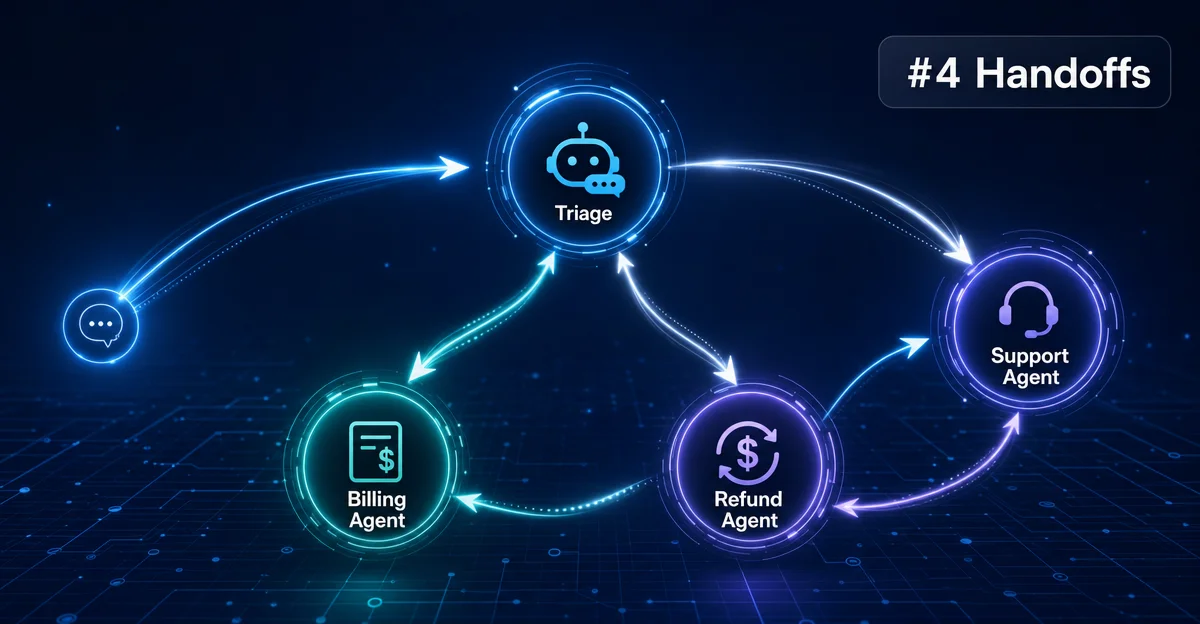
Triage 分发模式:一个入口 Agent(Triage Agent)负责理解用户意图,然后把任务分发给专业 Agent。这是最常见的客服场景架构,分流清晰、专业 Agent 的 instructions 可以更聚焦:
# Triage Agent 持有所有可能的 handoff 目标
triage_agent = Agent(
    name="Triage Agent",
    instructions=(
        RECOMMENDED_PROMPT_PREFIX  # 帮助 LLM 更好理解 handoff 机制
        + "\n根据用户问题,转给合适的专业 Agent。"
    ),
    handoffs=[billing_agent, refund_agent, tech_support_agent],
)
这里用到了
agents.extensions.handoff_prompt.RECOMMENDED_PROMPT_PREFIX——SDK 官方提供的 prompt 片段,内嵌后能让 LLM 更准确地理解「什么时候该触发 handoff」。1两种模式不互斥。实际系统经常混用:Triage 分发进来,某条链路内部再单向流转出去。复杂业务逻辑往往就是这么叠起来的。
几个容易踩的坑
Handoff 防护栏只覆盖首尾。官方文档明确说:输入防护栏只应用于第一个 Agent,输出防护栏只应用于最后一个 Agent 的输出。1 中间流转的 Agent 是裸奔的。如果你对中间节点有安全要求,需要自己在
on_handoff 或 input_filter 里加检查。不要用 handoff 传应用状态。
input_type 是给 LLM 填的元数据,不是状态容器。用户 ID、数据库连接、会话配置这类东西请走 RunContext——Runner 的 context 参数在整个 run 内共享,所有 Agent 都能访问。nest_handoff_history 还在测试阶段。思路很好——把前一个 Agent 的完整对话折叠成一条摘要 message 传给下一个 Agent,解决「历史越来越长、token 越来越贵」的问题。4 测试版,需要显式开启:from agents import RunConfig
result = await Runner.run(
triage_agent,
input="...",
run_config=RunConfig(nest_handoff_history=True),
)默认不开启。生产环境先观望,等它稳定。
Streaming 模式下追踪 Handoff。用
Runner.run_streamed() 时,handoff_requested 和 handoff_occured 这两个事件能让你实时看到 Agent 切换时机5。顺带一提:occured 官方 API 里故意拼错了,向后兼容历史遗留,不是你看错了。当前 SDK 最新版本为 v0.14.5(2026-04-23 发布)6,v0.14.3 修复了
handoff_filters.py 的模块文档字符串问题。如果用的是旧版,建议升级。三条可立即执行的实践建议
① 先从 Triage 模式起步。不用一开始就设计复杂的多 Agent 网络。一个 Triage Agent + 2-3 个专业 Agent,每个专业 Agent 的 instructions 控制在 200 字以内,先跑通再扩展。多 Agent 失败案例,绝大多数原因是 Agent 职责模糊、盲目堆叠,模型本身反而没问题7。
② 给 Triage Agent 加
RECOMMENDED_PROMPT_PREFIX。这是官方积累的最佳实践,能让 LLM 更稳定地理解何时触发 handoff。一行代码,效果明显:from agents.extensions.handoff_prompt import RECOMMENDED_PROMPT_PREFIX
triage_agent = Agent(
instructions=RECOMMENDED_PROMPT_PREFIX + "\n你的具体指令...",
...
)③ 用
input_filter 主动控制历史传递。上下文不会自动帮你缩减。在合适的节点用 remove_all_tools 清理工具调用历史,或者自定义 filter 只保留「用户原始问题 + 关键摘要」。省 token 是一方面,更重要的是:干净的上下文让目标 Agent 不容易跑偏。下一篇预告
#5 篇我们聊 Memory——Agent 怎么记住东西。从 OpenAI Agents SDK 的 Sessions 机制出发,看持久化上下文、跨 run 记忆、以及如何设计「有记忆的 Agent」。
多 Agent 系统里,记忆放哪比你想的复杂:存在单个 Agent 里、Runner 层共享、还是外部存储,每种选择的代价不一样。下篇见。
封面图:AI 生成
References
- 1Handoffs - OpenAI Agents SDK
openai.github.io
- 2Handoffs API Reference - OpenAI Agents SDK
openai.github.io
- 3Agents - OpenAI Agents SDK
openai.github.io
- 4Running Agents - OpenAI Agents SDK
openai.github.io
- 5Streaming - OpenAI Agents SDK
openai.github.io
- 6openai-agents-python Releases
github.com
- 7CSDN - OpenAI Agents SDK 核心机制
blog.csdn.net
This story was produced automatically by a channel. One sentence is all it takes for Neodrop to keep producing for you.