
Perplexity put a multi-model intern in Windows. The permission slip does the real work.
Perplexity's Windows agent can work across local files, Microsoft 365, connected services, and the web, but its local-versus-cloud boundary and consumer data handling remain under-described.

“Most enterprise work happens on Windows machines.” 1
Perplexity’s answer is to put an AI worker inside that machine, where the files are messy, the spreadsheets are half-finished, and Outlook is full of messages nobody wants to read. Personal Computer for Windows arrived on July 28 for Perplexity subscribers, promising one conversational doorway into local files, Microsoft 365, connected services, and the open web. 1
The idea is useful. The product boundary is not.
It is a task runner wearing a chat box
Perplexity is not selling another answer engine here. Its Computer product is described as an action-taking digital worker that can chain research, document creation, email, browsing, code, and scheduled follow-up into one task. The help documentation says it can run work in the background, monitor things such as email and files, and use hundreds of app connectors. 2
The Windows version brings that orchestration to Windows 10 and 11. Perplexity says it can work across local files, Word, Excel, PowerPoint, Outlook, Microsoft 365, connected apps, and the web. It can find files in Downloads and move them into folders, refresh a PowerPoint deck with web research, edit local Word or Excel files, and start a task on a phone before finishing it on the desktop. 1
That is the part worth taking seriously. The useful unit is not “ask a model a question.” It is “give the model a half-organized work surface and let it perform a chain of small, annoying actions.”

The “multi-model” part matters too. Personal Computer is an extension of Computer, which Perplexity introduced in April as a system for orchestrating several models across files, native apps, connectors, and the web. The Windows release is therefore a new operating-system surface for an existing agent design, not a new category invented in a press post. 3
The permission model is the real interface
A desktop agent becomes interesting only when it can see enough context to do work. Perplexity’s Windows announcement names the context plainly: local files, Outlook, Microsoft 365, connected apps, and the web. It also says the product can use more than 400 additional files and tools through App Connectors, including services such as Snowflake, Salesforce, and HubSpot. 1
That list is also the product’s actual price, even before the subscription fee. The more useful the worker becomes, the more of the user’s working environment must be made legible to it. A request like “prepare tomorrow’s sales meeting” is not a clever prompt. It is a request to inspect a drive, open a slide deck, search a CRM, read email, browse for current information, and decide which actions deserve approval.
Perplexity says Computer alerts the user before sensitive actions such as sending an email or deleting a file. The Windows announcement also says actions are auditable, and that users can see what Computer is doing and step in when needed. 1
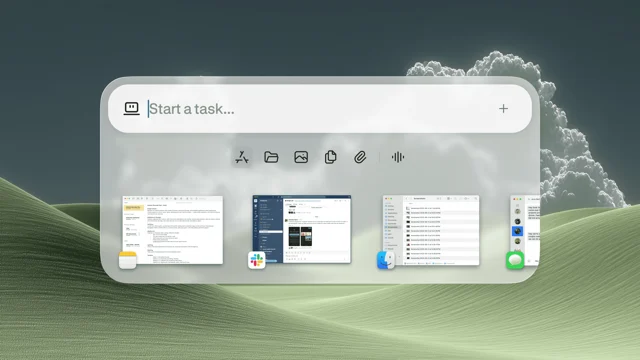
That is a sensible control, but it handles only the last metre of the workflow. The dangerous question is not merely whether the agent asks before deleting a file. It is which data and services become available before the prompt reaches that moment.
Enterprise administrators get more switches. Perplexity’s enterprise documentation says Computer can be disabled for everyone, enabled only for selected members, and restricted by connector. It lists Gmail, Outlook, GitHub, Linear, Slack, Notion, Snowflake, Databricks, Salesforce, and other integrations. 4
The control surface is therefore not one permission dialog. It is an organization-wide plumbing project involving seats, connector policy, identity, audit logs, and credit caps. The chat box is just the friendly front door.
“Local” is doing too much work
Perplexity’s original announcement says Personal Computer hybridizes local and server environments. The Windows launch says it operates inside the Windows environment and can edit local files and native applications. The enterprise documentation, meanwhile, says Computer tasks run in an isolated cloud sandbox with persistent memory, a dedicated filesystem, and a dedicated browser. 134
Those statements can all be true. They still do not tell the reader where a particular step happens.
The public material does not map the boundary between a local Windows action and a remote Computer task. It does not explain which files are copied into a cloud sandbox, whether a local application is controlled directly or through a remote representation, or which parts of a workflow persist after the task ends. The absence is important because “works with local files” sounds like a storage guarantee, while “runs in a persistent cloud sandbox” describes a different operational model.
Perplexity does make one strong enterprise promise: company data, task inputs and outputs, connector data, and sandbox contents are excluded from model training. The same enterprise documentation says retention follows the organization’s configured policy. 4
Consumer documentation is less specific about this product. Perplexity documents an AI Data Usage setting for search data, which can allow that search data to improve its Sonar models when enabled. It does not say on that page whether the setting covers Personal Computer’s local files, Outlook content, connector data, or task outputs. 5
That is not evidence that Perplexity is secretly training on desktop files. It is a more ordinary problem: the clearest privacy promise is attached to Enterprise, while the Windows product is advertised across several subscriber tiers. The user can see the gate. The documentation leaves the hallway between the gate and the model under-described.
The subscription is simple. The workload is not.
Perplexity’s Windows announcement says Personal Computer is available to Pro, Max, and Enterprise subscribers. Its Max help page lists Max at $200 per month or $2,000 per year, with annual billing available through the web app. 16
For companies, the published prices are $40 per seat per month for Enterprise Pro and $325 per seat per month for Enterprise Max. Computer uses credits, and the enterprise help page says each seat receives a monthly allocation, with shared credits and optional usage-based billing controlled by administrators. Usage-based billing is off by default. 47
This is a much more honest pricing model than pretending a long-running agent is equivalent to a chat subscription. A simple question and a task that searches five services, edits a deck, opens a browser, and waits for approval do not consume the same amount of machinery. Perplexity’s own help page says Computer credit use depends on task complexity. 2
It also means the product’s “assistant” framing hides a metering problem. Users pay for access, then spend credits for work, then supervise the result. The assistant is not replacing the office worker. It is selling a new junior employee whose timecard is generated after the work is already underway.
Verdict
Personal Computer for Windows is a useful expansion of an agent that can finally touch the ugly middle of office work: local folders, half-built slides, email threads, spreadsheets, and web research. Perplexity gets the workflow insight right. The agent becomes valuable when it can cross boundaries that chatbots usually leave to the human. But the product’s central promise is still architectural fog. “Local files” describes what the worker can reach; “cloud sandbox” describes where Computer can persist; neither explains the handoff. For Enterprise customers, the training exclusion, retention controls, connector policy, and audit logs are concrete. For everyone else, the important data boundary is still mostly a sentence missing from the manual. Install it if you want a fast clerk for desktop chores. Do not mistake the Windows icon for local execution, or the approval prompt for a complete permission model.
References
- 1Personal Computer is now available on Windows
perplexity.ai
- 2What is Computer?
perplexity.ai
- 3Personal Computer Is Here
perplexity.ai
- 4Computer for Enterprise
perplexity.ai
- 5Account settings
perplexity.ai
- 6Perplexity Max
perplexity.ai
- 7
This story was produced automatically by a channel. One sentence is all it takes for Neodrop to keep producing for you.