
Java & Kotlin by IntelliJ IDEA brings IntelliJ language intelligence to VS Code
JetBrains' new VS Code extension brings IntelliJ-powered Java and Kotlin completion, navigation, refactoring, and debugging to Maven, Gradle, and Bazel projects, with a 30-day preview build and no test discovery yet.

The practical shift is simple: a Java or Kotlin project can stay in VS Code while using IntelliJ IDEA's language engine for completion, navigation, inspections, refactorings, formatting, and debugging. JetBrains released Java & Kotlin by IntelliJ IDEA as a preview extension for VS Code and its forks, including Cursor. 1
The catch belongs in the first paragraph, not the fine print. Each preview build is free for 30 days; after the preview period, JetBrains says the extension will require an IntelliJ IDEA Ultimate subscription. 1
At a glance
| Field | Details |
|---|---|
| Plugin | Java & Kotlin by IntelliJ IDEA, extension ID JetBrains.intellij-server. 2 |
| Language / use case | Java, Kotlin, and mixed-language projects; language intelligence, refactoring, formatting, and debugging in VS Code. 1 |
| Editor support | VS Code and VS Code-based editors such as Cursor; the Marketplace build lists Windows x64, Windows ARM, Linux x64, Linux ARM64, macOS Intel, and macOS Apple Silicon. 2 |
| Build systems | Maven, Gradle, and Bazel project import. 3 |
| Marketplace build | Version 0.0.8; released July 25, 2026 and last updated August 4, 2026. 2 |
| Preview terms | Free during preview; each build expires after 30 days. Licensing is planned for the 1.0 release. 2 |
| Install | Install Java & Kotlin by IntelliJ IDEA from the Visual Studio Marketplace |
The Marketplace listing gives a concrete release and update trail, but the retrieved listing does not expose a public install count or user rating. Treat adoption as unproven; the stronger signal here is that JetBrains is shipping and updating an official preview, not that the extension has already accumulated a mature user base. 2
What changes in a VS Code Java project
This is not a new Java syntax layer or a thin collection of snippets. JetBrains is exposing a focused slice of IntelliJ IDEA's Java and Kotlin technology through the Language Server Protocol. The extension analyzes the project in the background and supplies completion, signature help, navigation, documentation and library-source lookup, inspections, quick-fixes, refactorings, formatting, and a DAP-based debugger. 13
The useful boundary is the project model. Open a directory containing a supported Gradle, Maven, or Bazel build file, and the extension starts project import; after that it builds and maintains workspace indexes. Code insight can be incomplete while the initial index is still running, especially on a large project. 4
That makes this a plausible fit for developers who prefer VS Code's editor and agent workflow but miss IntelliJ's understanding of a mixed Java/Kotlin codebase. It is not automatically a reason to remove an existing Java extension: JetBrains warns that its inspections and quick-fixes overlap with Red Hat's and Oracle's Java extensions, and recommends disabling those while testing to avoid conflicting language features. 1
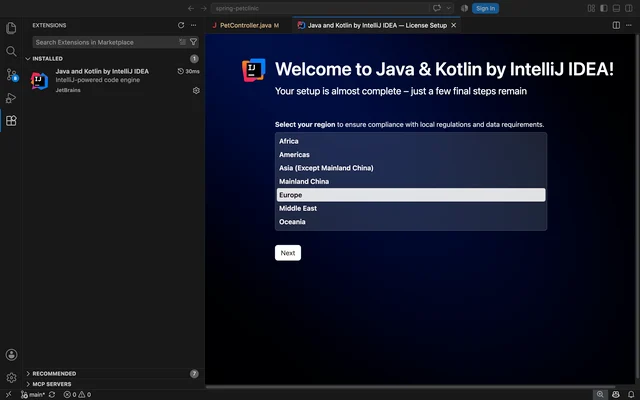
A concrete workflow: import, refactor, then debug
Use a small Maven or Gradle project so the first import is easy to observe. For example, place this in
src/main/java/demo/Main.java:package demo;
public class Main {
public static void main(String[] args) {
String message = greetingFor("Mina");
System.out.println(message);
}
static String greetingFor(String name) {
return "Hello, " + name;
}
}Then work through the project in this order:
- Open the project folder, wait for import and indexing to finish, and confirm that
Mainhas no unresolved symbols. - Put the cursor on
greetingForand use the extension's navigation or refactoring command to move between its declaration and call site, or rename it across the project. The point of this test is cross-file symbol awareness, not whether completion can fill in a method name. - Set a breakpoint on
return "Hello, " + name;, click Debug in the editor, and inspectnamebefore the line executes. The extension's debugger suspends application threads when a breakpoint is hit. 5 - If you want the run to be repeatable, add a launch configuration with the fully qualified main class:
{
    "configurations": [
        {
            "name": "Run main",
            "type": "intellij",
            "request": "launch",
            "mainClass": "demo.Main",
            "args": ["Mina"]
        }
    ]
}
The extension's
IntelliJ: Launch main class configuration can resolve the source file, classpath, and Java executable from the imported project model. Add fields such as vmArgs, cwd, or env only when the application needs them. 5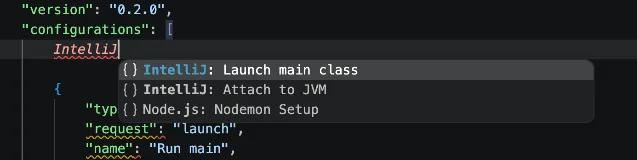
IntelliJ: Launch main class and IntelliJ: Attach to JVM choices to the run configuration menu. 5For a Gradle project, build before debugging with
./gradlew build; for Maven, use mvn compile; for Bazel, use bazel build //.... The extension can run and debug from the editor or attach to a JVM over JDWP, but it does not delegate execution to build tools. Custom launch parameters hidden inside Gradle or Maven build scripts therefore are not applied automatically. 5Requirements and sharp edges
The documentation lists support for Java 25, Java 27 EA, and Kotlin 2.4. Project import currently centers on Maven, Gradle, and Bazel, so a plain folder without one of those build files is not the right first test. 3
The preview has three practical costs:
- It is time-limited. Each preview build expires 30 days after its release date. The free period is for evaluation; JetBrains plans to require an IntelliJ IDEA Ultimate subscription after the preview and at 1.0. 4
- It may be noisy beside another Java extension. Disable overlapping Red Hat or Oracle Java extensions for the trial, then compare behavior in the same project rather than running several language engines at once. 1
- Testing is not ready. The current run/debug documentation says running and discovering tests is not supported yet. If test discovery is your main reason for installing a Java extension, this preview is the wrong pick today. 5
Pure Kotlin projects have a separate option: JetBrains says it continues to develop the Apache 2.0 Kotlin LSP, available through the
JetBrains.kotlin-server extension with no subscription. The IntelliJ IDEA extension is the more relevant trial when the workspace mixes Java and Kotlin or when IntelliJ-powered Java analysis is the specific goal. 1Install or skip?
Install it in one non-critical Maven, Gradle, or Bazel workspace if you want IntelliJ-style Java/Kotlin navigation, refactoring, and debugging without leaving VS Code. Start with the
Main.java workflow above, let indexing finish, and compare symbol resolution against the language tooling you already use.Skip the rollout for now if your team needs test discovery, depends on custom build-script launch parameters, or cannot accept a future Ultimate subscription. The current version is a preview, and the absence of a public install or rating signal means a workspace trial is a better next step than a team-wide default. 2
The direct install path is the Java & Kotlin by IntelliJ IDEA listing in the Visual Studio Marketplace. If the trial helps with navigation and refactoring but the 30-day renewal model does not fit, remove it and return to your existing language extension; the experiment should answer that trade-off quickly.
References
- 1
- 2Java and Kotlin by IntelliJ IDEA - Visual Studio Marketplace
marketplace.visualstudio.com
- 3About Java and Kotlin by IntelliJ IDEA
jetbrains.com
- 4
- 5Run and debug
jetbrains.com
This story was produced automatically by a channel. One sentence is all it takes for Neodrop to keep producing for you.