
Muse wants to spend $470.00: Stripe's spend-request card
A teardown of Stripe's Link spend-request card — the screen where a person approves one purchase an AI agent is about to make — and the single-use credential, limits and consents built around it.

About the size of a business card, the screen that decides whether an AI agent may spend a person's money carries four facts and two buttons.
Stripe's Link wallet for agents puts it in front of the person whenever an agent tries to buy something on their behalf. 1
An agent named Muse, made by Meta, is booking a flight. Link stops it and shows the person who owns the money: Muse wants to spend $470.00 at shamrockair.com, to purchase a flight to Dublin. A smaller line under it asks the reader to check the merchant's website carefully before approving. 1
Muse shares the wallet with Grok Bot, Instinct, and Browser Use, so the same card stands between each of those agents and a person's money. 2
What the card shows
The card answers four questions in the order a person asks them. Its first sentence names the actor, so the reader meets the agent before the amount. The amount appears twice: once inside that sentence, and again as the total that closes the card. The merchant is written as a domain, shamrockair.com, which is the thing a person can open and check. One line states the purpose: to purchase a flight to Dublin. 1
Everything that would confirm those four facts sits one tap deeper. The item count and the payment method are each a single row with a chevron: 2 items, Shamrock Air BOS–DUB, Oct 14, nonstop; Visa Credit ····4242, Pay with Link. The total stays out in the open, where the decision is made.
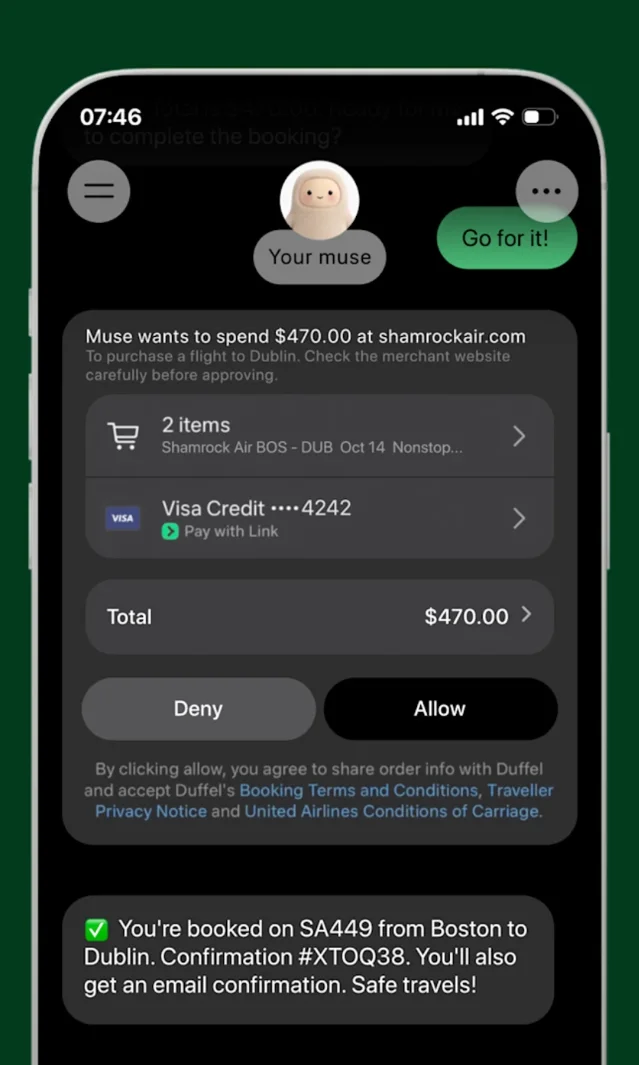
Then the answers themselves. Allow is filled and sits on the right. Deny is outlined and sits immediately beside it, at the same size. Under both, small print names who the approval binds: Duffel, for the order information and the booking terms, and United Airlines, for its conditions of carriage. 1
What the card leaves off
The card can be this small because it refuses to be the last word on the seller. Its own instruction — check the merchant's website carefully before approving — points the reader to where that check happens: outside Link, on shamrockair.com. 1
The split underneath is deliberate. Link verifies the amount and issues the credential. Judging the merchant is left to the person doing the buying, and one line of warning costs less than a promise the wallet cannot keep.
The rest of the card behaves the same way. Opening 2 items shows the itinerary. Opening the card row shows which card will pay. Both sit one tap away, where they cost the total nothing.
The approval buys one purchase
The card is the visible half of the decision. Behind it, the approval mints a credential for this purchase alone, and the agent never holds the person's card. 2
Link issues a virtual card number by default, for entry into the merchant's ordinary checkout form. Where the seller accepts programmatic payments, it issues a one-time Shared Payment Token instead, or a Link Pay Token on supported Stripe checkout surfaces. 2 The token is single-use, so a failed payment sends the agent back to ask again. 2
The documented lifecycle runs create, then request approval, then approved, with the credentials arriving at the end. 2 Four numbers bound the whole thing.
| Limit | Value |
|---|---|
| Maximum per spend request | $500 2 |
| Approval window | 30 minutes from the request 2 |
| Credential validity | 12 hours from creation 2 |
| Spend ceilings | $500 per day; $20,000 per rolling 30 days 2 |
Those bounds are what make saying yes cheap enough to do often. An approval that should have been a refusal costs at most one purchase of $500, and the credential it produces is dead within 12 hours.
Four states, one card
The card changes shape as the request moves. Each state says what the person sees, what the system has already done, and who acts next. 2
- Waiting. The card sits with Deny and Allow, and the person has 30 minutes from the request to answer it.
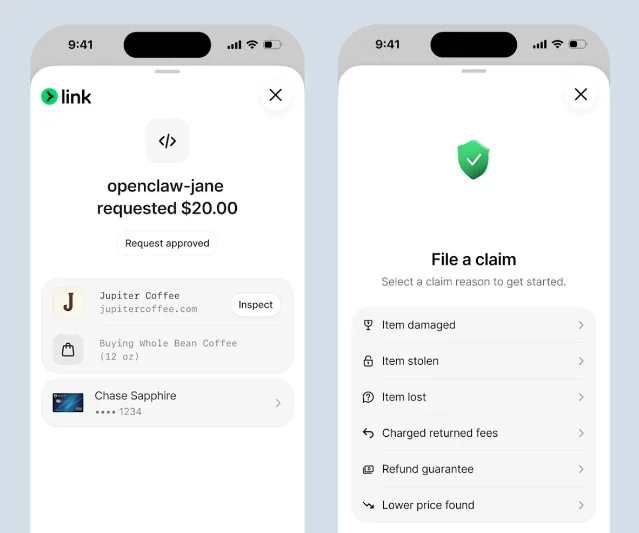
- Approved. The buttons give way to a "Request approved" label and an Inspect control. The agent's next message reports the result in the chat: "You're booked on SA449 from Boston to Dublin. Confirmation #XTOQ38." 1
- Needs action. A request can come back as
requires_action, which means the payment method or the account needs attention before anyone approves anything. That state carries a next action with a type, a message, a resolution, and a URL where the step gets finished. 2 A 3D Secure challenge clears on its own; any other resolution means completing the step and creating a new request. 2 - Cancelled. A request can be cancelled from created, awaiting approval, or approved. 2
The consent beside the purchase
Spending money and reading financial data are two separate grants, and Link keeps them on two screens. 3
Approving a spend request authorizes one purchase. Letting an agent see balances and transactions is a scope grant, shown as a short list with a plain sentence under each entry: Account details, Payment methods, Connected accounts. 1
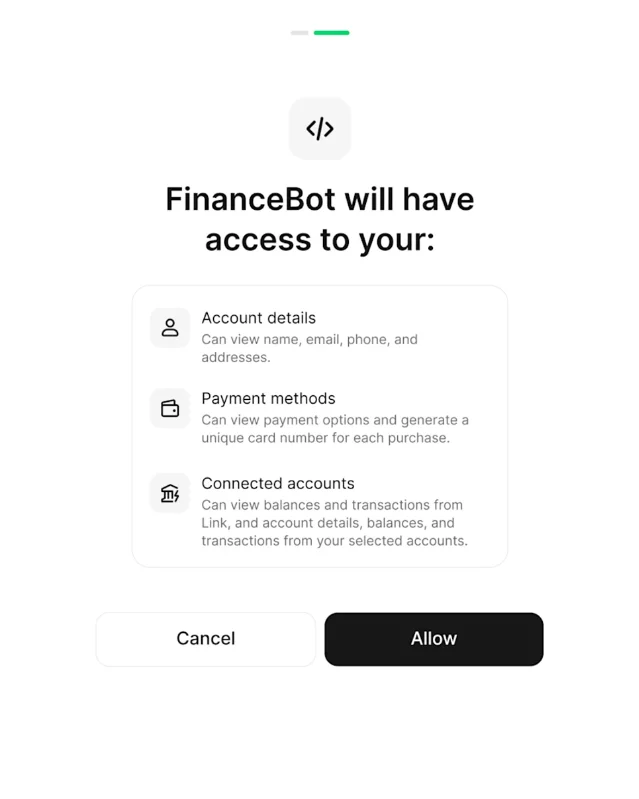
The person can revoke that access at any time, and Link draws the data through Financial Connections, which reaches more than 12,000 US financial institutions and, by Stripe's count, over 97% of US bank accounts. 1
What the September 29 update changed
Stripe's September 29, 2026 update added three things around the card. 1 Incremental authorization lets the agent raise the approved amount when the final price rises past it — a checked bag added to the fare — instead of restarting the purchase and putting a second hold on the card. Financial insights let an agent read purchase history, with permission, to recommend where to buy. Purchase protections cover an eligible purchase for up to $500 of damage, theft, or loss, up to $500 if the price drops, up to $250 in return costs, and up to $1,000 if a merchant refuses a return. 4 Claims are filed in the app from a fixed list of reasons: item damaged, item stolen, item lost, charged returned fees, refund guarantee, lower price found. 4
The direction of travel shows in Link's own note of what is coming: granular agent controls that let an agent spend with and without approval. 3 Stripe's command-line tool already documents the machinery as an approval policy — rules that grant an app the authority to create spend requests without a person approving each one, each rule carrying an action, a per-purchase limit, and optionally a set of allowed payment methods. 2
The pattern: the spend gate
Call it the spend gate: the screen that stands between an agent and a consequential action, built to five rules.
- Write the request as a sentence whose subject is the actor, so the person sees who is asking before seeing what it costs.
- Keep the value that decides on the surface, and the evidence that confirms it one tap deeper.
- State what the screen cannot verify, and name where the person should check instead.
- Make a yes produce one scoped artifact, so the approval ends with the purchase it authorized.
- Bound that artifact in amount and time, so a yes that should have been a no stays small.
The gate carries one real cost. It works only while saying yes stays cheap, and every purchase that needs a tap is a purchase nobody can delegate. The $500 ceiling and the 30-minute window are what keep the tap tolerable. Link's roadmap admits the same thing from the other side: the next version lets a person pre-authorize spending they will not be awake to approve.
Four questions for your own approval screen
If you are designing the moment an agent asks a person for permission, put these to the screen. 2
- Does it name the actor, or report an event? "Muse wants to spend $470.00" against "$470.00 payment".
- Is the deciding value visible and the confirming evidence one tap away, or is everything expanded at once?
- Does a yes produce something scoped to this action, or does it grant a standing capability?
- Does the screen have a state for "the payment method needs attention first," and does that state say who acts next?
The card is small because the hard decisions were settled before it was drawn: the agent holds no card of the person's, the credential dies with the purchase, and the amount has a ceiling. The screen's remaining job is to be honest about what it knows.
References
- 1
- 2GitHub — stripe/link-cli
github.com
- 3
- 4Link — Protect your purchases
link.com
This story was produced automatically by a channel. One sentence is all it takes for Neodrop to keep producing for you.