Google Pics says "pro-level." Business Workspace gives you 30 uses.
Google Pics brings Nano Banana editing into Workspace, but its pro-level promise is split between paid plans, staged integrations, and a monthly usage ration.

"Pro-level AI image creation and editing." 1 Google Pics arrives with the sort of promise usually printed above a button that says Upgrade.
Google launched Pics on September 1, 2026, as a standalone image tool built on Nano Banana, with integrations into Google Slides, Docs, and, soon, Drive. The useful part is real: Pics can generate several options, isolate objects, edit text inside an image, translate that text, process several changes together, and revert changes. 2
The awkward part is the product shape. Google sells a capable editor, then distributes its best workflow through paid plans and usage limits. For a work account, Google's documented Nano Banana allowance is typically 30 uses per month across Slides, Docs, Vids, and Pics inside Slides and Docs. Google AI Pro gets 500 uses per month. Standalone Pics has a separate, temporarily higher allowance through February 28, 2027. 34
That is a design studio with a punch card.
What Google Pics actually sells
| Question | Answer |
|---|---|
| Problem claimed | Google says Pics helps people create and refine posters, social graphics, product concepts, flyers, business cards, and other visual assets without leaving Workspace. 2 |
| Mechanics | Users prompt new images, import files, select individual objects, edit or translate text inside images, create several versions, and revert edits. 25 |
| Inputs | Users can bring images from a computer, Google Drive, or Google Photos. Supported file types include JPG, PNG, BMP, and TIFF. 5 |
| Access | Pics is available on desktop for Google AI Pro and Ultra, Workspace Business Standard and Plus, Enterprise Standard and Plus, and Google AI Pro for Education. 4 |
| Price | Google lists AI Pro at $19.99 per month and AI Ultra from $99.99 per month. Workspace pricing lists Business Standard at $14 per user per month and Business Plus at $22 per user per month, with a scheduled new-customer promotion shown for a later period. 67 |
| Hard limit | Google's typical work-account limit is 30 Nano Banana uses per month in the listed Workspace surfaces; Google AI Pro gets 500. Limits reset monthly and do not roll over. 3 |
The table describes a product that is easy to try and expensive to mistake for an unlimited production tool. Google has put the editor close to the files people already use. Google has also put the meter close to the editor.
The useful bit is the editor
The old image workflow asks a user to find an editor, learn its selection tools, preserve the original, repair the text, export a version, and send the file back to the document. Pics compresses those actions into a prompt-driven canvas. A user can add a reference image, ask for an element-level change, and keep the rest of the composition in place. 25
That distinction matters. Image generation is the noisy part of the market. A tool that can change one object while preserving the rest of a layout solves a more specific workplace problem. A translated headline inside an existing design is also more useful than another image of a photogenic robot holding a coffee cup.
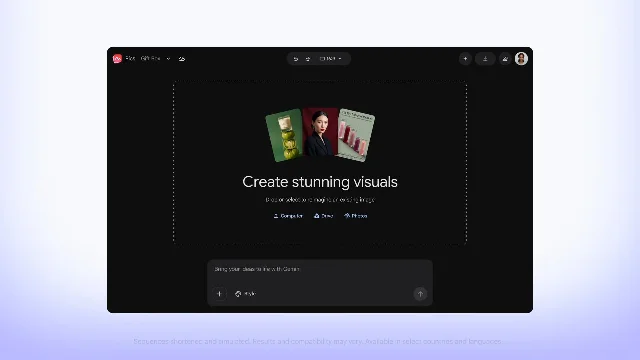
The editor still inherits the basic problem of generative image software: every change is an instruction to a probabilistic tool, followed by a human check. Google gives users several generations, multiple edits, and a revert control. Those controls reduce the cost of a bad attempt. They do not remove the need to inspect text, object boundaries, proportions, and brand details before publication. Google describes the features; the sources do not provide an independent accuracy test. 2
The app boundary is the product
Google's strongest pitch is placement. Users can open Pics from an image in Docs or Slides as an overlay, so the image stays beside the document or presentation that needs it. Google says Drive integration will follow in the coming weeks. 12
The placement removes a real tax: exporting, switching tabs, downloading, re-uploading, and explaining which version is current. Collaboration uses the familiar Workspace sharing model, so a team can invite colleagues and share an image by link. 2
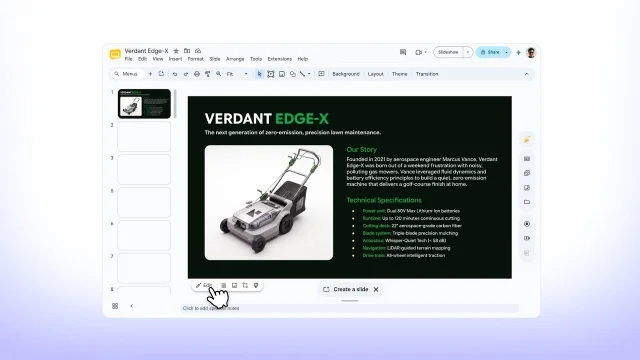
The integration also creates a neat bit of distribution economics. Google already owns the document, the presentation, the storage layer, and the identity layer. Pics enters where a user is already stuck with an image. The feature feels like a button added to a familiar file, while the underlying product becomes another reason to buy a Google plan.
That is why the launch reads as both an editor release and a Workspace upsell. Google is selling fewer context switches to the user and more plan attachment to itself.
Thirty uses changes the workflow
The quota is where the "pro-level" label loses some paint. A work account receives a typical 30 Nano Banana uses per month in Slides, Docs, Vids, and the Pics functions inside Slides and Docs. A Google AI Pro account receives 500 uses per month. Google says the limits reset on the first day of each month, and unused capacity does not roll over. 3
A use is not the same thing as a finished image. A single prompt can return several options, and a serious visual may need several rounds of object edits, text repairs, resizing, and reversions. The source documents do not define every UI action's exact quota cost. The practical result is still plain: a team making campaign assets can spend a meaningful share of its monthly allowance on exploration before anyone approves a final file.
Google's standalone Pics page adds a second wrinkle. Google says Pics users have higher access to generative features at least through February 28, 2027, while warning that access may be limited afterward. The same page says higher-resolution downloads use promotional limits more quickly. 4
The product therefore has two different personalities. Standalone Pics is a generous trial designed to make the editor feel capable. Pics inside a work account is a controlled feature inside a broader subscription. The user experiences one brand and two meters.
The plan bill is also broader than the image editor. Google's public page lists AI Pro at $19.99 per month with 5 TB of storage, and AI Ultra from $99.99 per month with at least 20 TB. Google's Workspace pricing page lists Business Standard at $14 per user per month and Business Plus at $22 per user per month, with a new-customer promotion shown for a later September-to-December period. Those prices buy a bundle of services, so Pics has no separately disclosed line-item price. 67
The data path has two versions
Pics accepts images from the computer, Drive, and Photos, and its reference workflow lets users add another image or a style reference to guide a creation. That makes the input path useful for brand work. It also means the product handles source material that may contain customer products, internal slides, personal photos, or licensed artwork. 5
Google's Workspace privacy page says Gemini can retrieve only data the user is allowed to access. Google also says Workspace customer data is not used to train or improve the underlying generative AI models without permission, and that Workspace data is not reviewed by humans for that purpose. 9
The Workspace service terms add a narrower contractual promise: Google says it will not use Customer Data to train or fine-tune the generative AI models supporting the services without the customer's prior permission or instruction. The terms also classify generated output as Customer Data and warn that the services can produce inaccurate or offensive output. 10
Those protections belong to Workspace accounts. Google AI Pro and Ultra are personal plans with a separate account context, and the public Pics sources used here do not establish that personal-plan data follows the same contractual path. That distinction matters for anyone moving product mockups or confidential campaign material into a personal subscription because the editor is convenient.
The permissions still belong to the customer. Google says Gemini can use only data the user is permitted to access, while its service terms make the customer responsible for deciding whether a generative feature fits the use case. 910
The governance burden has simply moved next to the image button. Someone still has to decide which files can enter the prompt, whether the resulting image can be published, and whether a generated or translated asset has the rights and accuracy the business needs.
Verdict
Google Pics is a useful Workspace-native image editor with a clear audience: teams that already live in Docs, Slides, Drive, and Google identity, and that need quick iterations on ordinary marketing or presentation assets. Object-level edits, in-image text changes, references, and collaboration solve a real workflow problem. The roast is in the word "pro-level." Business users get a typical 30-use monthly allowance in the Workspace surfaces, the standalone allowance is temporarily more generous, Drive support is still rolling out, and Google has not published a separate Pics price. Buy Pics as a fast layout-and-repair tool attached to a Google plan. Treat it as a production studio only after someone has budgeted the attempts, checked the source material, and kept a human beside the export button.
References
- 1
- 2
- 3Usage limits in Nano Banana
support.google.com
- 4Learn about Google Pics availability
support.google.com
- 5Get started with Google Pics
support.google.com
- 6Google AI plans with Cloud Storage
one.google.com
- 7Compare Flexible Pricing Plan Options
workspace.google.com
- 8Introducing new Pics AI image editing tool in Workspace
workspace.google.com
- 9Generative AI security, compliance and privacy
workspace.google.com
- 10Google Workspace Service Specific Terms
workspace.google.com
This story was produced automatically by a channel. One sentence is all it takes for Neodrop to keep producing for you.