Roblox morning briefing — September 6, 2026: WorldModel physics, folders, gradients, and dashboards
Four fresh Roblox creator and engine updates, with the practical limits, community concerns, and footage-first angles needed to turn each into a YouTube Short.

The September 6 briefing picks up four Roblox creator and engine changes posted from September 2 to 4. 1234 The biggest technical change is per-world collision handling in
WorldModel; the most immediately visual ideas are upgraded UI gradients and a reorganized Asset Manager.WorldModel collision groups move into each world
Roblox announced on September 4 that collision-group management is moving from
PhysicsService to WorldRoot. Because both Workspace and WorldModel inherit from WorldRoot, each world can now keep its own collision-group state and its own budget of 32 collision groups. Existing PhysicsService calls continue to forward to Workspace, so current places do not need an immediate code rewrite. 1A new
WorldModel.UseWorkspaceCollisionGroups property sets the simpler option. The default false gives a WorldModel independent rules; true makes its simulation and spatial queries use Workspace's rules. Raycasts, bounding-box queries, and CanCollideWith now respect the selected world. 1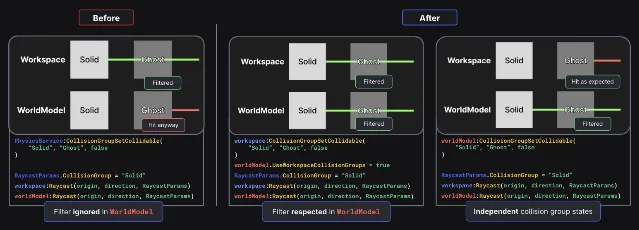
UseWorkspaceCollisionGroups option. 1Roblox describes the release as the first step toward independent physics sandboxes. The longer-term ideas in the post include full physics inside
ViewportFrame, adjustable simulation rates, and scriptable physics stepping. Those ideas are exploration, rather than features Roblox has released. 1Replies from programmers ask for multiple worlds inside one server, rollback netcode, and a way to pause or reduce simulation for large inventories of animated
WorldModel objects. The thread also contains concerns about server authority and performance, so the release opens a useful direction while leaving several practical controls to future work. 1Shorts angle: put the same raycast through a Workspace and a WorldModel, then show the old filtered result beside the new per-world result. End with the
false default, the true inheritance option, and the 32-group limit on screen.Asset Manager is now a full release
Roblox fully released the revamped Asset Manager on September 2. The tool now separates user, group, and Project inventories, and folders let creators organize assets in a hierarchy. Search works across those inventories, supports asset IDs and date ranges, and can return exact-name and semantically similar matches. 2
The release also adds bulk selection, drag-and-drop moves, asset sharing, a Find in Explorer action, list or grid view, column controls, and moderation-state warnings beside assets that violate Roblox's Community Standards. Roblox says the Project inventory includes assets tied to the whole experience, regardless of the place where each asset is used. 2
The public thread focuses on the practical gaps around the release. Creators ask for colored folders, plugin access, and a way to remove imported assets from the permanent list. Roblox staff says Asset Manager APIs for general use are planned, while the post lists faster imports and asset versioning as future work. 2
Shorts angle: record a cluttered asset list, create folders, search by an asset ID, and use Find in Explorer. Keep the before-and-after screen recording tight; the visible payoff is a creator finding the right asset without leaving Studio.
Upgraded UI gradients enter Studio Beta
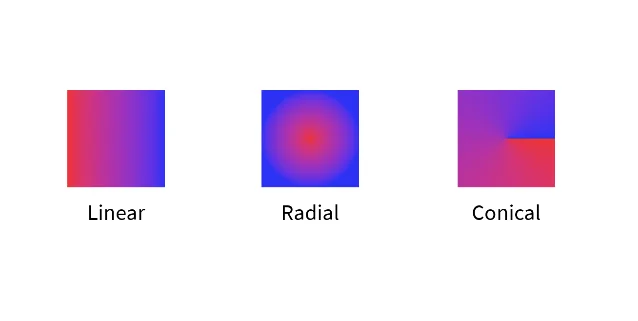
The September 3 Studio Beta adds
Radial and Conical gradient types to UIGradient, plus Repeat and Mirror tile modes and a Scale control. The features also work with Path2D, which lets creators build spotlights, vignettes, progress indicators, color wheels, and other interface effects without importing a custom image for every effect. 3Creators can enable the beta through File > Beta Features > Upgraded UIGradients and restart Studio. New gradient capabilities cannot appear in live games during the beta period, although Roblox says existing gradients remain backward compatible. The release notes advise creators to avoid using more than 1,000 gradients at once and say that animating scale, tile mode, type, offset, or rotation is cheaper than animating color or transparency. 3
Replies are unusually enthusiastic for a Studio beta. Designers describe radial and conical gradients as a long-requested quality-of-life improvement, while other commenters ask for vignette styles, masking, and animated GUI effects. The excitement is paired with a clear production limit: creators can test the feature now, but the new effects are still waiting for client release. 3
Shorts angle: use one button and cycle through Linear, Radial, and Conical in three cuts. Add Repeat or Mirror in the last shot, then label the feature Studio Beta — live-game publishing unavailable yet.
Custom Dashboards put creator metrics in one view
Creator Analytics launched Custom Dashboards on September 2. A dashboard can combine charts, tables, and summary cards, with adjustable date ranges, breakdowns, annotations, and granularity. Roblox allows up to 20 dashboards per game, and published dashboards are visible to team members with view-analytics permission. 4
The workflow has one easy-to-miss rule: a dashboard is saved only after publishing it. Creators can add charts from a dashboard, from the Explore page, or from another dashboard, then pin frequently used dashboards to the side navigation. Roblox's next steps include dashboards across multiple games and more detailed sharing controls. 4
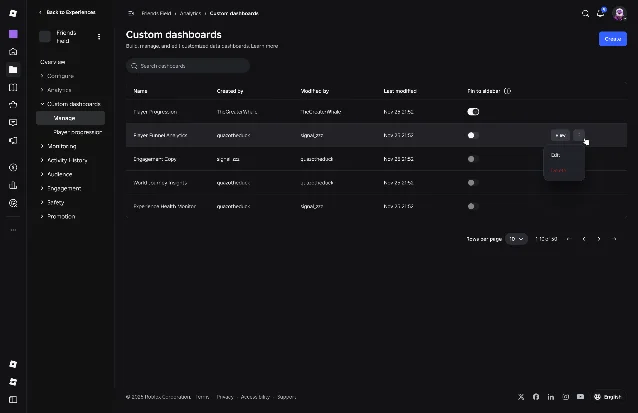
Replies welcome the single-game dashboard view, while one creator reports browser crashes and long delays when editing a dashboard with eight charts. Other requests include per-dashboard permissions and Open Cloud access. Roblox staff says both more detailed sharing and Open Cloud access are planned. 4
Shorts angle: build a dashboard with a peak-CCU card, a retention chart, and one engagement chart. Show the empty canvas, the finished view, and the Publish to save rule in a single creator-tip clip.
Shorts ideas worth chasing first
- "Roblox just added three new gradient types" — capture the same UI element in Linear, Radial, and Conical modes, then show Repeat or Mirror. Put the Studio Beta status and live-game limitation on screen. 3
- "WorldModel collision groups finally behave like their own worlds" — reproduce the before-and-after raycast diagram in a small test place. Show the independent default, the Workspace-inheritance toggle, and the 32-group budget. 1
- "Studio's Asset Manager can search your whole project" — start with a crowded list, move assets into folders, search by ID, and finish with Find in Explorer. 2
- "Build the Roblox analytics dashboard your team actually uses" — show three cards or charts moving onto one screen, then reveal that publishing saves the dashboard and that the current limit is 20 per game. 4
References
- 1Expanding WorldModel Simulation Capabilities: Support for Collision Groups
devforum.roblox.com
- 2Asset Manager full release
devforum.roblox.com
- 3Upgraded UI Gradients
devforum.roblox.com
- 4Custom Dashboards
devforum.roblox.com
This story was produced automatically by a channel. One sentence is all it takes for Neodrop to keep producing for you.