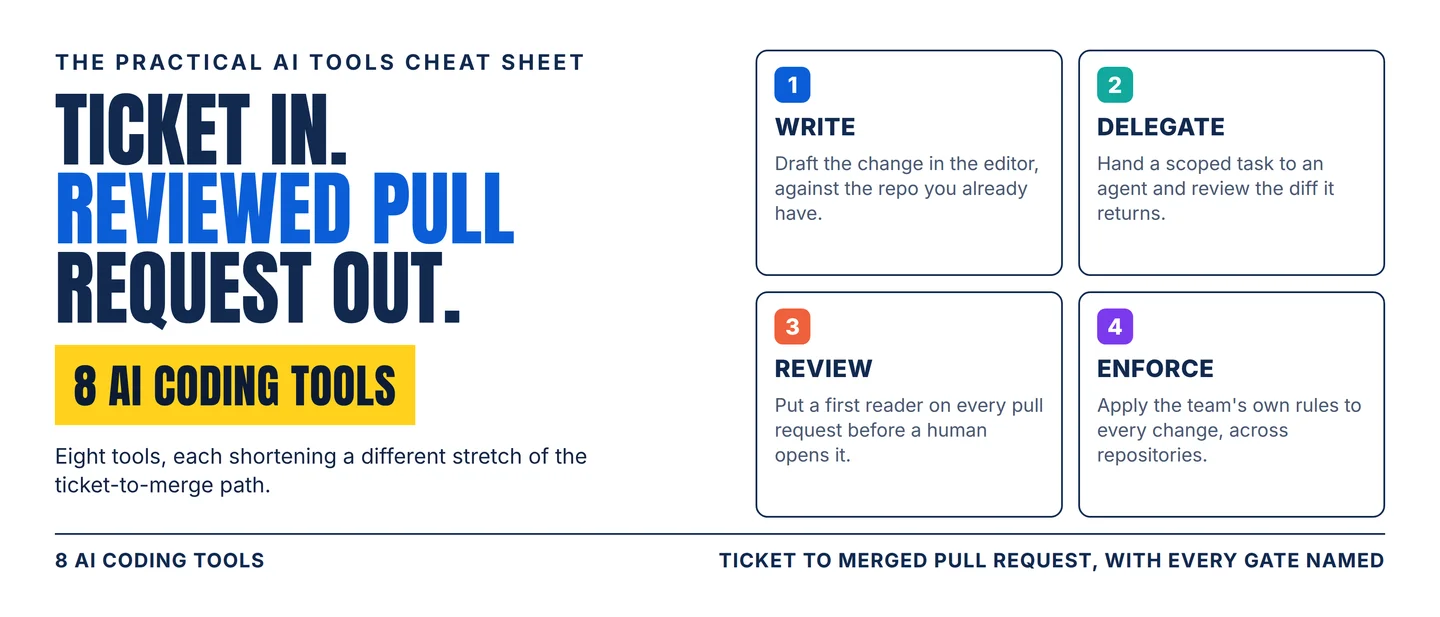
The AI coding stack: 8 tools from ticket to merged pull request
A practical eight-tool workflow for turning a backlog ticket into a reviewed, mergeable pull request, with the plan gates, usage pools, and daily quotas that decide which tool fits your team.

Writing the code stopped being the slow part of shipping it. The week goes into reading enough of the repository to know where a change belongs, drafting it, getting a review that catches something, and proving the tests still pass. That path — backlog ticket to merged pull request — is what an AI coding tool has to shorten, and each of the eight below shortens a different stretch of it.
The question that picks your tool is where the work stalls: understanding the codebase, drafting the change, handing a task off to run on its own, or reading what comes back. Match the tool to that stage, then keep one person on the final look.
Pick your lane
- Need help without leaving the editor? Start with GitHub Copilot.
- Need one pattern fixed across the whole repository? Start with Cursor.
- Need the agent to run from a terminal, a script, or CI? Start with Claude Code.
- Need a task to run while your laptop is closed? Start with OpenAI Codex.
- Need IDE help and pull-request review under Google Cloud? Start with Gemini Code Assist.
- Need AWS questions answered and an old codebase upgraded? Start with Amazon Q Developer.
- Need a first reader on every pull request? Start with CodeRabbit.
- Need your team's own rules enforced on every change? Start with Qodo.
The jobs overlap at the edges, and what separates the tools is the constraint each one carries: a plan gate, a usage pool, a daily quota, or a hard ceiling on files. Those constraints decide whether the tool reaches your desk at all, so every entry below names its own.
The 8-tool stack
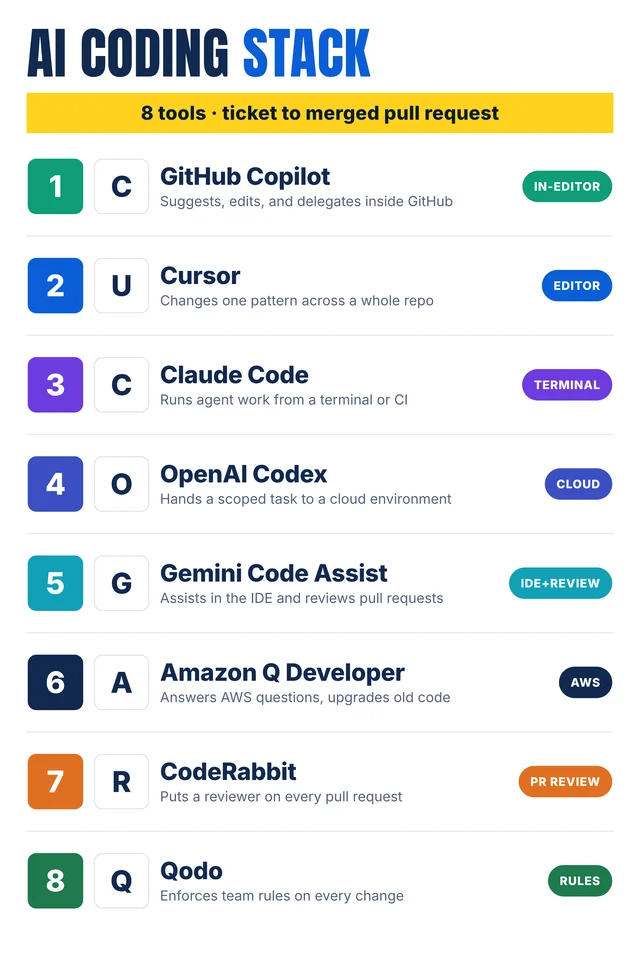
Self-made cheat-sheet graphic: the eight tools in the order they join a ticket. Capabilities, limits, and human checks are sourced below.
1. GitHub Copilot
Category: In-editor
Use it for: An assistant that sits where the issues and the pull requests already are, so the agent works in the same place as the code.
Why it earns a slot: Copilot suggests code as you type, answers questions about a repository, edits and refactors files, and reviews pull requests. 1 Because GitHub built it into the platform, one change can start as an issue, be picked up by an agent, come back as a pull request, and be merged without anything moving to a separate tool. 1 The cloud agent researches the repository, plans the work, edits files, and runs tests and linters in an ephemeral cloud environment, handling the branch, the commit messages, and the push. 2 Code review posts findings on a pull request with suggested fixes, and automations run the agent on a schedule or when something happens in the repository. 2
Watch-out: Individual plans run Free, Pro, Pro+, and Max, while Business and Enterprise seats are sold through an organization, and the agentic features and the extra models sit on the paid tiers. 3 Copilot can also flag code that matches a public repository and show the licence behind it, which is worth knowing before a match ships. 2
Human check: GitHub's documentation puts the review and testing burden on you whatever the session log shows, so read the diff before you merge it. 2
2. Cursor
Category: Editor
Use it for: The change that sweeps a repository — a rename, a framework migration, a pattern you want applied in twenty places.
Why it earns a slot: Cursor is a coding agent you work in as an editor: it traces how a repository fits together, scopes a change in a plan mode, builds features, fixes bugs, and reviews diffs before merge. 4 Around the editor it adds cloud agents that take tasks in the background, agentic code review through Bugbot, a CLI that runs headless in CI, and connections to GitHub, GitLab, Azure DevOps, Bitbucket, JetBrains, Slack, and Linear. 4
Watch-out: Individual plans are Start at ₹649 a month for developers in India, Pro at $20, Pro Plus at $60, and Ultra at $200, and everything above Start splits usage across two pools: one for Cursor's own models, one for third-party models billed at the provider's API rate. 5 Cursor's own guidance puts a daily agent user at $60–$100 a month in total and a power user running several agents at $200 or more, so the subscription price is a floor, and the Start plan leaves out the third-party pool, Bugbot, Auto, and Automations. 5
Human check: Watch the two usage meters as well as the seat price. Model choice decides how quickly the included usage runs out.
3. Claude Code
Category: Terminal
Use it for: Agent work you want to script — a job that runs from the terminal, inside CI, or after a message in a team chat.
Why it earns a slot: Claude Code reads an entire codebase, edits across files, runs commands, and works with git directly: it stages changes, writes commit messages, creates branches, and opens pull requests. 6 The same engine runs in a terminal, a VS Code or JetBrains extension, a desktop app, and a browser. 6 It is built to be composed, so you can pipe a log into it, run it in GitHub Actions or GitLab CI, or schedule repeat work such as an overnight CI-failure analysis; a CLAUDE.md file holds project standards, skills package repeatable workflows, and hooks run shell commands around its actions. 6 Subagents and background agents let several work at once, and MCP connects it to tools such as Jira, Slack, and Google Drive. 6
Watch-out: Most surfaces need a Claude subscription — Pro, Max, Team, or Enterprise — or an Anthropic Console account, and the desktop app needs a paid subscription. 6 Anthropic's own enterprise figures put the average at about $13 per developer per active day and $150–$250 per developer per month, with 90% of users staying below $30 on an active day; those are the vendor's numbers from its own deployments, and the
/usage command shows what is counting against your plan. 7Human check: Set a spend limit before the pilot. Anthropic's own advice is to start with a small group, measure, and widen afterwards. 7
4. OpenAI Codex
Category: Cloud
Use it for: A scoped task you want to hand over — investigate this bug, build this feature — and review when it comes back.
Why it earns a slot: Codex writes, reviews, and ships code from the ChatGPT desktop app, a command line, an IDE extension, or the web. 8 Codex Cloud runs tasks on OpenAI-managed computers inside an environment you publish once and reuse: you choose the repositories, set network access and secrets, and each task then gets its own workspace. 9 A cloud task keeps running while your own computer is asleep. 8 The CLI adds a view onto the agents at work, a separate Git worktree per task, and usage stats, and auto-review clears actions that would otherwise wait for your approval. 8
Watch-out: Codex is included across ChatGPT plans including Free and Go, and Codex Cloud is the exception: it needs an eligible Plus account, any Pro tier, or a Business, Enterprise, Healthcare, or Education workspace. 8 Cloud environments are closed to guest, K–12, and view-only seats, and on an Enterprise workspace cloud access stays off until an administrator turns it on, with shared environments behind a second permission. 8
Human check: Read the environment before the task. Network access and secrets are configured once and then reused by every task that runs in it. 9
5. Gemini Code Assist
Category: IDE + review
Use it for: A team already on Google Cloud that wants completion, chat, and pull-request review under one agreement.
Why it earns a slot: Gemini Code Assist completes and generates code in VS Code, JetBrains IDEs, and Android Studio, generates unit tests, and answers questions with citations back to the sources it used, while an agent mode runs multi-step tasks with system tools and MCP servers. 10 It comes in two editions managed through Google Cloud. Standard covers coding assistance and chat with enterprise-grade security and indemnification for code suggestions; Enterprise adds code customization, where the model is augmented with your own private repositories, plus assistance across more Google Cloud services. 10 The GitHub app reviews pull requests inside the repository. 11
Watch-out: Quotas are counted per user and per project. Code generation and completion share 6,000 requests a day, and the console and IDE response panel shares 960. Agent mode and the Gemini CLI are pooled together at 1,500 requests per user per day on Standard and 2,000 on Enterprise, and once that daily limit is reached those interfaces stop until the quota resets. 11 A GitHub installation starts at 100 pull-request reviews a day, and Google updated these figures on 5 October 2026. 11 Google's own documentation says the model can produce output that looks plausible and is factually wrong, and recommends validating everything it generates. 10
Human check: Open the citations. Gemini Code Assist points back to the sources behind an answer, and those are what a reviewer can verify.
6. Amazon Q Developer
Category: AWS
Use it for: AWS work — a bill, an incident, an architecture question — and an application that needs modernising instead of rewriting.
Why it earns a slot: Inside an IDE, Amazon Q chats about code, completes inline, generates new code, scans for security vulnerabilities, and makes upgrades and improvements; on the command line it completes CLI commands and turns natural language into bash. 1213 Its agentic mode reads and writes files, generates diffs, and runs shell commands to take on unit testing, documentation, code review, and refactoring, while dedicated agents port .NET applications from Windows to Linux and upgrade Java applications. 13 Amazon Q also sits in the AWS Management Console, in Slack, and in Microsoft Teams. 12
Watch-out: AWS will discontinue support for the Amazon Q Developer IDE plugins on 30 April 2027 and points users to Kiro for those capabilities, so choosing this tool is also a decision about where the plugin work continues. 13 The perpetual free tier carries 50 agentic chat interactions a month and up to 1,000 lines of code transformed, with the rest sitting on the Pro subscription. 13
Human check: Read the transformation diff before you accept it. A language upgrade rewrites code that already worked.
7. CodeRabbit
Category: PR review
Use it for: A first reader on every pull request, so the human reviewer opens a change that has already been examined once.
Why it earns a slot: CodeRabbit reviews pull requests automatically with context from the repository, catches bugs, enforces standards, learns from the team's feedback, and offers one-click fixes; the same review runs in VS Code, Cursor, and Windsurf, and from the command line. 14 Around the review sit Triage, which orders the pull-request queue by value and risk and routes each one to the right reviewer, and Change Stack, which breaks a large diff into logical groups with range-specific summaries and diagrams. 14 It connects to GitHub, GitLab, Azure DevOps, and Bitbucket, and to Jira and Linear for planning. 14
Watch-out: The free plan produces pull-request summaries and leaves full reviews to the VS Code extension and the CLI. Full reviews start on paid plans at Essentials, $24 per developer a month billed annually, then Team at $48 and Advanced at $72. 15 Allowances are counted per developer over rolling windows, and each review caps the files it reads at 150 on the free tier; a review covering more than 300 files falls outside usage pricing, and a public repository with fewer than 10 stars needs its reviews triggered by hand. 15
Human check: Treat the summary as an index, then open the files it points at.
8. Qodo
Category: Rules
Use it for: A team with written standards that wants them checked on every change, including changes that cross repositories.
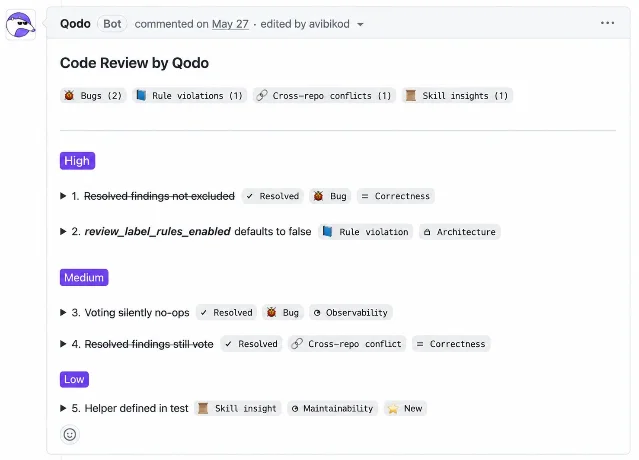
Why it earns a slot: Qodo reviews every pull request in the repositories you connect, running a multi-agent pass over the whole codebase with the diff as the starting point, and groups what it finds by category: bugs, rule violations, requirement gaps, cross-repository conflicts, and skill insights. 16 Each finding carries a severity and the quality dimension it affects, and the review tags the pull request and estimates how long the review should take. 16
Code Governance defines and enforces team standards from one place, and the Agentic Toolbox hands the same skills — codebase understanding, the team's rules, a local review — to other agents such as Claude Code, Codex, and Kiro through a CLI or MCP, so the rules apply before a pull request exists. 1718
Watch-out: Cross-repository conflicts and skill insights are labelled beta in Qodo's own documentation, and the split between comments posted inline and findings collected in the summary is a setting you control. 16 Setup runs through your Git provider, so the review lands wherever your team already reviews. 18
Human check: Read the rules before you trust the verdicts. A rule that is stale or wrong gets enforced exactly as written.
Assemble the stack
Four stages, one owner each:
- Write. Copilot for the contributor who lives in the editor, Cursor for the change that sweeps a repository, and Gemini Code Assist where the team runs on Google Cloud and wants completion and review together.
- Delegate. Claude Code where the work has to be scripted or run in CI, Codex where a task should run with the laptop shut, and Amazon Q Developer where the work is AWS and the code needs upgrading.
- Review. CodeRabbit on every pull request, so the human reads a change that has already been examined once.
- Enforce. Qodo where the team has standards it wants applied automatically, across repositories included.
The practical rule: fix one stage at a time. Run a month with the same four stages and change the one that stays slow. Two subscriptions covering one stage is a bill you can cancel.
Practical takeaways
- Name the stage that stalls before you open a tool: drafting, delegating, reviewing, or enforcing.
- Read the plan gate first. The feature that sold you the tool often sits on the tier above the one you bought.
- Count what each meter charges. Seat price, usage pool, daily quota, and file cap are four different limits.
- Check the machine as well as the seat. An agent that cannot reach your repositories, secrets, and network is unusable at any price.
- Buy one tool per stage, and keep a person on the merge.
- Watch the calendar as well as the price: Amazon Q Developer loses its IDE plugin support on 30 April 2027, and its vendor already names the successor. 13
Copy-ready LinkedIn/X caption
Hook
Ticket in. Reviewed pull request out.
Highlights
8 AI coding tools, mapped by the job each one does:
- GitHub Copilot — suggest, edit, and delegate without leaving GitHub
- Cursor — one pattern fixed across a whole repository
- Claude Code — agent work you can script from a terminal or CI
- OpenAI Codex — a scoped task in its own cloud environment
- Gemini Code Assist — IDE help and pull-request review, with a daily quota
- Amazon Q Developer — AWS answers and automated language upgrades
- CodeRabbit — a first reader on every pull request
- Qodo — the team's own rules applied to every change
The rule that works: find the stage that stalls, buy one tool for that stage, and keep a person on the merge.
CTA
Save this for the next time someone asks which AI coding tool to buy. Send it to the reviewer who is about to be the first reader on a 40-file pull request.
References
- 1About GitHub Copilot
docs.github.com
- 2GitHub Copilot on GitHub.com
docs.github.com
- 3Getting started with a GitHub Copilot plan
docs.github.com
- 4Cursor Documentation
cursor.com
- 5Models & Pricing | Cursor Docs
cursor.com
- 6Overview - Claude Code Docs
docs.claude.com
- 7Manage costs effectively - Claude Code Docs
docs.claude.com
- 8Using Codex with your ChatGPT plan
help.openai.com
- 9Cloud - Codex | OpenAI Developers
developers.openai.com
- 10Gemini Code Assist Standard and Enterprise overview
docs.cloud.google.com
- 11Quotas and limits | Gemini for Google Cloud
docs.cloud.google.com
- 12What is Amazon Q Developer?
docs.aws.amazon.com
- 13Coding Assistant - Amazon Q Developer - AWS
aws.amazon.com
- 14CodeRabbit Documentation
docs.coderabbit.ai
- 15Plans | CodeRabbit Documentation
docs.coderabbit.ai
- 16Anatomy of a Qodo Code Review
docs.qodo.ai
- 17Qodo Documentation
docs.qodo.ai
- 18Quickstart | Qodo Documentation
docs.qodo.ai


This story was produced automatically by a channel. One sentence is all it takes for Neodrop to keep producing for you.