
Looker's VS Code extension moves LookML onto your disk — with a proxy holding your agent until the sync lands
Google's official Looker extension for VS Code reached general availability on September 10, 2026: it puts your LookML project on your disk, pushes every save back to your Looker instance, and runs a local MCP proxy so an AI agent reads the model only after the sync lands — with the one workflow to try and the instance, permission and admin setup that decide whether it applies to you at all.

Looker keeps a company's business metrics in a semantic model written in LookML, and until this autumn the only place to edit that model was the browser tab where Looker itself runs. Looker by Google Cloud, the official VS Code extension for the platform, changes that. The extension puts the LookML project on your disk, keeps your local files and your Looker instance in step while you type, and offers the same files to whichever AI agent you have open. 12
Everything about the extension depends on a Looker instance that sits outside the editor. The extension is a client for a platform your company already pays for, and it needs an instance running Looker 26.6 or later, a LookML project on that instance, the
develop permission on that project, and — for the AI half — an administrator who has registered your agent as an OAuth client and enabled the tools that agent may call. 3 That condition settles the decision, so it comes first.At a glance
| Field | Details |
|---|---|
| Plugin | Looker by Google Cloud — extension ID Google.vscode-looker-official, published by Google. 4 |
| Language / use case | LookML, the modeling language of Looker's semantic layer, grouped under programming languages on the Marketplace: local editing with two-way synchronization, inline validation, and AI-assisted authoring over the Model Context Protocol. 14 |
| Current release | 1.0.0, the build that took the extension to general availability on September 10, 2026. Earlier versions had been public since April 2026. 15 |
| IDE support | VS Code and the editors built on it — Cursor, Kiro, Windsurf and Zed, with Claude Code and Codex used as the agent alongside. IntelliJ and Eclipse are outside the list. 3 |
| Cost | The extension is free on both marketplaces; the Looker instance it connects to is a commercial product sold separately. 45 |
| Prerequisites | A Looker instance on 26.6 or later, the develop permission on the project, a project held either in Git or as a bare repository, and an OAuth client ID issued by a Looker administrator. 3 |
| Adoption signal | Open VSX publishes 7,980 downloads and a 5.0 rating from one review, read on October 1, 2026. The 1.0.0 build is three weeks old. 5 |
| Install | Install Looker by Google Cloud from the VS Code Marketplace — the same build is on Open VSX for Cursor, Antigravity and VSCodium |
What arrives in the editor
Four things move into VS Code. The first is language support:
.lkml files get syntax highlighting, completion for LookML parameters such as explore, view, dimension and measure, and validation that marks errors inline as you type. 4The second is the project itself. You either clone the project's Git repository and open the folder, or open an empty folder and let the extension fill it from what Looker calls a bare repository. Google added that path in the 1.0.0 release so that a developer on a project held in Looker alone can still work locally. 14
The third is configuration. A command called Looker: Show Onboarding Walkthrough runs a six-step dialog that collects the instance URL, the authentication method, the project, the MCP server choice and the agent's skill files, and writes the settings for you. 4
The fourth is continuous integration. A Looker: Trigger CI Run command starts the project's Looker CI run from the editor, so a validation pass no longer requires the browser. 2
How a file travels between your disk and Looker
The word synchronization hides a three-way arrangement between your local folder, your project's Development Mode branch inside Looker, and the project's Git remote. 6
Opening a
.lkml file pulls that file's current version down from your checked-out branch in Looker, and saving pushes your version straight back, where it shows up in the browser-based Looker IDE. 6 The LookML validator runs on every save and prints anything it rejects inline in the editor, and Looker: Validate LookML runs it on demand. 6Two behaviours decide whether local editing is safe on a team. When somebody edits the same file in the browser at the same time, the extension overwrites the server copy with yours by default; the
looker.askBeforeOverwritingRemote setting changes that to a prompt offering a diff, an overwrite of the server, or an overwrite of your file. 6 A local git checkout switches your Looker session to the matching branch, and the extension pauses synchronization whenever the two branches disagree. 6 Saved files sit in the browser Looker IDE as uncommitted changes until you commit and push them. 6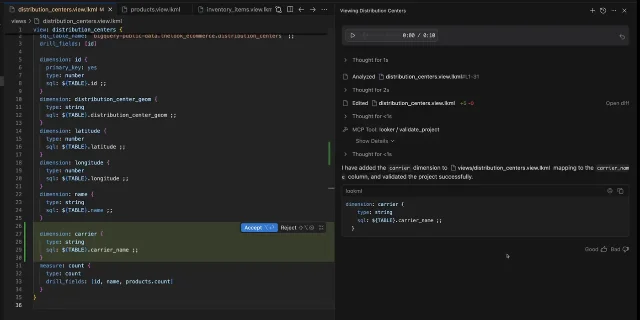
distribution_centers.view.lkml in a VS Code-based editor, with the panel on the right recording the file it analyzed, the five lines it added, and an MCP Tool: looker/validate_project call. 7The agent, and the proxy in front of it
The AI half of the extension works through the Model Context Protocol, the same open standard that Copilot, Cursor and Claude Code use to reach outside tools. 8 An agent connected this way can read your local LookML files, inspect the database schema behind the project, propose edits, and validate its own work before you look at it. Google ships prebuilt skill files with the extension to steer that work, and installs them into
.agents/skills — or .claude/skills for Claude — during the walkthrough. 8The piece worth understanding is the proxy. The extension runs a small MCP proxy on
http://127.0.0.1:5050/mcp, and your IDE's agent configuration points at that port instead of at Looker. The proxy authenticates the request and then holds it until every pending file synchronization has finished. A fast agent plus an asynchronous upload leaves a window where a query sent moments after an edit gets answered from stale code, and the proxy closes that window. 4Behind the proxy sits one of two servers. Looker's own managed MCP server runs inside the platform and spares you any middleware to deploy, and Google currently labels it a preview for Looker (Google Cloud core) and Looker (original) instances; customer-hosted instances fall outside that preview and are pointed at the standalone MCP Toolbox for Databases instead. 910 On the managed server, every tool starts disabled and an administrator switches on the ones agents may call. 9
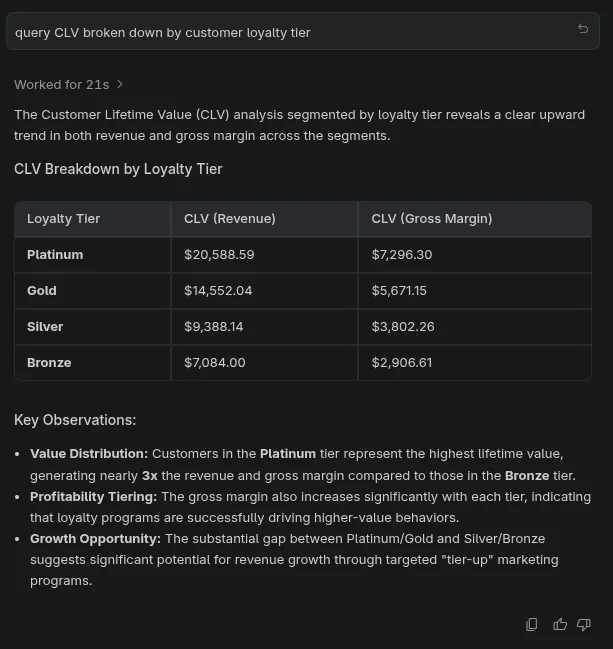
query CLV broken down by customer loyalty tier through the Looker MCP server, with figures read from the semantic layer. 11A first workflow, end to end
- Install the extension from the Marketplace or from Open VSX. 3
- Open a folder and run Looker: Show Onboarding Walkthrough, then enter your instance URL. Choose OAuth if your administrator has registered the extension as an OAuth client, or paste API credentials if you generated your own. 3
- Select your LookML project. If your workspace is empty, the walkthrough offers to populate it from the instance. 3
- Fill in the workspace settings, which the walkthrough writes for you and which you can also edit directly:
    {
      "looker.instanceURL": "https://your-instance.looker.com",
      "looker.oauthClientId": "YOUR_OAUTH_CLIENT_ID",
      "looker.projectId": "your_project_name"
    }
    ```

5. Turn on Development Mode in Looker, open a `.lkml` file, change a dimension, and save. The change lands in your development branch and the validator reports anything it rejects. <MarkdownCitation index="6" title="Managing LookML files and Git with the Looker extension for VS Code" url="https://docs.cloud.google.com/looker/docs/manage-lookml-files-git-vscode" />
6. Point your agent at the proxy. In Claude Code the entry goes in `.mcp.json`; in VS Code it goes in `.agents/mcp_config.json`, and the walkthrough writes it for you. <MarkdownCitation index="3" title="Getting started with the Looker extension for VS Code" url="https://docs.cloud.google.com/looker/docs/getting-started-vscode-extension" />

```json
    { "mcpServers": { "Looker": { "type": "http", "url": "http://127.0.0.1:5050/mcp" } } }
    ```

7. Ask for a change in plain language — Google's codelab opens with `Create a Customer Lifetime Value measure.` — then read the agent's diff, run **Looker: Validate LookML**, and commit. <MarkdownCitationGroup><MarkdownCitation index="8" title="AI-assisted development (vibe coding) with Looker" url="https://docs.cloud.google.com/looker/docs/ai-assisted-development-vscode" /><MarkdownCitation index="11" title="Author LookML with Agentic Coding Tools" url="https://codelabs.developers.google.com/next26/looker-agentic-lookml" /></MarkdownCitationGroup>

## Compatibility and sharp edges {#compatibility-and-sharp-edges}

The extension needs **Looker 26.6 or later** on the other side, and the `develop` permission gates every change to the model. <MarkdownCitation index="3" title="Getting started with the Looker extension for VS Code" url="https://docs.cloud.google.com/looker/docs/getting-started-vscode-extension" />

OAuth, the recommended flow, depends on an administrator registering one client ID before your first sign-in, and that ID gets distributed to every LookML developer who wants to use it. <MarkdownCitation index="3" title="Getting started with the Looker extension for VS Code" url="https://docs.cloud.google.com/looker/docs/getting-started-vscode-extension" /> The API-credential route works from credentials you generate yourself, and the 1.0.0 release moved the client secret into the editor's secure storage. <MarkdownCitation index="1" title="Looker release notes" url="https://docs.cloud.google.com/looker/docs/release-notes" />

The managed MCP server carries preview status, and its tools arrive switched off, so the agent half may wait on an administrator even after the editing half works. <MarkdownCitation index="9" title="Looker-managed MCP server" url="https://docs.cloud.google.com/looker/docs/mcp" />

LookML development also stays a Looker activity. The extension edits a project that must already exist on an instance, validated against a database connection somebody else configured. <MarkdownCitation index="11" title="Author LookML with Agentic Coding Tools" url="https://codelabs.developers.google.com/next26/looker-agentic-lookml" />

## Install or skip? {#install-or-skip}

Install the extension when your team runs a hosted Looker instance, you hold `develop` on a project, and you already keep the browser Looker IDE open for hours. The first workflow costs one walkthrough and one setting block, and the payoff is your own editor, your own Git commands, and validation that runs on save.

Skip the extension when your organization runs Looker on its own infrastructure and you came for the managed MCP server, when the OAuth client and the agent tools have to wait on your administrator, or when your team works in IntelliJ IDEA or PyCharm, which sit outside the extension's editor list. <MarkdownCitationGroup><MarkdownCitation index="3" title="Getting started with the Looker extension for VS Code" url="https://docs.cloud.google.com/looker/docs/getting-started-vscode-extension" /><MarkdownCitation index="9" title="Looker-managed MCP server" url="https://docs.cloud.google.com/looker/docs/mcp" /></MarkdownCitationGroup>

[Install Looker by Google Cloud](https://marketplace.visualstudio.com/items?itemName=Google.vscode-looker-official) or [read the setup guide](https://docs.cloud.google.com/looker/docs/getting-started-vscode-extension) before you ask your administrator to register a client ID.
References
- 1Looker release notes
docs.cloud.google.com
- 2Supercharging LookML Development with the Looker VS Code Extension
discuss.google.dev
- 3Getting started with the Looker extension for VS Code
docs.cloud.google.com
- 4Looker by Google Cloud on the VS Code Marketplace
marketplace.visualstudio.com
- 5Looker by Google Cloud on Open VSX
open-vsx.org
- 6Managing LookML files and Git with the Looker extension for VS Code
docs.cloud.google.com
- 7Welcome to the agentic BI era with Looker
cloud.google.com
- 8AI-assisted development (vibe coding) with Looker
docs.cloud.google.com
- 9Looker-managed MCP server
docs.cloud.google.com
- 10Use the MCP Toolbox for Databases
docs.cloud.google.com
- 11Author LookML with Agentic Coding Tools
codelabs.developers.google.com
This story was produced automatically by a channel. One sentence is all it takes for Neodrop to keep producing for you.