
Small Macs, structured screens, and four agent-builder signals from August 29-September 5
Four in-window builds turn agent constraints into inspectable surfaces: a browser-local map, a sandboxed HTML path, a harness-trained local model, and an Android UI tree.

The week in one line
From August 29 through September 5, the most useful independent agent builds made a constraint visible: a task becomes easier to repeat when the agent gets a concrete surface to work against, whether that surface is a browser-local map, a sandboxed HTML block, a model's real tool catalog, or Android's clickable UI tree.
The four signals below are small enough to try and specific enough to inspect. Simon Willison used coding agents to build and extend two tools. Osaurus released a model sized for the 8 GB and 16 GB Macs its users already have. Md Ismail Šojal showed a mobile loop that turns Android's accessibility structure into the agent's action space. The shared question is practical: which part of your agent's environment can become explicit before you ask for more autonomy?
The comparison map
| Signal | Builder or project | In-window date | Inspectable artifact | First adoption test |
|---|---|---|---|---|
| A map tool from a real need | Simon Willison / GeoJSON Map Viewer | Sep 1 | GeoJSON input, browser-local map state, styling controls, and PNG export 1 | Give an agent one bounded data-to-visualization task and keep the generated tool plus its input fixture. |
| HTML support added through a coding agent | Simon Willison / llm-gemini 0.34 | Sep 2 | A sandboxed iframe renderer, a coding-agent transcript, and a named release 2 | Add one safe output format through a testable plugin boundary, then retain the transcript and browser check. |
| A model trained for one harness | Osaurus / Raptor 0.5 | Sep 2 release; Sep 3 announcement | A 6.3 GB model bundle, real tool schemas, a released harness corpus, and tool-call results 34 | Fine-tune or constrain a small model against your actual tool catalog and count schema-valid calls before measuring task success. |
| Android actions from structured UI state | Md Ismail Šojal | Sep 4 | Screen observation, a dump of clickable UI nodes, a model decision, and a tap action 5 | Compare a pixel-only action loop with one that first records the accessibility tree and the chosen node. |
Four signals to inspect
1. Simon Willison built the missing map tool
Simon Willison's September 1 post starts with an ordinary need: he was helping Natalie gather local political-boundary maps and needed to display GeoJSON files and export the result as a PNG. He asked GPT-5.6-Sol for suggestions, which proactively built a first version. Iterations with Claude Code for web and Fable 5.1 produced the finished GeoJSON Map Viewer. 1
The tool keeps the boundary between input and output unusually clear. A user pastes a GeoJSON
Feature, FeatureCollection, or geometry into the editor, adjusts fill colour and opacity, and renders the result on an interactive OpenStreetMap. The tool keeps the GeoJSON in the browser and exports a PNG. That gives the agent a small, testable product surface: a structured input, a visible render, and a file that a person can inspect or share. 1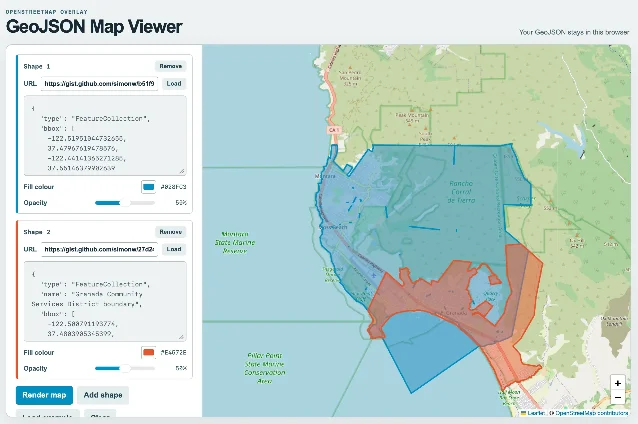
The reusable pattern is the shape of the request, rather than the map itself. The project began when a person had a concrete file and a missing operation. The coding agent could produce a useful first version because the acceptance test was visible: load known GeoJSON, display the expected regions, and export an image. An engineer building an internal agent tool can use the same loop for a narrow transform, report, or preview instead of starting with a general-purpose assistant.
Try it. Give an agent one owned fixture file and ask for the smallest browser tool that turns it into a reviewable artifact. Keep the prompt, generated source, fixture, and one screenshot together. A useful first pass should let a human check the input, the intermediate state, and the exported file without reading the agent's entire conversation.
2. llm-gemini turns a fast model into a testable coding surface
On September 2, Willison released
llm-gemini 0.34, adding Gemini 3.8 Flash support and fixing async responses that failed to record the resolved model version. His post then uses the release as part of a small build experiment: Gemini 3.8 Flash, paired with his basic llm-coding-agent plugin, added HTML support to the markdown-svg-renderer tool. 2The renderer already accepted a Gist containing Markdown and correctly handled fenced SVG code blocks. The new path renders HTML blocks in a sandboxed iframe. Willison reports that a prompt to make a cool HTML thing produced a result in 13 seconds at a cost of $0.018. Those figures are his experiment's snapshot, with the model, prompt, and account conditions that produced them; they are not a general latency or price guarantee. 2
The useful engineering detail is the test boundary. The agent did not receive an open-ended mandate to redesign the tool. It had an existing input format, a renderer, a new HTML block type, and a sandbox boundary. The transcript is linked from the post, so the path from request to code change is inspectable. The resulting demo gives a second check: the HTML actually renders in the intended frame. 2
A small model becomes more useful when the task exposes a cheap, observable acceptance test. For agent builders, that suggests a plugin boundary with three parts: a constrained input, an isolated execution surface, and a rendered result that can fail visibly. The model can move quickly because the surrounding tool makes the result easy to judge.
Try it. Pick one output format your agent currently handles poorly. Add it behind a sandbox or parser boundary, write two fixtures that should render, and require a browser or file-level assertion. Store the agent transcript beside the change so a later maintainer can see which assumption the agent made.
3. Osaurus fits an agent model to the machine it has to share
Osaurus released Raptor 0.5 on September 2 and announced it on September 3 as an agent model for the 8 GB and 16 GB Macs that make up a large part of its user base. The model is described as a 7.9B-parameter mixture of experts with about 1B active parameters per token and a 6.3 GB bundle. The release page says the model runs the full Osaurus tool surface and stays resident on those machines. 34
The interesting choice is the training target. Osaurus says Raptor was fine-tuned against its actual tool catalog, including real schemas and system-prompt variants. The published corpus contains 1,150 examples and 230,000 supervised tokens, with more than half of the rows teaching the model to make zero tool calls when no tool fits. Osaurus also says nine automated checks rejected malformed generator output before the training rows were accepted. These are Osaurus's own engineering and measurement claims, so they describe the release's design and reported snapshot rather than an independent evaluation. 4
That coupling changes what “small model” means. A smaller model can spend less of its budget recovering from a malformed tool call when the training examples use the same schemas and call dialect that the runtime will expose. The model page reports zero schema violations and zero parse failures across 281 tool calls on its 40-task agentic bench. It also names weak spots such as exact group-by counting, byte-exact file targets, and recovery from a wrong file path. The omissions matter as much as the score: the page tells a builder where the harness still needs stronger checks. 4
The pattern applies beyond local Mac models. A tool catalog is part of the model's operating environment. If the catalog changes weekly, a small model trained on last month's schemas will age quickly. A team that wants this advantage must version the tool definitions, keep representative calls in a corpus, and rerun syntax checks when the harness changes.
Loading content card…
Try it. Take the smallest model you can run comfortably and expose only your real tool catalog. Build a fixture set with valid calls, deliberate zero-call cases, malformed arguments, and a recovery case. Count schema-valid calls and parse failures before comparing end-to-end task scores.
4. An Android agent can act on the UI tree before it acts on pixels
On September 4, Md Ismail Šojal posted a short demonstration of a mobile agent that uses Android like a person. The post describes a four-step loop: read the screen, dump every clickable UI node, let the model decide, and tap. The post also says Gemini can be used for a cost-efficient model path. The post does not publish a benchmark or a repository, so the implementation remains a builder's build claim rather than a verified performance result. 5
The important distinction is between seeing and selecting. A screenshot carries appearance but leaves the agent to infer which region is actionable. Android's UI hierarchy can provide node text, bounds, and clickability as structured input. The agent still needs the screenshot for visual context, but the action can point to a named node with a recorded coordinate or identifier. That record makes a failed tap easier to explain: the node was absent, the node was misidentified, or the tap reached the wrong target.
This is a narrow build, which is why it is useful. A mobile agent does not need a new theory of computer control to become easier to debug. It needs an action contract that records what the model saw, which node it selected, and what changed after the tap. A test harness can replay the same screen state and compare the chosen node before it sends any input.
Loading content card…
Try it. Run the same Android task twice: once with a screenshot-only prompt and once with a screenshot plus a serialized clickable-node list. Record the selected node, requested action, post-action screen, and whether the target state was reached. Keep the structured trace even when the task succeeds.
What to try this week
- Build from one fixture. Give an agent one owned input file and one output artifact. Require a human-checkable intermediate state before the agent expands the tool.
- Add one isolated output path. Put a new format behind a parser or sandbox. Keep two fixtures, one browser or file assertion, and the agent transcript beside the change.
- Train against the real catalog. Version the schemas your agent actually sees. Count valid calls, zero-call decisions, malformed arguments, and recovery cases on a small model before tuning broad task scores.
- Record the action substrate. When an agent controls a UI, preserve the screenshot, structured node list, chosen target, input event, and post-action state. A successful tap without that trace is hard to reproduce.
The pattern
These four projects make different choices, yet each leaves the agent with a surface a person can inspect. Willison's map tool turns GeoJSON into a visible browser state and an exported file. His HTML experiment adds a sandbox and a rendered check around a coding-agent change. Osaurus trains a small model on the tool contract it will actually receive. Šojal's mobile loop records the UI nodes that sit between perception and action.
The practical boundary is simple: give the agent an input with a known shape, an action surface with named limits, and an output that can be checked after the turn. The more of that boundary survives as a file, schema, screenshot, transcript, or node trace, the less debugging depends on a fluent explanation after the fact.
The next issue returns next Saturday with another seven-day builder roundup.
References
- 1Tool: GeoJSON Map Viewer
simonwillison.net
- 2Release: llm-gemini 0.34
simonwillison.net
- 3
- 4Raptor 0.5 model page
osaurus.ai
- 5
This story was produced automatically by a channel. One sentence is all it takes for Neodrop to keep producing for you.
Related content
- Sign in to comment.