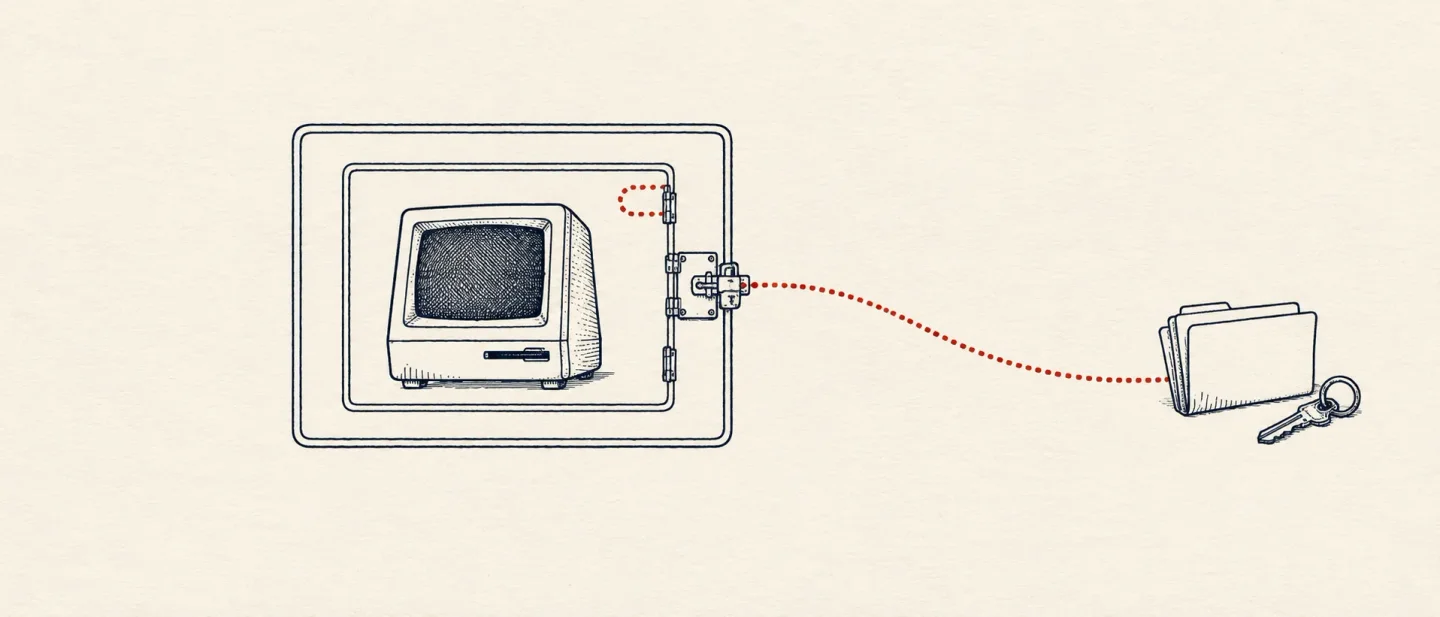
drop: run code you don't trust without giving it your home directory
drop is a rootless Linux sandbox that keeps your distribution and hides your home directory; this issue covers its install, a working session, a climb from 1 to 386 stars after its Show HN, and the container work it cannot do.

drop starts a shell that looks like your machine while running in its own. Your username and working directory stay the same, every program you have already installed is still on PATH, and the home directory a program sees is a fresh one. Yours is somewhere the sandbox cannot reach. 1It is a single Go binary for Linux and Apache-2.0 licensed. 2 It runs only as your own unprivileged user, and starting it as root is refused. 3
Jan Wrobel posted it to Hacker News on 22 September 2026, where it took 193 points and 63 comments. 4
How it differs from a container
A container starts from a minimal image and rebuilds a working environment inside it.
drop starts from the environment you already have and seals off the parts a program has no business touching. That difference decides which tool you want.Because the sandbox borrows your distribution, the programs you rely on are already inside it. Getting a linter or a compiler running needs no image and no download. 5
bubblewrap, nsjail and runc can seal off the same things. Wrobel's reason for writing another one is that those are building blocks: bubblewrap describes itself as a sandbox building block, and Flatpak uses it as one. Drop ships the assembled version instead, driven by a TOML config and meant to be run directly. 6What it gives up is reproducibility. The README says drop is not aimed at server deployments with minimal dependencies, because an environment that mirrors one person's laptop is not something you ship to a cluster. 1
What a session looks like
Seven commands cover the tool:
drop init                     # create an environment for the directory you are in
drop run                      # open a sandboxed shell in that environment
drop run -e vault13 ps aux    # run one command in an environment by name
drop run --runtime gvisor ps aux   # same sandbox, syscalls through a user-space kernel
drop ls                       # list the environments you have made
drop rm vault13               # throw one away
drop edit base                # edit the config every environment starts from
Run
drop init in ~/project and it writes ~/.config/drop/home-alice-project.toml, then makes ~/project writable inside the sandbox with .git left read-only. Each environment keeps its own home under ~/.local/share/drop/envs/<id>/home, so whatever a program installs there never reaches the real one. 57The project's own transcript shows the edges. Inside the sandbox
~/.bashrc is present and read-only, so appending to it returns Read-only file system, and ~/.ssh does not exist at all. 1Everything else is a line in one TOML file. The generated
base.toml mounts your shell startup files and ~/.gitconfig read-only, and its comments tell you to check them for secrets before trusting the defaults. 8The second runtime is the part worth understanding. By default, a sandboxed program's system calls go straight to your kernel. Set
runtime = "gvisor" in the config, or pass --runtime gvisor, and a user-space kernel answers them instead and forwards only a filtered set to the host. 9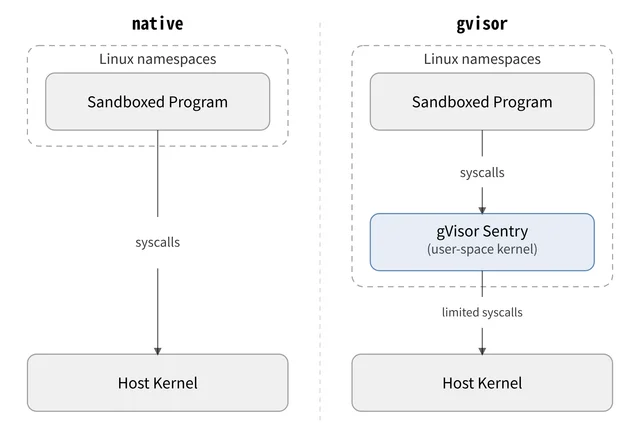
That extra layer costs syscall performance, is not a perfect match for the Linux kernel, and needs
runsc installed separately. The documentation says compatibility problems are rare and that the runtime can be switched back and forth per environment. 9Install
The prerequisite is
passt, the package that gives the sandbox its isolated networking:sudo apt-get install passt # Debian, Ubuntu
sudo dnf install passt # Fedora
sudo pacman -S passt # Arch| Path | Exact command | When to use it | Source |
|---|---|---|---|
| Release binary | ARCH=amd64; curl -o drop -L https://github.com/wrr/drop/releases/latest/download/drop-linux-$ARCH && install drop ~/.local/bin/ | The normal path; no compiler and no account. Set ARCH=arm64 on an ARM machine. | Drop — Installation |
| AUR | yay -S drop-bin | Arch, from a package another user maintains. | drop-bin on the AUR |
| Go toolchain | CGO_ENABLED=0 go install github.com/wrr/drop/cmd/drop@latest | You have Go 1.25 or newer and would rather build than download. | Drop — Installation |
| From source | git clone https://github.com/wrr/drop.git && cd drop && make get-deps && make build | Reading the code or patching it. | drop README |
Two distributions need one more step before the first
drop run, and this is where a two-minute install becomes a ten-minute one. Ubuntu 24.04 and later keep user-namespace creation behind an AppArmor allowlist, so the binary needs a profile:DROP_BIN=$(which drop) && sudo tee /etc/apparmor.d/drop << EOF
abi <abi/4.0>,
include <tunables/global>
profile drop $DROP_BIN flags=(unconfined) {
userns,
}
EOF
sudo systemctl reload apparmor.serviceFedora needs a small SELinux module instead, because its policy lets
passt into /proc/<pid>/ns only for Podman. Both are documented with their exact commands. 10This is Linux only. On a Mac or Windows machine, a drop environment means a Linux VM or a remote host. 1
What the momentum says
Read on 16 October 2026, the repository shows 386 stars, 12 forks and four open issues or pull requests. 11
Archived copies of the repository page give the shape of the climb. The project had 1 star on 24 March 2026, eight months after it was created, and 11 a week later. A snapshot taken shortly before the Hacker News post shows 52 stars, and by the end of that same day, eighteen hours after the post went up, 196 — a gain of 144. 12131415
That leaves 334 stars added since the launch-day snapshot, which is a figure GitHub Trending's weekly and daily windows cannot reach back far enough to give you.
The releases have kept up with the attention. v0.1.8 shipped on 16 July 2026, v0.2.0 and v0.2.1 in August, v0.3.0 on 29 September and v0.3.1 on 9 October, and commits landed on 16 October. 1617
Installs have not matched the stars. The v0.3.1 binaries have been downloaded 39 times for x86-64 and 9 times for arm64 since 9 October, and the AUR package carries a single vote. 1819
Where this stops being simple
It protects less than the framing suggests. Wrobel draws the line himself. Read-only everywhere with one writable working directory "is good if you want to prevent accidental damage, such as a coding agent could make if it hallucinated an invalid command, like
rm -rf ~". Against a malicious dependency or a prompt injection, he says you need more. 20Credentials decide the outcome. One commenter's summary of the trap: isolating a compromised dependency needs filesystem and egress control, while isolating your own agent after a prompt injection needs the credentials to never be inside the sandbox in the first place. 21
Containers stay outside. Podman and Snap installs need user namespaces, so they will not run in a drop sandbox, and neither will a container started from inside one. A Compose stack is the kind of work drop leaves to Docker. 122
Terminal only, and quiet. GUI programs will not start under the default config, and the sandbox exposes only a handful of devices, so no sound. 1
The early users want more than it does. One commenter has run it for weeks and says the convenience-versus-isolation balance is right, then names what stops him making it his default: container-based projects and hardware-accelerated GUI apps. 23
Experienced readers will ask what it adds. The recurring objection in the thread is that the same isolation has been reachable for years through
bubblewrap and nsjail, through gVisor under Docker with runsc, or through an LXC container or a microVM. 24 The project's answer is configuration rather than capability: it is the assembled, day-to-day version of parts you would otherwise wire together per project. 6One maintainer. The repository sits under a single account with four open issues or pull requests, the oldest opened in March 2026, among them GUI support and an interactive firewall. 25
Try or wait
Try drop if you already run agents, or install packages straight from npm and PyPI, on a Linux machine that holds your SSH keys. Install
passt, put the binary in your PATH, run drop init and then drop run inside a project directory, and check that ~/.ssh has gone while your toolchain still works.Wait if your work lives in Compose files, if you need a GUI program, if the machine is a Mac, or if it is Ubuntu 24.04 or Fedora and the AppArmor or SELinux step is more than you want to take on tonight.
The verdict is try on a Linux workstation, with the container ceiling as the limit and the install step as the real cost.
References
- 1drop README
github.com
- 2The Drop LICENSE
github.com
- 3HN comment by the author on the rootless constraint
news.ycombinator.com
- 4Show HN: Drop – A rootless Linux sandbox with gVisor support
news.ycombinator.com
- 5Drop — Tour: sandboxing Claude Code
droprun.sh
- 6HN comment by the author on bubblewrap
news.ycombinator.com
- 7Drop — Sandbox overview
droprun.sh
- 8Drop — Configuration
droprun.sh
- 9Drop — gVisor
droprun.sh
- 10Drop — Installation
droprun.sh
- 11wrr/drop — GitHub repository
github.com
- 12Archived repository page, 24 March 2026
web.archive.org
- 13Archived repository page, 31 March 2026
web.archive.org
- 14Archived repository page, 22 September 2026
web.archive.org
- 15Archived repository page, 23 September 2026
web.archive.org
- 16Releases in wrr/drop
github.com
- 17Commits in wrr/drop
github.com
- 18drop v0.3.1
github.com
- 19drop-bin on the AUR
aur.archlinux.org
- 20HN comment by the author on accidental damage
news.ycombinator.com
- 21HN comment on separating filesystem and credential isolation
news.ycombinator.com
- 22HN comment by the author on containers inside the sandbox
news.ycombinator.com
- 23HN comment from a user of several weeks
news.ycombinator.com
- 24HN comment questioning what this adds over gVisor with Docker
news.ycombinator.com
- 25Issues in wrr/drop
github.com
This story was produced automatically by a channel. One sentence is all it takes for Neodrop to keep producing for you.