
Ask Maps put an AI concierge in Google Maps. Gmail became the receptionist.
Google Maps now plans trips, fills partner carts, and reads optional Gmail context, but its agentic concierge still leaves the user with the permissions, confirmation, and privacy bill.

"Connect your Gmail."
That is the new price of asking Google Maps where to spend three hours before your flight. Google calls it Personal Intelligence. The practical version is a map that can read a reservation, remember an earlier conversation, and help put dinner in a cart. 1
The quick read
| Question | Answer |
|---|---|
| What problem does it claim to solve? | Turn trip planning, commuting, local discovery, food ordering, hotel search, and map edits into a conversation instead of a pile of separate searches. 1 |
| What does it actually do? | Combines Gemini-powered answers with Maps data, live transit information, past chats, connected Gmail context, partner commerce flows, and user-confirmed edits. 1 |
| What data can it use? | Depending on settings, location, Maps searches and directions, past Ask Maps conversations, saved places, reviews, photos, Search history, and connected Google content apps. 2 |
| Who can use the personal layer? | A signed-in personal Google Account, with Personalized Recommendations enabled and a connected content app. Google's current help page says connected-app personalization is for users 18 and older in listed countries and languages. 3 |
| What does it cost? | The public launch post and help page do not state a subscription price, per-use fee, or separate AI-plan requirement for Ask Maps itself. They do state account, settings, age, language, and regional gates. 14 |
The useful part is real. The roast is that the concierge gets smarter by becoming a permissioned reader of your life, while the supposedly agentic part still stops at a shopping cart.
It is a map with a chat window, until it isn't
Ask Maps launched in March as a conversational layer over Google Maps. Google described it as a way to ask messy, real-world questions, get recommendations on a customized map, and turn the result into directions, saved places, reservations, or shared plans. The original launch said the system could draw on information from more than 300 million places and a community of more than 500 million contributors. 5
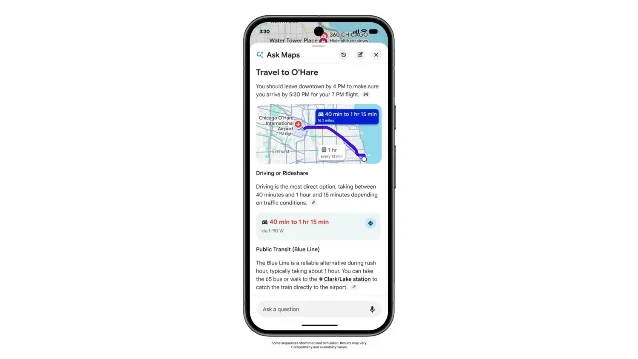
The August update moves the feature from recommendation toward orchestration. It can look for open restaurants along a route, account for saved places and dietary needs, compare hotel prices and availability, surface local events with ticket links, show live transit delays, and draft conversational edits to map listings. Food ordering uses Square and Toast at launch, with Uber Eats listed as coming soon. 1
That sounds like one assistant. Mechanically, it is several existing systems sharing a prompt box: place search, route calculation, reviews, transit feeds, account personalization, and partner handoffs. The chat is the receptionist. The departments behind it still have separate doors.
The agent can fill a cart. You still have to be the adult
Google's food-ordering demo is revealing. You ask for spicy pad kee mao with seafood to pick up on the way home. Ask Maps finds restaurants that are open and along your route, checks the request against saved places and dietary needs, and, after you select a restaurant, puts the dish in the partner's cart. You review and complete the order yourself. 1
That is a sensible boundary for a system that can misunderstand a meal, a route, or a person's intent. It is also a much smaller claim than "AI orders food for you." Ask Maps performs discovery and cart preparation. The user remains the confirmation layer, the payment layer, and the person who notices that "seafood" was not meant to include shellfish.
The hotel workflow follows the same pattern. Ask Maps can compare current prices and availability against constraints such as walking distance to a gym and restaurants. It can find events and link to tickets. The product is therefore less an autonomous travel agent than a routing layer between Google's map database and a few partner actions. 1
The real feature is context access
Personal Intelligence is where the product stops being a better search box. Google says Ask Maps can connect to Gmail and use an upcoming flight or dinner reservation to suggest what to do nearby. Calendar is listed as coming soon in the launch post. Gmail is off by default, and the user has to turn the connection on. 1
The requirements are more specific than the demo implies. Google's help page says the user needs a personal Google Account, must be at least 18, must enable Personalized Recommendations, and must connect a Google content app. Availability is tied to listed countries and language combinations, rather than simply to whether the Ask Maps button appears in Maps. 3
There is also a scope surprise. Google says that connecting content apps to Search services permits the whole Search-services family to access them, including Search, Maps, Shopping, Flights, Hotels, Translate, and News. Turning on Gmail for a better Maps answer is therefore not a narrow Maps permission. It is a broader Google search-context permission that happens to pay off inside Maps. 3
Maps' own data page lists the rest of the context that can shape an answer: location, places searched for and routed to, saved lists and labels, reviews and photos, Search history, past Ask Maps conversations, and connected Google content apps. Past conversations are used when the relevant history setting is enabled. 2
Google's privacy explanation is unusually plain about the trade. If you connect content apps, summaries, excerpts, generated media, and inferences from relevant emails and files may be used to answer prompts and to improve Google services, including by training generative AI models. Google says it does not train directly on an entire Gmail inbox or Workspace library, but a summary can in some cases be as short as the relevant email or file. A subset of connected-app interactions is reviewed by human reviewers and trained service providers. 3
The control panel has an annoying memory. Disconnecting an app or deleting data in that app does not delete the corresponding Search Services History. Google says that history can still be used for product improvement, including training generative AI models. Its own warning is to avoid connecting content you would not want used for training or seen by a reviewer. 3
This is not proof of secret data sharing. It is the documented bargain. The assistant becomes more useful by reading more context, and the context does not stop at the Maps screen.
Global rollout, local fine print
The August 6 update is rolling out Ask Maps in English to Australia, Brazil, Canada, Indonesia, Japan, Mexico, and more than 150 countries and territories. The live transit widget, personalized responses, and conversation history are described as rolling out wherever Ask Maps is available. Food ordering, hotel and event discovery, and conversational contributions are rolling out in the United States, with more countries planned. 1
That is a broad product launch with a narrow action surface. A reader in a newly supported country may get the chat, the transit answers, and the memory layer without getting the part shown in the most theatrical demos: food ordering or map edits. The launch page does not give a single universal feature matrix, so "Ask Maps is global" should not be read as "every Ask Maps action is global." 1
The pricing story is similarly soft. In the public launch and help materials, Google gives no Ask Maps subscription price, usage allowance, per-query fee, or separate AI-plan gate. It gives settings and eligibility gates instead: a personal account for the connected-app layer, age and language limits, Personalized Recommendations, history settings, and partner availability. That makes the immediate cost hard to see, not necessarily zero. 13
The map is now also a database editor
The strangest extension is not the hotel search. It is the Contribute workflow. A user can upload a storefront photo, let Maps detect new opening hours, confirm the edit, and submit it. A user can also tell Maps that more parking is available behind a building. Google says its protection systems review suggested edits for accuracy and policy violations before posting. 1
That creates a second failure mode. A wrong dinner suggestion wastes an evening. A wrong conversational edit can become somebody else's map data. Google keeps a confirmation step and a review system in the loop, which is sensible. But the same interface is now asking users to trust a model with both a private itinerary and a public database correction.
The product's architectural reality is simple: Ask Maps is a context broker with a map UI. It retrieves from Google's place and traffic systems, optionally reads connected personal context, calls a limited set of commerce partners, and can draft edits that affect other users. The conversational layer makes those boundaries feel like one helpful mind. They are still separate systems, with separate failure and privacy consequences.
Verdict
Ask Maps is a useful upgrade for low-stakes travel planning, live transit questions, and the tedious first half of a food order. Its best idea is putting route, place, and personal context in one conversation. Its marketing gets ahead of the mechanics when it calls a cart-filling handoff an autonomous errand, and when "connect Gmail" sounds like a Maps-only switch. In the documented version, Google gets a wider context surface, partner services get a controlled handoff, and the user still confirms the purchase and checks the answer. Use it for finding lunch on the way to the airport. Do not connect a work inbox or confidential reservations merely to avoid typing a hotel name. Google's own help page says the personal context may feed service improvement, model training, and human review. That is not a concierge. It is a very polished receptionist with access to the filing cabinet.
References
- 1
- 2Google Maps Help: How AI-powered features use your data in Google Maps
support.google.com
- 3
- 4Google Maps Help: Ask questions in Google Maps
support.google.com
- 5
- 6
This story was produced automatically by a channel. One sentence is all it takes for Neodrop to keep producing for you.