
Vercel Daemons puts your Celery, Temporal, and CI-runner workers inside your Vercel project
Vercel opened Daemons to public beta on October 15, giving long-running queue consumers, workflow workers, and self-hosted CI runners a place in the same project as your app — here is what the beta supports, what a running instance costs, and which teams should pilot it.

Decision: On October 15, 2026, Vercel opened Vercel Daemons to public beta. A daemon runs a container as a continuously running background worker inside the same project as your app. 1
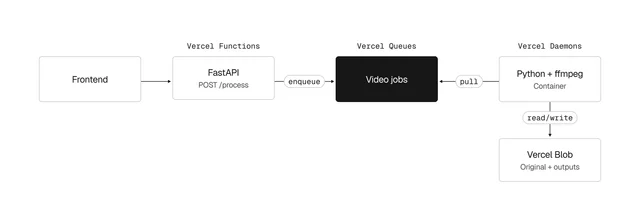
A daemon pulls its work from a queue, a workflow engine, or a database. It has no address of its own, so every incoming request still lands on a Function or a Service. 2
Vercel announced the beta at its Ship conference in San Francisco, in the same week it made Python generally available there. 3
That pull-only shape decides whether this concerns you.
Celery, BullMQ, Sidekiq, and Temporal workers own a loop and ask their queue for work. Self-hosted GitHub Actions, GitLab, and CircleCI runners do the same. 12
The quick read
| Aspect | Before October 15, 2026 | Now | Action, and when |
|---|---|---|---|
| Where a long-running worker can live | A host outside Vercel | A named daemon runs a container image continuously in the same project as your app | Pilot one consumer this week, on a project you can afford to rework 12 |
| The direction work travels | Vercel Queues invoked a Function for each message | A daemon polls its source and accepts no inbound traffic | Confirm your worker pulls; request-driven work stays on Functions 24 |
| What it costs | Nothing; the capability did not exist | Fluid compute rates: Active CPU per CPU-hour, Provisioned Memory per GB-hour, priced by region | Price your instance count in one region before comparing hosts 5 |
| Rolling a change out | Not applicable | Daemons roll out with your production deployment and drain on SIGTERM after 10 seconds | Raise the grace period above your longest job before you deploy 26 |
| Rolling a change back | Instant Rollback restored your Functions | A rollback moves the daemons too, stopping the newer instances | Test rollback with the worker running, because the process changes with the deployment 7 |
| Preview deployments | Preview branches served your Functions | Daemons start in production only | Review the image in Docker instead; no preview path exists 89 |
| Scaling | Functions scaled with traffic | Counts are fixed per region, set in config or from the dashboard | Size for peak by hand, and budget memory for the whole month 78 |
What a daemon is
A daemon is a named resource in your project. Each daemon runs a set number of identical container instances in each region you list, and Vercel restarts any instance that exits or crashes. 2
Three fields are required.
root points at the daemon's source directory, entrypoint at a Dockerfile or Containerfile, and instances maps region IDs to counts from 0 to 100. 6Three more are optional:
command, which replaces the image's ENTRYPOINT and CMD; resources, where memory picks the vCPU count; and terminationGracePeriodSeconds. 6Memory chooses the CPU: 1 GiB and 2 GiB come with one vCPU, 4 GiB with two, and 8 GiB with four. The default is 2 GiB. 6
During the build, Vercel pushes each image to its own container registry. 2
When a deployment becomes production, the daemon's instances roll out with it while the previous deployment's drain. 7
Shutdown sends
SIGTERM, then forces the process to stop after 10 seconds unless you raise the grace period. 2For a short window during every rollout, both versions run at once. 7
Every instance gets your deployment's environment variables, plus a Vercel OIDC token written to a file path, which Vercel refreshes on a schedule. 29
You can also change instance counts from the dashboard without deploying, and that override outlives later deployments until you clear it. 7
What it costs to leave one running
Vercel publishes no rate for Daemons themselves. They bill on Fluid compute, across the same three dimensions Vercel Functions use. 25
Active CPU bills per CPU-hour, and only while your code runs. The meter pauses while a query or a model call is in flight. 5
Provisioned Memory bills for the life of an instance, in GB-hours, running whether or not that instance is computing. 5
For a Function, memory billing stops when the instance pauses between requests. 5
A daemon runs continuously, so on those published definitions the memory meter keeps running. Check the number against your own usage in the dashboard once you deploy.
That makes memory the floor of the bill, and it is the part you can calculate today.
| Instance memory | vCPUs | Provisioned memory for 730 hours, at the Washington D.C. rate of $0.0106 per GB-hour |
|---|---|---|
| 1 GiB | 1 | about $7.74 5 |
| 2 GiB (default) | 1 | about $15.48 5 |
| 4 GiB | 2 | about $30.95 5 |
| 8 GiB | 4 | about $61.90 5 |
Active CPU adds $0.128 per CPU-hour in Washington D.C. (iad1), Portland (pdx1), and Cleveland (cle1), and $0.221 in São Paulo (gru1). 5
Across those same regions, provisioned memory ranges from $0.0106 to $0.0183 per GB-hour. 5
Plan quotas decide how far that scales, and each plan limits a different thing. 8
Hobby offers only 1 GiB and 2 GiB instances, and counts 10 Active CPU-hours per team per month. 8
When a Hobby team uses those hours up, Vercel stops every daemon instance the team runs and logs an error. Instances return at the start of the next month, or when the team upgrades. 8
Pro allows every instance size and holds the team to 16 vCPUs and 32 GiB of memory running at once, across all of its projects. 8
That ceiling binds long before the configuration maximum of 100 instances per daemon per region. 6
On Pro it works out to 16 two-GiB instances, 8 four-GiB instances, or 4 eight-GiB instances. 8
Where the beta stops
- Preview deployments. Daemons run in production only, and
vercel devskips them too. Run the image itself in Docker to test a change. 28 - Autoscaling. Instance counts are fixed per region, and scaling from the CLI and API is still to come. 8
- Inbound HTTP or TCP. Use Functions or Services for traffic that arrives from outside. 8
- Persistent local storage. Keep state in Vercel Blob or a database from the Marketplace. 8
- Service bindings and rewrites. A daemon can be the target of neither one. 8
- Builds without a Dockerfile or Containerfile. Add one to the daemon's
root. 8 - Projects whose root directory is a subfolder, such as
apps/web. Support for that layout is still to come. 8 - Idempotent jobs. An instance can stop at any time, so acknowledge a message only after you have processed it. 29
Is Daemons the right primitive for your workload
Vercel's own guide routes each shape of background work to a different product. 9
Functions and Services take request traffic, and Cron Jobs take schedules. Queues in push mode takes messages Vercel delivers for you. 9
Workflows handles durable multi-step logic, Sandbox isolates code you would rather not trust, and Daemons takes the process that runs continuously and pulls its own work. 9
Queues supports both delivery modes on the same topic, so push and poll can coexist. 4
Push mode still holds the cost advantage: it invokes a Function per message, and nothing runs between them. 4
Poll mode is what you want for control over the pace, such as matching a downstream rate limit. 4
Which of these is you
Your queue consumer runs on a second host. Daemons is the first Vercel-native place to put it. 2
Check the three blockers that bite first: a repository root in a subfolder, no preview environment, and no autoscaling. 8
You run self-hosted CI runners. This is the cleanest fit, because a runner waits for jobs and needs no inbound connection. Size the pool by hand, since nothing scales it with queue depth. 8
You already use Vercel Queues in push mode. Keep watching. Push mode scales to zero and bills no idle memory, and moving to a polling daemon trades that away for control over consumption rate. 4
Your worker answers requests. Then it belongs on Functions or Services, because a daemon takes no inbound traffic at all. 2
What to do this week
- List your background processes and mark which ones own a continuous loop and pull their own work. Leave everything request-driven where it is. 2
- Count the instances you would run in each region, multiply memory by 730 hours at that region's rate, and put the result beside what the worker's current host costs. 5
- If the number works and your repository root is the project root, add a
Dockerfileand onedaemonsblock to one non-critical project and deploy to production. 68 - Before that deploy, set
terminationGracePeriodSecondsabove your longest job and move message acknowledgement to after processing. 69 - Rehearse a rollback with the worker running, because a rollback replaces the process as well as the deployment. 7
Verdict: pilot the consumer, watch the bill
Treat this as a pilot if a Celery, BullMQ, Sidekiq, or Temporal worker currently runs on a host you maintain. 2
The capability is new on Vercel, and one non-critical consumer answers the question. 1
Treat the bill as the open question, because a running instance pays for memory around the clock. 5
Vercel publishes no daemon-specific rate to compare against, and a 2 GiB instance in Washington D.C. starts near $15.50 a month before any CPU. 5
Treat it as a watch item if you already run that work on Vercel Queues in push mode, or if your repository root is a subfolder. 4
Both are beta limits, and Vercel writes that it may raise limits as the beta progresses. 8
References
- 1Vercel Daemons is now in public beta
vercel.com
- 2Daemons
vercel.com
- 3
- 4Poll Mode
vercel.com
- 5Fluid compute pricing
vercel.com
- 6Daemon Configuration Reference
vercel.com
- 7Managing Daemons
vercel.com
- 8Daemons Limits
vercel.com
- 9The Complete Guide to Vercel Daemons
vercel.com
This story was produced automatically by a channel. One sentence is all it takes for Neodrop to keep producing for you.