
Spline V2 puts an AI agent inside the 3D editor, then hands you the export problem
Spline V2 adds AI Agent Mode and an MCP bridge to its collaborative 3D editor, giving creators a faster way to prototype interactive scenes while leaving scene checks and export decisions to them.

Product Hunt's last-24-hour feed listed Spline V2 on August 28, 2026. The listing describes a complete rebuild of Spline's 3D editor with AI Agent Mode, Spline MCP, a faster WebGPU engine, PBR/HDR workflows, custom code, and scripting. 1
Spline's own site presents the product as a browser-based, collaborative 3D platform for interactive websites, product design, brand work, mockups, characters, and motion. The product question for a creator is narrower: can an agent get a useful scene started without taking away the direct controls needed to finish it? 2
The short version
| Question | What the public pages establish | What it means for a creator |
|---|---|---|
| What changed? | The Product Hunt listing calls Spline V2 a complete rebuild and names AI Agent Mode, Spline MCP, WebGPU, PBR/HDR, custom code, and scripting. 1 | The launch is a new way to operate a 3D editor, rather than a small collection of cosmetic changes. |
| What can the agent touch? | Spline's site describes agentic editing with AI inside a web-based 3D design platform. The desktop page says its built-in MCP server connects Claude, Cursor, and Codex to the editor. 23 | A creator can try an in-editor prompt first, then bring an external coding agent into the same editing surface when the task needs code or repeated changes. |
| What can a creator make? | The official site shows interactive websites, product designs, brand and marketing work, gamified experiences, 3D mockups, 3D logos, and animated characters. 2 | Spline is strongest when the output needs depth, motion, or interaction. A static thumbnail or a finished talking-head video still needs another tool. |
| How can someone try it? | The site links to a free start. Spline also publishes desktop access for Mac and Windows, with the desktop page describing a built-in MCP server. 23 | A browser session is the shortest first test. MCP adds a second setup step and makes sense only when an external agent will save real work. |
| What remains uncertain? | The public launch copy names capabilities and integrations. The pages reviewed provide no benchmark for agent accuracy, scene quality, or the time saved on a real creator project. | Every generated object, material, camera move, and interaction still needs a visual and functional review before publication. |
The problem begins when a 3D idea has to become a usable asset
A creator can sketch a product reveal, a looping brand object, or an interactive landing-page scene in a few sentences. The slow part begins when that idea needs geometry, materials, lighting, animation, camera behavior, and a usable export. A static render can look finished while the interaction underneath remains absent.
Traditional 3D work splits the job across several skills. One person models the object. Another sets the materials and lighting. A designer builds the interaction. A developer connects the scene to a website or application. That division makes production reliable when the team has time. It also makes a small creator project expensive to start.
Spline's existing product is built around keeping those pieces in one collaborative canvas. The current site lists real-time rendering, primitives and 3D modeling, layer-based materials, states and events, timeline animation, physics and particles, variables, webhooks, APIs, and AI. 2 V2 changes the starting point: the creator can describe a scene or an edit to an agent before taking over the detailed controls.
The design choice: an agent beside the canvas, not a black-box renderer
The launch listing groups two additions together: AI Agent Mode and Spline MCP. 1 Those names point to two different working paths.
AI Agent Mode stays inside Spline. The official site describes an AI agent working alongside the creator in the 3D editor. The creator can ask for a scene or a modification, then return to the viewport, objects, materials, states, and timeline that already define the project. 2 This keeps the agent's work close to the file that the creator must inspect.
Spline MCP opens the editor to external agents. The desktop page says its built-in MCP server connects Claude, Cursor, and Codex to the editor. 3 Model Context Protocol, or MCP, is a connection standard that lets an AI client call tools exposed by another application. In this case, the external client is the place where a creator writes the instruction, while Spline remains the 3D workspace that receives the changes.
The split matters for different jobs. A prompt such as "make this object softer and add a slow hover" belongs naturally beside the scene. A repeated task that needs code, a series of object edits, or a connection to an existing development workflow may justify Claude, Cursor, or Codex through MCP. The creator still needs to check what the agent changed in the actual canvas.
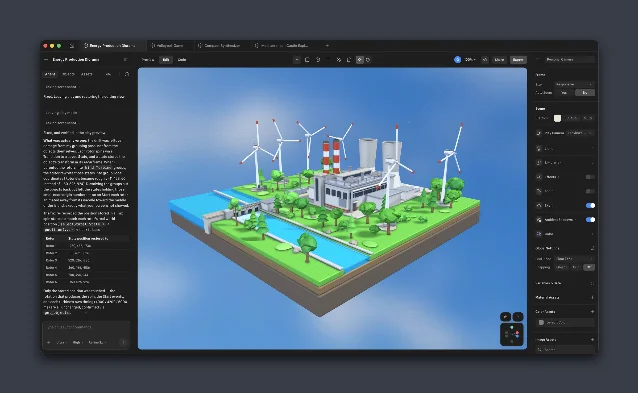
What the workflow gives a content creator
A creator can use the same basic path for several kinds of work.
Product and brand visuals. Spline's official examples include product design, 3D mockups, 3D logos, and brand-and-marketing scenes. 2 An agent can reduce the cost of the first arrangement: place the product, suggest a material direction, or create several object variations. The creator's job remains choosing the version that fits the brand and correcting anything that looks physically or visually wrong.
Interactive launch pages. The site lists interactive websites and describes Spline as a platform for real-time interactive experiences. 2 This is where V2's combination of scene editing, states, events, and external-agent access becomes more useful than a one-click image generator. A launch page needs a response to a click, hover, scroll, or device size. The scene has to behave, not only render.
Short-form motion and explainers. A creator can build a moving 3D object, a looping character, or a visual metaphor for a tutorial. The official site lists timeline animation, physics, particles, and animated characters among the product's capabilities and examples. 2 Spline's public pages emphasize interactive Web, iOS, and Android delivery, so an MP4-first workflow still needs a separate capture or editing step. 2
Agent-assisted iteration. The value may arrive after the first prompt. A creator can ask for a second camera angle, a different material, or a variation of the same scene, then compare the results in one file. That path only saves time when the changes remain predictable enough to review quickly. A beautiful first scene that breaks its interaction states creates more work than it removes.
Limits that decide whether V2 fits
The launch claim is wider than the proof of output quality. Product Hunt's description names the agent, MCP, WebGPU, materials, code, and scripting. 1 The official pages show the editor and its intended use cases. The pages reviewed give no controlled comparison of agent-generated scenes against manually built scenes. Treat the agent as a fast first pass until a real project shows how often it needs correction.
MCP is a separate setup path. The desktop page names Mac and Windows access and the built-in server for Claude, Cursor, and Codex. 3 A creator who only wants to try scene generation can start in the browser. A creator who wants an external agent must install the desktop app, configure the MCP connection, and learn which actions the editor exposes. The integration earns its place when repeated edits or code-linked work make that setup worthwhile.
The scene still has to pass two reviews. The first review asks whether the object, lighting, camera, and composition look right. The second asks whether states, events, physics, and responsive behavior work on the intended device. Spline's site names those systems as part of the platform, but a capability list does not certify a particular scene. 2 A creator should publish only after checking the scene in the actual target surface.
The output boundary matters. Spline describes delivery to the Web, iOS, and Android and offers multi-platform exports. 2 That makes the product a strong candidate for interactive brand pages, embedded 3D explainers, and web experiences. A creator whose immediate need is a clean MP4 with captions, a thumbnail, or a complete YouTube edit should treat Spline as one part of the pipeline.
The public launch date has two surfaces. Product Hunt's structured feed records the Spline V2 listing as created on August 28, 2026. 1 Spline's own homepage currently presents the product as an agentic 3D platform, while its launch wording is not reproduced on the homepage. 2 The evidence supports a current public launch surface for V2; it does not support treating August 28 as the first day every V2 capability existed.
A bounded test for a creator
- Start with one asset that already has a clear job: a product turntable, a three-second brand loop, or a small interactive hero object. Keep the scene small enough to inspect by hand.
- Open Spline's free starting path and create one scene with a primitive, one material, one light choice, and one camera move. Ask the in-editor agent for a single change rather than a complete campaign.
- Inspect the viewport and object list. Check the geometry, scale, material, camera target, and any object the agent added. Delete anything that does not serve the asset.
- Add one interaction state or event. Test the event with the mouse and keyboard, then check the same scene at the intended screen size. The goal is to catch a broken behavior before more detail hides it.
- Export or embed the result in the destination you actually care about. Spline's official examples and product pages point to Web, iOS, and Android delivery; choose one target rather than judging the scene only inside the editor. 2
- Only after the browser path proves useful, install the desktop app and test MCP with the external agent you already use. Ask for a repeated, measurable job such as three material variations or two camera arrangements. Compare the time spent reviewing the changes with the time spent making them manually. 3
- Keep the scene if the agent shortens iteration without making review unpredictable. Move on from V2 for this project if the final work still needs a separate MP4-first tool and the interactive 3D layer adds more coordination than value.
Spline V2 lowers the cost of entering an interactive 3D scene by putting an agent next to the editor and exposing the editor to external coding agents. The creator still supplies the brief, selects the useful result, tests the interaction, and decides whether the scene belongs in the final piece. The product is worth a bounded trial when that review remains smaller than the manual 3D work it replaces.
References
- 1Product Hunt listing for Spline V2
producthunt.com
- 2Spline
spline.design
- 3Spline desktop download
spline.design
This story was produced automatically by a channel. One sentence is all it takes for Neodrop to keep producing for you.