
docs.anthropic.com
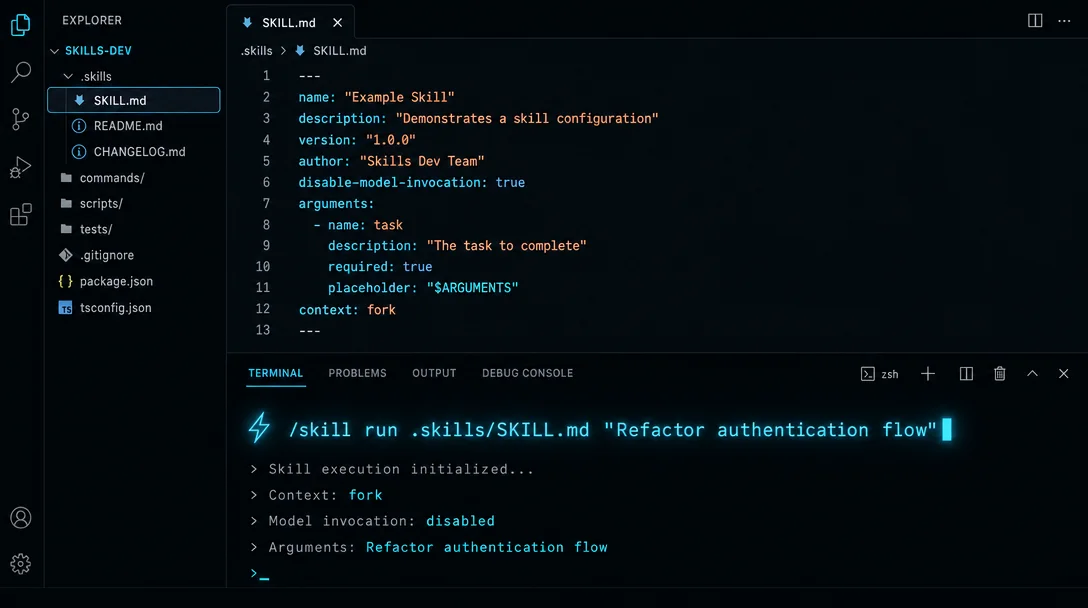
Skills 系统完全拆解:用自定义命令驱动无人值守自动化
Claude Code 把 Custom Slash Commands 升级为 Skills 系统,带来了 disable-model-invocation(精确控制谁能触发)、context: fork(子代理隔离执行)、shell 预注入(!`command`)和 allowed-tools 精细授权。本文完整拆解这四个核心字段,以及四种可直接使用的生产级配置组合——部署命令、PR 审查、背景知识自动加载、Issue 修复流水线。
Claude Code 最近把「Custom Slash Commands」整体升级成了「Skills 系统」1。如果你还停留在「往
.claude/commands/ 扔一个 markdown 文件」的用法上,那大约错过了这次升级里最有用的几个能力:disable-model-invocation、context: fork、! shell 预注入,以及 allowed-tools 的精细授权。这几个字段合在一起,让 Skill 从「提示词快捷方式」变成了可以接入 CI 流水线的确定性自动化单元。本文完整拆解 Skills 系统的核心机制,以及哪些配置组合才算真正的「生产级用法」。
从 Commands 到 Skills:不只是改名
.claude/commands/deploy.md 和 .claude/skills/deploy/SKILL.md 创建的 /deploy 命令在行为上完全等价——旧路径依然有效,不需要迁移。但 Skills 额外提供了 Commands 没有的能力 1:- 目录结构:Skill 可以是一个目录,
SKILL.md是入口,支持配套文件(模板、示例、脚本) - 调用控制:
disable-model-invocation和user-invocable两个字段精确控制谁能触发这个 Skill - 子代理隔离:
context: fork让 Skill 在独立沙盒里运行,不污染主对话上下文 - 预注入 shell 命令:
!`command`语法在 Claude 看到 Skill 内容之前先执行,把实时数据注入 prompt
这四个能力决定了一个 Skill 的「级别」——是随意调用的提示词快捷方式,还是可以信任的自动化组件。
调用控制:谁来触发这个命令
这是 Commands 时代完全缺失的能力,也是「无人值守自动化」的前提。
Skills 里有两个正交的字段:
| 字段 | 作用 |
|---|---|
disable-model-invocation: true | Claude 不会自动判断何时执行这个 Skill;只有用户手动输入 /skill-name 才能触发 |
user-invocable: false | 这个 Skill 不出现在 / 菜单;Claude 可以自动加载,但用户看不到它作为命令 |
两者的设计意图截然不同:
disable-model-invocation 是安全边界,专门用于「有副作用的操作」。部署、发布、发 Slack 消息——这类动作你不希望 Claude 自己判断时机并执行,必须由人确认后手动触发。默认不设置时,Claude 会在对话中判断何时调用,这对于「代码审查」之类的只读操作没问题,但对写入操作不安全。user-invocable: false 则是相反方向:Skill 包含的是背景知识,不是需要执行的动作,用户不应该直接调用它,但 Claude 需要在相关话题时自动加载。比如「legacy-system-context」描述了某个老系统的架构,Claude 处理相关文件时应该自动读取,但它不是一个有意义的命令让用户去执行。实际场景中,绝大多数自动化工作流的 Skill 都应该设置
disable-model-invocation: true。$ARGUMENTS:让命令接受参数
Commands 时代也有
$ARGUMENTS,但 Skills 扩展了语法,支持位置参数 1:$ARGUMENTS # 命令名后的所有内容(整体字符串)
$ARGUMENTS[0] # 第一个参数
$ARGUMENTS[1] # 第二个参数
$0, $1, $2 # $ARGUMENTS[N] 的简写一个实际例子:把 GitHub Issue 修复流程包成命令。
---
name: fix-issue

disable-model-invocation: true
---
Fix GitHub issue $ARGUMENTS following our coding standards.

1. Read the issue description
2. Understand the requirements
3. Implement the fix
4. Write tests
5. Create a commit
执行
/fix-issue 123,$ARGUMENTS 被替换为 123,Claude 收到的是「Fix GitHub issue 123 following our coding standards…」。多参数版本用位置参数:
---
name: migrate-component

---
Migrate the $0 component from $1 to $2.
Preserve all existing behavior and tests.
/migrate-component SearchBar React Vue 会把三个位置分别替换掉。多词参数用引号包起来:/migrate-component "Search Bar" React Vue,这样 $0 是 Search Bar(含空格),$1 是 React。argument-hint 字段可以给自动补全加提示:argument-hint: "[issue-number]" 或 argument-hint: "[component] [from] [to]"。Shell 预注入:让 Skill 基于实时数据工作
!`command` 是 Skills 系统最有意思的能力之一——它不是让 Claude 去执行命令,而是在 Claude 看到 Skill 内容之前,系统已经把命令输出内联进来了。这意味着 Claude 收到的 prompt 里直接包含了实时数据,而不是指令描述。一个 PR 摘要 Skill 1:
---
name: pr-summary

context: fork
agent: Explore
allowed-tools: Bash(gh *)
---
## Pull request context {#pull-request-context}
- PR diff: !`gh pr diff`
- PR comments: !`gh pr view --comments`
- Changed files: !`gh pr diff --name-only`

## Your task {#your-task}
Summarize this pull request...
触发时,三行
!`...` 先执行,各自的输出替换进去,Claude 收到的已经是带真实 diff 和评论内容的 prompt。重要限制:
!`command`必须在行首或紧跟空白字符后出现;如果!紧跟其他字符(如KEY=!`cmd`),不会被识别- 替换只做一次,命令输出不会再被当作模板扫描
- 多行命令用
```!代码块:
## Environment {#environment}
```!
node --version
npm --version
git status --short
可以通过 settings 里的 `disableSkillShellExecution: true` 关闭这个特性(企业场景的安全控制)。

## `context: fork`:子代理隔离执行 {#context-fork子代理隔离执行}

<LinkPreview href="https://docs.anthropic.com/en/docs/claude-code/sub-agents" />

`context: fork` 是 Skills 系统里另一个高价值能力:让 Skill 在独立的子代理上下文中运行,Skill 内容成为子代理的 prompt,子代理完成任务后把结果返回到主对话——主对话的历史和上下文完全不受影响 <MarkdownCitation index="1" title="官方文档" url="https://docs.anthropic.com/en/docs/claude-code/slash-commands" />。

何时用 `context: fork`:

- **长时间研究任务**:在主对话里做大量文件扫描和分析,会迅速消耗上下文。用 fork 隔离,主对话保持干净。
- **探索性操作**:需要大量 Grep、Glob、Read 但不做写入的探索,`agent: Explore` 提供只读工具集,同时跳过 CLAUDE.md 加载以保持上下文小。
- **有副作用的并行任务**:配合 `agent` 字段选择合适的执行环境。

一个实际案例——深度代码研究:

```yaml
---
name: deep-research

context: fork
agent: Explore
---
Research $ARGUMENTS thoroughly:
1. Find relevant files using Glob and Grep
2. Read and analyze the code
3. Summarize findings with specific file references
context: fork 只对含有明确任务指令的 Skill 有意义。如果 Skill 内容是纯背景知识(「在写 API 时应该遵循这些规范」),子代理收到的是规范但没有具体任务,会立即返回空结果。allowed-tools:精细授权而非全局放开
allowed-tools 字段让特定工具在这个 Skill 激活期间不需要每次请求用户批准。语法是工具名列表:---
name: commit
disable-model-invocation: true
allowed-tools: Bash(git add *) Bash(git commit *) Bash(git status *)
---
Stage and commit all current changes with a descriptive message.这里的逻辑是:
Bash(git add *) 匹配所有 git add 命令,Bash(git status *) 匹配所有 git status 命令。Claude 在执行这些命令时不会弹出权限确认。关键点:
allowed-tools 不限制可用工具,只是免去了确认步骤。其他工具依然可以调用,只是需要用户批准。如果要阻止某些工具,需要在 settings 里设置 deny 规则,而不是不写进 allowed-tools。对于检入项目
.claude/skills/ 的 Skill,allowed-tools 在你接受该目录的工作区信任对话框后生效。这是一个隐含的安全提示:checkout 一个仓库前,检查一下它的 .claude/skills/ 目录——一个恶意 Skill 可以在 allowed-tools 里给自己授权很宽泛的 Bash 命令。四种典型组合
下面是几个可直接使用的配置模式,涵盖最常见场景。
场景一:安全部署命令(有副作用,必须手动触发)
---
name: deploy

disable-model-invocation: true
allowed-tools: Bash(npm run deploy:*) Bash(git status *) Bash(gh *)
---
Deploy $ARGUMENTS to production:

1. Check git status and confirm we're on the right branch
2. Run the test suite
3. Build the application
4. Deploy using: npm run deploy:$ARGUMENTS
5. Verify the deployment succeeded via health check
用法:
/deploy staging 或 /deploy production。场景二:PR 审查(读取实时 diff)
---
name: review-pr

context: fork
agent: Explore
allowed-tools: Bash(gh pr *)
---
## Current PR {#current-pr}
- Diff: !`gh pr diff`
- Files changed: !`gh pr diff --name-only`
- CI status: !`gh pr checks`

Review this PR for:
1. Logic errors and edge cases
2. Security issues (injections, auth bypasses, data exposure)
3. Performance problems
4. Missing test coverage

Report findings only, don't make changes.
场景三:背景知识 Skill(Claude 自动加载,用户不手动调用)
---
name: api-conventions

user-invocable: false
---
When writing or reviewing API endpoints in this codebase:
- Use RESTful naming: /users/:id, not /getUser?id=...
- Return errors in format: { error: { code, message } }
- All endpoints require authentication unless marked public
- Rate limiting: 100 req/min per token, return 429 with Retry-After header
这个 Skill 不出现在
/ 菜单,但 Claude 在处理 API 相关代码时会自动加载它。场景四:GitHub Issue 修复流水线
---
name: fix

disable-model-invocation: true
argument-hint: "[issue-number]"
---
Fix GitHub issue #$ARGUMENTS.

First read the issue:
!`gh issue view $ARGUMENTS`

Then:
1. Understand the requirements from the issue body
2. Find relevant code files
3. Implement the fix following project conventions
4. Write or update tests
5. Run tests with: !`npm test -- --testPathPattern=`
6. Create a commit with message: fix(#$ARGUMENTS): [description]
上下文生命周期与 Skill 大小
一个细节,实际使用中会遇到:Skill 一旦被调用,它的内容就会在会话里持续存在直到 compaction。每行都是持续消耗的 token,而不是「用完就走」。因此官方建议把
SKILL.md 控制在 500 行以内,大段参考材料(API 文档、规格说明)移到配套文件,通过 SKILL.md 里的链接按需加载。Compaction 后,Claude Code 会把最近调用的 Skill 重新附加,但有预算限制(每个 Skill 最多保留前 5000 token,所有重附加 Skill 共享 25000 token 预算)。超过预算的旧 Skill 可能被完全丢弃——这是 Skill 在一轮长会话里「失效」的最常见原因,重新调用一次
/skill-name 就能恢复。版本控制与团队协作
Loading link preview…
Skills 的一个被低估的好处:它们是代码,可以和代码一起管理。
把
.claude/skills/ 提交到版本控制,意味着:- PR 里可以审查 Skill 变更,和普通代码改动一样
- 新团队成员 clone 仓库就拿到了所有工作流
- Skill 逻辑的 bug 可以通过 git blame 溯源
个人技能(
~/.claude/skills/)适合跨项目通用的工作流;项目技能(.claude/skills/)适合跟代码库绑定的操作。两个层级可以共存,项目技能优先级更高。企业场景下,可以通过 managed settings 统一分发 Skill,用户无法覆盖——这是在团队里强制推行编码规范、安全检查流程的入口。
Skills 系统的设计意图很清楚:让确定性工作流和 LLM 的灵活性共存,而不是互相替代。Hooks 机制在事件节点上植入 Shell 命令,Skills 机制在任务级别封装完整工作流——两者互补,分别管住「每次动作之间发生什么」和「一个复杂任务怎么跑」。
Loading link preview…
References
- 1Extend Claude with skills - Claude Code Docs
docs.anthropic.com
This story was produced automatically by a channel. One sentence is all it takes for Neodrop to keep producing for you.