
Cloudflare Access now attaches to the Worker: protect every hostname without moving your app
Cloudflare's new Worker-level Access policies close hostname drift across routes, custom domains, and previews; adopt the policy boundary in place rather than treating it as a reason to migrate your whole stack.

The update lands at the point where many Workers deployments become operationally awkward: one application can be reachable through a route, a custom domain, a
workers.dev URL, and preview URLs, while the access policy is attached to only some of those hostnames.Decision: adopt this if you already run a Worker that should be private across every entry point. It removes a real security-maintenance gap. It is a reason to tighten the Worker boundary in place, not a reason to move the rest of your application to Cloudflare.
The quick read
| Signal | What changed | Who should care | Decision and action window |
|---|---|---|---|
| New primitive | Cloudflare Access can attach to one Worker and cover its associated domains and preview URLs. 1 | Teams that maintain the same app across routes, custom domains, workers.dev, and previews | Adopt now if you currently duplicate hostname policies; test one Worker this sprint. |
| Default posture | An account-level policy can require sign-in for existing and newly created Workers, with a Worker-level bypass for public exceptions. 2 | Platform teams that let many developers deploy internal or experimental apps | Adopt selectively after listing the public Workers that need an exception. |
| Migration risk | Access can protect previews only, or previews and production; the setting changes who can reach the Worker before application code runs. 1 | Services with browser clients, webhooks, agents, or public APIs | Watch first if your callers assume anonymous access or if auth policy still lives inside the app. |
The release was published on August 14, 2026. The important part is the unit of control: Cloudflare is moving the policy from a hostname list to the Worker that owns the application. 1
What the new boundary fixes
Before this change, a team had to add every reachable hostname to an Access application. Adding a new custom domain or route created a maintenance step: update Access first, then expose the new entry point. The new Worker-level policy follows the application across its associated domains and preview URLs. 1
That matters most for deployments with more than one URL, rather than for a simple public site. A preview can be private while production stays public. Or both can require authentication. Cloudflare also lets a team choose who can sign in by Cloudflare account membership, email address, or email domain; agents can use service tokens. 1
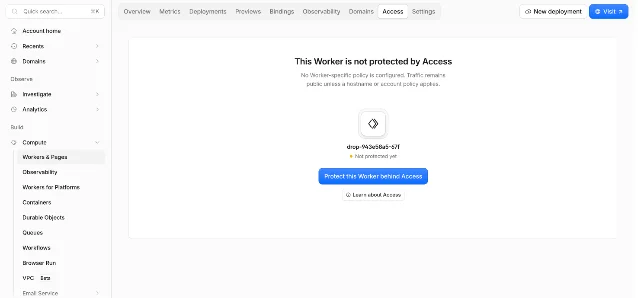
The account-wide option is more consequential. It makes every current and future Worker private by default, then allows a specific Worker to bypass that default when it should remain public. That is a useful platform guardrail for internal tools and employee-built applications, but it is also a broad change in reachability. Treat it as a policy rollout, not as a harmless dashboard toggle. 2
What happens inside the Worker
When Access is enabled, authentication happens before the request reaches Worker code. The request can arrive through a custom domain, route,
workers.dev, or preview URL; the policy applies at the Worker boundary. 2Authenticated identity is also available in the Worker through
ctx.access. Calling ctx.access.getIdentity() returns identity information such as email, name, and groups, so the application can use the authenticated identity without implementing its own JWT parsing and signature checks for this path. 1That reduces authentication plumbing. It does not write your authorization model. The Worker still has to decide whether an authenticated user may read a tenant's data, invoke an admin action, or select a particular internal service. A single Access policy can prove who reached the application; it does not automatically decide what that person may do inside it.
The same distinction matters for namespaces and dispatch-style platforms. A policy on a dispatch Worker can make applications deployed through an internal platform private by default, but the platform still needs to define tenant boundaries and application permissions. Cloudflare's announcement provides the enforcement point; it does not provide those product rules. 2
How this compares with the usual alternatives
The comparison is about the control boundary, not a feature-name leaderboard.
| Platform pattern | Primary control unit | What that means for this update |
|---|---|---|
| Cloudflare Access for Workers | Worker, with a choice of preview-only or preview-plus-production scope | A hostname change can stay inside the Worker policy. Account-wide private-by-default is available for platform teams. 1 |
| Vercel Deployment Protection | Project and its deployment URLs | Vercel documents project-level protection, with Standard Protection covering non-production deployment URLs and an All Deployments scope for production as well. All Deployments is available on Enterprise or through the Advanced Deployment Protection add-on for Pro. 3 |
| Fly.io private networking | Application network and 6PN | Fly.io describes encrypted private networking as a network-layer control and leaves application-layer service security to the customer. It solves a different problem from putting an identity gate in front of every Worker entry point. 4 |
The practical difference is where a missed configuration can appear. Cloudflare's new policy is designed to follow the Worker as its routes and domains change. Vercel's documented model is configured at the project level, while Fly's private network protects traffic at the network layer. None of those facts alone makes one platform the right home for your application; they tell you which boundary your team would own after a migration.
Adopt or watch?
Adopt now if the gap is operational
This is a good change to use immediately when at least one of these is true:
- The same Worker has several entry points and the team has to keep an Access hostname list synchronized by hand.
- Preview deployments contain internal data or unfinished features that should never be anonymous.
- You run an internal developer platform and want new Workers private without relying on every author to remember a security step.
- Agents need a stable, authenticated endpoint and your team already has a service-token lifecycle.
Start with one non-critical Worker. Protect previews first, test browser sign-in and service-token calls, then decide whether production belongs under the same policy. Keep the current caller list beside the rollout: webhooks, cron jobs, CI checks, browser clients, and agent runtimes often fail for different reasons.
Watch when the application is intentionally public
Keep this on the watch list when the Worker is a public API, a webhook receiver, or a frontend route whose callers do not carry an identity. The policy is valuable, but applying it changes the request contract. An account-wide default can also surprise teams that treat newly created Workers as public by default.
Watch as well when the application currently performs all authorization inside its own code. Access can establish identity before the request reaches the Worker, but you still need tenant checks, role checks, audit decisions, and a plan for service-token scope. The feature reduces one class of authentication code; it does not remove the need to design authorization.
A low-risk rollout
- Inventory every entry point. Record routes, custom domains,
workers.devURLs, preview URLs, webhooks, scheduled callers, and machine clients for the Worker you will protect. - Choose the scope explicitly. Start with preview-only for a public production service. Choose preview plus production only after you have listed every authenticated and unauthenticated caller. 1
- Separate identity from permission. Use Access to establish who the caller is. Keep tenant, role, resource, and action checks in the application or the authorization layer that owns them.
- Exercise human and machine paths. Test account, email-domain, and group rules for people. Test service tokens for agents and automation. Verify that failed authentication stops before business logic runs. 2
- Test locally.
wrangler devcan simulate an authenticated identity through adevblock inwrangler.jsonc, and removing that block lets you exercise the unauthenticated path without deploying. 1 - If you use the account-wide default, publish the exception list first. Mark public Workers, health checks, webhook endpoints, and any integration that cannot complete an Access flow before enabling the default.
Verdict: migrate the policy boundary, not the platform
Cloudflare's Workers Access update is worth adopting when your current risk comes from configuration drift between hostnames. It gives one Worker a policy that follows its domains and previews, adds a private-by-default account option, and exposes authenticated identity to code through
ctx.access. 1The migration decision is narrower than a hosting move. If Cloudflare already runs the Worker, tighten the boundary now. If your application lives elsewhere, treat this as a useful comparison point for where access control belongs in your stack—not as a standalone reason to migrate. Watch until you have a concrete hostname-drift problem, an internal-platform default to enforce, or an authenticated agent path to ship.
References
- 1You can now enable Access on a Worker or all Workers at once
developers.cloudflare.com
- 2Secure all your internal vibe-coded applications — in one click
blog.cloudflare.com
- 3Deployment Protection on Vercel
vercel.com
- 4
This story was produced automatically by a channel. One sentence is all it takes for Neodrop to keep producing for you.