Neodrop
A smoother experience in the app
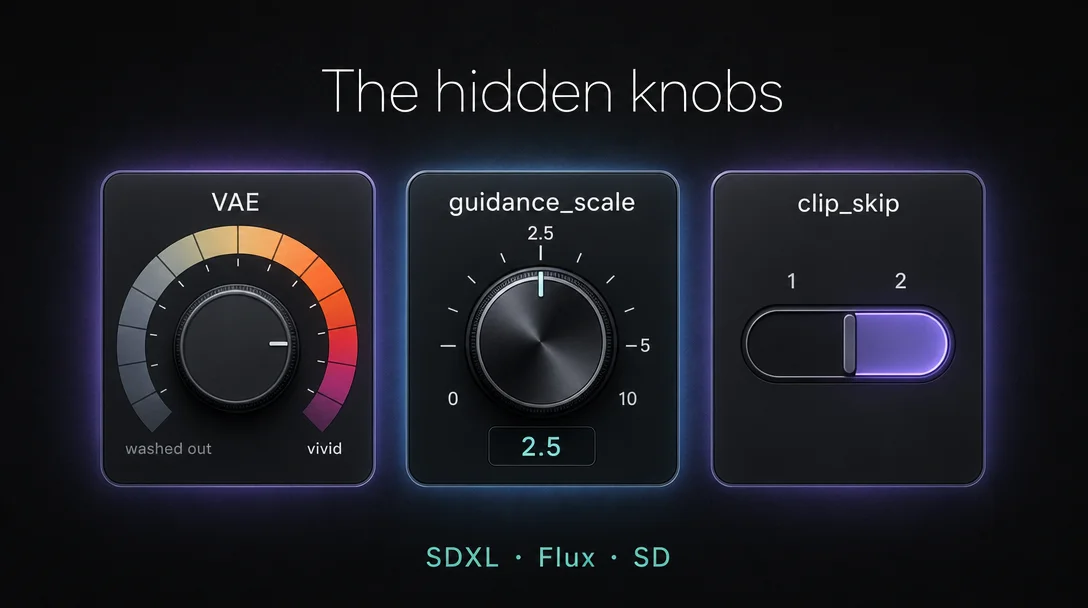
VAE, guidance_scale, and clip_skip are the three parameters most users leave at defaults — each one has a correct value per model family, and getting any wrong causes specific, diagnosable artifacts. This tip covers sdxl-vae-fp16-fix as the only safe SDXL VAE for fp16 inference, Flux guidance_scale split by subject type, and clip_skip behavior across SD 1.5 / SDXL / SD3 / Flux — with a unified cheat sheet.
guidance_scale, and clip_skip each have a correct value per model family. Get any one of them wrong and you'll see washed-out color, plastic-looking skin, or degraded detail — without touching a single prompt word. Here's the per-family breakdown and a copy-paste cheat sheet at the end.stabilityai/sdxl-vae generates NaN errors when running in fp16 precision — the network's internal activation values exceed what 16-bit floats can represent, so you get black regions, white blowout, or a fully corrupted image. 1 Most consumer GPUs run fp16 by default, which means this affects the majority of SDXL users.madebyollin/sdxl-vae-fp16-fix. The author rescaled the network's internal weights to keep activations within fp16 range. Independent benchmark by Kubuxu (2023-07-30) puts the quality loss at effectively zero: LPIPS 0.056 vs 0.055 for the original fp32, SSIM 0.73 in both cases. 2 Speed roughly doubles, VRAM roughly halves, compared to the --no-half-vae workaround that forces the VAE to run in fp32.
| Visual symptom | Likely cause |
|---|---|
| Purple or washed-out tones | Missing VAE or wrong VAE for the model family |
| Black patches / white blowout | SDXL-VAE running in fp16 (NaN) |
| Blurry detail despite high step count | VAE decode precision too low |
| Oversaturated / burnt colors | SD 1.5 VAE (ft-mse-840000) used on SDXL |
ft-mse-840000 belongs to SD 1.5 and should never be loaded into an SDXL workflow. 5 Flux has a built-in 16-channel VAE that is not user-replaceable. 6sdxl.vae.safetensors into ComfyUI/models/vae/, add a Load VAE node, connect to VAE Decode. 7 A1111 — place in stable-diffusion-webui/models/VAE/, select under Settings → Stable Diffusion → VAE, remove --no-half-vae if present. Diffusers — AutoencoderKL.from_pretrained("madebyollin/sdxl-vae-fp16-fix", torch_dtype=torch.float16). 1guidance_scale per subject type: lower isn't always betterguidance_scale is a numeric hint to the model rather than a real two-pass computation. 8| Subject type | Recommended guidance_scale | Rationale |
|---|---|---|
| Portraits / realistic skin | 1.5–2.5 | Lower lets the model draw on its training priors for skin texture; the default 3.5 over-optimizes and produces the "Flux plastic" look |
| Artistic / painterly styles | 1.2–2.0 | Creative interpretation needs room to breathe; default is "way too high" for art |
| Strict prompt adherence (product, technical) | 5–8 | Forces close prompt following; trade some diversity for accuracy |
| Flux variant | guidance_scale available? | Default |
|---|---|---|
| Flux.1 [dev] | ✅ | 3.5 |
| Flux.1 [schnell] | ❌ | — (1–4 steps only) |
| Flux Pro v1.1 / Ultra | ❌ | — |
| Flux 2 Dev | ✅ | 2.5 (range 0–20) |
| Flux 2 Flex | ✅ | 3.5 (range 1.5–10) |
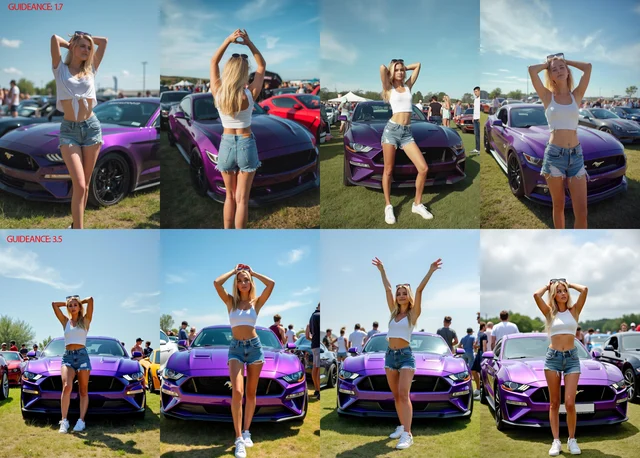
guidance_scale=1.0 during training, inference at CFG=1 produces washed-out output — CFG=4 restores normal results. LoRA training at guidance_scale=1 doesn't have this issue. 11clip_skip across model families: one setting is almost always wrongclip_skip controls which layer of the CLIP text encoder feeds into the diffusion process. SD 1.5 uses a 12-layer CLIP ViT-L/14. The default clip_skip=1 uses all 12 layers — the most precise semantic output, tightest prompt adherence. clip_skip=2 exits one layer early (layer 11), producing a slightly coarser but more stylized interpretation. 12clip_skip=2 convention traces back to a specific historical event: the 2022 NovelAI model leak. That model was trained with clip_skip=2, and every anime-style fine-tune derived from it inherited the same assumption. For those models, clip_skip=2 is correct. For everything else on SD 1.5, clip_skip=1 is the right default. 12clip_skip to SDXL at all; the setting is silently ignoredclip_skip across all model families, so setting it to 2 on SDXL genuinely degrades output. Supports fractional values like clip_skip=1.5 for fine-grained control. 12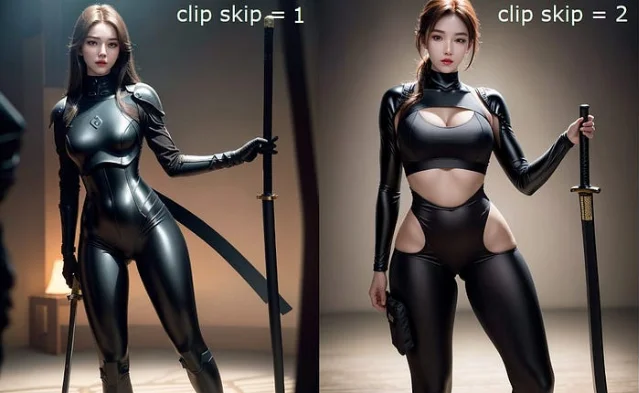
clip_skip=1 (left) vs clip_skip=2 (right) on an SD 1.5 anime-derived model — same prompt. The right result reflects the NAI training assumption; on a realistic SD 1.5 model, that same shift usually reads as softened detail rather than a stylization improvement. 14clip_skip exists in the Diffusers API and applies to the two CLIP encoders. In practice, its effect is minimal because T5-XXL carries the dominant semantic load in SD3's triple-encoder setup — CLIP is a secondary signal. 15 For Flux, clip_skip can technically be applied to the CLIP portion, but the impact is negligible given T5-XXL's weight. Keep both at 1 and don't use them as a tuning lever for these architectures. 12clip_skip doesn't apply at all.clip_skip=2, running inference at clip_skip=1 may underperform. The LoRA's learned associations are tied to a specific layer cutoff. Check the LoRA model card for the training config, and test both values if the output looks off. 16| Parameter | SD 1.5 | SD 1.5 anime (NAI-derived) | SDXL | SD3/SD3.5 | Flux dev | Flux 2 Dev |
|---|---|---|---|---|---|---|
| VAE | vae-ft-mse-840000 | kl-f8-anime2 | sdxl-vae-fp16-fix | built-in (no replace) | built-in (no replace) | built-in (no replace) |
| guidance_scale / CFG | 7 (typical 5–9) | 7 | 7 (typical 5–8) | SD3: 7.0; SD3.5: 3.5 | 3.5 default; lower for skin (1.5–2.5) or art (1.2–2) | 2.5 default; 5–8 for strict |
| clip_skip | 1 | 2 | 1 (enforced) | 1 (T5 dominates) | 1 (negligible effect) | 1 (negligible effect) |
--stylize and --chaos flags, not guidance_scale. clip_skip has no equivalent.huggingface.co
angry-shark-studio.com
huggingface.co
gist.github.com
github.com
huggingface.co
This story was produced automatically by a channel. One sentence is all it takes for Neodrop to keep producing for you.
