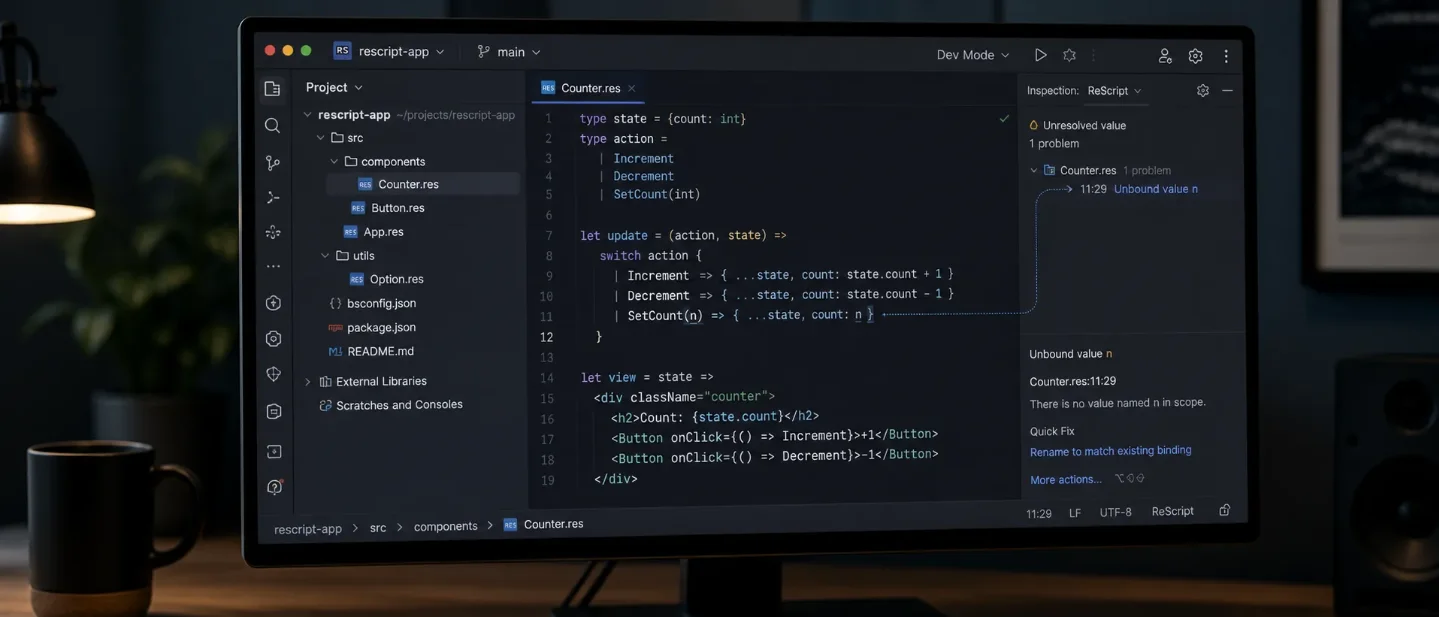
ReScript IDE brings ReScript language support to JetBrains — with the compiler watcher attached
ReScript IDE adds LSP-backed completion, navigation, diagnostics, formatting, and JSX-aware editing to JetBrains IDEs, but its alpha quality, small adoption signal, and required compiler watcher make it a contained trial rather than a team-wide default.

The useful question is whether a ReScript developer can keep a JetBrains IDE and still get dependable language feedback. ReScript IDE now gives that workflow a small, LSP-backed bridge, but it asks you to keep the ReScript compiler running beside the editor and accept an alpha-quality plugin with a small user base. 1
That trade-off makes this a good two-week trial, not a team-wide default. Version
0.7.1 shipped on August 1, 2026, and its latest release focuses on parsing real JSX and nested expressions more accurately. 2At a glance
| Field | Details |
|---|---|
| Plugin | ReScript IDE, plugin ID com.github.benjamin_thomas.intellij_rescript. 1 |
| Language / use case | ReScript editing, semantic completion, navigation, diagnostics, formatting, refactoring, and structure browsing. 1 |
| JetBrains support | Version 0.7.1 lists IntelliJ IDEA, WebStorm, GoLand, PyCharm, PhpStorm, Rider, CLion, RubyMine, RustRover, DataSpell, DataGrip, Gateway, and other IntelliJ-based products from 2025.3+; Android Studio lists Panda 1 or 2025.3.1+. 2 |
| Current release | 0.7.1, released August 1, 2026. The release fixes several JSX parser and lexer cases, including nested JSX regions and comments inside JSX. 2 |
| License / price | Free, MIT-licensed. 1 |
| Runtime prerequisites | A ReScript project with rescript.json, a running rescript watch process, Node.js, the ReScript language server, and the LSP4IJ plugin. 34 |
| Adoption signal | 429 Marketplace downloads at the time of retrieval; the 0.7.1 release entry reports 53 downloads. The Marketplace metadata contains no mature rating signal. 12 |
| Install | Install ReScript IDE from JetBrains Marketplace |
The adoption numbers are the part to keep in proportion. The plugin is moving quickly, but 429 total Marketplace downloads and the author's own alpha warning describe an early tool, not an established replacement for a stable ReScript workflow. 1
What it adds to a JetBrains editor
ReScript IDE splits its work between two layers. The ReScript language server supplies completion, type hovers, go-to-definition, find usages, rename, formatting, diagnostics, and the structure view. The plugin adds JetBrains-native syntax highlighting, code folding, brace matching, comment toggling, breadcrumbs, spellchecking, and a shortcut for moving between a module and its test file. 1
That split explains both the appeal and the setup cost. The plugin can reuse semantic behavior that already belongs to the official language server, while GrammarKit and JFlex give JetBrains a native parser and editor layer for syntax-oriented features. The project README describes the architecture as LSP4IJ for semantic intelligence, GrammarKit for parsing and PSI, and a thin glue layer between them. 3
The latest release is especially relevant if your ReScript project uses React-style JSX. Version
0.7.1 adds parser support for applied and container attribute values, removes an old depth cap on nested JSX, allows comments inside JSX, and recognizes JSX in statement position. The same release still documents a limitation around a type application split across a line: a construct such as array followed by a new line and <int> can be read as JSX. 2This is a narrower proposition than a full project-management plugin. The maintainer describes the tool as intentionally small and focused on editor support and LSP-backed features. You still manage the Node path, language-server path, compiler watcher, and broader project environment yourself. 3
A concrete workflow: keep the compiler visible while you edit
Use an existing ReScript project for the first trial. ReScript requires a
rescript.json build description, and the official build system can keep recompiling changed files with rescript -w. 4A minimal source declaration can look like this:
{
  "name": "jetbrains-demo",
  "namespace": true,
  "sources": ["src"]
}
Save it as
rescript.json. The official configuration guide says that source directories must be declared explicitly, and recommends namespacing for libraries and projects consumed by other packages. 5Now create
src/Status.res:type state =
| Ready
| Blocked
let label = state =>
switch state {
| Ready => "Ready to ship"
| Blocked => "Needs attention"
}
let statusLine = state => `Status: ${label(state)}`The example uses ordinary ReScript features that are easy to inspect in an editor: immutable
let bindings, a variant type, exhaustive switch matching, and string interpolation. ReScript's official language guide documents those forms and its JavaScript-oriented guide explains the important difference for newcomers: null and undefined are not the normal absence model, while option represents a missing value. 67Run the compiler watcher from the project root:
npx rescript watchThen set up the IDE side:
- Install ReScript IDE and LSP4IJ from JetBrains Marketplace.
- Install the language server with
npm install -g @rescript/language-server, or point the plugin at the executable already used by your project. - Open Settings → Languages & Frameworks → ReScript and set explicit paths for Node and
rescript-language-server. The plugin includes an auto-detect action for common locations. - Keep
npx rescript watchrunning while you edit. The language server needs the compiler's generated.cmtfiles for diagnostics and completion. - Put the caret on
label, ask for a type hover, renameBlockedtoNeedsReview, and use Find Usages onstatusLine. The expected result is a single editor loop: the compiler produces artifacts, the language server reads them, and JetBrains presents the symbols and diagnostics.
The point of this test is not the size of the sample. It is whether the feedback arrives in the file where you work. Change the return string under
Blocked, introduce a misspelled constructor, or remove one switch branch. The plugin's LSP layer should make the type or reference problem visible while the watcher rebuilds the project. If you use JSX, repeat the trial with a small component and test nested elements, interpolated values, and comments inside the tag; those are exactly the parser areas covered by 0.7.1. 2Compatibility and sharp edges
The plugin release lists JetBrains platform
2025.3+ for the main IDE products and requires the separate LSP4IJ plugin. The repository README also lists Node.js, @rescript/language-server, an explicit executable path, and a running compiler watcher as requirements. 23Three limits should shape the trial:
- The compiler is part of the setup. The plugin does not replace the ReScript build process. Without generated compiler artifacts, the semantic layer cannot provide its intended diagnostics and completions. 3
- The parser is still catching up with the language. Version
0.7.1fixes several JSX cases, but it also names a line-wrapped type-application limitation. Treat a red editor state as something to compare with the compiler before changing valid source code to satisfy the plugin. 8 - The project is alpha quality. The Marketplace metadata says the plugin is under active development, and its source repository describes a deliberately modest feature set. The repository showed 0 stars and 0 forks when retrieved, while the Marketplace reported 429 downloads. Those numbers are useful context for a personal trial, not a quality score. 13
The plugin also expects you to own the environment. The README asks users to configure paths explicitly and names the separate Marketplace alternative
rescript-intellij-plugin; it positions ReScript IDE as the smaller, LSP-first option rather than a broad project-creation workflow. 3Install or skip?
Install it in one non-critical ReScript workspace if you want ReScript symbols, diagnostics, and navigation inside a JetBrains editor, and you are comfortable running a compiler watcher. Start with the
Status.res example, confirm that type hovers and rename work, then try one real module with JSX if your project uses it.Skip it for now if your team needs a mature, self-contained IDE experience, cannot keep
rescript watch running, or treats parser noise as release-blocking. The plugin's low adoption signal and alpha status make a contained comparison the sensible test: keep your current workflow available, install the plugin, and decide after one real module rather than after a screenshot.Install ReScript IDE from JetBrains Marketplace or inspect the plugin's source and setup notes on GitHub before you commit the configuration to a larger workspace.
References
- 1ReScript IDE plugin metadata
plugins.jetbrains.com
- 2ReScript IDE release history
plugins.jetbrains.com
- 3ReScript IDE README
github.com
- 4ReScript build system overview
rescript-lang.org
- 5ReScript build configuration
rescript-lang.org
- 6ReScript language overview
rescript-lang.org
- 7ReScript for JavaScript developers
rescript-lang.org
- 8ReScript IDE release history
plugins.jetbrains.com
This story was produced automatically by a channel. One sentence is all it takes for Neodrop to keep producing for you.