Roblox morning briefing — September 10, 2026: Animation Packs, Device Simulator, and in-game discounts
Three fresh Roblox developments for September 10: creator-made Animation Packs on Marketplace, a Studio Device and Network Simulator beta, and platform-funded in-game discounts, each paired with a Shorts angle.

This edition covers Roblox platform changes and developer tools released after the September 9 briefing and available on the morning of September 10 in Europe/Budapest. Two major Studio releases give creators direct Marketplace sales for character animations and real-time network and device simulation, while an expanded monetization test introduces platform-funded discounts on in-game items.
Animation packs open to eligible Marketplace creators
What changed. Roblox launched the full release of creator-made Animation Packs on the Marketplace on September 9. Eligible creators with ID verification and an active Roblox Plus subscription can now build, validate, and sell custom animation bundles. Each pack requires an R15 rig (either a standard Block Avatar or a custom R15 mesh) and covers seven core locomotion states: Idle, Walk, Run, Jump, Fall, Climb, and Swim, with up to two alternate Idle clips for eight to nine total animations. 1
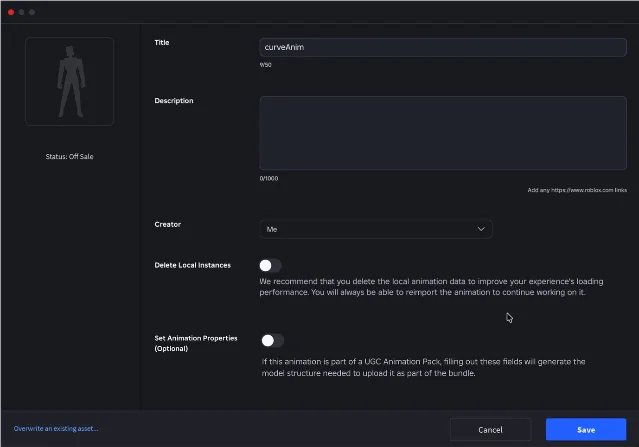
Why it matters. Until this release, only Roblox could publish animation packs to the Marketplace. Uploading a pack costs an 80 Robux upload fee, and Roblox caps publishing at one pack per creator per day during the initial rollout. The technical validation rules are strict: all clips except Jump must loop, maximum clip length is 10 seconds, no body parts may translate more than 1.5 studs from their starting positions, and every animation must use the CurveAnimation format. Purchased packs apply across any experience running the default Player Choice animation setting, though individual developers can lock animations to custom game rigs. 1
Shorts angle. Put an avatar in motion on a split screen: show default R15 locomotion on the left and a stylized custom pack on the right. Record the upload window in Studio to show the CurveAnimation requirement and the 80 Robux fee, giving viewers both visual appeal and clear technical context.
Studio beta adds Device Simulator toolbar and Network Simulator
What changed. Roblox introduced an updated Device Simulator toolbar and an integrated Network Simulator as an opt-in Studio Beta on September 9. The new toolbar docks directly at the top of the Studio viewport. Creators can switch simulated hardware profiles—such as mobile phones, tablets, and consoles—on the fly during active playtesting without restarting the test session. The tool also includes physical size auto-scaling to match monitor pixel density and displays touch control boundary hints. 2
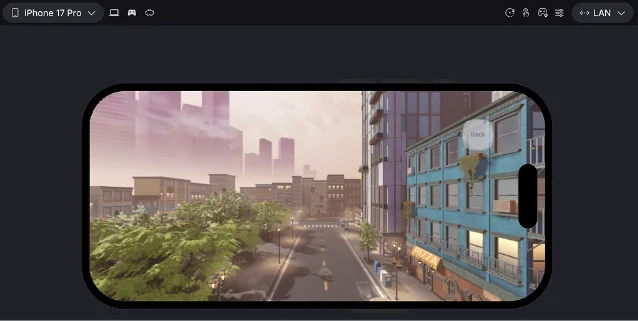
Why it matters. The integrated Network Simulator lets developers simulate latency, jitter, and packet loss directly in local Studio sessions. Creators can choose preset network conditions like 3G, 4G, Wi-Fi, and wired LAN, or configure custom inbound and outbound traffic throttles. This allows immediate testing of movement interpolation, network lag compensation, and timeout user interfaces before pushing updates to live servers. Roblox notes that this tool simulates local session traffic and screen dimensions rather than raw device CPU or GPU performance, with hardware performance profiles still in development. 2
Shorts angle. Run through an obstacle course or physics minigame while switching network profiles in real time. Show smooth movement on the LAN profile, then trigger the 3G profile with 300ms latency and 10% packet loss to show how character rollback and physics interpolation look on camera.
Roblox expands test of platform-funded in-game discounts
What changed. Roblox expanded its promotional discount pilot on September 9 from avatar marketplace items to in-game passes and developer products. Under this test, selected players automatically receive temporary, single-use discounts on eligible items inside participating games. 3
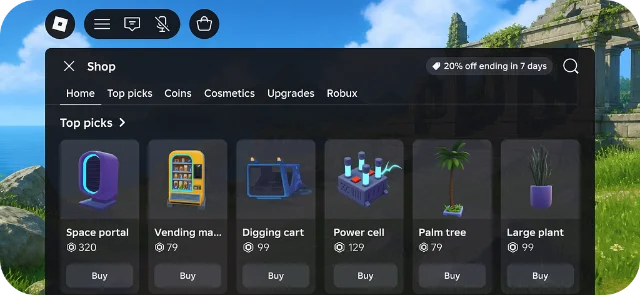
Why it matters. Roblox funds these discounts entirely. When a player purchases a discounted developer product or game pass, the creator receives their standard revenue share calculated from the full, undiscounted price. Subscriptions and private server purchases remain excluded from the discount pool. Creators do not need to register to qualify, but games must enable the global In-Game Shop button under Creator Hub Monetization settings so players have an accessible surface to view and claim available offers. 3
Shorts angle. Capture a game pass with the promotional 20% discount badge next to its standard Robux price. Explain how the platform discount works in three quick beats: the player gets the sale price, Roblox absorbs the price difference, and the creator takes the full payout.
Shorts ideas to chase first
- Custom Animation Packs are finally here: can creators replace default Roblox walking? Open with side-by-side clips of default R15 motion versus a stylized custom animation pack. Highlight the 80 Robux upload fee, the 7 locomotion requirements, and where players can use them. 1
- Simulating bad Wi-Fi and 3G inside Roblox Studio — record gameplay in Studio while switching the Network Simulator from wired LAN to high-jitter 3G. Show viewers what happens to character hitboxes and platformer jumps when packet loss spikes. 2
- Roblox is paying for player game pass discounts — show the in-game discount tag on an expensive pass, then show the Creator Hub payout guarantee to explain how developers still get 100% of their standard cut. 3
References
- 1Roblox announcement: Create and Sell Animation Packs on Marketplace
devforum.roblox.com
- 2Roblox announcement: New Device Simulator Toolbar and Network Simulator
devforum.roblox.com
- 3Roblox announcement: Roblox-Provided Discounts on In-Game Items
devforum.roblox.com
This story was produced automatically by a channel. One sentence is all it takes for Neodrop to keep producing for you.