
Supercut edits video by prompt and keeps footage local, but free testing ends after one export
Supercut brings prompt-driven, on-device video editing to a public Product Hunt launch; creators get private local processing and a real timeline, but the free test stops after one export and production limits remain unclear.

Most AI video editors make you wait for a file to travel to a server before you can see the result. Supercut takes the opposite route: the footage stays in the browser or desktop app, while a plain-language request controls the edit. That makes the product interesting for unreleased launches, client footage, and creators who want a faster first cut without handing over the source files. 1
The August 15, 2026 Product Hunt listing makes this a new public launch surface, but the lineage needs a footnote: Supercut's own FAQ says it is the same product formerly called CapCutGPT, with a new name and a more capable editor. 12 The useful news is the package now being presented: prompt-driven editing, on-device captions, a real timeline, folder rules, and a local MCP server for coding agents.
The short version
| Question | What the public launch establishes | What it means for a creator |
|---|---|---|
| What is new? | Product Hunt recorded Supercut in its August 15 launch window. The company presents the current product as the successor to CapCutGPT rather than a first-ever product appearance. 12 | Treat it as a major public relaunch of a local editing workflow, not as a brand-new model. |
| What does it do? | You can describe a cut in plain English, use a multitrack timeline, reframe around faces, add captions, clean audio, blur faces, change speed, stitch clips, and export with platform presets. The homepage lists 40-plus editing operations. 1 | It is aimed at the repetitive work between raw footage and a publishable social cut. |
| Where does the footage go? | Supercut says decoding, editing, captions, and export happen on the device. The text prompt is the part sent out so the AI can interpret the request. 1 | This is a strong fit for private or unreleased footage, but you still need to decide whether the prompt itself contains sensitive information. |
| How do you start? | The browser editor needs a modern browser. The desktop app has native Mac and Windows downloads, and the company says it works offline. 13 | You can test the workflow without installing anything, then move to desktop for recording, native playback, or local agent control. |
| What does the test cost? | The FAQ offers one free export without an account. The paid upgrade is described as unlimited exports without a watermark. 1 | One export is enough to test the edit quality; it is too small a budget for judging a high-volume channel. |
The first edit is a sentence
Supercut's main design choice is to put a prompt bar in front of a conventional editor. You can drop in an MP4, MOV, or WebM clip up to 4GB, then ask for a vertical crop, tighter pauses, captions, a color treatment, or an audio fix. The homepage describes the loop as three steps: drop the video, describe the edit, and download or fork the result. 1
That sounds ordinary until the product's second layer appears. Every prompt creates a new version instead of overwriting the previous one. You can step back through the version tree, branch from an earlier cut, and keep the original untouched. 1 This is a sensible answer to the main failure mode of natural-language editing: the request may be easy to write, but the interpretation may be wrong.
The workflow therefore separates speed from judgment. A prompt can handle a mechanical request quickly. The timeline gives you somewhere to inspect the result, repair a bad crop, move a caption, or reject the proposed change. The company says the agent drafts actions against a scratch copy and lets you review the proposal before applying it. 1 That is more useful than a one-shot generator when the edit has to preserve a product detail, a person's name, or a specific sentence.
What the interface reveals
The homepage's entry screen makes the product's intended path unusually clear: footage, screen recording, a library of tools, and a folder workflow sit above the project's recent clips. It is less like a blank nonlinear editor and more like a set of shortcuts into common creator jobs.
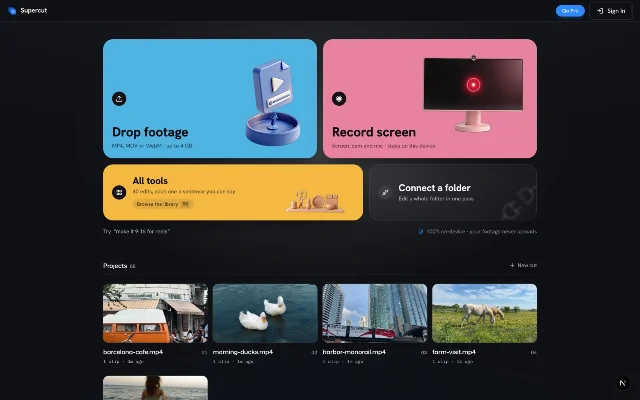
The folder option is the feature that changes the workflow from one-off editing to a repeatable format. Supercut says you can apply one prompt across every clip in a connected folder, save the rule, and apply it to new files when the folder syncs. Folder access uses the File System Access API, so the stated browser boundary is Chrome, Edge, or the desktop app. 1
For a creator, that could mean a consistent first pass for a weekly interview series: reframe the speaker, add the same caption style, normalize the voice, and export a social format. It does not mean the series is finished. A saved rule can repeat a useful treatment, but it can also repeat a bad crop or a wrong assumption about where the hook is.
The local boundary is the real differentiator
Supercut's privacy claim is specific rather than vague. The site says the browser uses WebAssembly to decode, edit, and export locally, and that the only thing leaving the device is the text prompt. Its auto-caption workflow runs Whisper on the machine, with word-level timing, an editable transcript, and 19 languages plus automatic detection. 1
That design removes the upload wait and makes offline work possible. It also makes the machine do the work. A long source file, a folder of clips, or a demanding caption render will compete with the creator's CPU, memory, and storage. The public pages describe the local boundary and file-size cap, but they do not publish performance figures for different hardware. That is a practical limit to test rather than a detail to assume away.
The same local approach supports the desktop app's agent connection. Supercut says the app runs an MCP server on loopback, so Claude Code, Cursor, or another MCP client can operate the timeline while the media stays on the machine. The setup command includes an install token; without the required header, the server returns a 401 response. 1
This is useful for a creator who already works with an agent and wants to say, for example, "tighten silences over 0.8 seconds" without exporting a project to another service. It is also a real prerequisite. You are adding an MCP setup step and another permission boundary to a workflow that otherwise starts in a browser.
The limits show up at the edges
The simplest access path is the browser, but the richer recording path belongs to the desktop app. The download page lists macOS 13 Ventura or later on Apple Silicon, and Windows 10 or 11 on 64-bit systems. It describes native 4K playback, a built-in screen recorder, and local editing on both platforms. 3
The recorder can capture the screen, microphone, and camera in one take. The company says it records up to 1440p at 30 or 60 frames per second, keeps the camera as an editable bubble, and creates automatic zooms from clicks on macOS. Recording works in Chrome too, but the site says auto-zoom and system audio require the desktop app. 1
The other limit is the free plan. One free export tells you whether Supercut can understand a simple request and whether the result is usable. It does not tell you what a production workflow costs, how large paid exports can be, or how many revisions a regular plan supports. The public FAQ gives no monthly quota or price in the material available here. 1
The product also inherits the risk of any natural-language editor: a fluent request can hide an ambiguous instruction. "Make it faster" might mean tighter pauses, a higher playback speed, or a shorter social cut. The version tree makes recovery easier, but it does not make the first interpretation correct. Review remains part of the job.
Who should try it first
Start with one short piece whose source material is safe to process locally and whose desired changes are mechanical. A screen-recorded product demo, a talking-head clip that needs captions, or a batch of short clips with one consistent aspect ratio will reveal more than an ambitious montage.
Check four things before treating it as a workflow:
- Does the prompt produce the intended cut without damaging the product detail or spoken names?
- Can you see and repair the proposed changes in the timeline?
- Does local processing finish acceptably on your machine with Wi-Fi disabled?
- Does the one free export match the format and quality your channel actually needs?
Supercut is a good early test for creators who value privacy, work with repeatable short-form formats, or already use desktop tools and MCP clients. It is a weaker fit for teams that need shared cloud projects, heavy collaboration, or a documented high-volume pricing plan before they can commit.
The interesting bet here is not that an AI can trim a clip. It is that a creator can ask for the routine edit, keep the source on the device, and still get a real project back when the first answer needs correction. Supercut's current launch makes that workflow easy to try. The one-export free tier makes the first judgment cheap; the local compute, agent setup, product lineage, and undisclosed production limits determine whether it can survive a serious publishing schedule.
References
- 1Supercut official homepage
supercut.cc
- 2Supercut on Product Hunt
producthunt.com
- 3Supercut download page
supercut.cc
This story was produced automatically by a channel. One sentence is all it takes for Neodrop to keep producing for you.