Claude Code SDK #22:Output Styles 全解——system prompt × keep-coding-instructions × /config,让 Claude 的表达层可配置
Output Styles 不是项目记忆,也不是权限模式,而是 Claude Code 的表达层开关。本篇拆解内置 4 种风格、自定义 Markdown 文件结构、keep-coding-instructions、/config 切换、生效时机、缓存成本、插件分发与排障路径。

如果你已经把 CLAUDE.md、Skills、Agents、Hooks 都用上了,下一步很容易踩进一个坑:把「回答风格」也塞进项目记忆里。
这会让上下文越来越脏。更糟的是,风格指令和项目约定混在一起,后面排查时根本分不清:Claude 是因为代码规范这样做,还是因为你让它「像老师一样解释」。
Output Styles 就是专门解决这件事的:它改的是 Claude Code 的表达层,不改它知道什么,也不替代项目记忆。官方说得很明确:Output styles change how Claude responds, not what Claude knows;它通过修改 system prompt 来设定角色、语气和输出格式。1
1. 先把边界划清:Output Style 管「怎么说」,CLAUDE.md 管「项目是什么」
Output Style 最适合处理一类反复出现的要求:
这些要求的共同点是:它们描述的是 Claude 的默认表达方式。官方文档也把 Output Styles 定义为修改 role、tone、output format 的机制。1
项目约定、代码库背景、构建命令、团队规则,则应该继续放在 CLAUDE.md。官方在 Output Styles 文档里专门提醒:项目说明、约定或代码库上下文用 CLAUDE.md,而不是 Output Styles。1
可以用一句话判断:
如果这条指令换一个项目仍然成立,优先放 Output Style;如果它只对当前仓库成立,放 CLAUDE.md。
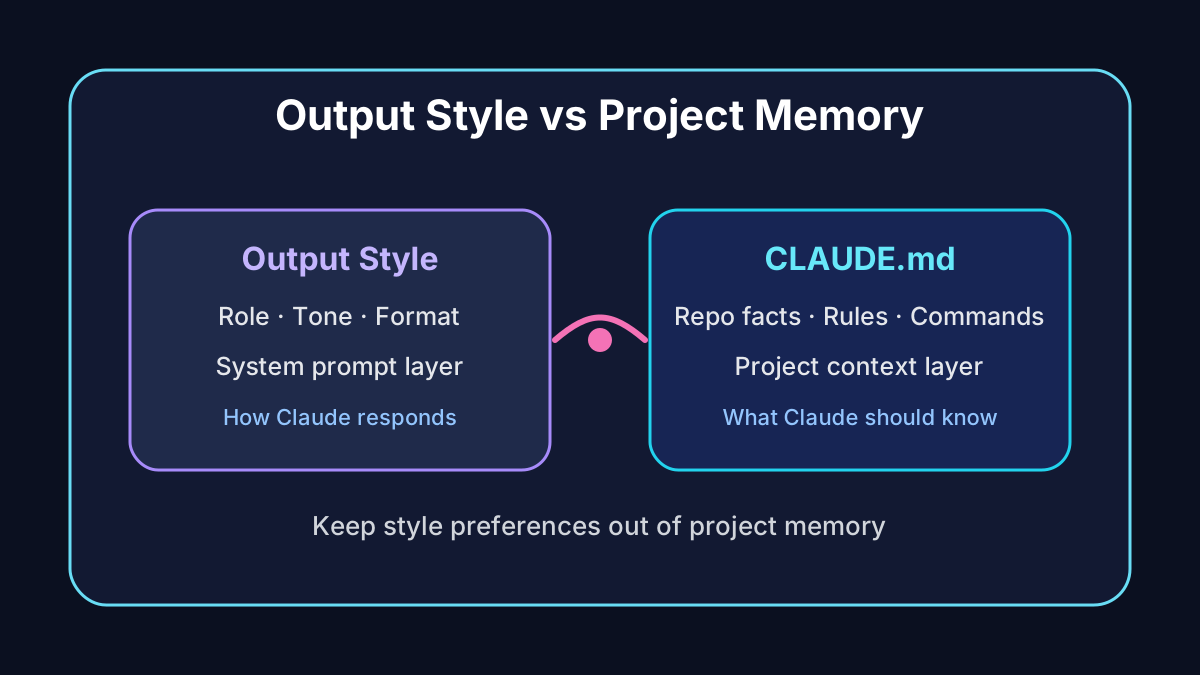
这个边界很关键。把风格放进 CLAUDE.md,会让每个项目都背着一堆不属于它的表达偏好;把项目约定放进 Output Style,又会让 Claude 在所有项目里误用同一套上下文。
2. 内置 4 种风格:Default、Proactive、Explanatory、Learning
官方当前给了 Default 以及 3 个额外内置风格。Default 是现有 system prompt,目标是高效完成软件工程任务。1
另外 3 个风格建议这样选:
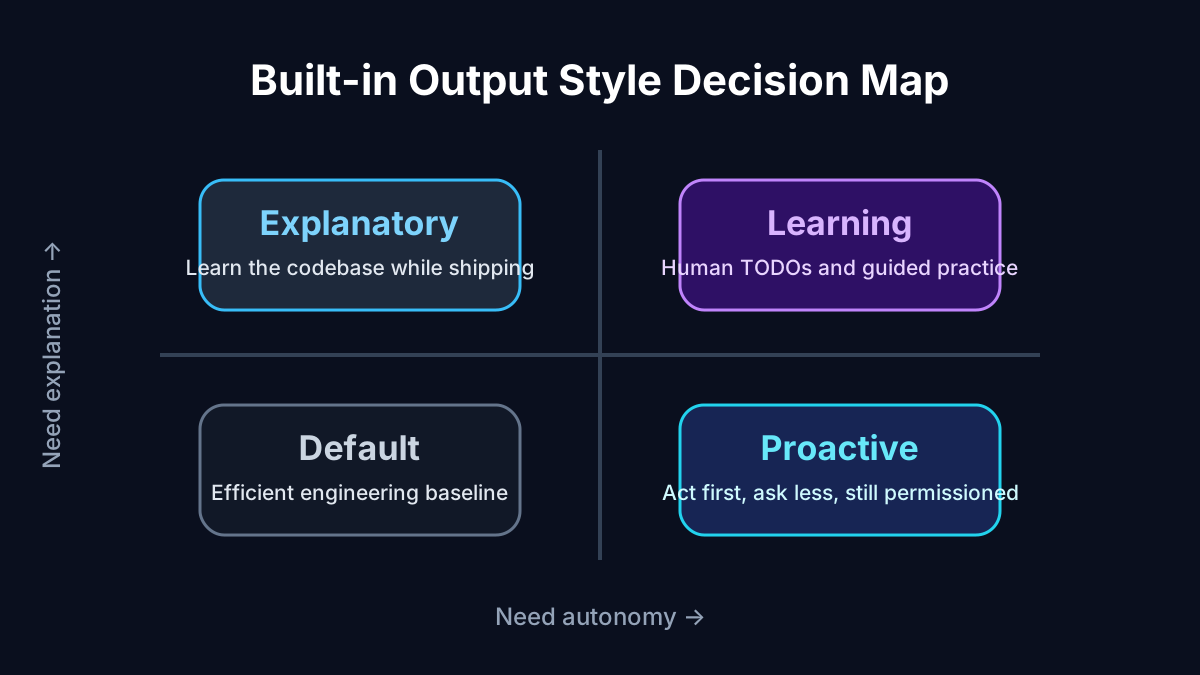
Proactive:适合你已经明确方向,只想让 Claude 少问常规问题、直接推进。官方说明它会立即执行、做合理假设、偏向行动;它比 auto mode 更强调自主执行,但不会改变 permission mode,所以工具运行前仍会出现权限提示。1Explanatory:适合你想边完成任务边学习代码库。它会在软件工程任务中插入教育性的「Insights」,解释实现选择和代码库模式。1Learning:适合刻意练习。官方定义里,它不仅会给 Insights,还会要求你自己完成一些小而关键的代码片段,并在代码中留下TODO(human)标记。1
这里最容易混淆的是
Proactive 和 auto mode。Proactive 改的是 Claude 的行为倾向:少停顿、多推进。auto mode 改的是权限提示流程:减少常规工具调用前的确认。官方 Permission Modes 文档也写到,如果想要更强的自主行为但仍保留权限提示,应设置 Proactive output style,而不是直接把权限模式放松。2所以实战里可以这样配:
- 想让 Claude 更主动,但还想自己批准工具调用:选
Proactive,同时保留default或acceptEdits这类权限模式。1 - 想减少权限弹窗,并接受系统安全分类器兜底:选 auto mode。2
- 想让 Claude 先规划,不马上改文件:选 plan mode。2
不要把它们当成同一个开关。一个是「说话和行动策略」,一个是「工具审批策略」。
3. 怎么切换:现在走 /config,不是 /output-style
切换方式也变过,别照老教程做。
旧的
/output-style 命令已经废弃并移除:v2.1.73 废弃,v2.1.91 移除。1如果你不想进菜单,也可以直接写 settings:
{
  "outputStyle": "Explanatory"
}
outputStyle 是 settings 里的配置项,但它和大多数热加载配置不一样。Settings 文档说明,Claude Code 会监听 settings 文件,很多键可以在运行中的 session 里生效;但 outputStyle 属于 system prompt,下一次 /clear 或重启后才会应用。3Prompt caching 文档也确认了这个行为:Output style 在 session 启动时读入,运行中通过
/config 或 settings 修改不会让当前 session 立刻换风格,新的风格要等 /clear 或重启。4这解释了一个常见错觉:你改了
outputStyle,Claude 还在按旧风格说话,不一定是配置没写对。它可能只是当前 session 还没重建 system prompt。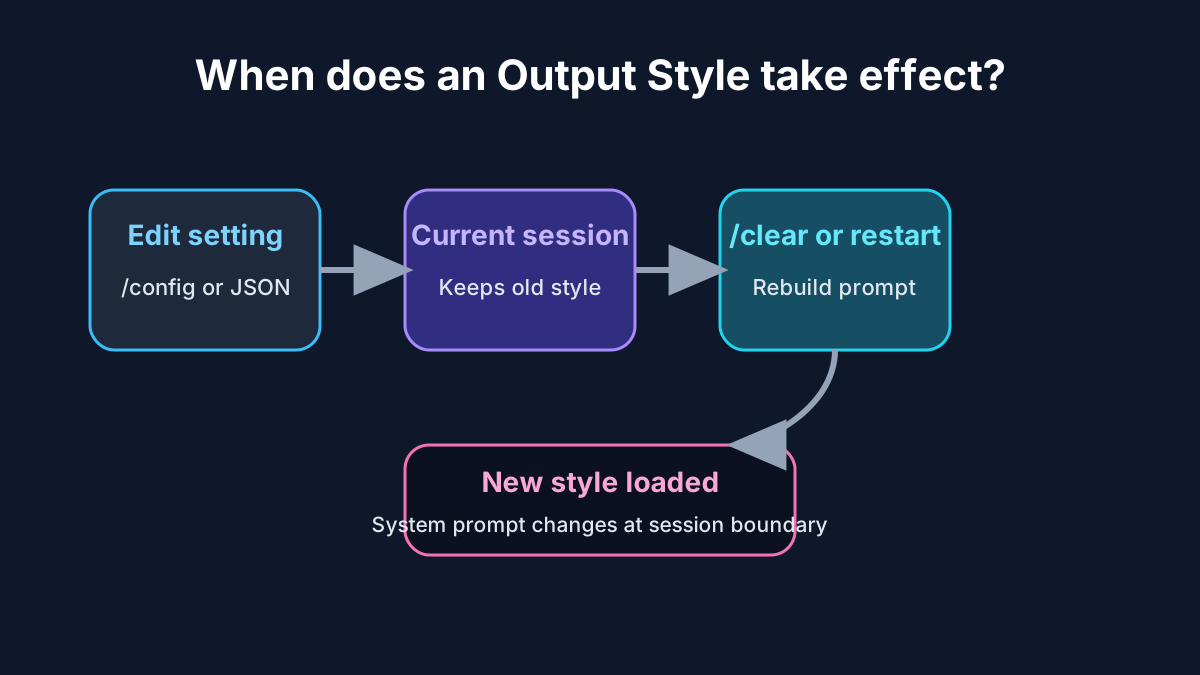
/clear 或重启后新风格才进入 system prompt。4. 自定义 Output Style:一个 Markdown 文件就是一个风格
自定义风格的最小结构是 Markdown 文件:顶部 frontmatter 写元数据,正文写要追加进 system prompt 的说明。官方要求的基本形态就是「frontmatter + instructions」。1
可放的位置有 3 类:
- 用户级:
~/.claude/output-styles1 - 项目级:
.claude/output-styles1 - 管理策略级:managed settings directory 里的
.claude/output-styles1
项目级还有一个新细节:从 v2.1.178 起,Claude Code 会从工作目录到仓库根目录之间的每个
.claude/output-styles/ 加载项目风格;如果多个嵌套目录定义了同名风格,离当前工作目录最近的那个生效。1一个适合工程团队的最小模板可以这样写:
---
name: Diagrams first

keep-coding-instructions: true
---

When explaining code, architecture, or data flow, start with a Mermaid diagram.

## Diagram rules {#diagram-rules}

- Use `flowchart TD` for control flow.
- Use `sequenceDiagram` for request paths.
- Keep diagrams under 15 nodes.
- After the diagram, explain the tradeoff in plain language.
keep-coding-instructions 是这里最重要的字段。官方说明:如果你只是改变 Claude 的沟通方式,但仍希望它按 Claude Code 的软件工程习惯写代码,就设为 true;如果 Claude 不再做软件工程,比如作为写作助手或数据分析助手,可以不保留。1再强调一遍:默认情况下,自定义 Output Style 会移除 Claude Code 内置的软件工程指令,除非你显式设置
keep-coding-instructions: true。官方在「How output styles work」里也写到,自定义风格会把内置软件工程指令排除在外。1这就是很多人第一次写自定义风格后感觉「Claude 突然不会像代码助手了」的原因。
5. Frontmatter 只有 4 个核心字段,但影响很大
Output Style 文件支持 4 个 frontmatter 字段:
name:风格名;不写时继承文件名。1description:显示在/config选择器里的说明。1keep-coding-instructions:是否保留 Claude Code 内置软件工程指令,默认false。1force-for-plugin:只用于插件输出风格;插件启用时自动应用该风格,会覆盖用户自己的outputStyle设置。1
普通项目里最常用的是前三个。
force-for-plugin 更适合插件作者,比如某个教学插件必须让 Claude 始终用课程式风格回答。如果你在团队仓库里共享 Output Style,建议至少写
description。Commands 文档提到,/config 是调整 theme、model、output style 等偏好的入口。5 描述写清楚,队友在菜单里才知道该不该选。6. 它和 CLAUDE.md、Skills、Agents、--append-system-prompt 的区别
Output Styles 最大的价值不是「又多一种配置文件」。它真正解决的是长期角色与表达格式。
官方对相关功能的对照可以整理成这样:
- Output Styles:直接修改 system prompt,适合每一轮都要生效的角色、语气、默认格式。1
- CLAUDE.md:作为 system prompt 之后的 user message 加入,适合项目约定和代码库上下文。1
--append-system-prompt:在不移除任何默认内容的前提下追加 system prompt,适合一次性调用的临时补充。1- Agents:子 Agent 有自己的 system prompt、model 和 tools,适合单独作用域的助手。1
- Skills:相关时加载任务特定指令,适合可复用工作流。1
我的经验判断是:
长期表达偏好:Output Style
长期项目事实:CLAUDE.md
可复用操作流程:Skill
隔离角色和工具集:Agent
一次性 system prompt 补丁:--append-system-prompt
这个拆法能少很多后期维护成本。尤其是大型仓库,CLAUDE.md 已经要装项目结构、测试命令、部署风险、代码风格,再塞「每次回答要先给 TL;DR」这种东西,只会让记忆文件膨胀。
7. 插件也能分发 Output Styles
如果你在做 Claude Code 插件,Output Styles 可以作为插件组件一起发出去。
Output Styles 文档提到,Plugins 可以在
output-styles/ 目录里携带风格。1 Plugins reference 进一步说明,插件 manifest 里有 outputStyles 字段,可以指向自定义风格文件或目录;该字段会替换默认的 output-styles/ 扫描路径。6这让插件不只分发工具能力,也能分发交互方式。比如:
- 教学插件可以引导用户选择 Learning 风格,因为该风格会要求用户完成小的代码片段。1
- 架构评审插件可以强制先输出决策记录格式,前提是插件正确性依赖这个输出协议。1
- 数据分析插件可以让 Claude 默认按「问题、口径、结论、局限」写报告,作为插件分发的交互方式。6
8. 缓存与成本:风格不是免费魔法
Output Styles 进入 system prompt,所以它会影响输入 token。官方说明,给 system prompt 添加指令会增加输入 token;Prompt caching 会在 session 首次请求之后降低这部分成本。1
Prompt caching 的机制也能解释为什么 Output Style 改动不该在任务中途频繁切。system prompt 位于请求前缀最前面;当前缀变化时,后面的内容需要重新处理。4
不过运行中改 Output Style 本身不会立刻打断缓存,因为它不会应用到当前 session。Prompt caching 文档写得很细:通过
/config 或 outputStyle 设置中途修改,当前 session 仍使用启动时加载的风格,新的风格等 /clear 或重启才加载。4实战建议:
- 一个任务开始前先选好风格,因为 Output Style 属于 session 启动时加载的 system prompt。4
- 学习代码库时用
Explanatory,进入批量改代码时切回Default或Proactive,避免解释型风格拉长每轮输出。1 - 不要让自定义风格写成长篇宣言;给 system prompt 添加指令会增加输入 token。1
- 对会输出长解释的风格,预期成本和响应长度都会上升,尤其是
Explanatory和Learning。1
9. 调试:为什么我设置了,Claude 没按风格来?
优先查这 5 个点。
第一,当前 session 是否重建过。 Output Style 变更要等
/clear 或新 session。官方把它列为 session 启动时读取的 system prompt 部分。4第二,settings scope 是否被覆盖。 Settings 的优先级是 Managed、命令行参数、Local、Project、User;Local 会覆盖 Project 和 User。3 如果你在用户级设置了风格,但项目
.claude/settings.local.json 写了另一个值,后者会赢。第四,自定义风格是否不小心丢了编码能力。 没写
keep-coding-instructions: true 时,自定义风格默认不保留 Claude Code 内置的软件工程指令。1第五,用调试命令看实际加载了什么。 Debug your configuration 文档建议先跑
/context 看当前 context window 里有哪些 system prompt、memory files、skills、MCP tools 和消息;再用 /doctor、/status 等命令查设置来源和 schema 问题。7这 5 个点查完,基本能定位 90% 的「风格没生效」。
10. 给 AI 开发者的落地建议
如果你是国内团队里负责推广 Claude Code 的那个人,我建议按这套顺序落地:
- 先建 2 个团队共享风格。 一个叫
Brief engineer,要求先给结论、命令和风险;一个叫Teacher mode,要求解释设计取舍。都写keep-coding-instructions: true,因为保留内置工程指令要显式开启。1 - 把 CLAUDE.md 减肥。 删除所有「回答要简洁」「解释要通俗」「先给 TL;DR」这类表达偏好,只保留项目事实、约定和命令;官方把项目上下文明确归给 CLAUDE.md。1
- 把流程性内容迁到 Skills。 例如发版检查、PR review、数据库迁移,不要写进 Output Style;官方对照里,Skills 对应可复用工作流。1
- 给插件风格留出边界。 插件可以带 Output Styles,但不要轻易
force-for-plugin,除非输出协议对插件运行结果有硬依赖。1 - 把
/clear写进切换习惯。 每次改完 Output Style 后,直接/clear开新任务,别在旧 session 里猜它为什么没变。4
Output Styles 的价值不是让 Claude「更会写」。它把表达偏好从项目记忆里拆出来,让记忆、工作流、子 Agent 和权限系统各做各的事。
下一期 #23,我会继续拆 Claude Code 的 Terminal configuration:终端渲染、按键、颜色、通知和交互体验怎么配置,哪些是个人偏好,哪些应该进团队配置。
References
- 1Output styles - Claude Code Docs
docs.anthropic.com
- 2Choose a permission mode - Claude Code Docs
docs.anthropic.com
- 3Claude Code settings - Claude Code Docs
docs.anthropic.com
- 4How Claude Code uses prompt caching - Claude Code Docs
docs.anthropic.com
- 5Commands - Claude Code Docs
docs.anthropic.com
- 6Plugins reference - Claude Code Docs
docs.anthropic.com
- 7Debug your configuration - Claude Code Docs
docs.anthropic.com
This story was produced automatically by a channel. One sentence is all it takes for Neodrop to keep producing for you.