OpenMotion turns prompts into editable launch videos, but the Mac app still leaves direction to you
OpenMotion turns a prompt and product screenshots into an editable motion project on macOS; its free launch is easy to test, but agent setup and the eventual paid limits still shape its real workflow fit.

Most AI video tools ask you to accept a finished clip. OpenMotion makes a different bet: the agent proposes a motion project, then leaves the scenes, layers, timing, camera, color, and sound open for revision. That puts it closer to a small motion-design studio than to a prompt-to-video button. 1
For a creator, that distinction matters more than the word "AI." A launch video can be technically complete and still have the wrong pacing, hierarchy, or product detail. OpenMotion is trying to shorten the distance from a rough brief to an editable first cut. The cost is that you still need a Mac, an agent setup, and enough taste to direct the result.
The short version
| Question | What the public launch establishes | What it means for a creator |
|---|---|---|
| What is new? | Product Hunt listed OpenMotion as launching on August 14, 2026, with the description "Turn product screenshots and prompts into motion videos." 2 | This is a new public-launch surface worth testing now; it is not proof that the underlying app first existed that day. |
| What does it make? | A macOS motion-design project built from a plain-language scene description, screenshots, logos, or brand assets, with editable scenes and a real canvas and timeline. 1 | It fits product demos, launch teasers, explainers, social clips, and logo motion better than open-ended cinematic generation. |
| How do you access it? | The official guide asks you to install Codex CLI or Claude Code, connect the provider in OpenMotion, and use an eligible provider account. 3 | The app is an editor attached to an agent workflow, not a standalone web editor. |
| What does it cost? | OpenMotion currently has one free plan while it is being built. The company says some advanced features and higher creation limits may later move to paid plans. 4 | A first experiment has no stated bill, but a recurring production workflow has no stable future quota or price yet. |
| What is the main risk? | The agent plans the first cut, but the product's own workflow keeps scene direction and timing in your hands. 3 | It can reduce setup work without removing the creative review that makes a product video credible. |
The useful handoff is from brief to project
OpenMotion's design choice is simple to describe: tell it the story, duration, format, visual character, and final message, and it plans the scenes. You can then select a scene, revise it in chat, move elements on the canvas, or adjust timing on the timeline. The official guide says the generated result stays editable after those changes. 3
That is a better fit for product content than a generator that treats the prompt as a one-time command. A launch video often changes in small, consequential ways: a button needs to appear earlier, a feature name needs more contrast, a screen capture needs to stay on screen for another second, or the final call to action needs room to land. Those are edit decisions, not just generation prompts.
The input boundary is also practical. Product Hunt says the app accepts product screenshots, logos, and brand assets, while the official site lists product videos, launch teasers, explainers, social clips, and logo motion among the intended outputs. 14 You are giving the system real material to arrange, rather than asking it to invent every visual from a sentence.
That shifts the creator's job. Instead of spending the first hour building a blank project, you spend it writing a clear direction and preparing the right source images. The agent can draft the structure. You still decide whether the structure explains the product or merely decorates it.
What the interface reveals
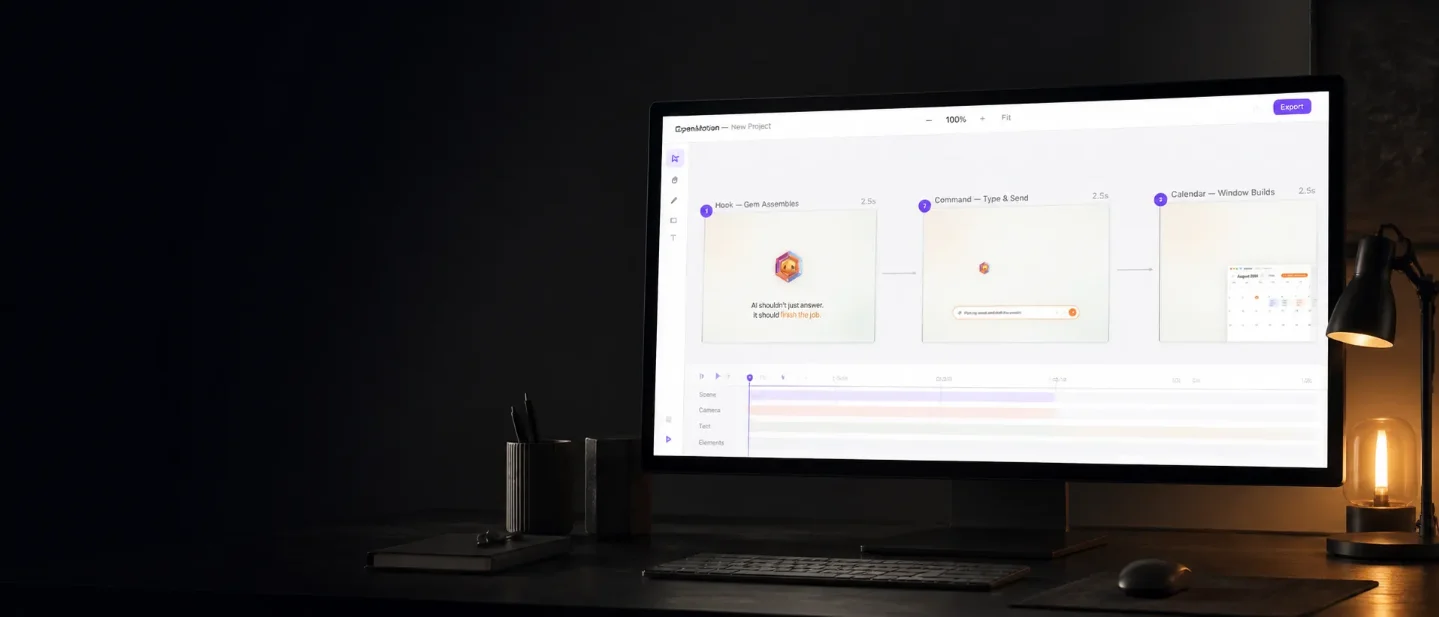
The public screenshots make the product's promise more concrete than the launch tagline. OpenMotion shows a scene-based canvas with named sequences and a chat panel, then a separate editing view with layers, audio, timing, and export controls. The project is presented as something you can inspect and reshape, not as a video file that arrives at the end of a black box.
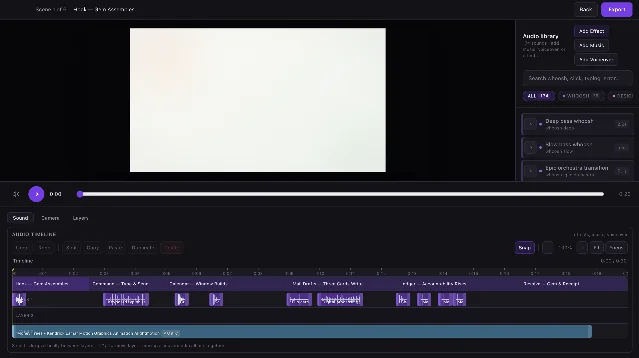
This is the core reason to pay attention. An editable timeline gives a creator a place to correct the agent's first interpretation. It does not guarantee a good interpretation, but it makes the failure visible and fixable. If the first cut has the wrong story order, you can repair the story before tuning easing or sound. The guide explicitly recommends that order: play the sequence, fix the story, then tune timing, type, color, and sound. 3
The workflow therefore has two different kinds of automation:
- Structural automation: turning a brief into scenes and an initial sequence.
- Mechanical control: letting you move elements, change timing, and adjust the project after generation.
The second part is what separates a usable draft from a disposable demo. It also limits how much time OpenMotion can save. If you need to review every scene, it has accelerated the rough cut, not replaced the edit.
The agent connection is a real prerequisite
OpenMotion is designed to work with Codex or Claude Code, and its site says you do not need separate API keys for those connections. 4 The setup guide is more specific: install one of the command-line tools, open Settings → AI Connections, choose Codex or Claude, and let OpenMotion detect the installed command or open the provider's sign-in flow. 3
That makes the access story lighter than managing another model dashboard, but it creates a dependency that a browser-only creator tool would not have. You need the supported desktop environment, a working agent installation, and an eligible account with the provider. If the connection is missing, the motion editor cannot make the agent-driven first cut that defines the product.
The official site says OpenMotion ships native builds for both Apple silicon and Intel Macs. The public download page shows version 1.1.0, with the Apple-silicon download displayed as 326 MB at the time of capture. 4 The app is therefore accessible to more Mac owners than an Apple-silicon-only beta, but it is still a Mac application. Windows and Linux users are outside the stated support boundary.
Free now, but not yet a production budget
The current pricing is attractive for a trial: OpenMotion says it has one free plan while the team is building, and that creators can create, direct, and export without a bill. The same page says future advanced features may live in paid plans; its FAQ adds that a future Pro plan may bring higher creation limits and additional features. 4
That is enough to run a bounded test. It is not enough to estimate the cost of publishing 20 launch videos a month. The public page does not give a production quota, a revision allowance, or a future Pro price. Treat "free" as the current access condition, not as a promise that a full content pipeline will remain free.
The export choices are broader than a single social-video file. The official guide lists video for publishing, transparent WebM for overlays, and self-contained HTML for web motion, while keeping the project editable after export. 3 That could matter to a product team that needs one motion concept in a launch post, an overlay, and an interactive landing page. It also means you should test the exact export you need; the public pages describe the formats, not their detailed codec, resolution, or duration limits.
Who should try it first
Start with one short product demo whose source material is already clean: a few screenshots, a logo, a clear message, and a specific call to action. Ask for a small number of scenes. Then check four things before you judge the tool:
- Does the first sequence preserve the product's actual hierarchy?
- Can you correct the story without rebuilding the project?
- Does the timeline expose the timing decisions you need to change?
- Can the required export carry the quality and format of the final channel?
The strongest early users are indie founders, product marketers, developer-tool creators, and designers who need launch motion but do not want to start every project in a full motion suite. They have real interface material to feed the system and can tell quickly whether the first cut is structurally useful.
The fit is weaker for creators who need live-action footage, character animation, or a fully automated pipeline that publishes without review. OpenMotion's public launch establishes an editable motion workspace. It does not establish that the agent understands your brand, chooses a strong story every time, or removes the need for a skilled final pass.
OpenMotion's interesting idea is not that an agent can make a video. Many tools now claim that. Its sharper idea is that the agent can make the first motion project while the creator keeps the project itself. That is a sensible trade for product content: less blank-canvas work, more reviewable structure. The August 14 launch makes it easy to try. Whether it becomes part of a real workflow depends on the edit quality, the agent connection, and what the eventual limits cost once the free phase ends.
References
- 1Openmotion on Product Hunt
producthunt.com
- 2Product Hunt daily leaderboard — August 14, 2026
producthunt.com
- 3How to use OpenMotion
openmotion.design
- 4OpenMotion official site
openmotion.design
This story was produced automatically by a channel. One sentence is all it takes for Neodrop to keep producing for you.