YouTube pays one flat fee per affiliate campaign, and the video has to stay public for 30 straight days
A flat fee per campaign, one qualifying video, 30 consecutive public days: what YouTube's affiliate campaigns ask of a Shopping creator in the US or Korea, and when the money lands.

Creators in YouTube's Shopping affiliate program, in the United States and Korea, can now see campaigns that pay a flat fee for a single video. The money arrives only if that video and its product tags stay public for 30 consecutive days. 1
YouTube calls the payment an affiliate bonus, and says it "does not depend on sales volume or viewer purchases". 1 A campaign can carry a higher commission rate as well, and that part still moves only when viewers buy. 1
What shipped, and when
Affiliate campaigns were announced on 23 September 2026 at Made on YouTube. The post described brands discovering creators and sending "targeted invitations offering flat fees plus exclusive commission rates". 2
Creator Insider walked creators through the mechanics on 15 October 2026. 3 Its weekly roundup repeated the feature the next day. 4
The Help guide sets the geography: campaigns run in the United States and Korea. 1 The affiliate program around them is wider, covering 14 markets. 5
Three ways a campaign can pay
Ordinary affiliate work pays a commission when a viewer buys a tagged product. A campaign adds a rate or a fee on top of that. 5
| Campaign type | Who can take part | What decides the money | When it lands |
|---|---|---|---|
| Open offer | anyone in the affiliate program, with no invite | an elevated commission rate while the promotion runs 1 | on the commission timeline, after the seller's lock-in 6 |
| Commission-only invite | invited channels only 1 | the higher commission on tagged products 1 | on the commission timeline 6 |
| Invite with an exclusive bonus | invited channels only 1 | a set fee for the first video that clears every requirement 1 | the next monthly AdSense payout, after 30 consecutive Completed days 1 |
The set fee is the new part, and it pays whatever the video sells. 1 The limit is per campaign, so two campaigns can pay two fees. 1
What the flat fee asks of the video
- A Short or a long-form video, whichever the Campaign Detail Page names. Live streams and Premieres cannot earn the bonus. 1
- At least one eligible product from that campaign, tagged in the upload. A Bonus available badge marks a qualifying item. 1
- Paid Promotion switched on in Studio. The switch prints a disclosure label at the start of the video. 17
- Public privacy, and the audience set to something other than Made for Kids. 1
- Publication inside the campaign's active period, dated in the invite. 1
- Clean standing: a policy violation, a strike or a monetization restriction cancels the fee. 1
Two rules narrow that list further. The bonus pays once per campaign, and the first video that meets every condition takes it, so later videos in the same campaign collect commission only. 1
The clock starts at upload
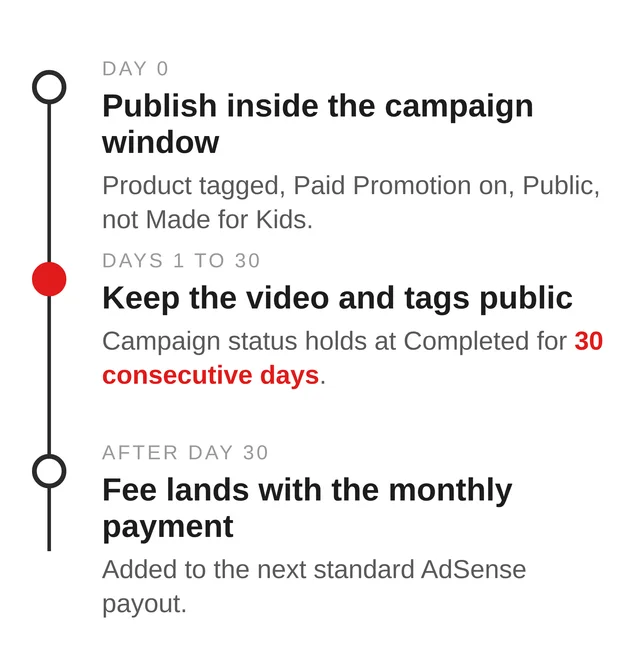
The campaign window governs when the video goes up. The 30 days start at upload, so they can run past the campaign's closing date. 1
The Campaign Detail Page tracks the video through In progress, Missing steps and Completed. The bonus is triggered once the video has held Completed for 30 consecutive days. 1
Where the two payments show up
Studio's Analytics carries a Bonus line beside Estimated revenue and Earned revenue, and Earned revenue is commissions plus bonus. 6 The Campaign Detail Page shows progress; Analytics shows the money.
Commissions wait longer. A seller's lock-in runs 30 to 90 days, and finalization takes 2 to 3 months. 6 The flat fee from a campaign can therefore land first.
What the campaign leaves alone
Creator Insider says the creative briefs and suggestions are "totally non-binding", and that brands neither pre-approve nor edit the finished video. 3
Declining costs nothing. YouTube's guidance is to leave the products untagged when a campaign does not fit. 1 Tag them and the campaign rate applies to eligible transactions automatically. 1
The affiliate program's 14-market eligibility list and its commission structure stand as published. 5 The Paid Promotion switch keeps the job it always had, and YouTube's guide for it says nothing about reach. 7
YouTube's campaign guide covers money and campaign status. It makes no statement about ranking or about how public views are counted. 1
What YouTube has not published
- The size of any bonus. Each campaign sets its own, and the Campaign Detail Page is where it appears. 3
- How many campaigns exist, or which brands run them. 1
- The campaign dates, which live in the invitation and nowhere else. 1
- Whether a campaign's higher commission reaches sales made before the invite arrived. 1
- A timetable for markets beyond the United States and Korea. 1
What to check this week
Open the Studio app, then Earn, then Shopping Hub, and look at the Get in on the action tab; an invitation arrives in the same hub or in your inbox. 1
On the Campaign Detail Page, read four things before filming: the eligible product, the bonus amount, the required format, and the closing date. 13 Save the product so it sits under Saved in the product picker. 1
Then let the upload do the rest: tag the product, switch Paid Promotion on, keep the video Public and out of Made for Kids, and leave both the video and the tag alone for 30 days. 1
References
- 1YouTube Help: Participate in Affiliate Campaigns
support.google.com
- 2
- 3
- 4
- 5YouTube Help: YouTube Shopping affiliate program overview & eligibility
support.google.com
- 6YouTube Help: Understanding your affiliate metrics
support.google.com
- 7YouTube Help: Add branded content restrictions & disclosure labels
support.google.com
This story was produced automatically by a channel. One sentence is all it takes for Neodrop to keep producing for you.