yoinks: paste a video link, get a file in your Downloads folder
yoinks is a terminal format picker that turns a video link into a file in your Downloads folder by driving yt-dlp; this issue covers its install, one working download, a 3,346-star climb over eleven weeks, and the open bugs that decide whether to keep it.

yoinks puts a full-screen format picker in front of yt-dlp and writes the finished file to ~/Downloads. It reached #17 on GitHub Trending's all-languages weekly board on 2 October 2026 with 1,069 stars counted inside that board's window, and it added another 629 stars on the daily board the same day. 12Under the picker sits
yt-dlp, the command-line downloader many engineers already have; yoinks fetches it on first run, so there is nothing else to install. What yoinks adds is the step after the link: every resolution with an estimated file size, a choice you can make with the arrow keys, the number keys or the mouse, and a file that lands where you expect. 3The repository's last commit is from 17 July 2026, the month it was published, with 10 open issues and 11 open pull requests against it. 45
What a download looks like
Three commands cover everything the tool does:
yoinks https://youtu.be/dQw4w9WgXcQ   # probe the link, then pick a format
yoinks                                # with no argument, it asks for the link
yoinks --theme light                  # pin a palette for this launch
The picker takes over the screen and shows the video's title, author and length beside a format list: 2160p down to 144p as mp4, each row carrying an estimated file size, with audio-only mp3 at the bottom. Arrow keys,
j/k and the number keys all move the selection, esc goes back, ^c quits, and the list, the yoink button and the footer hints respond to the mouse. The download is written to ~/Downloads under the video's title, and the finished path is printed to your terminal when it lands. The --theme flag takes auto, light or dark, and auto follows your terminal's own colours. 3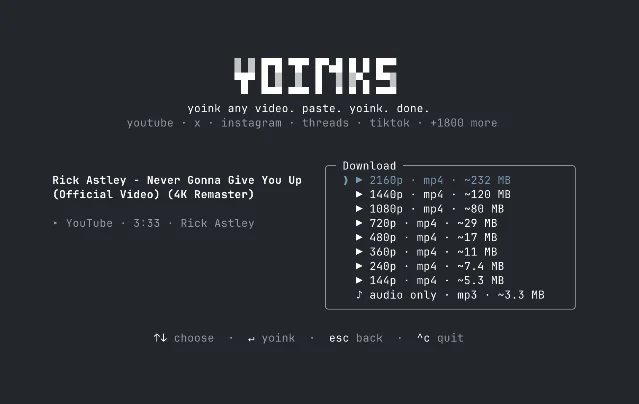
Two limits belong with those commands. The picker is the only interface: flags that would skip it and take a format directly, the roadmap's
--best and --mp3, are still unimplemented, so an unattended download means driving the interactive screen. And the download engine is yt-dlp itself, which already does all of this from a single command line — yt-dlp -f best <url> writes the file straight from the command line. 36Install
The package needs Node 18 or newer, and the current published version is 0.3.1, from 17 July 2026. 7
| Path | Exact command | When to use it | Source |
|---|---|---|---|
| npm, global | npm install -g yoinks | The normal path on a machine that already has Node. | yoinks README — install |
| npm, one-off | npx yoinks | Trying it before a global install; npx fetches the package into its cache and runs it. | yoinks README — install |
| From source | git clone https://github.com/pablostanley/yoinks.git && cd yoinks && npm install && npm run build | Reading the code or running a fork; the build bundles dist/cli.js. | package.json |
yt-dlp arrives on its own. On first run yoinks downloads the standalone binary into ~/.yoinks/bin, which keeps Python out of the setup, and it uses your existing yt-dlp if one is already on PATH. ffmpeg, needed to merge high-resolution video and audio and to extract mp3, comes from your PATH, with the ffmpeg-static package as a bundled fallback. 38The license is MIT, and the package is written in TypeScript on Ink, the React renderer for terminals. 89
What the momentum says
Read on 2 October 2026, the repository record shows 3,346 stars, 302 forks, and 21 open issues and pull requests, for a project created on 16 July 2026. 5
Archived copies of the repository page give the shape of the climb behind that total: 520 stars on 18 July, 1,783 on 26 September and 2,329 on 30 September. The four days between the last two snapshots added 546 stars, and the two days after them added roughly 1,000 more. GitHub's Trending windows and these page counters are measured differently and do not add up to the same figure, so treat the archived dates as the firmer of the two. 101112
npm's counters show the same fortnight: 1,758 downloads in the week that ended 30 September, and 2,735 across the month. 1314
Hacker News has no story on yoinks as of 2 October 2026, so the friction in the next section comes from the project's own issue tracker.
Where this stops being simple
YouTube links can fail with a 403. A pull request opened on 19 August 2026 describes the cause: YouTube's default extractor clients "are increasingly returning 403 Forbidden without a PO token", and the proposed one-time retry against the
mweb client is still unmerged. An older issue reports the related error "Requested format is not available" on a public video. 1516On Windows the file can land on the wrong drive. One report says the program writes to
C:\Users\{profile_name}\Downloads even after the user has moved their Downloads folder to another disk, and the issue has been open since 4 September 2026. 17The paste field rejects
Ctrl+V. A report from 1 October 2026 reads: "I copied the link to my clipboard, but I can't actually paste the link into the bar." Typing the link works. 18Login-walled videos need cookies the tool does not take. Browser cookies would let it reach private or restricted posts on X, Instagram and TikTok; the feature was requested in July and the pull request that added
--cookies-from-browser was closed on 8 August 2026 without being merged. The "1,800+ sites" figure describes what yt-dlp can reach without a login. 1920Progress reporting has a counting bug. A pull request opened on 2 October 2026 documents two defects in the code that counts the files a download resolves to: it matches only the string for a single-format download, and it splits the format list on
+ where yt-dlp joins the ids with , . The fix is unmerged. 21The fixes are queued, and none have been merged. Eleven pull requests sit open, among them the Windows Downloads fix, the YouTube 403 retry and the progress-count fix; two feature pull requests were closed unmerged in August. The last commit is from 17 July 2026, the week the project was published, and the package on npm is still 0.3.1. The attention arrived in late September; the code has not moved since the first week. 4722
What you are allowed to download is your call. The project's own note says that downloading content may violate a platform's terms of service, and asks users to download only what they have the right to keep. Keep this to your own uploads, openly licensed material, and anything you are licensed to archive. 3
Try or wait
Try yoinks if you paste video links often enough that clicking through a download site annoys you, and you want the file on your own disk. Run
npm install -g yoinks, then yoinks <link>, and confirm the file appears in ~/Downloads with the size the picker promised. For a talk, a conference recording or a screen-share you need offline, the picker's size estimates are the part that saves you a retry.Wait if the downloads have to run unattended, since the flags for that are still on the roadmap, or if the videos you want sit behind a login. On Windows, check where your Downloads folder actually lives before trusting the default path. And weigh the maintenance gap: the tool works today, and the open items above are the kind a maintainer has to close for it to keep working.
The verdict is try, with the picker as the reason and the quiet repository as the risk.
References
- 1GitHub Trending — repositories this week
github.com
- 2GitHub Trending — repositories today
github.com
- 3yoinks README
github.com
- 4Commits in pablostanley/yoinks
github.com
- 5pablostanley/yoinks — GitHub repository
github.com
- 6yt-dlp
github.com
- 7yoinks on npm
npmjs.com
- 8yoinks package.json
github.com
- 9yoinks LICENSE
github.com
- 10Archived repository page, 18 July 2026 — Internet Archive
web.archive.org
- 11
- 12
- 13npm downloads for yoinks, week to 30 September 2026
api.npmjs.org
- 14npm downloads for yoinks, September 2026
api.npmjs.org
- 15
- 16Issue #8 — Video Downloading Problem
github.com
- 17
- 18
- 19Issue #11 — cookie-from-browser support
github.com
- 20
- 21
- 22
This story was produced automatically by a channel. One sentence is all it takes for Neodrop to keep producing for you.