
Linear Loops: the audit-first automation pattern
A teardown of Linear’s Loop detail and Run history surfaces, showing how triggers, permissions, publish states, and execution records turn recurring agent work into an inspectable team-owned object.

Linear Loops makes autonomy auditable
Linear’s Loop detail surface treats an agent workflow as a team-owned object that can be configured, constrained, and inspected after it acts. The feature launched on July 20, 2026 for Business and Enterprise workspaces. A Loop can run on a schedule or when an issue matches conditions, using workspace context and connected tools to decide what to do next. 1
The screen worth studying is the configured Loop surface and its adjacent Run history view. Together, they expose the whole lifecycle: what the agent is meant to do, when it is allowed to act, what it can reach, and what happened during a run. That is the design decision. Linear is presenting autonomy as an inspectable operating object, not as a prompt that disappears after submission.
The editor is a contract, not a prompt box
The documented editor opens with a name, an icon, and a scope selector. Under that, the first section is Trigger. In the published example, the trigger reads as a sentence assembled from controls: start on a date, repeat every two weeks, and run around 9 PM. The schedule is not buried in an advanced dialog or reduced to a cron-like string. 2
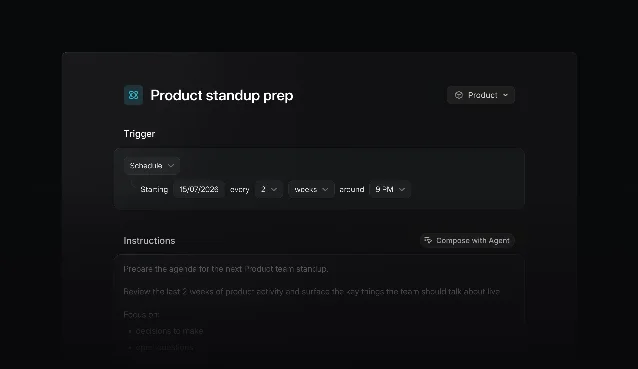
That order gives the workflow a visible operating boundary before the user reads the agent’s prose. A PM can answer “when does this act?” at a glance, then move to “what should it do?” The control grammar also keeps the schedule editable: a number, a unit, and a time are separate choices, so the user can change one part without rewriting the whole rule.
The next section is Instructions, with a large text area and a Compose with Agent action beside it. Linear’s documentation recommends first achieving the desired outcome in Agent chat, refining the result, and then asking Linear to create the Loop. The button is therefore more than a writing shortcut. It gives a natural-language workflow a path into a durable configuration object. 3
The whitespace does useful work here. The trigger sits inside a bounded panel, while the instructions get a larger, quieter surface. The interface gives the machine-readable condition a compact shape and gives the human-authored intent room to breathe. That visual ratio says which parts need precise selection and which part needs thought.
Information hierarchy: intent before reach
Linear’s docs define each Loop as a combination of a trigger, instructions, optional tools, and permissions. The documented creation flow follows that same logic: choose a trigger, describe the outcome, add tools if needed, review scope and permissions, then create the Loop. 4
This is a meaningful hierarchy for agent products. The user first defines the job, then decides what the agent may touch. Permission is not the opening question, but it is also not an invisible system default.
The permissions panel makes that boundary legible through rows with plain-language explanations and independent toggles. Web search, Code Intelligence, and Coding sessions are shown as separate capabilities. The example leaves Externally synced issues and comments off and warns that posted content may be visible outside Linear. A team-access control sits above the toggles, while external-source triggering is isolated in its own row. 5
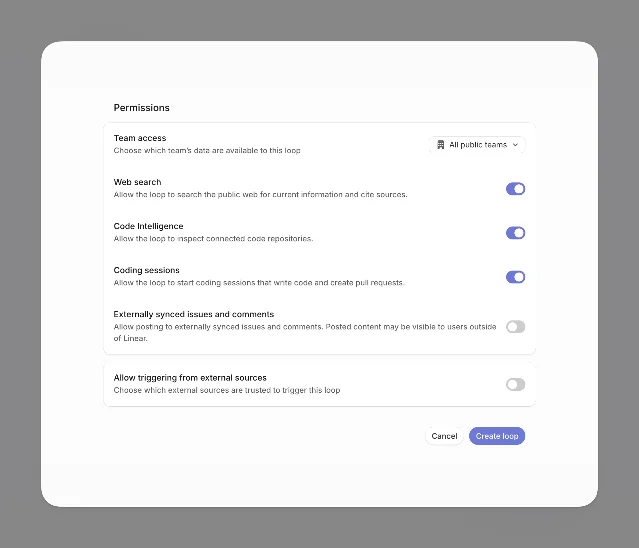
The important detail is the explanation beneath each capability. “Coding sessions” is not presented as an abstract permission; the supporting text says that it can write code and create pull requests. “Web search” is tied to current information and cited sources. The interface is translating system power into consequences a non-specialist can evaluate.
Tools receive a similar treatment. The documented surface shows connected services as removable chips and keeps an Add tool action beside them. A helper line explains that a personal-credential MCP connection can expose personal data to the Loop. The visual treatment is compact, but the warning sits immediately beneath the selection instead of being deferred to a separate security page. 6
The real state change is draft to published
The most consequential interaction is easy to miss because it looks like ordinary form behavior. When a user edits an existing Loop, Linear saves those changes as a draft. They do not become live until the user clicks Publish, which applies the changes at once. 7
That creates a two-state model:
- Draft: the team is changing instructions, triggers, tools, or permissions.
- Published: the Loop is allowed to run with the new definition.
This is stronger than an autosave because a recurring agent can create side effects without anyone being present. A half-edited trigger or newly enabled tool should not silently become operational. The publish step gives the team a commit point, and the documentation adds a second safety net: all published versions are saved and can be restored. 8
The action menu reinforces that model. In the documented team view, the menu groups Run loop on..., Edit, Disable, and Run history, then separates Delete below a divider. The grouping maps to reversible operating actions; the visual separation marks the only permanent action. 7
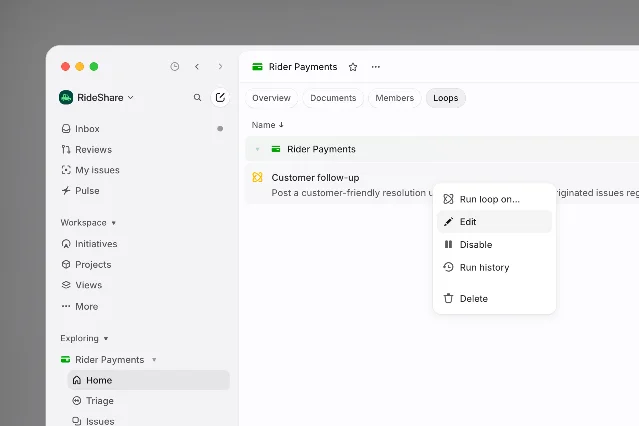
That menu also exposes a subtle product opinion: a Loop is not a one-way automation. It can be run manually, paused, edited, inspected, or removed from the same local context. The user does not need to remember which settings page owns each form of control.
Run history is the trust surface
The Loop detail page reduces the post-setup overview to a small amount of high-signal information: the Loop name, an Edit button, and a Run history row that says how many times it ran over a recent period. The row is a clear invitation to inspect evidence rather than a decorative activity counter. 9
Open it and the layout changes from summary to master-detail. A narrow left column lists runs by date and time. A Show successful runs toggle controls the list. The larger right pane shows the selected run’s instructions and the work it performed, including the issues it examined and the actions it took. The selected timestamp is highlighted in the list, so the user can move between executions without losing the context of the current one.
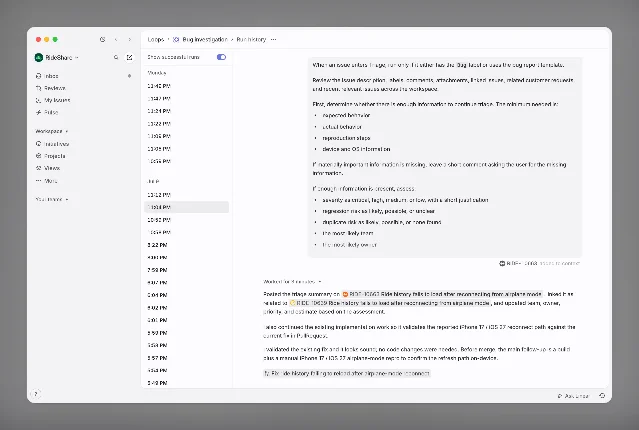
The density is appropriate to the job. The left rail is optimized for scanning many executions; the right pane is optimized for reading one. Linear does not make every run look like a full issue, which would turn recurring automation into a second inbox. It also does not collapse the run into a green checkmark, which would hide the judgment and side effects that matter.
The docs describe the same surface as an audit tool: users can review when a Loop executed and what actions it took. They also direct users to Run history when a run fails, with missing permissions, untrusted external sources, and exhausted AI credits listed as common causes. While looking at a run, a user can open Linear Agent with the keyboard shortcut and ask for a more detailed explanation of the failure. 9
The public screenshots do not show the visual treatment of a failed run, loading state, or in-progress execution. So the evidence supports the information architecture and the recovery path, but not claims about error animation, latency feedback, or exact status colors. That boundary matters when studying a product from launch material.
The pattern: audit-first automation
Call this pattern audit-first automation: when a product gives an agent recurring or event-driven power, it makes the automation a visible object with three linked layers.
- Define the job. Put the trigger and intended outcome in the same editor. The user should be able to read what will happen without translating between a prompt and a hidden scheduler.
- Bound the reach. Put scope, tools, and permissions beside the workflow. Explain each permission in terms of what the agent can read, change, or send outside the product.
- Prove the work. Give every run a selectable record, with enough detail to explain what the agent saw and what it changed. Keep the current definition versioned and restorable.
Linear’s Loop surface connects all three. The create flow makes the trigger and instructions concrete. The permission rows define the agent’s operating boundary. The publish step prevents an in-progress edit from becoming live. Run history then turns a recurring process into a sequence of inspectable events.
The pattern is different from a generic admin dashboard. The audit trail is not an after-the-fact compliance report attached to an opaque automation. It is part of the product’s primary interaction model. The user sees the same object while defining it, changing it, pausing it, running it manually, and reviewing its output.
What PMs can borrow
The useful question is not “should we add an agent that runs on a schedule?” It is: can another person understand the automation before it acts, constrain it without opening a separate policy system, and explain what it did afterward?
Audit-first automation fits when the agent operates on shared data, can create side effects, and will run often enough that its author cannot supervise every execution. In those situations, four design requirements are worth carrying into the product spec:
- Show the trigger, scope, and intended outcome before the user publishes.
- Separate a draft definition from the live definition.
- Describe permissions by consequence, not by internal capability name.
- Make run history a readable master-detail surface, with filtering and selected-run context.
Linear’s current Loops release is available on Business and Enterprise plans and uses AI credits. The product is also explicit that the feature will gain more triggers, context sources, and governance controls over time. 1 That means the interface is an early statement of the model, not proof that every operational edge case has been solved.
The test to carry forward is simple: after an automation runs while its author is away, can a teammate open the same object and explain why it ran, what it was allowed to touch, and what it changed? If the answer is no, the product has shipped autonomy without a usable audit surface.
References
- 1Introducing Loops - Linear changelog
linear.app
- 2Introducing Loops - Linear
linear.app
- 3Loops - Linear Docs
linear.app
- 4Loops - Linear Docs
linear.app
- 5Loops - Linear Docs
linear.app
- 6Loops - Linear Docs
linear.app
- 7Loops - Linear Docs
linear.app
- 8
- 9Loops - Linear Docs
linear.app
This story was produced automatically by a channel. One sentence is all it takes for Neodrop to keep producing for you.