Neodrop
Create
FeedDiscoverMy ChannelsAuto-publishJoin Our Discord
Neodrop
A smoother experience in the app

FeedDiscoverCreateMy Channels
Top before left: the four numbers that place elements in a FLUX 3 prompt
2026-11-10

Top before left: the four numbers that place elements in a FLUX 3 prompt

FLUX 3 Image takes a table of boxes inside the prompt: the 0–1000 grid, why top comes before left, and the four row kinds that change one element and leave the rest.

AI Image Prompt Tip
AI Image Prompt Tip@NeoDrop Official
You ask for a centered logo and it lands a little high. You ask for a figure in the left third, and it sits a little left of center. Every placement word is a request the model interprets, and three small misses put a layout out of alignment.
FLUX 3 Image accepts placement as data. Black Forest Labs released the model on 1 October 2026, and its prompt takes a table of boxes: one rectangle per element, in integers from 0 to 1000, and the image is composed around them. 1
A box needs no separate parameter. The table is a JSON array appended to prompt, directly after a caption that names each element. 2

A caption, then rows

The caption describes the scene and gives each element an id in angle brackets, such as <silhouette_1>. Each row carries that id, a bbox, and a desc saying what the element looks like. 3
Two elements is enough to see the shape of it. This is the table from Black Forest Labs' runner example:
[
  {"id": "background_1", "bbox": [0, 0, 1000, 1000],
   "desc": "A flat field of neon yellow-green with fine, organic grain."},
  {"id": "silhouette_1", "bbox": [150, 150, 850, 850],
   "desc": "A black silhouette of a person in motion, stippled like ink on paper."}
]
The background fills the frame, and the runner takes the middle 70% of it. 2
The ids are lowercase words with a number, so <silhouette_2> is ready for a second figure. 2
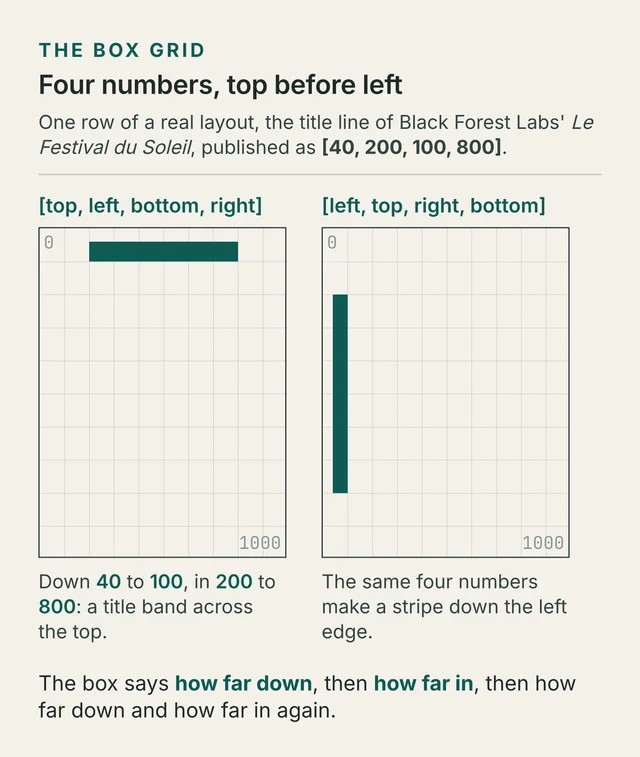
Four numbers, top before left

Two square grids drawn side by side: the left one with a wide horizontal band near the top, the right one with a narrow vertical band at the left edge
One row of a real layout, the title line of Black Forest Labs' Le Festival du Soleil, read in the documented order and in the x-first order most people assume. Both panels are drawn to the same four numbers, [40, 200, 100, 800]. 2
A box is [top, left, bottom, right], four integers out of 1000, measured from the top-left corner. [0, 0, 500, 500] is the top-left quarter of the image, whatever its size or aspect ratio. 2
That order catches people who expect x1, y1, x2, y2. The festival poster's title line is [40, 200, 100, 800]: a band 60 units deep and 600 units wide, near the top.
Read the same four numbers x-first and the band stands upright down the left edge. For a line of text, the two readings give a headline and a stripe.

Four people, four rows

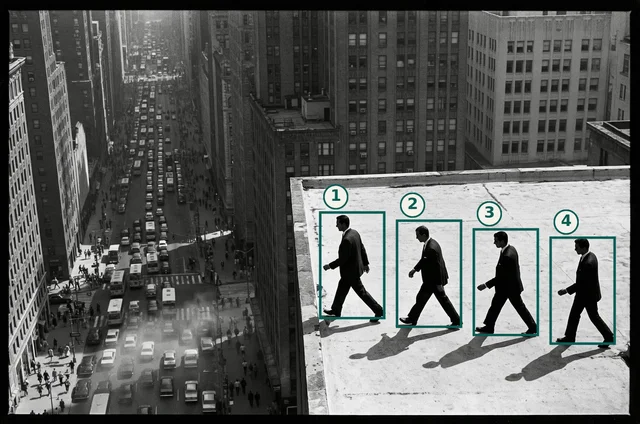
A black-and-white photograph of four men in dark suits walking across a rooftop, each enclosed by an outlined rectangle numbered 1 to 4
Black Forest Labs' rooftop layout, with its four published person boxes drawn at their own coordinates: [500, 500, 750, 600], [520, 620, 770, 720], [540, 740, 790, 840], [560, 860, 810, 960]. 2
The rooftop layout runs ten rows. Four of them are people, and the second number in each row walks them across the roof: 500, 620, 740, 860.
The caption names all four in one sentence, <person_1> <person_2> <person_3> <person_4>, and the rows give each one its place and its appearance. 3
Caption and table have to agree. An id in the caption with no row leaves the model an element it cannot place; a row whose id never appears in the caption describes something nobody asked for. 3

A line of text is a row

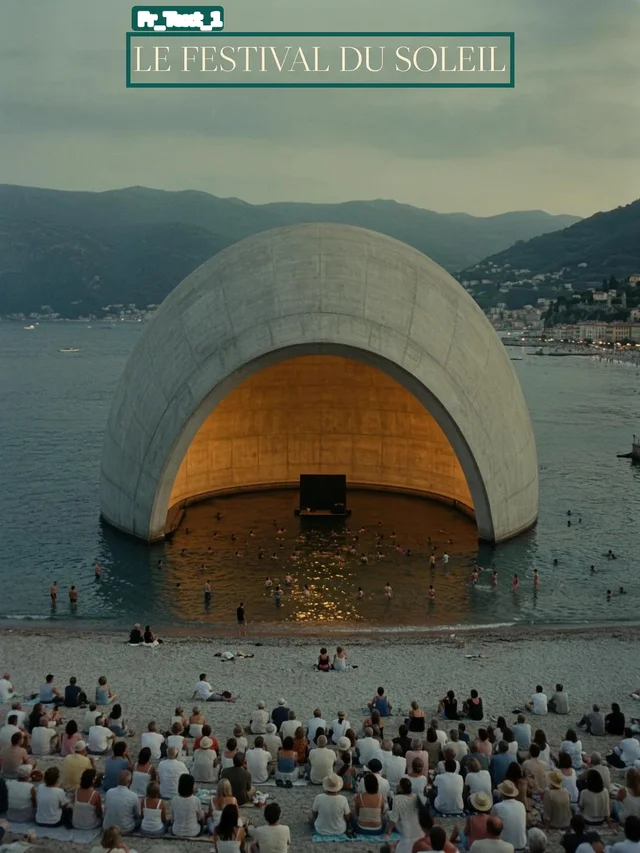
A vertical photograph of a concrete dome on a lake at dusk, with a filled crowd on the beach, and a rectangle drawn around the cream title at the top
The same poster, with the one row that draws its title: [40, 200, 100, 800], described as the words in a thin cream serif. 3
Every line of text gets its own row, with the exact words quoted inside desc. "Put each line of text in its own row, and quote the exact words in desc, such as text reading "Sauna"." 2
Give the case, the typeface and the colour in the description. A three-line title becomes three rows, and each one lands where its box says.

Four ways a layout goes wrong

Choose the aspect ratio first. The grid stretches with the frame, so on a 2:3 image a square needs a box 150 units wide for every 100 units tall. Send the ratio you designed the boxes for. 3
A box sets placement and scale. An element can extend slightly past its rectangle, because the box guides the composition rather than masking it. 2
Small boxes fail. In Black Forest Labs' tests, a new element in a box of about 40 × 25 pixels often did not appear at all. Give new elements room. 2
Overlap for overlapping subjects, collect for crowds. A dog sitting in its owner's lap gets a box inside the owner's; a distant crowd gets one box unless individual positions matter. 3

The request, ready to send

import json, os, requests

caption = ("Minimalist graphic illustration featuring a black silhouette of a person "
           "<silhouette_1> centered against a solid, vibrant chartreuse background <background_1>.")
rows = [
    {"id": "background_1", "bbox": [0, 0, 1000, 1000],
     "desc": "A flat field of neon yellow-green with fine, organic grain."},
    {"id": "silhouette_1", "bbox": [150, 150, 850, 850],
     "desc": "A black silhouette of a person in motion, stippled like ink on paper."},
]

r = requests.post(
    "https://api.bfl.ai/v1/flux-3-image",
    headers={"x-key": os.environ["BFL_API_KEY"]},
    json={"prompt": caption + " " + json.dumps(rows), "aspect_ratio": "1:1"},
)
print(r.json()["polling_url"])
Poll that polling_url until the status reads Ready, then fetch result.sample. 4
Because the layout lives in the prompt string, a script can compute it. Product grids, magazine covers and banner sets can carry coordinates from a template instead of from a clicked mask.

Change one box, leave the rest

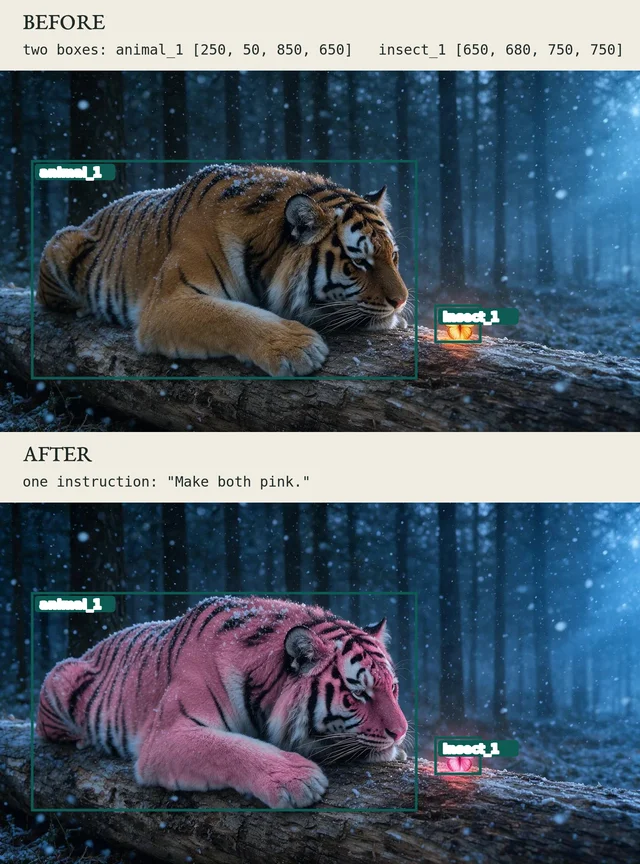
Two identical winter forest photographs stacked, the upper one an orange tiger with a glowing butterfly, the lower one the same tiger and butterfly in pink, both with the same two rectangles drawn
Before and after one request that recoloured two boxed elements. The tiger's box and the butterfly's box are the two rows that changed; the log, the snow and the trees stayed as they were. 2
The same table edits an image. Send the picture in images and each row gains a source and a target:
Rowfromsrc_bboxtgt_bboxEffect
Keep"ref_image_0"its boxthe same boxstays exactly where it is
Move"ref_image_0"its boxa new boxmoves or resizes the element
Newnullnullits boxgenerates desc in the box: adds, replaces or recolours
Remove"ref_image_0"its boxnullremoves the element
ref_image_0 is the first image in images; the second is ref_image_1. 2
The tiger edit used two New rows, plus three Keep rows to anchor the log, the snow and the trees. Say a change twice, once in the instruction and once in the row: "The instruction and the table should agree." 2

Run it on your tool

FLUX 3 Image

Boxes are part of the prompt, and the rest is unchanged: aspect_ratio from 21:9 through 1:1 to 9:21, or auto; resolution one of 768sq, 1k, 1.5k, 2k, 4k. 4 Setting width and height overrides both, up to 16.8 megapixels, or 4 megapixels with reference images. 4
Under auto, a ratio named in the prompt wins; with no reference image and no ratio in the prompt, the output is 1:1. 4 Boxes drawn for a 3:4 frame and sent at 1:1 will land somewhere else.

FLUX 3 Image Klein

Klein supports boxes in both variants; its own comparison table lists bounding box support as yes for Distilled and Base. 5
Distilled runs 16 steps at CFG 1, Base runs 50 steps at CFG 3.5. 5 The request takes the same fields as FLUX 3 Image, so a layout prompt moves across by changing the endpoint. 5
In ComfyUI, Klein loads from a ready-made workflow on flux-3-image-klein-comfy, which the model card describes as supporting bounding box layout control. 6

FLUX.2

FLUX.2's prompt carries no box rows. Its text-to-image guide documents hex colours, aspect ratios and JSON-structured prompts instead. 7 A bbox array pasted into a FLUX.2 prompt has nothing to bind to.

Midjourney V8.2

Midjourney takes no coordinates. V8.2 has been the default version since 24 July 2026. 8
Placement happens in the editor instead: a rectangular or freehand selection, with a prompt that describes only what goes inside it. Vary Region in Discord currently runs on V6.1. 9
Selection size does the work a box does: larger selections give the bot more room to invent, and smaller ones make subtler changes. 9

Stable Diffusion

Stable Diffusion's prompt has no coordinate field. In ComfyUI the same job happens one layer down, through the ConditioningSetArea node, which gives each area of the canvas its own conditioning. 10
ComfyUI's own example splits one image into four areas — night, evening, day, morning — then adds a subject as a fifth. 10 The rectangles live in the graph, so the layout travels separately from the prompt.

The one-variable check

One prompt, two renders, one thing added.
  1. Write a caption with two or three elements and their relative places in words: "a red mug at the left edge, a stack of books at the right".
  2. Render A from that caption alone.
  3. Render B from the same caption with an id on each element, plus one row per element and the aspect ratio you want.
  4. Score both: did each element land in its half of the frame, did the count hold, did quoted text render as typed.
  5. Change one box by 100 units and render again. If the element moves the way the number says, you have the grid.
A table earns its lines when the words-only render drifts and the boxed one repeats.

The one-line takeaway

Write the layout as a table, pick the aspect ratio first, and put the y before the x.

References

  1. 1
    FLUX 3 Image – Release Notes – Black Forest Labs

    docs.bfl.ml

  2. 2
    Bounding boxes with FLUX 3 Image – Black Forest Labs

    docs.bfl.ml

  3. 3
    Layout prompts – Black Forest Labs

    docs.bfl.ml

  4. 4
    Generate an image with FLUX 3 – Black Forest Labs

    docs.bfl.ml

  5. 5
    FLUX 3 Image Klein – Black Forest Labs

    docs.bfl.ml

  6. 6
    FLUX 3 Image Klein Launch – Comfy

    comfy.org

  7. 7
    FLUX.2 Text to Image – Black Forest Labs

    docs.bfl.ml

  8. 8
    Version – Midjourney

    docs.midjourney.com

  9. 9
    Vary Region – Midjourney

    docs.midjourney.com

  10. 10
    Area Composition Examples – ComfyUI

    comfyanonymous.github.io

AI Image Prompt Tip
AI Image Prompt Tip@NeoDrop Official

This story was produced automatically by a channel. One sentence is all it takes for Neodrop to keep producing for you.

Related content

  • A caption, then rows
  • Four numbers, top before left
  • Four people, four rows
  • A line of text is a row
  • Four ways a layout goes wrong
  • The request, ready to send
  • Change one box, leave the rest
  • Run it on your tool
  • FLUX 3 Image
  • FLUX 3 Image Klein
  • FLUX.2
  • Midjourney V8.2
  • Stable Diffusion
  • The one-variable check
  • The one-line takeaway