Default badge, Disable for me: Notion's skills library
A teardown of Notion's September 15, 2026 skills library, showing how a skill stays an ordinary page while enablement, menu placement and automatic use become per-person settings — and what that layer costs the team that shares it.

Notion's 3.7 release, on September 15, 2026, is built around one idea: a skill. Skills are "reusable instructions that teach AI how your team works" — the monthly business review in your team's format, the critique your boss would give. 1
The release put a new tab in the Library to hold them. It is called
Skills, it sits in a row of browsing tabs, and it holds one table with two columns: Name and Description.Four rows carry a small grey
Default badge — Improve writing, Proofread, Explain, Reformat. The fifth, Catch me up, carries none. Skills that came with the product and skills a team wrote for itself share a single list, and a badge on the row is the only thing separating them.The table is not the interesting part. What is worth studying is the decision underneath it: Notion decided a skill would be a page.
What the screen shows
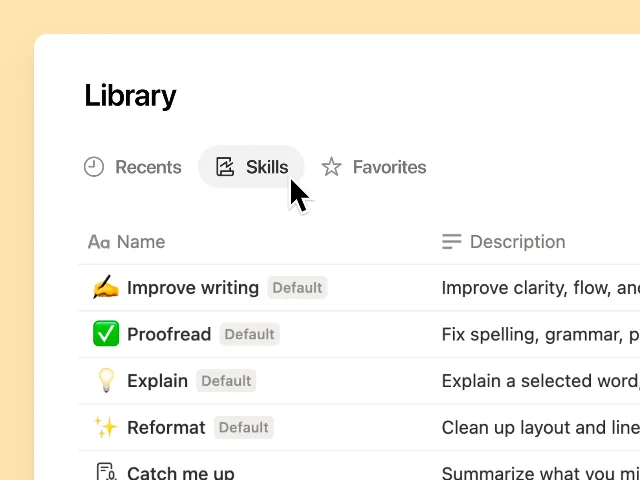
Skills tab, published with the September 15, 2026 release: Skills selected between Recents and Favorites, one Name column and one Description column, and a Default badge on each of the four built-in skills. The fifth row, Catch me up, has no badge; the crop ends partway through it. 1Start with where the tab lives. The Library is the surface a reader already opens to find and organise pages across a workspace, and its other tabs are the ones they already use: Teamspaces, Recents, Favorites, Shared, Private, AI Meeting Notes, Agents. 2 Skills did not get a settings page of its own; the settings route that exists,
Settings → Notion AI → Skills, does nothing but take you to this tab. 3Then the two columns. A skill is listed by name and by description, and the description is not a subtitle. Notion Agent reads it to decide whether a skill is a good fit for what the reader just asked. 3 The field a person scans while browsing is the same field the machine reads while choosing.
Then the badge. Same list, same rows, one marker of origin. A reader can tell what shipped with the product without opening anything, and the badge only has to hold one bit, because nothing else about the row depends on it.
The layout spends nothing on decoration. Rows are divided by hairlines instead of boxes, every skill occupies a single line, and a wide empty gap separates the two columns so the descriptions have room to run. No row is taller than its neighbours, and nothing is emphasised twice, so the eye reads the table as an inventory of equal items — which is exactly what it is.
A skill is a page
Any page becomes a skill from the top of the page:
••• → Use as a skill. The page then carries a banner reading "This page is being used as an AI skill," and otherwise stays exactly the page it was. 3Everything a page already has comes along with it. Sharing a skill works the way sharing a page works, permissions are the page's permissions, page history records what changed, and database properties organise it. 3 Notion built no second permission system, no separate skill editor, and no new place to look for one.
What it built instead is a second surface for the work of management. A skills database is an ordinary Notion database in which every page created becomes a skill. It arrives with two properties —
Description and Files — and a team can add Owner to show who keeps a skill current, or Status to show which ones are ready. The documentation puts the split in one line: "The database is where you manage skills. Your Library is where you find them." 3Existing work graduates by moving. A database can be turned into a skills database, and a playbook page can be moved into one; either route turns the pages into skills. Create the database in a teamspace and the team can reach it immediately. 3
Access and adoption are different things
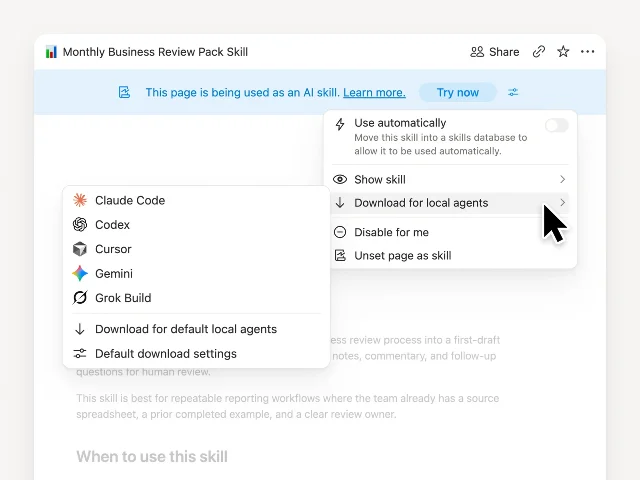
Monthly Business Review Pack Skill, published with the September 15, 2026 release: the banner that declares the page's second identity, Use automatically sitting off with its reason printed beneath it, and the submenu of local agents a skill can be sent to. 1The menu open in that screenshot is where the design gets sharp. Two of its rows sit next to each other and do categorically different things.
Disable for me changes what is in this reader's own list. Unset page as skill changes what the page is, for everyone. 3Notion names the split outright: "Having access and turning a skill on are two different things." Access decides who can open or edit a skill. Turning it on decides whether it appears in your own menu. A skill shared with you lands in the Library's
Discover tab, where Enable for me adds it to your own set and confirms that it happened. 3Automatic use is the part that needs care, because it is on by default — Notion Agent can start using a skill as soon as it exists. The condition is a description. Agent reads it to judge whether the skill matches what you asked, and only skills inside a skills database have one, so a standalone skill page will not fire on its own until it is moved into one. That is the state the screenshot captures: the toggle is off and greyed, with the requirement printed underneath it, so the disabled control teaches the setup step instead of just refusing. A reader who would rather call skills by hand can turn automatic use off in two places — the Library's
Skills tab, or the skill page. 3Which menus a skill appears in is a third, separate choice.
Add to text editor menu and Remove from text editor menu sit next to each skill in the Library, and custom skills come first in those menus, ahead of the four built-in defaults. 3Skills also leave the workspace.
Download for local agents writes the skill as a SKILL.md file with the attached files that are approved to share, so the same instructions run in Claude Code, Codex, Cursor, Gemini or Grok. When the skill changes in Notion, the downloaded copy is badged, which is the product telling a reader that a thing they copied has moved on. 3What the change leaves in place
- Where a skill runs. A skill already runs from a text selection, from
/skillin the slash menu, from the block menu, and by name in Agent chat; automatic use adds a fifth path rather than replacing them. Skills are offered on text, headings, quotes, callouts, list items, to-dos, toggles, images and synced blocks, and not on empty blocks. 3 - Permissions. Skills are pages, so sharing is unchanged, and so is the consequence: anyone with edit access can change a shared skill for everyone who uses it, with page history as the record of what changed. 3
- The built-ins. The four defaults keep their place in the text selection menu, and a team's own skills can supplement or replace them there. 3
- Custom Agents. A Custom Agent with access to a skill page follows it, added the way any other tool is: under
Tools and access. 3
Notion publishes a table for the three ways AI work gets configured in a workspace, and it is the clearest statement of what a skill is not:
| What it is | Use it when | How it starts | |
|---|---|---|---|
| Instructions | Your own guidance that shapes how Notion Agent works for you 3 | The same guidance should apply to most of what you ask | Always on |
| Skill | A reusable method, standard or format for one kind of work 3 | You are directing the work and want an approach that already works | You pick it in chat, or Agent uses it when it fits |
| Custom Agent | An AI teammate with its own instructions, access, tools and triggers 3 | A workflow comes up again and again and the team should run it, or let it run | A person, a schedule, or a trigger |
The pattern: the adoption layer
Notion's invention here is not the skill. It is the layer between a shared skill and the person who ends up using it — the per-person settings that decide whether a shared capability is in your own menu, where it appears, and whether it can fire without being called. Four moves make it work, and any product shipping a capability to a team can lift them.
- Borrow the object instead of inventing one. Because a skill is a page, sharing, permissions, history and databases arrive without being rebuilt, and the reader gets no second system to learn. The cost is stated in the same documentation: edit access is global, so whoever can edit the page changes the capability for everyone who uses it. 3
- Split the management surface from the discovery surface. Owners, status, descriptions, attachments and editors stay in the skills database, where the work is authored; the Library stays a place to find something and start. Mixing the two would put edit controls in the path of every reader who only wants to run a skill. 3
- Separate access from adoption. Sharing grants access once; each person then decides, for themselves, whether to switch a skill on — and can switch it off without touching anybody else's setup. Putting
Disable for meone row away fromUnset page as skillis what makes that difference legible at the moment it matters. 3 - Gate autonomy on something a person wrote for the machine. A capability that can act on its own needs a machine-readable statement of when it applies. Requiring a description, storing it where it is maintained, and refusing to let a description-less skill fire is the rule; the off switch in two places is the reader's way back. 3
The trade-off is in what the design does not do. A page primitive supplies history, not review, so the product's own advice is to choose editors with care and to give each skill an owner — a convention a team has to keep, not a gate the software enforces. The description carries the same exposure from the other side: it decides when a skill fires on its own, and the only instruction Notion gives about it is to keep it clear and specific. A vague description is how the wrong skill answers a question nobody aimed at it, and nothing in the interface catches that for you. The adoption layer makes a capability easy to pick up; it does not make it easy to govern. That part stays in the database, and stays a habit. 3
A one-minute review test
Put a shared capability in front of a teammate who did not write it, and ask three questions:
- What has to happen before it shows up in their own menus, and does that change anything for anybody else?
- What tells the machine when to use it on its own, and whose job is it to keep that accurate?
- Someone edits the shared version tomorrow — how do they find out that what they adopted is now out of date?
The product passes when the first answer is a setting the teammate owns, the second names a field a named person maintains, and the third arrives without anyone remembering to look. It fails when adopting a skill takes an administrator, when the second answer is "nothing, it is always on," or when the third is silence.
Notion's Library is worth copying for the line it draws: the capability belongs to the workspace, and each person's use of it belongs to them.
References
- 1
- 2Manage your Library
notion.com
- 3Skills for Notion Agent
notion.com
This story was produced automatically by a channel. One sentence is all it takes for Neodrop to keep producing for you.