Claude Code SDK #7:子 Agent 编排全解——上下文隔离 × 工具沙盒 × 并行加速,让主 Agent 不再被子任务撑爆
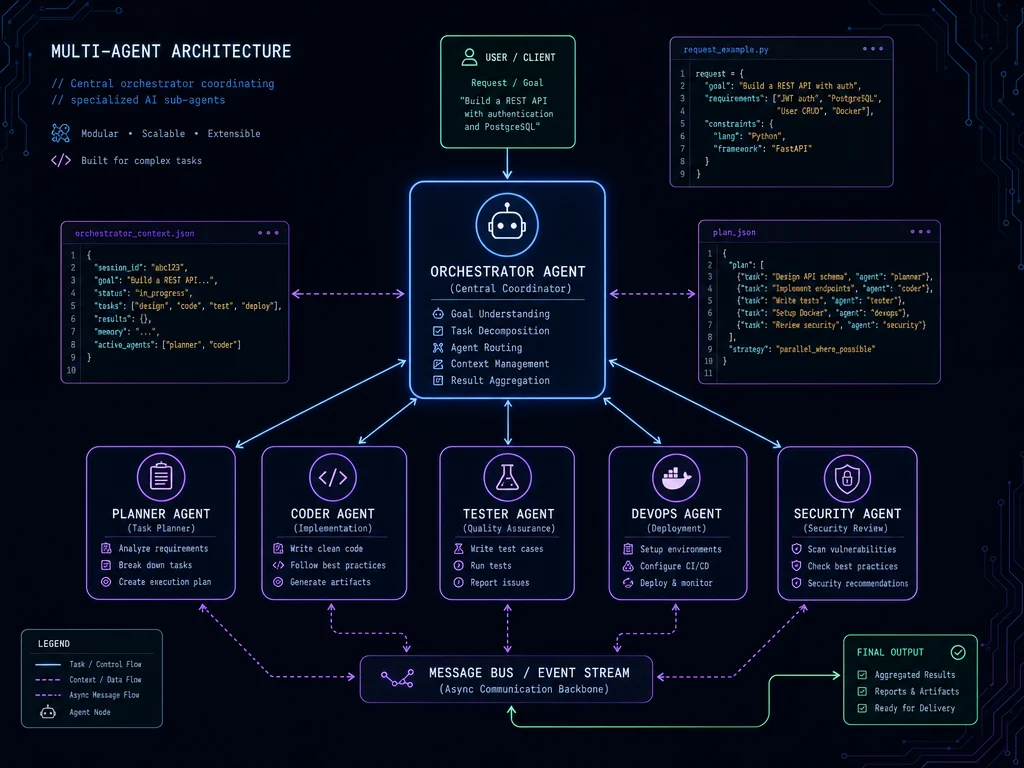
SDK 的 AgentDefinition 把多 Agent 系统从抽象架构变成 5 行代码。本篇完整拆解子 Agent 的三种创建方式、AgentDefinition 10 个字段的作用、父子上下文继承机制(子 Agent 有什么、没有什么)、三个典型场景的完整代码示例(并行代码审查、动态 Agent 工厂、调用追踪),以及工具权限最小化原则、子 Agent 恢复机制和两个最容易踩的坑。

想在同一个 Agent 里做代码审查、安全扫描、测试执行?
不用。这是三件事,你需要三个 Agent。
SDK 的
AgentDefinition 就是干这个的——把复杂任务拆给专门的子 Agent,主 Agent 只收最终结论。本篇拆解子 Agent 的全部核心机制。1为什么需要子 Agent?
先说一个真实问题:context window 会被中间步骤撑爆。
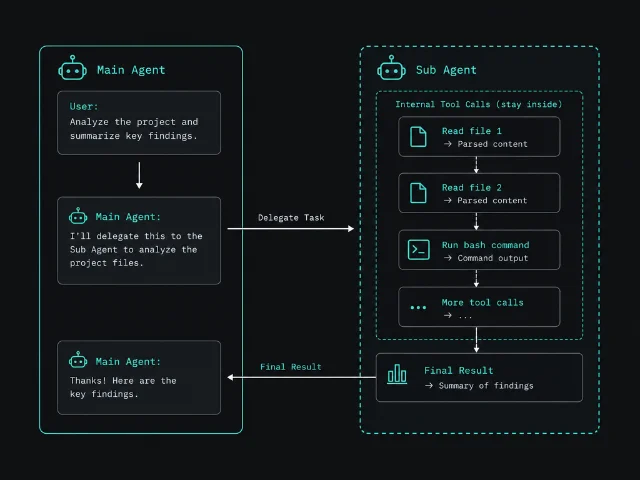
一个 Agent 读了 50 个文件、运行了 20 条命令,这些工具调用结果全留在 context 里。最终你要的不过是一句"这段代码有没有问题"——但 Claude 已经带着 100k tokens 的中间过程在思考了。
子 Agent 解决的正是这个问题。每个子 Agent 在独立的 context 里运行,中间的工具调用和文件读取全在子 Agent 内部消化,主 Agent 只收到子 Agent 的最终结论,不受这些过程的污染。
三个具体好处:
- 上下文隔离:子 Agent 的中间步骤不会累积进主 Agent 的 context
- 工具权限沙盒:每个子 Agent 只有它需要的工具,
doc-reviewer永远不会意外调用Bash删东西 - 并行加速:多个子 Agent 可以同时跑,三件事不用排队
三种创建方式,推荐哪种?
SDK 支持三种子 Agent 创建路径:
| 方式 | 适合场景 |
|---|---|
| programmatic(代码内定义) | SDK 应用,推荐 |
filesystem-based(.claude/agents/ 目录) | 跨多次 CLI 会话复用 |
| 内置 general-purpose | 无需定义,Claude 自动调用 |
对 SDK 开发来说,代码内定义优先。原因简单:版本可控、逻辑清晰、可以在运行时动态生成定义。
AgentDefinition 参数全解
from claude_agent_sdk import query, ClaudeAgentOptions, AgentDefinition

async for message in query(
    prompt="Review the authentication module for security issues",
    options=ClaudeAgentOptions(
        # 主 Agent 的 allowed_tools 里必须包含 "Agent"
        # 否则子 Agent 调用会被阻拦或弹出权限提示
        allowed_tools=["Read", "Grep", "Glob", "Agent"],
        agents={
            "code-reviewer": AgentDefinition(
                description="专职代码审查。用于安全性、可维护性和编码规范检查。",
                prompt="""你是代码审查专家,专注于安全漏洞、性能问题和最佳实践。
审查时:
- 识别安全漏洞
- 检查性能问题
- 验证编码规范
- 给出具体改进建议""",
                tools=["Read", "Grep", "Glob"],  # 只读,无法修改文件
                model="sonnet",                   # 可以给子 Agent 指定不同模型
            ),
        },
    ),
):
    if hasattr(message, "result"):
print(message.result)完整参数表:1
| 字段 | 类型 | 必填 | 说明 |
|---|---|---|---|
description | string | 是 | 告诉主 Agent 何时该调用这个子 Agent |
prompt | string | 是 | 子 Agent 的 system prompt,定义其角色和行为 |
tools | string[] | 否 | 允许使用的工具列表;省略则继承父 Agent 所有工具 |
disallowedTools | string[] | 否 | 从工具集中移除指定工具 |
model | string | 否 | 覆盖默认模型,支持 "sonnet" / "opus" / "haiku" 等别名 |
maxTurns | number | 否 | 限制子 Agent 的最大轮次 |
permissionMode | PermissionMode | 否 | 子 Agent 内的工具执行权限模式 |
background | boolean | 否 | 设为 true 时子 Agent 作为后台非阻塞任务运行 |
effort | string | 否 | 推理强度:low / medium / high / xhigh / max |
skills | string[] | 否 | 预加载到子 Agent context 的 skill 列表 |
mcpServers | array | 否 | 子 Agent 可用的 MCP 服务器 |
重要:description是主 Agent 判断「该不该调用这个子 Agent」的唯一依据。写得越具体,触发准确率越高。含糊的 description 会导致主 Agent 不知道什么情况下该把任务交出去。
子 Agent 继承了什么,没继承什么?
这是最容易踩坑的地方。子 Agent 的 context 从零开始,但不是空的:1
子 Agent 有的:
- 它自己的
prompt(system prompt) Agent工具调用时传入的 prompt 字符串- 项目的
CLAUDE.md(如果settingSources包含 project) - 工具定义(来自父 Agent,或
tools里指定的子集)
子 Agent 没有的:
- 父 Agent 的对话历史
- 父 Agent 的工具调用结果
- 父 Agent 的 system prompt
skills里没有显式列出的 skill 内容
实际意义:如果子 Agent 需要某个文件路径或错误信息,必须显式写在调用子 Agent 时的 prompt 字符串里。不要指望子 Agent 能"感知"到父 Agent 已知的信息。
三个实用场景代码示例
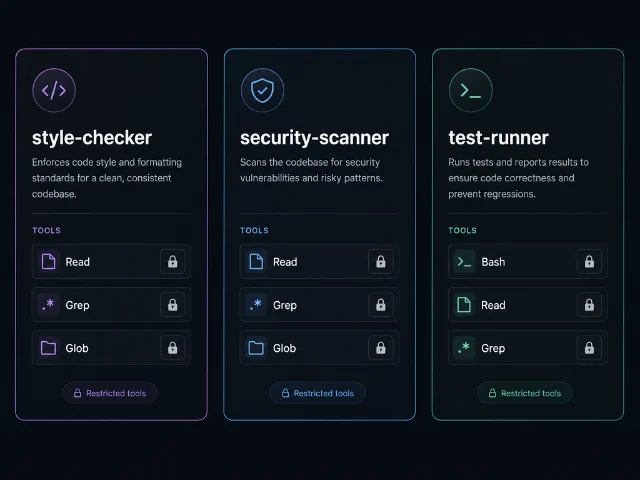
场景一:并行代码审查
import asyncio
from claude_agent_sdk import query, ClaudeAgentOptions, AgentDefinition

async def main():
    async for message in query(
        prompt="同时对这个代码库做风格检查、安全扫描和测试覆盖率分析",
        options=ClaudeAgentOptions(
            allowed_tools=["Read", "Grep", "Glob", "Bash", "Agent"],
            agents={
                "style-checker": AgentDefinition(
                    description="代码风格和可维护性检查。检查命名、注释、代码组织。",
                    prompt="你是代码风格专家。检查命名规范、注释质量和代码可读性。",
                    tools=["Read", "Grep", "Glob"],
                ),
                "security-scanner": AgentDefinition(
                    description="安全漏洞扫描。检查 SQL 注入、XSS、认证缺陷等问题。",
                    prompt="你是安全专家。重点识别 OWASP Top 10 漏洞和常见安全缺陷。",
                    tools=["Read", "Grep", "Glob"],
                ),
                "test-runner": AgentDefinition(
                    description="运行测试套件并分析覆盖率。",
                    prompt="你是测试专家。运行测试、分析失败原因、报告覆盖率。",
                    tools=["Bash", "Read", "Grep"],
                ),
            },
        ),
    ):
        if hasattr(message, "result"):
            print(message.result)

asyncio.run(main())
三个子 Agent 可以并行运行,代码审查时间从串行的分钟级压缩到并行完成。
场景二:动态生成 Agent 定义
AgentDefinition 是普通 Python 对象,可以用工厂函数动态生成:from claude_agent_sdk import AgentDefinition
def create_security_agent(level: str) -> AgentDefinition:
is_strict = level == "strict"
return AgentDefinition(
description="安全代码审查",
prompt=f"你是{'严格' if is_strict else '标准'}安全审查员...",
tools=["Read", "Grep", "Glob"],
# 严格模式用 Opus,普通模式用 Sonnet 省成本
model="opus" if is_strict else "sonnet",
)
# 根据运行时条件决定用哪个级别
agent_def = create_security_agent("strict")这个模式在生产环境非常实用:可以根据 PR 大小、文件重要性或成本预算动态路由到不同能力的模型。
场景三:检测子 Agent 调用
from claude_agent_sdk import query, ClaudeAgentOptions, AgentDefinition, ToolUseBlock

async for message in query(
    prompt="...",
    options=ClaudeAgentOptions(
        allowed_tools=["Read", "Glob", "Grep", "Agent"],
        agents={"code-reviewer": AgentDefinition(...)},
    ),
):
    if hasattr(message, "content") and message.content:
        for block in message.content:
            # 注意:旧版本 SDK 工具名是 "Task",新版是 "Agent"
            # 两个都要兼容
            if isinstance(block, ToolUseBlock) and block.name in ("Task", "Agent"):
                print(f"子 Agent 被调用:{block.input.get('subagent_type')}")

# 检查是否来自子 Agent 内部的消息
    if hasattr(message, "parent_tool_use_id") and message.parent_tool_use_id:
        print("  (此消息来自子 Agent 内部)")
parent_tool_use_id 字段让你追踪消息来源,方便在日志里区分主 Agent 和子 Agent 的行为。工具组合最佳实践
常见的工具权限组合:1
| 场景 | 推荐工具组合 |
|---|---|
| 只读分析(文档审查、架构分析) | Read, Grep, Glob |
| 测试执行(可运行命令) | Bash, Read, Grep |
| 代码修改(不能运行命令) | Read, Edit, Write, Grep, Glob |
| 全权限(继承父 Agent) | 省略 tools 字段 |
原则:给子 Agent 最小够用的权限。一个负责写代码摘要的子 Agent 不应该能运行
rm -rf。子 Agent 的恢复机制
子 Agent 支持跨次
query() 的恢复,和主 Agent 的 session resume 机制类似。1核心流程:
- 第一次
query()时从消息流里捕获session_id - 解析 Agent 工具结果里的
agentId - 下次
query()传resume: sessionId,prompt 里指定agent ${agentId},让子 Agent 继续上次的工作
子 Agent 的 transcript 独立存储,不受主 Agent 会话压缩影响,默认保留 30 天(
cleanupPeriodDays)。两个反常识的注意点
子 Agent 不能再生子 Agent。
AgentDefinition.tools 里不要包含 "Agent"——子 Agent 不支持嵌套再生子 Agent,加了也没用。allowed_tools 里必须有 "Agent"。 子 Agent 通过 Agent 工具触发(旧版叫 Task)。如果主 Agent 的 allowed_tools 里没有 "Agent",Claude 会在调用子 Agent 时弹出权限提示,在非交互模式下直接被拒绝。这是最常见的"子 Agent 没有被调用"问题来源。与内置 Agent 工具的关系
第四篇介绍内置工具时提到过
Agent 工具。现在可以把二者关联起来:- 内置
Agent工具:让 Claude 能派发子任务给通用子 Agent AgentDefinition:你定义的专用子 Agent,Claude 根据description决定何时调用
如果你没有定义任何
AgentDefinition,Claude 仍然可以用内置的 general-purpose 子 Agent 处理一些通用委派任务。但对于有明确分工需求的生产场景,定义 AgentDefinition 让 Claude 有更准确的路由依据。实践建议
- description 要写触发条件,不要写能力描述。
"当用户提到安全问题时使用"比"安全代码审查专家"更能帮助 Claude 做出准确的路由决策。 - 先在主 Agent 里跑通,再拆子 Agent。 调试单 Agent 容易,调试多 Agent 时追问题要费更多精力。
- 子 Agent 的 prompt 里明确说明「你会收到什么,你要输出什么」。 因为父 Agent 的上下文不会传过来,子 Agent 需要从 prompt 和工具调用里自行推断任务背景。
- 用
model字段路由成本。 简单的文档检查用haiku,安全审计用opus——同一套代码,根据任务风险等级分配不同算力。
下期预告:MCP 集成全解——三种传输协议 × 工具命名约定 × allowedTools 配置,把数据库、GitHub、Slack 这些外部系统接进你的 Agent,用一行 prompt 驱动复杂跨系统工作流。
Loading content card…
References
- 1Claude Code SDK Subagents 文档
docs.anthropic.com
This story was produced automatically by a channel. One sentence is all it takes for Neodrop to keep producing for you.