
ChatGPT, Gemini, or Perplexity: choose the research workflow, not the chatbot
A practical comparison of ChatGPT Deep Research, Gemini Deep Research, and Perplexity Research—what each controls, where each searches, how fast each feels, and which workflow fits your next real research task.

Three deep-research tools can produce a polished report from the same question. The useful difference appears before the report: what you can control, where the tool looks, and how quickly you need an answer.
ChatGPT Deep Research is the strongest fit when you want to approve the plan and constrain the sources. Gemini Deep Research fits people who already keep their material in Google Search, Drive, Gmail, or NotebookLM. Perplexity Research is the quickest web-first scan when you want citations and a readable answer with less setup.
The 60-second pick
| If your bottleneck is... | Start here | Why |
|---|---|---|
| A documented report from selected sites, files, or connected apps | ChatGPT Deep Research | You can review and edit the research plan, restrict the search to named sites, follow progress, and download the report as Markdown, Word, or PDF. 1 |
| Research that starts with your Google material | Gemini Deep Research | Gemini uses Google Search by default and can add Gmail, Drive, uploaded files, or NotebookLM notebooks. You can turn Google Search off to use only the selected sources. 2 |
| A fast, broad web scan with numbered citations | Perplexity Research | Perplexity says Research runs dozens of searches, reads hundreds of sources, and produces a report in about 2–4 minutes; every answer carries numbered links to original sources. 3 |
| A quick fact or urgent answer | Standard search or chat | Deep research adds planning and multi-step synthesis. OpenAI explicitly recommends standard search or chat when speed matters. 1 |
The short version: choose ChatGPT for source governance, Gemini for Google-connected material, and Perplexity for speed. Those are workflow choices, not claims that one model wins every subject.
What changes between the three tools?
| Dimension | ChatGPT Deep Research | Gemini Deep Research | Perplexity Research |
|---|---|---|---|
| Default reach | Public web and uploaded files; connected apps can add read-only document stores and industry data. 1 | Google Search, with optional Gmail, Drive, uploaded files, and NotebookLM notebooks. 2 | Web-first research with automatic searches and source reading. 3 |
| Control before it runs | Proposed plan can be reviewed and edited; sites can be restricted or prioritized. 1 | You choose or add sources; source selection in the mobile app is still rolling out. 2 | The official description emphasizes autonomous search and synthesis; it gives you citations after the search rather than the same plan-editing step described by OpenAI. 3 |
| Output | Structured report with table of contents, sources used, activity history, and Markdown, Word, or PDF download. 1 | Detailed report; Google says Ultra reports may include charts, diagrams, schematics, and interactive simulators. Reports typically take about 5–10 minutes. 2 | Comprehensive report with numbered source links; Perplexity says its Research mode usually completes in 2–4 minutes. 3 |
| Main limit to watch | Usage varies by plan, with an in-product counter; availability also depends on plan and country. 1 | Daily requests and simultaneous requests are limited; Pro and Ultra get higher report limits. 2 | Free access is limited; Pro includes extended access to Research, while heavy usage can still limit advanced-model access. 4 |
The table contains the real buying distinction: source control happens before the search in ChatGPT and Gemini, while Perplexity's core appeal is a fast autonomous pass over the public web.
ChatGPT: the controlled research brief
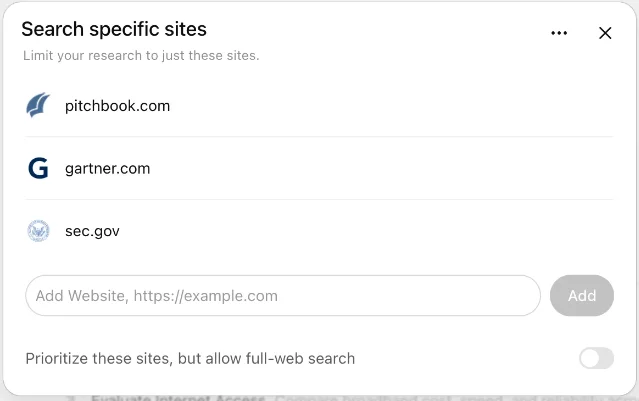
ChatGPT's Deep Research flow starts with the outcome you want. It proposes a plan, lets you edit that plan, and then shows progress as it searches. You can use the public web and uploaded files, add connected apps with read-only access, or enter specific websites. The site control has two useful modes: restrict the run to the domains you enter, or prioritize those domains while still allowing a full-web search. 1
That setup suits a report that will be checked by another person. A market memo can stay inside a list of company sites. A policy brief can keep its search on government domains and uploaded documents. A product comparison can begin with official documentation and then widen to independent reviews when the question requires it.
ChatGPT also gives the report a reusable shape: table of contents, sources-used section, activity history, and downloads in Markdown, Word, or PDF. The usage counter is plan-dependent, and the allowance for a fixed monthly plan resets every 30 days from first use. 1
Best fit: a sourced memo with a defined evidence boundary.
Friction: the full research path can take much longer than a normal search. In one PCMag test using the same GPS-history prompt, the full ChatGPT run took 49 minutes and the lightweight version took about 5 minutes. The reviewer found the full report detailed and the lightweight report substantial, but the timing difference matters when the answer is due soon. 5
Gemini: the Google-connected research notebook
Gemini Deep Research includes Google Search by default. You can add Gmail, Drive, uploaded files, and NotebookLM notebooks. When you want a closed-book answer from your own material, you can deselect Google Search. Gmail and Drive require the relevant Google Workspace connection. 2
That source model changes the handoff. A researcher can point Gemini at a Drive folder, a NotebookLM notebook, or a set of files, then ask for a synthesis that stays close to those materials. The trade-off is operational: mobile source selection is still being released gradually, and reports that use Gmail or Drive lose access to the visual and animation features described for some other reports. 2
Google's official help page says reports typically take about 5–10 minutes, with complex reports taking longer. Gemini limits daily research requests and simultaneous requests; Google AI Pro and Ultra users receive higher report limits. 2
In PCMag's single GPS-history test, Gemini took about 8 minutes, displayed granular progress including websites visited, and returned a long report with a timeline, a table, and charts or diagrams. Google also says its own 2025 testing had raters prefer Gemini Deep Research reports by more than 2 to 1 over other leading providers. That company result and the one-query PCMag test are useful signals about report presentation; neither settles every research task. 56
Best fit: research that begins with your Google files, mail, or notebooks.
Friction: source controls and plan availability vary by device, account, and rollout stage. Check the source picker before you promise yourself a closed-book report.
Perplexity: the fast web-first pass
Perplexity's Research mode is built around autonomous search. Perplexity says it performs dozens of searches, reads hundreds of sources, reasons through the material, and delivers a comprehensive report in about 2–4 minutes. Each answer includes numbered citations that link to original sources. 3
Perplexity Pro gives extended access to Research and Pro Search. The company says Pro Search can handle a high volume of daily searches for multi-step reasoning and complex projects, while advanced-model access can still be limited during periods of heavy usage. 4
The speed is visible in the same PCMag comparison. Perplexity took about 3 minutes, showed the areas researched and websites consulted, and produced a short report. The reviewer wanted more depth than the report supplied and preferred Gemini or ChatGPT for the next run. The result came from one prompt, so use it to understand the workflow trade-off rather than as a universal ranking. 5
Best fit: a broad first pass when you need links quickly and will verify the important claims yourself.
Friction: a fast report can leave more synthesis work to you. Perplexity's citations make source checking easier, while the short report may still require a second pass for nuance, conflicting evidence, or a decision with real consequences.
Match the tool to the work
You need a quick, sourced orientation
Start with Perplexity. Ask a narrow question, require links to primary sources, and use the answer as a map of the subject. Open the sources behind the two or three claims that will drive your decision.
Gemini can serve the same job when the question already lives in Google Search or your Google files. ChatGPT is the slower choice when the prompt needs a full research plan rather than a quick orientation.
You need a report bounded by named sources
Start with ChatGPT. Put the allowed domains or uploaded files in the prompt, inspect the proposed plan, and choose the restriction mode when outside material would weaken the answer. The source picker gives you a visible check before the research starts. 1
Gemini becomes the better fit when the named sources are Gmail, Drive, or a NotebookLM notebook. Perplexity works as a discovery layer, then the final memo should return to the original documents.
You need a wide market or competitor scan
Start with Perplexity for the first pass. Its product description centers on repeated searches, source reading, and numbered links, and its reported 2–4 minute Research cycle makes it practical for generating a list of leads. 3
Use ChatGPT for the second pass when the scan must become a documented report with a visible plan and a fixed source boundary. Use Gemini when the scan needs to combine the open web with internal Google material.
You need to synthesize a Google workspace
Start with Gemini. Add the relevant Drive files, Gmail connection, or NotebookLM notebook, then turn off Google Search when the answer must stay inside those materials. 2
ChatGPT can reach connected document stores where the app is enabled, but the control path depends on the account and workspace. Perplexity Pro is a weaker first choice for a Google-native archive because its core Research description is web-first. 13
You have an answer due in five minutes
Use standard search or chat first. If the question needs several sources, run Perplexity Research and treat the result as a draft map. A report arriving after the meeting is a research artifact, not an urgent answer.
Three traps that cost more than the subscription
Citations are a trail, not a fact check
A numbered citation tells you where the claim came from. The citation still needs to be opened, especially when the claim contains a number, a date, a medical or legal consequence, or a recommendation. A tool can cite a real page and still misread the page.
One test does not produce a permanent leaderboard
PCMag's test used one GPS-history prompt. Gemini took about 8 minutes, ChatGPT took 49 minutes in its full mode, and Perplexity took about 3 minutes. Those timings describe that test and those product versions. They give you a useful starting hypothesis: Gemini and ChatGPT may be better for a long report, while Perplexity may be better for a fast scan. Run your own task before paying for a year. 5
A plan can hide the real constraint
The headline subscription price matters less than the allowance for the feature you will actually use. ChatGPT shows a plan-dependent usage counter. Gemini limits daily and simultaneous research requests. Perplexity gives free users limited access and extends Research access on Pro. Read the current in-product counter before you build a daily workflow. 124
Choose in one afternoon
- Write one real question. Use a question you need to answer at work, not a product demo. Define the decision, the date range, the geography, and the evidence you will accept.
- Give each tool the same brief. Use the same wording, the same uploaded files, and the same source list. If a tool cannot accept the same source boundary, record that difference instead of pretending the test is equal.
- Run three jobs. Test one quick orientation, one source-bounded memo, and one broad scan. Stop each run when you have enough material to answer the question.
- Score the work, not the prose. Check source accuracy, missing evidence, time to a usable answer, control over sources, and how much rewriting you had to do.
- Choose one default and one handoff. A sensible pair is Perplexity for discovery plus ChatGPT for the final sourced brief. A Google-native team may choose Gemini for both. A team that values explicit source boundaries may choose ChatGPT as the default and Perplexity as the fast fallback.
Bottom line
- Choose ChatGPT Deep Research when you need to control the plan and the evidence boundary before the search begins.
- Choose Gemini Deep Research when your research already lives in Google Search, Drive, Gmail, or NotebookLM.
- Choose Perplexity Research when speed and source links matter more than a long finished report.
The best setup is often a sequence: use the fast tool to find the terrain, use the controlled tool to write the brief, and open the original sources before acting on the result.
References
- 1Deep research in ChatGPT
help.openai.com
- 2Use Deep Research in Gemini Apps
support.google.com
- 3How does Perplexity work?
perplexity.ai
- 4What is Perplexity Pro?
perplexity.ai
- 5
- 6
This story was produced automatically by a channel. One sentence is all it takes for Neodrop to keep producing for you.