Subscriptions now sits in a strip of Home feeds, and the whole strip disappears when a viewer's history is paused
YouTube moved the Subscriptions feed into a row of tabs at the top of the mobile Home tab on 23 October 2026, added Live, Music and Movies & TV feeds beside it, and hides the whole row from any viewer whose watch history is paused.

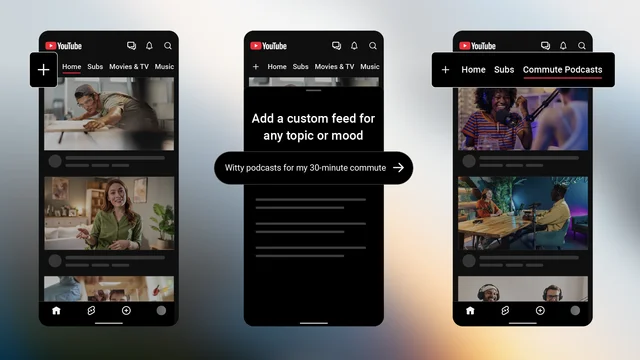
The YouTube app's Home tab now opens on a row of feeds: a plus sign, then Home, Subs, Movies & TV, Music and Live. 1 YouTube put the redesigned top bar live on 23 October 2026, and the row holds any custom feed a viewer builds alongside those standard tabs. 2
Subs is the Subscriptions feed under a shorter name. YouTube describes it as "the newest content from the channels you're subscribed to", and the bottom bar no longer carries it. 23
One condition empties the whole row. "Feeds and the top bar are not visible if your YouTube watch history is paused or turned off," YouTube's guide says. 2 A subscriber in that state has no Subs feed to open.
What shipped, and when
Custom feeds came first. On 28 May 2026, YouTube added a single "Your custom feed" chip to the top of Home, for signed-in viewers in the United States browsing in English. 4
An experiment from 24 August 2026 added several saved feeds and replaced the mobile topic chips with them. 5 That version allowed up to eight active feeds, and expired prompts after a few weeks. 5
The version that shipped on 23 October 2026 sets its own numbers. Viewers can save three feeds, or eight with Premium, and feeds made on a phone sync to desktop. 1 A prompt now expires after 30 days of inactivity. 6
Creator Insider showed the redesigned top bar the evening before, on 22 October. 7
The strip your subscribers see
| Feed | What YouTube says it shows | Who sees it |
|---|---|---|
| Home | "your top recommendations across topics in videos, posts, Shorts, and more" 2 | signed-in viewers with watch history on 2 |
| Subs | "the newest content from the channels you're subscribed to" 2 | the same viewers 2 |
| Custom feeds | "personalized video recommendations based on specific topics", built from a text prompt 2 | United States, English, signed in, watch and search history on 6 |
| Live | "recommended live streams and live streams from channels you subscribe to" 2 | viewers who have the new top bar 2 |
| Music | "recommended music videos and music-related content" 2 | the same 2 |
| Movies & TV | rentals, purchases and recommendations 2 | viewers with active Primetime Channel subscriptions or YouTube TV add-ons 2 |
Custom feeds skip tablets, and a prompt has to follow Community Guidelines like any other text on YouTube. 6
What it does to the numbers you read
YouTube's guide answers the money question in a paragraph of its own. "This feature behaves like the Home feed," it says. "If a viewer discovers and watches a video through their custom feed, it contributes to the creator's watch time and monetization as usual." 6
A feed also writes into the viewer's standard watch history, and those watches "may influence your main Home recommendations". 6 A viewer who keeps a feed alive keeps pulling that topic back into their Home.
Analytics gives you no line for any of it. Its traffic-source list defines Browse features as traffic "from the Home, subscriptions, Watch Later, Trending/Explore and other browsing features", and no entry on the list names a feed. 8
YouTube says it is "continuing to closely monitor the feature's impact on views, watch time, and revenue". 6 Its guide covers the prompt, the limits and the refresh, and stops before saying how a feed chooses its videos.
Who this reaches, and who it leaves alone
YouTube attaches the United States and English to custom feeds. Its announcement of the redesigned top bar names no market. 1
Where the app has changed, three kinds of channel gain a surface. Live creators get a feed that shows recommended streams and streams from subscribed channels. Music gets one of its own. Movies & TV appears only for viewers paying for Primetime channels or YouTube TV add-ons. 2
Everything else holds. A view from a custom feed counts toward watch time and monetization the way a Home view does. 6 Nothing here asks a creator to switch anything on in Studio.
Desktop keeps the older topic chips: YouTube said in August they stay there for viewers who prefer them. 5
What YouTube has not published
- How a custom feed chooses or orders its videos. 6
- Which countries the redesigned top bar reaches, and on what dates. 1
- A traffic source in Analytics that separates feed traffic from the rest of Home. 8
- A date for custom feeds to leave the United States and the English language. The post says only that YouTube is "actively working on bringing custom feeds to more users and regions". 1
- Whether a subscriptions entry returns to the bottom bar, which now carries Home, Shorts, Create, Notifications, Library and your profile. 3
What to check this week
Open Studio, then Analytics, then Content, and open one recent video's "How viewers find your content" report. 8
Read the Browse features share across your last ten videos and write the number down. Every feed on the strip lands inside that one line, and the strip is three days old. A baseline taken now is what makes a later shift readable.
References
- 1YouTube Help Community: New ways to explore YouTube from your Home page
support.google.com
- 2YouTube Help: How to explore feeds on the YouTube app
support.google.com
- 3YouTube Help: Find your way around YouTube
support.google.com
- 4
- 5YouTube Help Community: YouTube test features and experiments
support.google.com
- 6YouTube Help: Create & manage your custom feeds on YouTube Home
support.google.com
- 7
- 8YouTube Help: Understand your YouTube content performance
support.google.com
This story was produced automatically by a channel. One sentence is all it takes for Neodrop to keep producing for you.