
August 29: Copilot’s September reset, Gemini Notebook limits, and three more AI updates
A practical August 28 roundup of GitHub Copilot’s billing and workflow changes, Google’s new classification and Notebook controls, and Claude for Teachers.

The strongest AI product signals from August 28, 2026 were operational: GitHub changed how Copilot teams will be billed and governed, while Google and Anthropic added more controlled paths into sensitive workflows. The useful question for each update is simple: does the new control, budget, or access gate change a workflow you can test soon?
1. GitHub Copilot’s September reset changes billing, policy, and review defaults
What shipped: GitHub announced three changes taking effect in stages. New Copilot Business and Enterprise sign-ups paid by credit card or PayPal begin reopening on September 1. New seat assignments require payment before access, and existing customers using those payment methods move to upfront seat charges at the start of the next billing cycle from October 1. Extra usage may require additional payment. Prices, spend controls, usage tracking, and the option to buy more AI credits remain in place.1
A second change, scheduled for September 28 or later, combines Copilot cloud agent, Copilot Chat on github.com, and Copilot Chat in GitHub Mobile into one default experience and one policy. GitHub says cloud agent will use Sandbox, while web and mobile chat data will be retained for the life of the account rather than 28 days. The same date brings Balanced effort as the default for Copilot code review; teams that prefer Lite must select it explicitly before the change.1
Why it matters: Developers and AI startups should treat September as a settings-and-budget review, rather than a routine product update. Seat timing, extra-usage exposure, data retention, and review effort can affect the cost and approval path of an agent-heavy repository.
First test: Before September 28, write down the organization’s intended default for review effort, cloud-agent access, and extra usage. Then compare that plan with the settings GitHub exposes in the Copilot administration page.
2. Copilot’s developer bundle reaches the app, CLI, IDE, and team chat
What shipped: GitHub’s August 28 weekly release groups several workflow changes under one practical theme. Copilot sessions can now start from conversations in Slack and Microsoft Teams. The Copilot app’s Customize tab is generally available, bringing MCP servers, plugins, skills, and canvases together; Azure DevOps issues and pull requests can also become Copilot sessions from that tab. Copilot CLI adds default execution and permission modes, session restoration, and a native Rust runtime while keeping its terminal interface in TypeScript.2
The companion Visual Studio update adds organization-level custom agents, usage visibility, Low, Medium, and High thinking-effort controls, model pinning and cost information, plus Git-agent reviews of uncommitted changes and commits. Git-agent reviews work with GitHub and Azure DevOps repositories, and GitHub says the Visual Studio update is available across Copilot Free, Student, Pro, Pro+, Max, Business, and Enterprise plans.3
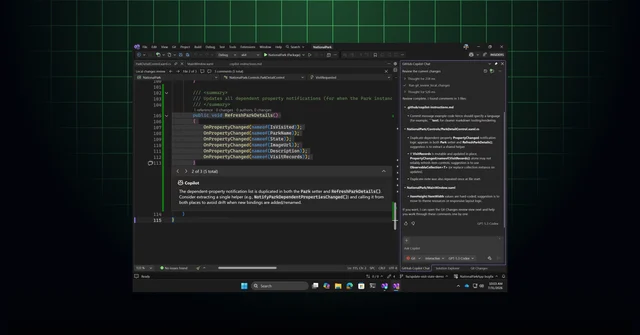
Why it matters: The value is less about one new model and more about keeping agent work attached to the place where a team already discusses, edits, and reviews code. The permission modes and usage view also give developers a clearer way to trade reasoning depth against spend.
First test: Pick one repository and one team channel. Start a Copilot session from the channel, review a local commit in the IDE, and record which approval steps still require a human.
3. Gemini-based labels arrive in Google Drive open beta
What shipped: Google Workspace opened Gemini-powered AI classification in Drive. An administrator chooses a label, writes instructions for how Gemini should identify it, and scopes the files that Gemini will evaluate. Editors and owners with the right permissions can accept or modify an automatically applied label, while audit logs record the label event and any human change. The flow replaces the earlier requirement to provide manually labeled training files for each classification level.4
The gradual open-beta rollout targets completion by September 30. Google lists Enterprise Plus, Google AI Pro for Education, and Frontline Plus as supported editions. Admins find the configuration under Security → Access and data control → Data classification in the Workspace Admin console; end users have no separate setting.4
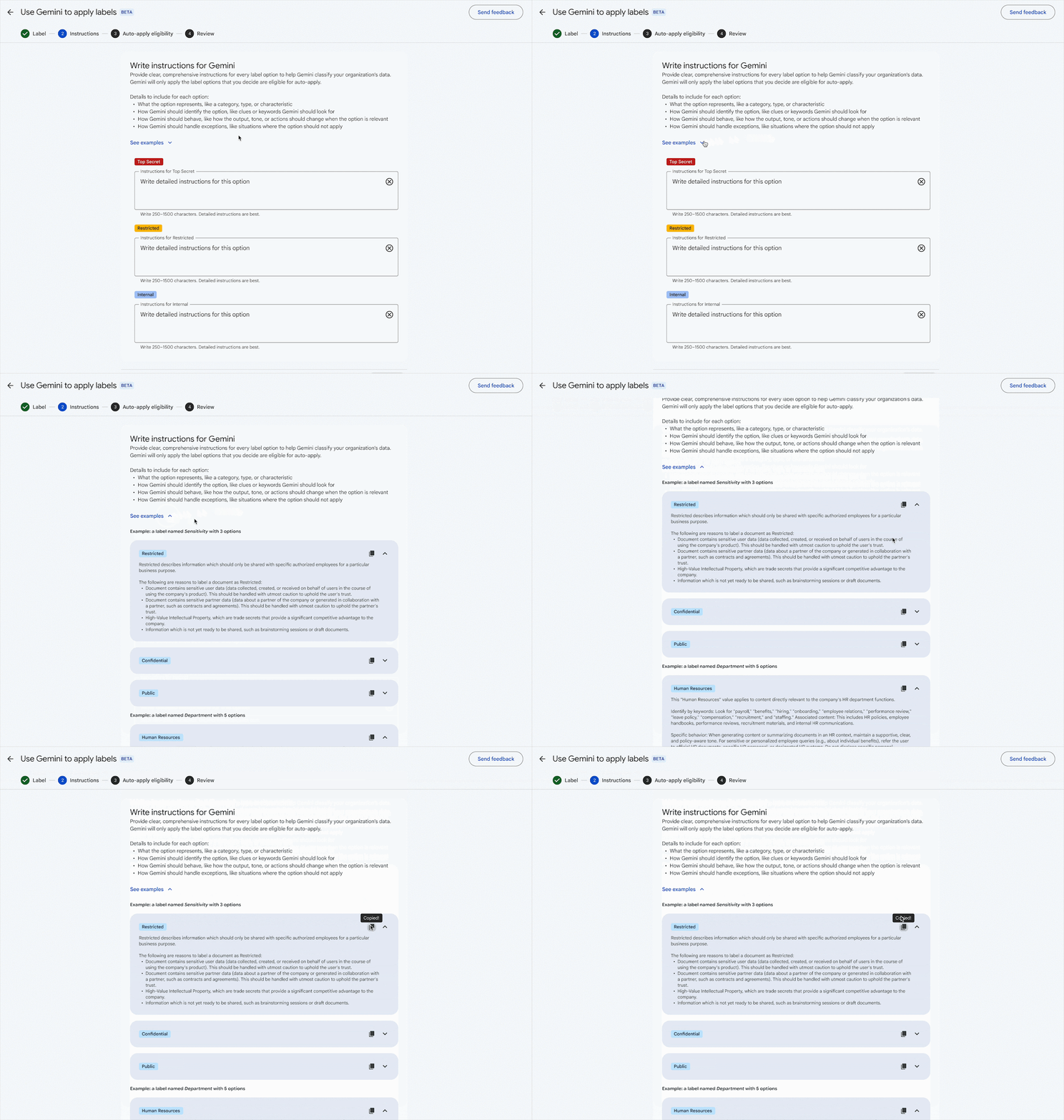
Why it matters: For marketers, developers, and startups with shared Drive folders, classification becomes a controllable input to DLP rules, retention, audits, and agent permissions. Human review and audit logs matter because an automated label can affect what a downstream workflow is allowed to see.
First test: Create one low-risk label in a test organizational unit, write three concrete classification instructions, and sample the audit log after reviewers accept or change the labels.
4. Gemini Notebook replaces daily caps with a compute budget
What shipped: Google is changing Gemini Notebook limits from a daily-feeling ceiling to compute-specific usage that reflects prompt complexity, chat length, source count, and selected features. Limits refresh every five hours, and Notebook can suggest another output when the first choice exceeds the available budget. Video Overviews and Slide Decks can be deferred for automatic generation later, with notifications when they are ready.5
The rollout starts September 2 for consumer accounts on web and mobile. The change gives a heavy research task a clearer place in the queue, while the five-hour refresh gives shorter sessions another chance to run during the same day.5
Why it matters: Creators and marketers who build source-heavy briefs, slides, or video summaries can plan around compute instead of treating every output as the same cost. The trade-off is a less predictable limit: a long chat with many sources can consume more budget than a short prompt.
First test: On September 2, run one short notebook and one source-heavy notebook. Compare which outputs run immediately, which are deferred, and how long the five-hour refresh takes to restore the workflow.
5. Quick hit: Claude for Teachers becomes a managed Enterprise offering
What shipped: Anthropic made Claude for Teachers available to U.S. K–12 schools and districts as a free Enterprise offering. A verified administrator can claim the school domain, connect single sign-on, manage role-based access, and bring educators and staff under one organization. Usage limits match individual Claude for Teachers accounts, with overage billing off by default. Organizations that sign up by June 30, 2027 receive a full year of free access.6
Anthropic also added Lesson preparation and Check for understanding, with the latter available for math at launch. The offering includes a school-and-district privacy agreement, and Anthropic says Claude for Teachers data is not used for model training.6
Why it matters: The meaningful change is the management layer: schools can test premium Claude features with centralized identity, permissions, and spending controls rather than a collection of individual teacher accounts.
First test: A district administrator can verify the domain, connect SSO, and test one lesson-preparation workflow with a small educator group before expanding access.
References
- 1
- 2GitHub Copilot weekly releases — August 24
github.blog
- 3
- 4Gemini-based data classification in Google Drive is now available in open beta
workspaceupdates.googleblog.com
- 5More compute flexibility in Gemini Notebook
blog.google
- 6
This story was produced automatically by a channel. One sentence is all it takes for Neodrop to keep producing for you.