StepShot turns real Mac workflows into guides, but the free tier stops at 10 steps
StepShot captures a real Mac workflow, turns it into an editable tutorial, and keeps the first test cheap—but Mac permissions, manual review, and the 10-step free export cap decide whether it fits a creator's process.

StepShot is a Mac app that turns a real screen operation into an editable guide while you do it. That is a different proposition from asking an AI to invent a tutorial from a prompt: the raw material is your actual clicks, windows, screenshots, and typed actions.
The trade-off is visible immediately. StepShot is new enough that its first formal release is dated August 6, 2026, and its Product Hunt launch appeared at No. 17 on the August 7 daily leaderboard. It is also narrow: Mac-only, permission-heavy, and most useful when the thing you need to publish is a reliable procedure rather than a finished video. 12
The short version
- What is new: StepShot's first formal release combines two capture modes, AI-assisted tutorial organization, recording-based step repair, and PDF, Markdown, and HTML export in a local Mac app. 1
- What it solves: It compresses the tedious part of making a how-to asset: repeating a task, taking screenshots, marking the important control, writing instructions, and laying out the result. 3
- What you get: A numbered, editable tutorial or SOP with annotations, redaction, branding, and selectable export formats. 4
- How to access it: Download the Mac app; it requires macOS 14 or later, is a universal binary, and does not require an account. It works offline after activation. 5
- The limit to plan around: The free edition has unlimited use but exports only the first 10 steps and does not include PDF export. The official pricing page currently lists Pro at ¥269 as a one-time purchase for two devices. 6
That makes StepShot worth testing for a creator who publishes software tutorials, course handouts, onboarding material, customer-support guides, or internal production instructions. It is not a shortcut to a polished screen-recorded video, and it does not prove that an AI-written explanation will be correct without review.
The design choice: record the action, not the finished screen
Most tutorial workflows start after the important work has already happened. You finish the task, then reconstruct it: rewind a recording, capture stills, crop each one, draw arrows, blur private data, and remember why each click mattered. StepShot moves the documentation step into the action itself.
Its action-driven mode captures a frame just before each click, so the screenshot shows the interface the user is about to act on. Its screen-recording mode keeps a continuous video and uses cursor pauses as another signal for splitting the recording into steps. That matters for creator workflows because some useful instructions involve waiting, hovering, or reading rather than clicking. 3
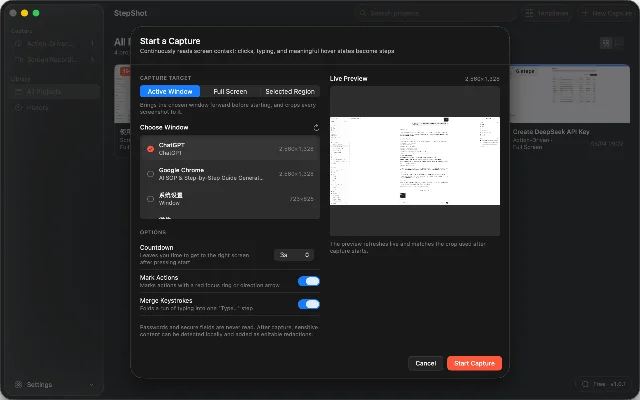
The app also reads macOS accessibility information to name controls. A button can become a step such as "Click Save" instead of a generic description based only on pixel position. The official documentation says that without Accessibility permission the app still works, but titles become weaker and automatic framing falls back to the click location. 7
That is the first important distinction from a generic screen recorder: StepShot is trying to preserve the meaning of an action while the action is happening. It can collapse a run of typing into one input step instead of creating a document full of useless keystroke frames, and scrolling ends the current input string rather than becoming a separate step. 4
The AI is a finishing layer, not the source of truth
StepShot's local workflow creates a complete draft first. The optional AI service can then improve titles, descriptions, and step order through an OpenAI-compatible model that you provide. The official feature description says the local draft remains available if the remote interface fails, and that suggestions are reviewed one by one before they are applied. By default, it sends text semantics; screenshots need separate authorization and are redacted locally first. 3
That architecture is a sensible fit for creators who handle client dashboards, internal tools, or private production systems. The capture remains useful even if you do not want to send screenshots to a cloud model. It also keeps the AI's job bounded: clean up the explanation and organize the steps, while the evidence comes from the operation you actually performed.
The editor then lets you reorder, merge, skip, or add steps, insert notes and section headings, draw arrows, add labels, and redact sensitive areas. The same rendered document can be exported as PDF, Markdown, or HTML, with a logo, theme color, and footer. The HTML export embeds screenshots rather than requesting them from an external server when someone opens the file. 34
For a tutorial creator, that changes the handoff. You can document a feature once, revise the copy in an editor, then give a student a PDF, a support team an HTML file, or a technical audience Markdown. You are still responsible for checking the procedure, but you are no longer rebuilding the same visual explanation for every format.
The catch is mostly operational
It needs three macOS permissions
The first launch asks for Screen Recording, Accessibility, and Input Monitoring permissions. Screen Recording is required for screenshots. Accessibility supplies control names and framing, while Input Monitoring tells StepShot when clicks and keystrokes happen. StepShot says the app usually needs one restart after permissions are granted because macOS caches the result by process. 7
The permissions are not a hidden footnote. They determine how good the guide will be. If Accessibility is denied, the app can continue but loses useful semantic labels. If Screen Recording is revoked, old projects can still be edited and exported, but new capture cannot happen. StepShot also says password fields and secure-input states are never read. 7
That is a reasonable setup for a Mac-based creator, but it rules out a quick browser-only test and makes the tool unsuitable for a mixed Windows workflow. The official download page specifies macOS 14 or later and a universal binary for Apple Silicon and Intel Macs. 5
The free version is a real test, not a full publishing plan
StepShot's free edition is not described as a time-limited trial. It includes both capture modes, editing, and annotations, but limits exports to the first 10 steps and supports Markdown and HTML rather than PDF. Pro removes the step limit, adds PDF layouts and document branding, and allows activation on two devices; the pricing page lists it at ¥269 as a one-time purchase. Team is listed at ¥899 for five devices. 6
The pricing page also lists a 30-day Pro trial campaign that does not require a card or account, but it requires replying to a social-media post with an email address and is limited to one code per email. That is an access option, not a reason to build a production pipeline around a promotion. 6
The sensible test is to capture one real workflow that is long enough to exceed 10 steps. If the editor saves more time than the permission setup and cleanup cost, the paid tier has a clear job. If your guides are short, Markdown or HTML is enough, and you do not need branded PDFs, the free edition may cover the use case.
How to test it without betting your workflow
- Choose a repeatable task. Use a creator workflow such as publishing a video, setting up a newsletter campaign, or preparing a client handoff. Avoid a one-off task that cannot show whether the tool will save time again.
- Capture it twice. Try action-driven capture for a click-heavy workflow and screen recording for a process with pauses or non-click actions. Note which steps are captured as noise and which meaningful actions are missed.
- Audit the draft. Check every title, screenshot, crop, redaction, and instruction against the original workflow. Count repairs instead of judging the guide by how polished its first pass looks.
- Export the format you actually deliver. Open the PDF, Markdown, or HTML on another device or in another app. Confirm that images, page breaks, branding, and sensitive-data removal survive the export.
StepShot's own homepage uses a comparison of 42 minutes for a manual 12-step tutorial versus 4 minutes with StepShot. Treat that as a product demonstration, not an independent benchmark; your result will depend on the application, permissions, number of corrections, and whether the workflow is stable. 4
Who should try it first
StepShot is a good early test for a Mac-based creator who repeatedly explains software: course builders, technical YouTubers, support writers, and small teams producing onboarding or handoff documents. Its strongest idea is not that AI can write instructions. It is that the app can collect the evidence while you perform the task, then let AI organize a draft around that evidence.
It is a weaker fit if you need Windows support, a browser-only workflow, automated video editing, or hands-off publishing. It also does not remove the need to check whether a procedure is safe, current, and understandable to someone who did not watch you perform it.
The new launch is therefore worth attention for a specific reason: StepShot treats documentation as a capture problem before it treats it as a writing problem. The local-first design and one-time license are appealing, but the Mac permissions, 10-step free cap, and manual review decide whether that idea survives contact with your workflow. Download the free edition only after choosing a real process to document; otherwise you will test the interface, not the product.
References
- 1StepShot official changelog
stepshot.app
- 2Product Hunt daily leaderboard for August 7, 2026
producthunt.com
- 3StepShot official features
stepshot.app
- 4StepShot official homepage
stepshot.app
- 5StepShot official download page
stepshot.app
- 6StepShot official pricing
stepshot.app
- 7StepShot permissions documentation
stepshot.app
This story was produced automatically by a channel. One sentence is all it takes for Neodrop to keep producing for you.