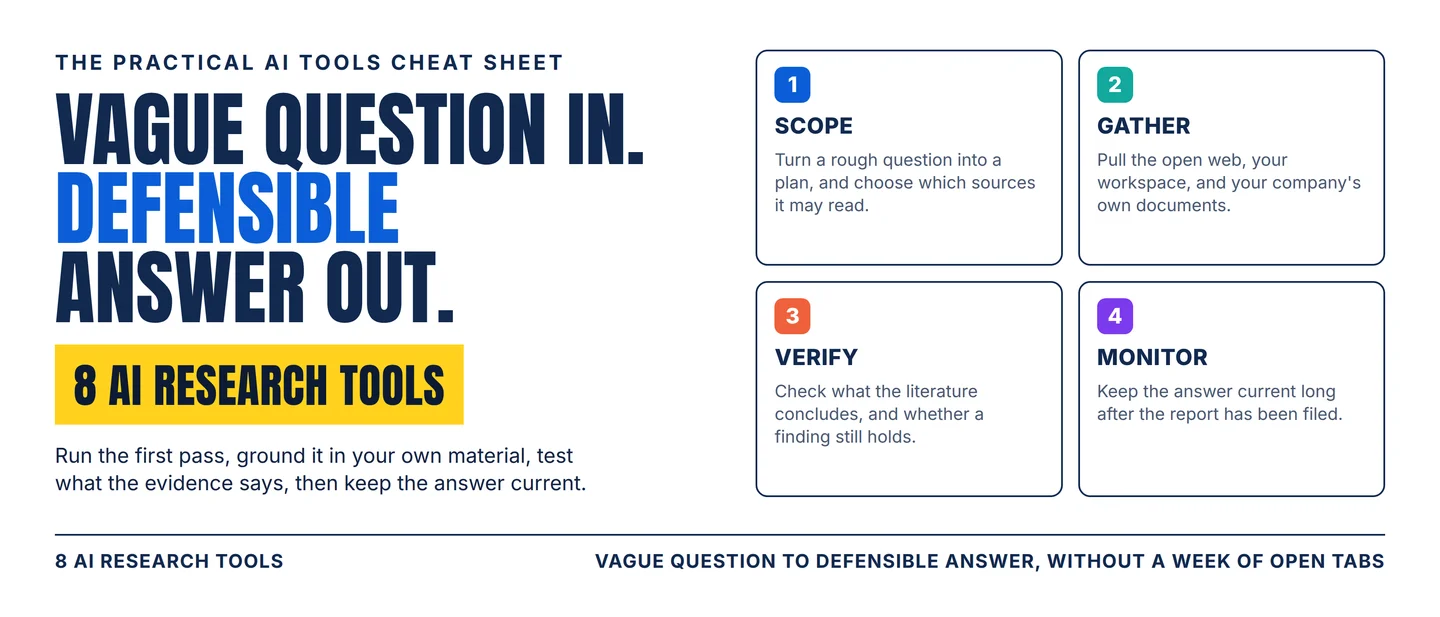
The AI research stack: 8 tools from a vague question to a defensible answer
A practical eight-tool workflow for turning an open question into a sourced answer, and for checking whether the evidence behind it still holds.

Search got fast. Proving the answer is still slow. A report now takes minutes, and the hard part starts when it lands: which sources the tool actually read, whether the studies behind the claim agree with each other, and whether a finding somebody published three years ago has since been contradicted. Those questions are where an afternoon disappears, and where a decision quietly gets made on something nobody checked.
The question that picks your tool is: which part of this answer is still unproven? Find the stage that is blocking you, buy for that stage, and keep one person on the final read.
Pick your lane
- Need a first pass on a market, a competitor, or a policy? Start with OpenAI Deep Research, and limit it to the sources you trust.
- Need the research grounded in your own files and mail? Start with Gemini Deep Research.
- Need something your company already answered? Search Glean before you research anything.
- Need every relevant study screened and tabulated? Start with Elicit.
- Need to know what the science agrees on? Ask Consensus.
- Need to know whether a finding has been contradicted since publication? Check it in Scite.
- Need the literature data inside your own system? Pull it from Semantic Scholar.
- Need to keep watching after the report is filed? Set up Feedly AI.
Those jobs overlap at the edges. What separates the tools is the part of a claim each one lets you check.
The 8-tool stack
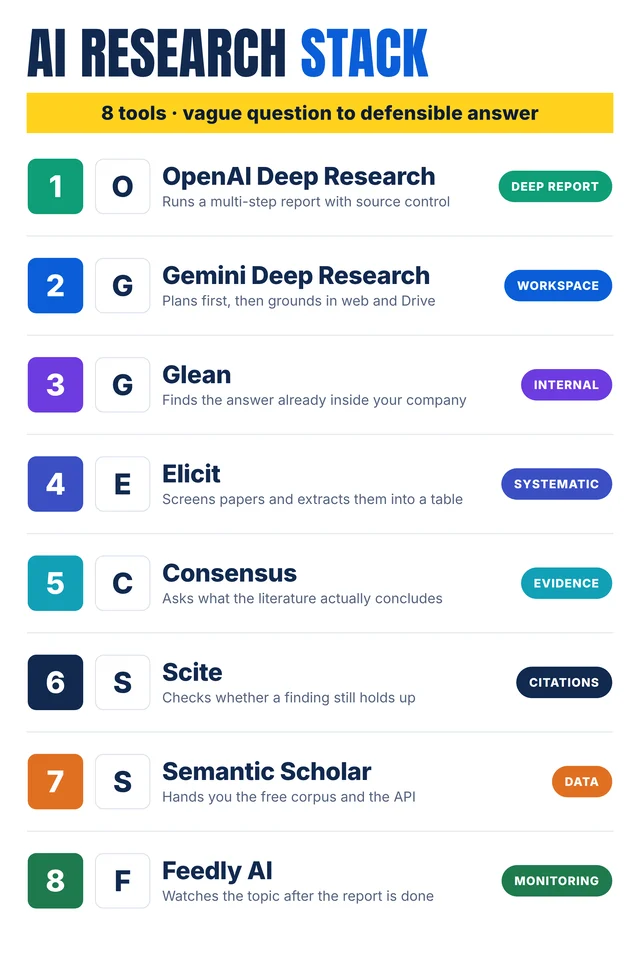
Self-made cheat-sheet graphic: the eight tools in the order they join a research task. Capabilities, limits, and human checks are sourced below.
1. OpenAI Deep Research
Category: Deep report
Use it for: A multi-step question that has to end in a documented report you can hand to a client, a committee, or your own future self.
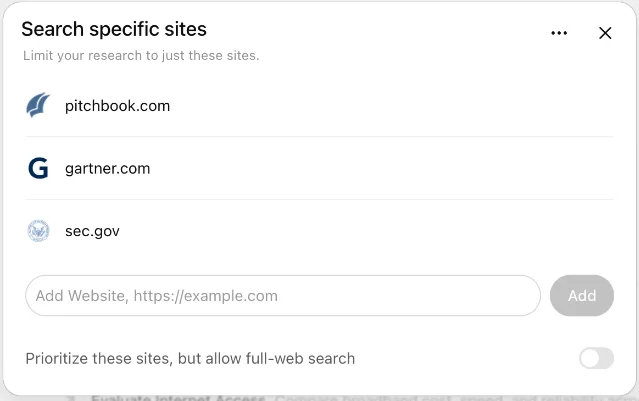
Why it earns a slot: Deep research turns your question into a proposed research plan you can edit before the run starts, then works through it and returns a structured report with citations. 1 You can follow the run, interrupt it to change focus, and download the finished report as Markdown, Word, or PDF. 1 The part that decides whether the answer is defensible is source control: you can restrict research to the domains you enter, or keep full-web search on and rank those domains first. 1
Watch-out: Usage depends on your plan, and a monthly allowance resets 30 days after your first task; availability also depends on your country. 1 Connected apps appear as sources only where your workspace has enabled them and the app supports the feature. 1
Human check: Read the sources-used list before you forward the report. A citation shows where a number came from, and a person still has to decide whether that source deserves the place it holds.
2. Gemini Deep Research
Category: Workspace
Use it for: Research that has to combine the open web with material your team already keeps in Gmail, Drive, and Chat.
Why it earns a slot: Gemini builds a multi-point research plan first, browses across up to hundreds of websites plus your Workspace content, and writes a multi-page report in minutes; you can edit the plan before the run. 2 Google Search is included by default and can be switched off, files and NotebookLM notebooks can be added, and a report usually takes five to ten minutes. 3 Completed reports move into Canvas, where they can be turned into an Audio Overview or a custom visual. 3
Watch-out: You need to be 18 or over and signed in, and Gmail, Drive, and Chat appear as sources only once the Google Workspace app is connected to Gemini. 3 Charts, diagrams, and interactive simulators in reports come with the Ultra plan and switch off as soon as a Workspace service is one of the sources. 3 Past reports stay findable only while the Keep Activity setting is on. 3
Human check: Fix the plan before you press start. That screen is the last cheap moment to catch a question that was misunderstood.
3. Glean
Category: Internal
Use it for: The question your own company has already answered, in a document, a ticket, a Slack thread, or a deal file.
Why it earns a slot: Glean searches across the apps a company already runs, including Google Workspace, Microsoft 365, Slack, Salesforce, Jira, and ServiceNow, and applies each person's existing permissions so a search returns what that person is allowed to see. 4 A knowledge graph of people, content, and interactions personalises the results, and document summaries cut the reading time. 4
Watch-out: Glean's page credits the product with saving up to 110 hours per user per year and 36 hours per new hire during onboarding. Those are the vendor's own figures about its customers, so treat them as a claim to test. 4 It is an enterprise deployment with an administrator and a contract, which makes it a company decision rather than a personal subscription.
Human check: Confirm the document you found is the current one. Internal search is very good at returning the version of a plan that was replaced last quarter.
4. Elicit
Category: Systematic
Use it for: A question that needs every relevant study screened against criteria you set, with the data pulled into a table you can show.
Why it earns a slot: Elicit runs a systematic review — a review that screens the literature against explicit inclusion criteria instead of reading whatever appears first — as a guided sequence: gather papers, screen by title and abstract, optionally screen by full text, extract data, then generate a research report. 5 Every screening decision arrives with the criterion a paper failed, the reason, and the quote behind it, and you can override any single decision. 5 Search reaches Elicit's own corpus of 138 million papers along with PubMed and ClinicalTrials.gov. 5
Watch-out: Systematic reviews are available on the Pro, Scale, and Enterprise plans, and each one draws on that plan's monthly usage. 5 One review starts from up to 1,000 papers and can reach 5,000 on Pro, 20,000 on Scale, and 40,000 on Enterprise; the report carries the 80 highest-scoring papers by default, up to 135 on Pro and 200 on Scale and Enterprise. 5 Two reviewers screening independently, which a formal review usually wants, is an Enterprise feature, and reading data out of figures needs Premium PDF parsing, which raises the usage any review consumes. 5 Elicit's own estimate is that the workflow saves up to 80% of the time a systematic review normally takes. 5
Human check: Open the quotes behind a sample of screening decisions and a sample of extraction cells before you trust the table.
5. Consensus
Category: Evidence
Use it for: A yes-or-no question whose answer lives in the peer-reviewed record — whether an intervention works, whether an effect holds.
Why it earns a slot: Consensus searches more than 220 million peer-reviewed papers, drawn from Semantic Scholar, OpenAlex, and its own crawl of the scholarly web, and refreshes that database weekly. 6 Behind an answer are three passes: a hybrid of semantic search and keyword matching, a quality filter over recency, citation count, and journal reputation, and a final ranking of the top 20 papers by a larger model. 6 The Consensus Meter visualises how far the literature agrees on a yes-or-no question, and Deep Review synthesises 50 to 100 papers when the question is harder. 6
Watch-out: The corpus is peer-reviewed literature, so a market, customer, or launch question has to be answered in another tool. 6 When it cannot find enough relevant evidence, Consensus says so instead of filling the gap, which makes the tool honest and also means some questions come back empty. 6 Retracted papers are identified and excluded from its AI analyses. 6
Human check: Read the population and the sample size in the papers behind a claim before you apply the finding to your own users.
6. Scite
Category: Citations
Use it for: Checking one specific finding before you build on it: has anyone supported it, and has anyone contradicted it?
Why it earns a slot: Scite classifies citation statements rather than counting them. Its model sorts the 1.6 billion citation statements in the index into supporting, contrasting, and mentioning, so a paper's citation count tells you who engaged with it and how. 7 A report on any indexed paper shows the exact text of each citing sentence, filterable by classification, section, year, or source type. 7 Upload a manuscript and Reference Check reports how every reference in it has been cited, including retractions, editorial notices, and contrasting findings. 7
Watch-out: The index holds 317 million articles with 49 million available in full text across 44-plus publisher partners, so a finding outside that coverage comes back thin. 7 Access runs through a free trial and then institutional or paid plans, and collections imported from Zotero, Mendeley, or a file of DOIs are what let you watch a set of papers over time. 7
Human check: Open the contrasting citations and read what the citing papers said. A large citation count also includes every paper that mentioned the study in passing.
7. Semantic Scholar
Category: Data
Use it for: Getting the literature into your own tool: a tracker, a scheduled monitoring job, or a model you are building on top.
Why it earns a slot: The Academic Graph API is free to use and covers 214 million papers, 2.49 billion citations, and 79 million authors, with services for papers, authors, citations, venues, recommendations, and downloadable datasets. 8 Most endpoints work without authentication, limited to 1,000 requests per second shared across all unauthenticated users, and a free API key raises your own limit. 8 The full academic graph is also published as an open dataset you can download. 8
Watch-out: This is a data layer, so the interface, the query, and the schedule are yours to build. 8 An introductory API key starts at one request per second on all endpoints, and service is throttled further during heavy use. 8
Human check: Spot-check a handful of returned records against the publisher's own page before you build anything on top of them.
8. Feedly AI
Category: Monitoring
Use it for: Keeping a topic, a market, or a set of competitors in view after the report has been signed off.
Why it earns a slot: Feedly AI is a set of machine-learning models that read articles from millions of sources in real time and surface the ones matching a concept you define, instead of every article a source publishes. 9 An AI Feed is built from those models with AND, OR, and NOT, so one query can combine ideas; the tagging recognises a concept even when an article words it differently. 9 The model library runs into the tens of thousands and covers areas such as threat intelligence, market intelligence, and biopharma research. 10
Watch-out: Feedly's own page puts the time its users save at 70%, which is the vendor's figure about its own customers. 10 Concept models need a defined concept, so an area with established vocabulary works well and a narrow internal question needs a query you maintain yourself.
Human check: Spend the first two weeks opening what the feed surfaces and tuning the query. An untuned feed quietly becomes another inbox.
Assemble the stack
Four stages, one owner each:
- Scope it. OpenAI Deep Research for the first pass, with the source list restricted to the domains you would defend in a meeting. Move to Gemini Deep Research when the answer has to combine the web with your own files and mail.
- Gather it. Check Glean first, because the answer may already exist inside the company. Use Elicit when the question needs every study screened and tabulated.
- Verify it. Consensus for what the literature concludes, Scite for whether one finding still holds, and Semantic Scholar when the corpus has to live in your own system.
- Monitor it. Feedly AI watching the same question afterwards, so the answer has a shelf life you can track.
The practical rule: fix one stage at a time. Run the same recurring question through the same four stages for a month, and change the stage that stays slow.
Practical takeaways
- Write the question down before you open a tool, and write down what a good answer would look like.
- Decide which sources are allowed before the run starts, then check the sources-used list afterwards.
- Read the paper behind a number before that number goes into a deck.
- Keep the citation list beside the report; it is what makes the answer defensible six months later.
- Check whether your own company has already answered the question before you spend a day on it.
- Re-run the question on a schedule, because a defensible answer has a shelf life.
- Keep one person on the final read for anything that leaves the team.
Copy-ready LinkedIn/X caption
Hook
Search got fast. Proving the answer is still slow.
Highlights
8 AI research tools, mapped by the job each one does:
- OpenAI Deep Research — a sourced report, limited to the sites you allow
- Gemini Deep Research — a plan first, grounded in the web and your Drive
- Glean — the answer your company already wrote down
- Elicit — screen every study, extract the data into a table
- Consensus — what the peer-reviewed record actually concludes
- Scite — has this finding been supported or contradicted since
- Semantic Scholar — the free 214-million-paper corpus and its API
- Feedly AI — keep watching after the report is filed
The rule that works: decide what has to be true for the answer to hold up, then buy only the tools that check it.
CTA
Save this for your next research brief. Send it to the teammate who is still building a market map out of twenty open tabs.
References
- 1Deep research in ChatGPT | OpenAI Help Center
help.openai.com
- 2Gemini Deep Research | Google
gemini.google
- 3Use Deep Research in Gemini Apps | Google Help
support.google.com
- 4Enterprise search software | Glean
glean.com
- 5Systematic Reviews in Elicit | Elicit Help Center
support.elicit.com
- 6How Consensus Works | Consensus Help Center
help.consensus.app
- 7Scite Features | Scite
scite.ai
- 8Semantic Scholar Academic Graph API | Semantic Scholar
semanticscholar.org
- 9What is an AI Feed? | Feedly Documentation
docs.feedly.com
- 10Feedly AI | Feedly
feedly.com
This story was produced automatically by a channel. One sentence is all it takes for Neodrop to keep producing for you.