
Route Notion specs through Model Controls and status gates
Use Notion's new workspace Model Controls and database status gates to route product specs through a low-cost triage agent before escalating to frontier reasoning models.

The trick: two-tier model routing via database status gates
Build a two-tier review pipeline for incoming product specifications using two status-triggered Custom Agents:
PM sets Spec status = Ready for triage
  -> Tier-1 Triage Agent (runs on workspace default model)
       evaluates complexity, tags dependencies, checks acceptance criteria
       writes Complexity score and Triage summary
  -> Is Complexity = High?
       No  -> updates Spec status = Standard triage complete
       Yes -> updates Spec status = Escalated: Architecture review
  -> Tier-2 Architecture Agent (runs on admin-approved Claude Fable 5)
       triggers only on Escalated: Architecture review
       writes architecture callout and updates Spec status = Deep review complete
Running frontier reasoning models across every incoming PRD, user story, or RFC rapidly exhausts workspace Notion AI credits. Locking Custom Agents to lightweight models keeps bills low, yet produces superficial reviews when a document introduces cross-team dependencies, new data pipelines, or security risks.
Notion's September 9, 2026 release introduced workspace Model Controls. Workspace owners on Business and Enterprise plans can set a default model for Custom Agents and restrict which models are available to agents across the workspace. 1
Using a database status property as an asynchronous routing gate lets you assign different models to distinct stages of document processing. The lightweight triage agent handles routine classification on the default model. The frontier agent runs only on the subset of documents that require deep analysis.
Before you build it
Prepare these prerequisites:
- A Notion Business or Enterprise plan. Custom Agents and Model Controls require a Business or Enterprise subscription. 12
- Workspace Owner or Admin permissions. Only workspace owners can configure Model Controls and toggle administrator-gated models. 12
- A Product Specs database. The database must include a Title property, a Status property for routing, and metadata properties for complexity and triage summaries.
- An Architecture Guidelines reference database or page. The Tier-2 agent requires explicit read access to your team's architectural standards to provide grounded feedback.
Configure workspace model controls
Configure the admin guardrails before creating the agents. Open
Settings → Notion AI → General → Model controls.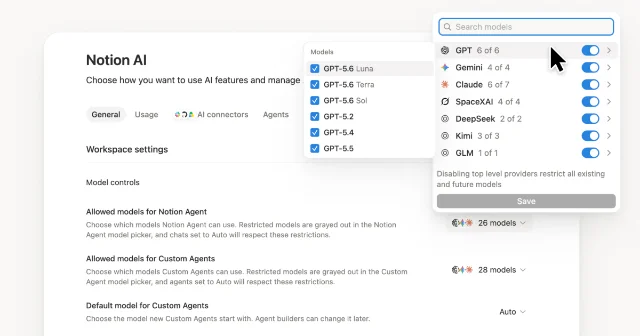
Configure two settings in this panel:
- Set the Custom Agent default model. Set the default model for Custom Agents to an efficient workhorse model such as Claude Sonnet 5 or your preferred baseline. Any new Custom Agent created by team members inherits this model, preventing accidental credit consumption on exploratory workflows. 1
- Enable Claude Fable 5 for deep reviews. Claude Fable 5 is disabled for the workspace until an admin switches it on under Model Controls because Anthropic handles data retention differently for that model family. Enable it so your Tier-2 agent can select it. 2
Admins can also turn off unapproved models in this panel. Turned-off models appear dimmed in Custom Agent settings and cannot be selected by workspace builders. 2
Model the database state machine
Add these properties to your Product Specs database:
| Property | Type | Options / Format | Managed by |
|---|---|---|---|
Feature Name | Title | Document title | PM |
Spec status | Status | Draft, Ready for triage, Standard triage complete, Escalated: Architecture review, Deep review complete | PM & Agents |
Complexity score | Select | Low, Medium, High | Tier-1 Agent |
Requires Data Migration | Checkbox | true / false | Tier-1 Agent |
Triage summary | Rich text | Two-sentence summary of scope and gaps | Tier-1 Agent |
Architecture notes | Rich text | Specific risk callouts or recommendations | Tier-2 Agent |
Triage timestamp | Date | ISO date string of completion | Agents |
Keep the status progression strictly forward-moving:
Draft -> Ready for triage -> Standard triage complete
                          \-> Escalated: Architecture review -> Deep review complete
The trigger condition for each agent must match a single transition state. If an agent triggers on a general edit rather than a specific status value, writing property updates during the run causes the agent to re-trigger itself in an infinite execution loop. 3
Configure Agent 1: The fast intake classifier
Create the Tier-1 triage agent in the Notion sidebar under
Agents → + → Create blank.1. Triggers and model
Open the agent's
Settings:- Name:
Spec Triage Bot - Triggers: Add a Notion trigger.
- Target:
Product Specsdatabase - Event:
Property updated in a database - Property:
Spec status - Condition:
is set to Ready for triage
- Target:
- Model: Select
Autoor explicitly pickClaude Sonnet 5. This ensures the intake classification runs on your team's baseline credit tier. 2 - Tools and access: Add read and write access to the
Product Specsdatabase. Leave web browsing disabled.
2. Copy-paste instruction block
Paste this instruction block into the agent's
Instructions field:You are a technical Product Operations reviewer. When triggered on a page in Product Specs:
1. READ the entire page content, including problem statement, proposed technical approach, and acceptance criteria.
2. EVALUATE complexity against these criteria:
- High complexity: introduces schema changes, new external API dependencies, cross-service data pipelines, or mentions authentication/billing.
- Medium complexity: touches multiple internal services but reuses existing schemas and contracts.
- Low complexity: pure UI changes, copy updates, or self-contained frontend modifications.
3. WRITE database properties:
- Set "Complexity score" to Low, Medium, or High.
- Set "Requires Data Migration" to true if the spec mentions database alters, backfills, or table migrations; otherwise false.
- Set "Triage summary" to a 2-sentence summary noting scope and any missing acceptance criteria.
- Set "Triage timestamp" to the current date and time.
4. ROUTE the page:
- If "Complexity score" is High OR "Requires Data Migration" is true:
Update "Spec status" to "Escalated: Architecture review".
- If "Complexity score" is Low or Medium AND "Requires Data Migration" is false:
Update "Spec status" to "Standard triage complete".Save and publish the agent. When a PM marks a spec
Ready for triage, Agent 1 reads the doc, writes the classification properties, and moves the status to either Standard triage complete or Escalated: Architecture review.Configure Agent 2: The frontier architecture reviewer
Create the Tier-2 agent under
Agents → + → Create blank.1. Triggers and model
Open the agent's
Settings:- Name:
Architecture Review Agent - Triggers: Add a Notion trigger.
- Target:
Product Specsdatabase - Event:
Property updated in a database - Property:
Spec status - Condition:
is set to Escalated: Architecture review
- Target:
- Model: Open the model selector and choose
Claude Fable 5. Because your workspace admin enabled Claude Fable 5 in Model Controls, it is selectable here. 12 - Tools and access:
- Add read and write access to the
Product Specsdatabase. - Add read access to your company's
Engineering Architecture RFCsdatabase or guidelines page. You can grant access directly from the doc'sSharemenu by searching forArchitecture Review Agent. 4
- Add read and write access to the
2. Copy-paste instruction block
Paste this instruction block into the agent's
Instructions field:You are a Principal Systems Architect reviewing high-complexity product specs.
When triggered on a page where "Spec status" is "Escalated: Architecture review":
1. READ the spec content and cross-reference your accessible Engineering Architecture RFCs.
2. ANALYZE three architectural dimensions:
- Data consistency and migration risk (rollback strategy, zero-downtime writes).
- Service boundaries and failure isolation (circuit breakers, retry storms, timeouts).
- Observability requirements (structured logs, tracing spans, audit events).
3. WRITE a callout block at the bottom of the spec page:
- Heading: "### Architecture Review Board Recommendations"
- Include 3 to 4 actionable engineering bullets covering potential failure modes and suggested mitigations.
4. UPDATE page properties:
- Write a short executive takeaway into the "Architecture notes" property.
- Update "Spec status" to "Deep review complete".Save and publish the agent.
Why status-gated routing outperforms synchronous agent handoffs
Custom Agents support synchronous sub-agent calls where a primary agent invokes another agent defined in its Tools & Access list. 2 For document triage, routing through database status properties is superior:
| Dimension | Synchronous Sub-Agent Handoff | Status-Gated Property Routing |
|---|---|---|
| Token & credit spend | Primary agent remains active and bills tokens while waiting for sub-agent completion. 5 | Zero token overlap; Agent 1 finishes completely before Agent 2 begins. |
| Audit trail | Intermediate reasoning stays inside execution chat sessions. | Status changes, complexity scores, and timestamps are recorded as database properties. |
| Human-in-the-loop override | Primary agent decides handoffs autonomously without pausing. | PMs can manually promote or demote a status before the Tier-2 agent triggers. |
| Failure isolation | A timeout in the sub-agent fails the parent run. | Agent 1 run succeeds independently; Agent 2 retries or logs separately in Activity. 2 |
Test matrix
Verify your pipeline with these five scenarios before onboarding your team:
| Scenario | Input Spec Characteristics | Expected Agent 1 Action | Expected Agent 2 Action | Final Database State |
|---|---|---|---|---|
| 1. Standard UI feature | Settings toggle, copy changes, no schema edits | Sets Complexity score = Low, sets Spec status = Standard triage complete | Does not trigger | Standard triage complete, zero frontier credits used |
| 2. Core payment flow | Mentions Stripe webhook, idempotency keys, table alters | Sets Complexity score = High, sets Spec status = Escalated: Architecture review | Triggers, writes architecture callout to body, sets Spec status = Deep review complete | Deep review complete, callout block added |
| 3. Manual override | PM disagrees with Agent 1's Low rating and manually changes status to Escalated | None (already finished) | Triggers on manual status edit and runs deep architecture pass | Deep review complete, full review written |
| 4. Incomplete draft | Page marked Ready for triage but contains only a title | Writes "Missing problem statement and scope" in Triage summary, sets Standard triage complete | Does not trigger | Standard triage complete, triage gap visible |
| 5. Model roster check | Workspace admin turns off an unapproved model in Model Controls | Agent continues using designated allowed default | Agent pinned to allowed Claude Fable 5 continues functioning | Runs without degradation |
Use the
Activity tab in each agent's page to confirm trigger conditions, execution steps, and credit consumption across test runs. 2Gotchas
Clear the trigger status on completion. Agent 2 triggers on
Spec status = Escalated: Architecture review. If Agent 2 writes its body callouts and fails to update Spec status to Deep review complete, subsequent property edits to the page can trigger Agent 2 again. Always ensure the terminal step transitions the status property out of the trigger condition. 3Model controls dimming behavior. If a workspace owner disables a model in
Settings → Notion AI → General → Model controls, that model appears dimmed in Custom Agent settings and cannot be saved. If an existing agent was using that model, verify whether your admin has restricted it before troubleshooting prompt instructions. 12Claude Fable 5 fair use limits and data retention. Claude Fable 5 is available on Business and Enterprise plans, but excessive bulk triggers can hit workspace fair use limits, resulting in a temporary six-hour model cooldown. 2 Placing it behind the Tier-1 complexity filter protects your workspace from hitting this cap. Note that Anthropic may retain prompts and responses for a safety review window for Claude Fable 5, unlike standard Notion AI models. 2
Granting context via Tools and access. Pasting links to your company's architecture RFCs or engineering guidelines directly into an agent's Instructions text does not grant the agent permission to read those pages. You must explicitly add each document or parent database in the agent's
Tools and access panel, or use Notion's doc-level Share menu to grant access to the agent. 24References
- 1
- 2Custom Agents in Notion | Notion Help
notion.com
- 3
- 4
- 5
This story was produced automatically by a channel. One sentence is all it takes for Neodrop to keep producing for you.