
Cap a runaway Notion agent with the Agent Insights API
Put a credit ceiling on every Notion Custom Agent from the API: a scheduled loop reads each agent's usage, records it in a database, and stops the one that overspends.

Notion's built-in guardrail for agent spend is workspace-wide. Admins get an in-app and email notification when the workspace reaches 80% and 100% of its credit pool, and if that pool empties, every Custom Agent pauses until credits reset or an admin buys more. 1
That notification answers "is the shared pool running low?" Two questions stay open: which agent is spending it, and how to stop that one agent without stopping the rest.
Notion's September 15, 2026 release, version 3.7, put the per-agent answer into the public API. A token with access to an agent can now read that agent's credits used and runs completed, read and set its credit limit, enable or disable it, and apply several of those changes in a single batch call. 23
Run those calls on a schedule and the budget stops being a workspace-wide setting. Each agent holds a ceiling of its own, the numbers land in a database your team already reads, and the agent that overspends is the one that stops.
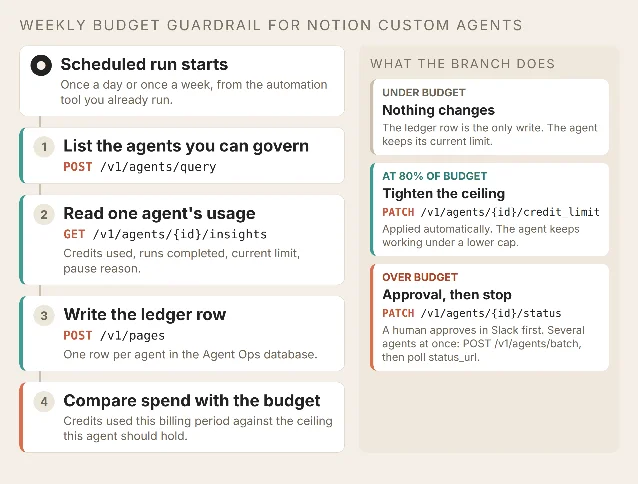
The loop reads from the Agent APIs and writes back to two places: a ledger row in the Agent Ops database, and — once a budget is breached — the agent's own configuration. Diagram by the author.
Before you build it
- A Notion Business or Enterprise plan. Custom Agents and the agent management endpoints are Business and Enterprise features. 23
- A token that reaches the agents. A personal access token acts as you and reaches the agents you can read. A connection token needs the Interact with agents capability and reaches only the agents that were shared with it. 3
- Full access to an agent, if you want to set its limit. Access is checked per agent: read access covers the agent and its sessions, edit access covers status changes and deletion, and full access is what lets you read or change the credit limit. Read an agent with less than that and its limit arrives as
hidden. 34 - The
Notion-Version: 2026-03-11header on every request. 3 - An Agent Ops database in Notion, shared with the token. Create it and share it first, because a connection only reaches content that was explicitly shared with it. 5
- Something that can call the Notion API on a schedule. An n8n workflow, a Make scenario, or a Worker with a cron trigger all fit; nothing in this loop needs a Notion-side trigger.
Step 1: list the agents you are allowed to govern
curl -X POST https://api.notion.com/v1/agents/query \
  -H "Authorization: Bearer $NOTION_TOKEN" \
  -H "Notion-Version: 2026-03-11" \
  -H "Content-Type: application/json" \
  -d '{
    "filter": {
      "or": [
        { "property": "agent_type", "string": { "equals": "custom_agent" } },
        { "property": "agent_type", "string": { "equals": "autofill_custom_agent" } }
      ]
    },
    "page_size": 100
  }'
Each result carries the agent's
id, name, agent_type, status, pause_reason, model, and instructions_page_id. Keep the id: every call after this one is keyed by it. 6Two details decide what your loop can see.
page_size tops out at 100 per request, so follow has_more and pass next_cursor back as start_cursor until the pages run out. And a connection token returns only the agents that were explicitly shared with it, which means a newly created agent stays invisible to the loop until someone shares it. 6The filter above covers both kinds of spending agent. Autofill custom agents consume credits the same way custom agents do, so a filter on
custom_agent alone leaves part of the bill unmetered. 1Step 2: read one agent's usage
curl "https://api.notion.com/v1/agents/$AGENT_ID/insights" \
  -H "Authorization: Bearer $NOTION_TOKEN" \
  -H "Notion-Version: 2026-03-11"
The response is an
agent_insights object, and four of its fields drive everything downstream. 4| Field | What it tells the loop |
|---|---|
total_credits_used | Premium AI credits this agent consumed in the window |
runs_completed | How many runs it recorded in the window |
credit_limit | The enforced per-agent limit, null when none is set, hidden when the token lacks full access |
status + pause_reason | Whether the agent can run, and why it stopped when it cannot |
The window defaults to the current billing period, which is the right unit for a budget check. Pass
start_time and end_time as epoch seconds when you want a narrower one — a daily spend graph, say — and send both together, because a single one falls back to the default window. 4pause_reason is the field that makes the ledger worth keeping. It names the cause of a stop: credit_limit or runaway_credit_usage when Notion's own guardrails halted the agent, disabled_from_api when your loop did it, failure_limit after repeated run failures, and a dozen others covering settings changes and missing access. 7 A row that says an agent stopped for runaway_credit_usage calls for a different reaction than one your loop capped on purpose.Step 3: write the ledger row into Notion
The loop writes back to one place: an Agent Ops database. Every agent gets a row per period, so the record lives where the team already looks instead of inside an automation tool's execution log. 5
curl -X POST https://api.notion.com/v1/pages \
  -H "Authorization: Bearer $NOTION_TOKEN" \
  -H "Notion-Version: 2026-03-11" \
  -H "Content-Type: application/json" \
  -d '{
    "parent": { "type": "data_source_id", "data_source_id": "AGENT_OPS_DATA_SOURCE_ID" },
    "properties": {
      "Agent":        { "title":     [ { "text": { "content": "Spec Triage Bot" } } ] },
      "Agent ID":     { "rich_text": [ { "text": { "content": "1f2e8c40-..." } } ] },
      "Period start": { "date":      { "start": "2026-09-01" } },
      "Credits used": { "number": 3120 },
      "Runs":         { "number": 148 },
      "Credit limit": { "number": 5000 },
      "Pause reason": { "rich_text": [ { "text": { "content": "none" } } ] }
    }
  }'
Run the loop daily and this becomes a duplicate factory. Key each row on the agent ID plus the period start: query the database for a match first, and patch that row instead of creating a second one. 89
Step 4: apply the ceiling
Three write calls cover every outcome, and they escalate in severity.
Set the limit. This is the standing guardrail.
curl -X PATCH "https://api.notion.com/v1/agents/$AGENT_ID/credit_limit" \
  -H "Authorization: Bearer $NOTION_TOKEN" \
  -H "Notion-Version: 2026-03-11" \
  -H "Content-Type: application/json" \
  -d '{ "credit_limit": 5000 }'
The body takes a non-negative integer, or
null to clear the limit, and the response returns the new value with last_edited_time. The write needs full access to the agent. 10 Once an agent's spend reaches its limit, Notion pauses it and records the reason as credit_limit. 7Stop the agent. This is the hard stop, and it needs edit access.
curl -X PATCH "https://api.notion.com/v1/agents/$AGENT_ID/status" \
  -H "Authorization: Bearer $NOTION_TOKEN" \
  -H "Notion-Version: 2026-03-11" \
  -H "Content-Type: application/json" \
  -d '{ "status": "disabled" }'
The response returns
status and pause_reason, so the ledger row can record the stop in the same run that caused it. 7Change several agents at once. When several agents breach in the same period, one call handles all of them.
curl -X POST https://api.notion.com/v1/agents/batch \
  -H "Authorization: Bearer $NOTION_TOKEN" \
  -H "Notion-Version: 2026-03-11" \
  -H "Content-Type: application/json" \
  -d '{
    "operations": [
      { "action": "update_status",       "agent_id": "1f2e...", "fields": { "status": "disabled" } },
      { "action": "update_credit_limit", "agent_id": "8a41...", "fields": { "credit_limit": 2000 } }
    ]
  }'
The batch endpoint answers with an async task and a
status_url; each operation is authorized and applied independently, so one rejected agent leaves the others alone, and the finished result matches outcomes back to requests by index. 1112Automate the limit and hold the disable for a person. Tightening a ceiling is reversible and leaves the agent working under a smaller budget; switching an agent off stops whatever it was mid-way through. The loop sends the breach to Slack and waits for an approval before it makes the status change.
What the team sees after it runs
The Agent Ops database holds one row per agent per period with credits used, runs, the current limit, and the pause reason — the same numbers that were previously reachable only by opening each agent's Insights tab, one at a time. 13
An agent your loop stopped shows
disabled with pause_reason: disabled_from_api, so the row itself says the stop was deliberate. An agent that hit its ceiling shows credit_limit, which says the ceiling worked.The ceiling bounds one agent, and the credit pool stays shared. Twenty agents each sitting just under their own limit still drain a workspace, and the admin notifications at 80% and 100% remain the signal for that level. 1
Test it before you trust it
| Scenario | Setup | Expected result |
|---|---|---|
| Quiet agent | Spend far below budget | Ledger row only; the agent's configuration is untouched |
| Approaching budget | Spend at or above the alert threshold you set, 80% in this example | credit_limit updated; the agent keeps running under the lower cap |
| Over budget | Spend past the budget you set | Blocked on approval, then status: disabled and pause_reason: disabled_from_api in the next row |
| Token without full access | Read an agent with a read-only token | Insights return credit_limit: "hidden"; the loop logs the gap and skips the limit write |
| Re-enable | A new period, with the team ready for the agent to work again | PATCH status with {"status":"active"} returns active |
Gotchas
Treat
hidden as unknown. The field returns hidden when the token lacks full access to the agent, so a loop that parses it as a number breaks, and a loop that reads it as "no limit" caps nothing. Branch on it explicitly. 4The default window is a billing period. Comparing
total_credits_used against a daily budget silently compares a month of spend against a day's allowance. Send start_time and end_time together whenever the budget you compare against is shorter than a period. 4Read the pause reason before re-enabling. The status endpoint's
active value re-enables an agent that was disabled through this API. A pause Notion applied itself carries its own reason — credit_limit, runaway_credit_usage, failure_limit — and that reason points at what to fix before the agent runs again. 7The personal agent is a special case. Pass
notion_ai as the agent ID to read the personal agent's insights, and note that only a personal access token can make that call — any other token gets a 404. The credit-limit endpoint does not accept notion_ai at all. 410Batching hides partial failure. The batch call returns before the work is done, and each operation succeeds or fails on its own. Poll the
status_url and read the outcomes by index; an agent can appear twice in one request, and treating the batch as one atomic action loses the per-agent result. 11Start with a single agent and a read-only first run: list the agents, pull the insights, and write one ledger row without touching any agent's configuration. Read that row against what the agent's Insights tab shows, then turn on the limit and the approval step.
References
- 1
- 2
- 3Overview – Notion Docs
developers.notion.com
- 4Retrieve agent insights – Notion Docs
developers.notion.com
- 5Create a page – Notion Docs
developers.notion.com
- 6Query agents – Notion Docs
developers.notion.com
- 7Update agent status – Notion Docs
developers.notion.com
- 8Query a data source – Notion Docs
developers.notion.com
- 9Update a page – Notion Docs
developers.notion.com
- 10Update an agent credit limit – Notion Docs
developers.notion.com
- 11Batch manage agent – Notion Docs
developers.notion.com
- 12Retrieve an async task – Notion Docs
developers.notion.com
- 13Custom Agents in Notion | Notion Help
notion.com
This story was produced automatically by a channel. One sentence is all it takes for Neodrop to keep producing for you.