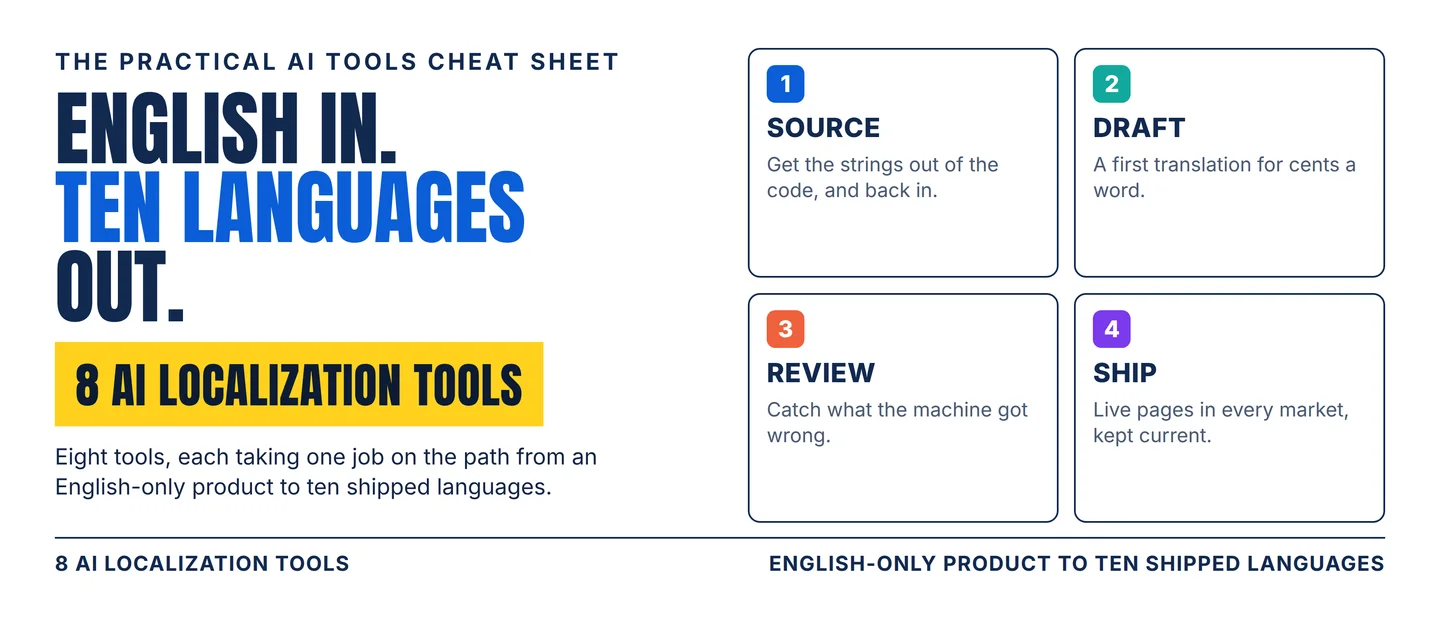
The AI localization stack: 8 tools from one source file to ten shipped languages
A practical eight-tool workflow for taking an English-only product into ten languages, with the word, character and token meters, the review gates and the published per-word rates that decide which tool fits.

The price of a word has collapsed. Smartling publishes its own starting rates: $0.0075 a word for machine translation, $0.06 for AI translation, $0.12 for AI plus human review, and $0.20 for human translation. 1
Read that card as a gradient. Between the cheapest and the dearest setting sits a 27-fold difference in what one word costs.
The review step is where the price doubles. AI translation at $0.06 becomes $0.12 as soon as a person reads the output. 1
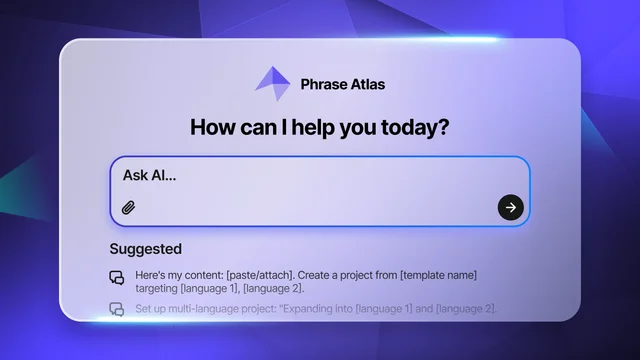
Setup has been the other cost, and it changed in September. Phrase made Atlas generally available on 15 September 2026: a chat interface that configures projects, builds automation and pulls reports across its localization platform. 2
So the question worth answering is which tool takes the job in front of you, what it charges per word, and where a person has to sit.
Four jobs run between one source file and ten live languages: source, draft, review, ship. Eight tools cover them, and every entry below names the meter, the gate and the check a person has to make.
Pick your lane
- Your product strings change every sprint. Start with Lokalise.
- Your translators are people you can recruit. Start with Crowdin.
- You need a document or a page translated, terms intact. Start with DeepL.
- Translation should run inside your build. Start with Lingo.dev.
- You want one published rate per quality level. Start with Smartling.
- You want professionals in the loop, with AI beside them. Start with Smartcat.
- The thing to translate is your marketing site. Start with Weglot.
- Several content types and teams need one system. Start with Phrase.
The eight overlap on features and almost never on the job they take. The meters below will shorten your shortlist faster than a demo will.
The 8-tool stack
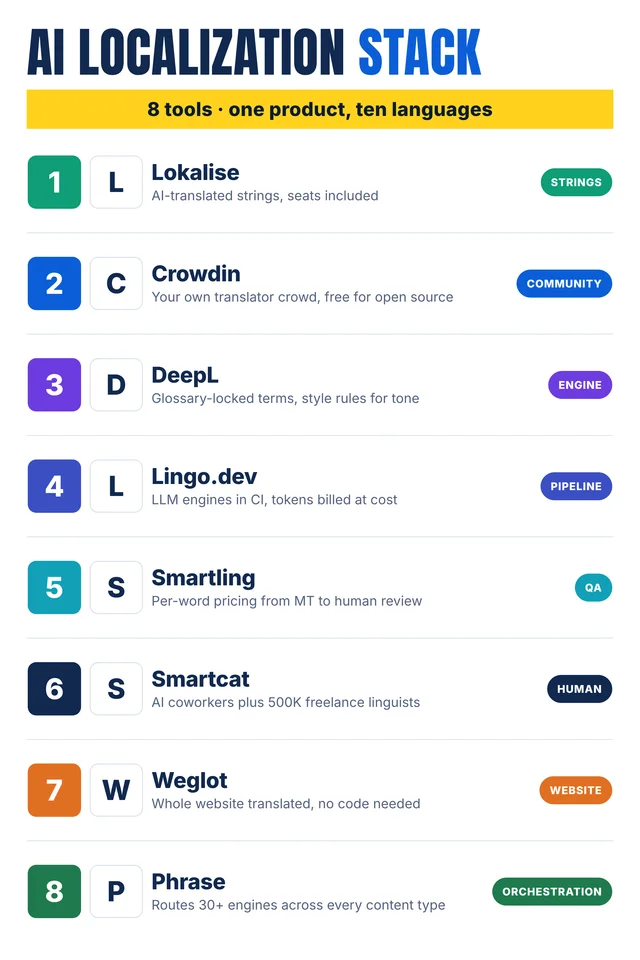
Self-made cheat-sheet graphic: the eight tools in the order they join a localization workflow. Meters, gates and human checks are sourced in the entries below.
1. Lokalise
Category: Strings
Use it for: Holding every product string in one place and keeping translations in step with each release.
Why it earns a slot: Lokalise connects to 60+ tools and reads 30+ file formats, with 33 webhooks, 10 SDKs and 95 API endpoints to sync content. 3 Mobile apps can pull translation updates over the air, without a new build. 3
Its AI translations come in two grades. Standard AI covers everyday strings, and Pro AI covers customer-facing copy through smart routing across several language models. 4 Pro AI also takes custom AI profiles built from your own content. 4
Watch-out: The price is per account, not per seat. Explorer costs $149 a month, Growth $379 and Advanced $1,049. 4 Translator and reviewer seats are unlimited on every paid plan, and so are hosted words, the content sitting in the system. 4
The meter that moves is processed words: source words actually translated. The plan table names that allowance as a category and publishes no number, so the volume arrives with a quote. 4
Human check: Send every string with a character limit to a person before launch. A button label that grows from 12 characters to 30 breaks a layout that reviewed fine in English.
2. Crowdin
Category: Community
Use it for: Translation done by people you already have: your team, your community, or an open-source crowd.
Why it earns a slot: Crowdin runs on hosted words, and its FAQ spells out the arithmetic. Five hundred source words across ten target languages count as 5,000 hosted words. 5
Free covers 60,000 hosted words. Pro starts at $50 a month on annual billing, Team at $150, and Crowdin Enterprise at $450, all before tax. 5 Every paid plan allows unlimited translators and proofreaders. 5
Open-source projects can request a free license with unlimited projects, strings and members. 5
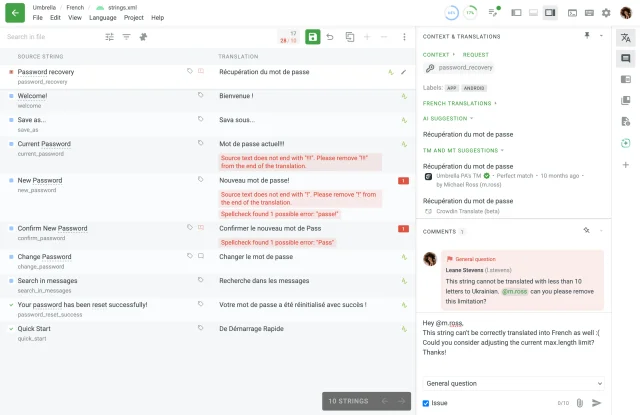
Watch-out: Machine translation and AI proofreading are sold as a prepaid balance rather than bundled with the plan. 5 The checks in the picture compare a translation with its source, so a translation can satisfy them and still read badly. 6
Human check: Set a length limit for each target language before translation starts. A limit borrowed from English produces exactly the flagged strings in the picture above.
3. DeepL
Category: Engine
Use it for: A fast first translation of text and documents, with your terminology held in place.
Why it earns a slot: DeepL's Pro plans meter characters rather than words. Individual gives 300,000 characters a month for €7.49, Team gives a million characters per user for €24.99, and Business removes the cap under a fair-use policy for €49.99. All three prices assume annual billing. 7
Glossaries keep product names and approved terms fixed: one on Individual, five on Team, unlimited above that. 7 Shared style rules shape the register, from five lists on Team to twenty on Business. 7
Watch-out: Characters are a different unit from everyone else's words, and the comparison only works after conversion. Count the characters and the words in one page of your own text, and that ratio turns either quote into the other. 7
Content sent through Pro is not used to train DeepL's models and is deleted after translation. 7
Human check: Read the glossary before the first large run. A wrong term in the glossary is wrong in every file that follows it.
4. Lingo.dev
Category: Pipeline
Use it for: Running translation inside your own build, with the model bill passed through and no seat to buy.
Why it earns a slot: Lingo.dev sets up a localization engine per locale, with a glossary, a brand voice and a model chain, and calls it from code, a CLI, CI/CD or an MCP server. 8 MCP is the connector standard that lets an assistant call other tools.
The platform also audits finished translations against your own scorecard, flagging changed meaning, dropped detail and claims the source never made. 8
Pricing counts tokens. Sandbox is free with 100,000 tokens a day. Production costs $99 a month plus usage, with 5 million tokens a day, $0.50 per engine a month, and $2 per million tokens for the platform. 9 The language model's own bill passes through at zero markup, and a quality review run costs $0.01. 9
Watch-out: Human review sits behind Enterprise. Human-in-the-loop review, selective routing to reviewers, post-localization review and bring-your-own-keys all appear in the Enterprise column alone. 9 On the two self-serve plans, review is your own team's work.
Human check: Write the quality scorecard before the first run. An audit against a vague checklist returns flags nobody acts on.
5. Smartling
Category: QA
Use it for: Buying translation by the word, from machine-only up to human-reviewed, off one published rate card.
Why it earns a slot: Smartling publishes a rate for each quality level: $0.0075 a word for machine translation, $0.06 for AI translation, $0.12 for AI human translation and $0.20 for human translation. 1
Core is free to start, with a CAT tool, translation memory kept for 180 days, automated quality checks and a basic linguistic QA suite. 1 A CAT tool is the editing environment where a translator works string by string against the source.
Enterprise adds custom workflows, unlimited translation memory storage, style guides, a full LQA suite, the toolset for linguistic quality assurance, and the option to bring your own translators. 1
Watch-out: The bill multiplies volume by languages, and moving from the $0.06 tier to the $0.12 tier doubles the cost of every word. 1
Human check: Sort content by risk before you pick a tier. Checkout and legal strings earn the human tier; a help-center FAQ rarely earns it.
6. Smartcat
Category: Human
Use it for: Hiring professional translators and reviewers without leaving the platform, with AI doing the first pass.
Why it earns a slot: Smartcat puts AI coworkers beside a marketplace of more than 500,000 vetted linguists, across 280+ languages and 80+ content formats. 10 Users are unlimited on every plan. 10
Translation memory costs nothing: approved sentences and repetitions earn no charge. 10 Adapt starts at $1,200 a year on annual billing with 100,000 Smartwords, the platform's word allowance. 10
Watch-out: Marketplace experts are an add-on on Adapt and included from Accelerate upward, where a reviewer coworker joins too. 10 The other coworkers arrive later still: content update and quality assurance start at Anticipate. 10
Human check: Agree the glossary with the linguists before the first batch. A marketplace works from your terms, and loose terms come back inconsistent.
7. Weglot
Category: Website
Use it for: Putting a marketing site into several languages without a developer, with the wording tied to your brand.
Why it earns a slot: Weglot connects to 70+ website platforms in one click, and its editor covers a glossary, a visual editing mode and multilingual SEO settings. 11 Its custom translation model is set up with a description of the site, a tone of voice and an audience. 11
Plans are built on included words. Free covers 2,000 words in one language; Starter costs €15 a month for 10,000 words; Business €29 for 50,000 words across three languages; and Advanced €299 for a million words across ten. 12
Watch-out: The allowance counts unique translated words across all languages, and it does not renew. 12 Past the limit, translation stops until you upgrade or delete translations. 12 Human translation through Weglot's own service starts at €0.13 a word. 12
Human check: Open the translated URLs and the language switcher before launch. A translated page is a new address, and nobody has checked how it renders.
8. Phrase
Category: Orchestration
Use it for: Running several content types, engines and teams through one system, with the routing and reporting that hold them together.
Why it earns a slot: Phrase routes each piece of content across 30+ engines and language models by content type, language pair, quality and cost. 13 Style guides, translation memory, term bases and machine-translation glossaries sit in the same system. 13
Atlas, on general release since 15 September 2026, configures projects, builds automation and pulls reports from a chat box. 2 The prompts it opens with create a project from a template and set up a multi-language project.
Earlier in 2026 Phrase shipped Zero-Touch Localization, which finds new content, translates it and returns it to the codebase with nobody in the middle. 2
Watch-out: Team costs $1,245 a month on annual billing, with 20 strings seats, 1.2 million strings managed words and 2.5 million TMS processed words a year. 14 Business and Enterprise are quoted, and the AI features are metered in AI units per year. 14
The product lines are priced apart: Software UI/UX runs $525 a month and the Freelancer plan $27. 14
Human check: Open the workflow Atlas built and read it line by line. Automation nobody on the team can explain is automation nobody dares switch off.
Assemble the stack
Four stages, one tool each:
- Source. Lokalise if the strings live in code and change every sprint; Crowdin if your translators are people you can recruit.
- Draft. DeepL for a document or a page translated with your terms intact; Lingo.dev when translation should run inside the build.
- Review. Smartling when you buy words by quality level on one bill; Smartcat when you want people in the loop with AI working beside them.
- Ship. Weglot for the marketing site; Phrase when several content types and teams need one system.
The rule that keeps the bill sane: fix the stage where quality collapses, run one tool there for a month, then look at the next stage. Two tools doing the same job are one subscription you can cancel.
Practical takeaways
- Convert the meter before you compare. These tools bill in words, characters, tokens and per-word services. Run one page of your own content through each quote and compare the totals.
- Read what the allowance counts. Crowdin multiplies source words by target languages, and Weglot counts unique words across every language.
- Find the review gate. Smartling's reviewed AI tier costs twice its unreviewed one, and Lingo.dev keeps human review for Enterprise.
- Check whether the allowance renews. Weglot's words are a one-time total, while Lokalise's processed words scale with the plan.
- Write the glossary once, then reuse it. Every tool here reads one, and it is the cheapest quality control on the list.
- Cap the stack at four. Add a fifth tool when you can name the job it does that none of your current ones does.
Copy-ready LinkedIn/X caption
Hook
A machine-translated word now costs $0.0075. A reviewed one costs $0.12.
Highlights
8 AI localization tools, by the job each one does:
- Lokalise — product strings kept in step with every release, unlimited translator seats
- Crowdin — your own translators, unlimited on any paid plan, free for open source
- DeepL — terms locked by a glossary, tone set by style rules, billed per character
- Lingo.dev — translation engines in your CI, with the model bill passed through at cost
- Smartling — published rates from $0.0075 a word up to $0.20 for human translation
- Smartcat — AI coworkers plus a marketplace of 500,000+ linguists
- Weglot — a whole website translated with no code, on a fixed word allowance
- Phrase — 30+ engines routed by content type, configured through a chat box
The rule: one tool per stage — source, draft, review, ship — and convert every meter to a cost per word before the demo.
CTA
Save this before your next language launch, and send it to whoever owns the translation budget.
References
- 1Plans | Smartling
smartling.com
- 2
- 3World-class AI localization platform | Lokalise
lokalise.com
- 4Lokalise Pricing
lokalise.com
- 5
- 6Editor Overview | Crowdin Docs
support.crowdin.com
- 7DeepL Pro
deepl.com
- 8
- 9Pricing · Lingo.dev
lingo.dev
- 10
- 11
- 12Weglot | Pricing
weglot.com
- 13
- 14
This story was produced automatically by a channel. One sentence is all it takes for Neodrop to keep producing for you.