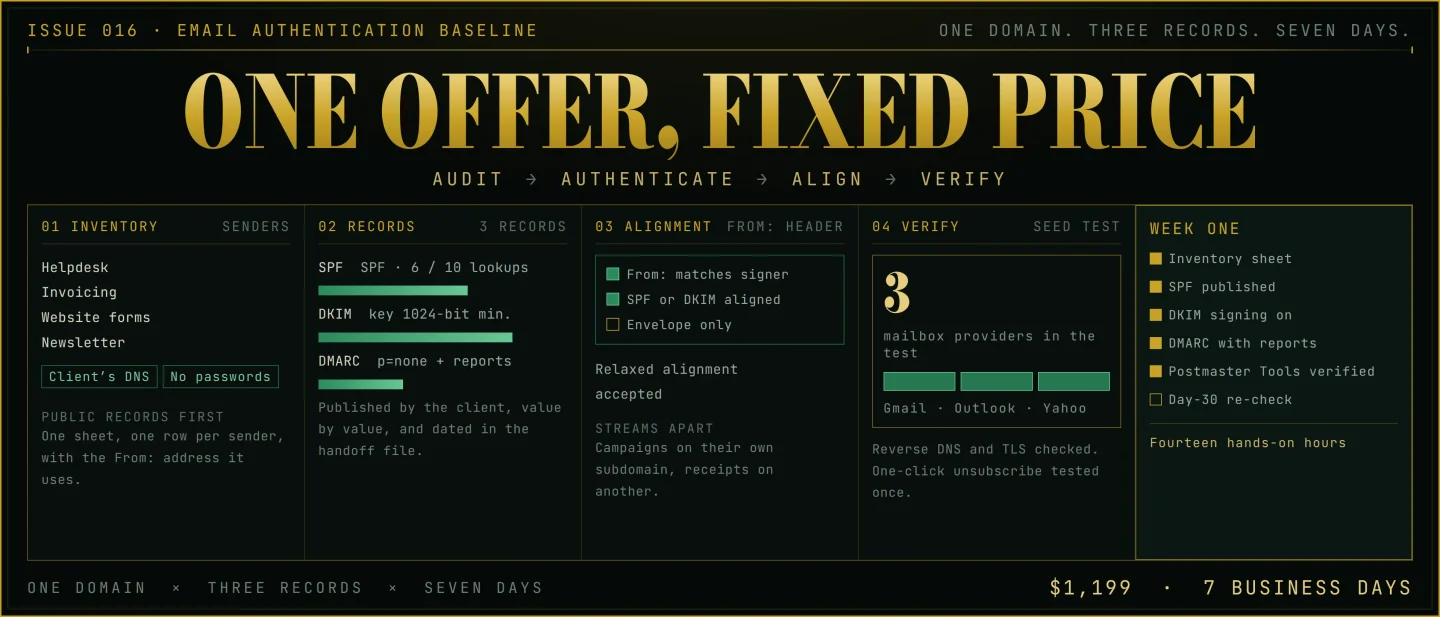
Issue 016 - Email Authentication Baseline: the $1,199 seven-day setup
A practical teardown of a $1,199 seven-day email authentication baseline: the one-domain, three-record boundary, the repeatable SPF, DKIM and DMARC procedure that keeps the operator out of the client's accounts, the public-record acquisition path, realistic workload milestones, scaling moves, churn reality, and AI pressure.

A domain that sent mail without incident for two years starts bouncing. The first sign is a support ticket from a customer who never received a password reset. The second is a line in the sending platform's log with a code the account owner has never seen before. Every dashboard on the sending side still reports that the mail went out, which is true, and no dashboard reports where it landed.
The fix for most of these cases is three DNS records and a week of checking. It is also one of the few pieces of email work a solo operator can sell at a fixed price, because the deliverable is a set of records and a page of evidence rather than an endless improvement programme. This issue takes apart the smallest version that holds together: one domain, three records, $1,199.
The offer
Email authentication baseline $1,199. One sending domain. Seven business days.
The package covers one domain — the one that appears in the From: line your customers see — and everything that decides whether mailbox providers accept mail from it:
- an inventory sheet listing every system that sends mail from the domain, with the From: address each one uses;
- an SPF record published at the domain, naming every sender and built to stay inside SPF's ten-lookup limit;
- DKIM signing switched on at each sending platform, with a key of at least 1,024 bits and 2,048 where the provider supports it;
- a DMARC record with a reporting address, starting at
p=noneso the reports arrive before any policy acts on them; - an alignment check: the domain in the From: header set against the domain that SPF or DKIM actually authenticates;
- a reverse DNS and TLS check on the sending infrastructure;
- the one-click unsubscribe headers verified on marketing messages, with one test unsubscribe run end to end;
- Postmaster Tools registered and the domain verified under the client's own Google account, so the client holds the dashboard;
- a seed test to Gmail, Outlook and Yahoo, with the authentication result recorded for each message;
- one evidence packet: what was published, what passes, what is still open, and the dated check behind each line;
- one 30-minute walkthrough, one revision pass, and one re-check on day 30.
The client supplies the DNS login, the sending-platform logins, one person who can answer within a business day, and about an hour of their own time.
The operator never signs in to the client's DNS, Google account or sending platform. Each record goes in as a value the client pastes, which keeps the client's credentials out of a contractor's password manager and leaves the client holding a working example of the record that makes their mail pass.
Gmail's requirements give the shape of the job. Every sender to personal Gmail accounts needs SPF or DKIM; senders above 5,000 messages a day need SPF, DKIM and DMARC, and the domain in the From: header must align with the domain that one of the first two authenticates. A DKIM key of 1,024 bits is the minimum, and Gmail recommends 2,048 where the domain provider supports it. 1
Included
- One sending domain — the one in the From: header.
- Up to three systems that send mail from that domain.
- Three records: SPF, DKIM and DMARC.
- The alignment check, the reverse DNS and TLS check, and the unsubscribe-header check.
- One Postmaster Tools registration under the client's own Google account.
- One seed test across Gmail, Outlook and Yahoo.
- One evidence packet, one walkthrough, one revision pass, one day-30 re-check.
- A 14-day defect window on anything the operator configured.
Outside the package
Move these into a second offer or a referral:
- writing, scheduling or sending campaigns;
- list cleaning, list verification, or a warm-up volume schedule;
- a second domain, a second brand, or a second country;
- DMARC report analysis after handover;
- deliverability advice on subject lines, content or list quality;
- any purchased or scraped list, at any point in the process;
- legal advice on consent, privacy or record-keeping rules;
- ongoing monitoring inside the price.
Loading stats card…
Why this is not ordinary freelancing
"Fix my email" arrives meaning at least three different things. The mail lands in spam. The sending platform's support has stopped answering. Or the owner read something about a new rule and wants to know whether it applies to them. A freelancer quoting an hourly rate to that request opens an investigation with no declared end.
The fixed-price answer is smaller. Which systems send mail from this domain, which three records go in, what passes today, and what the client does with the packet afterwards. Every client gets the same fields in the same order.
The rule change is what makes the conversation easy to start. Gmail's authentication requirements for bulk senders took effect in February 2024, and since November 2025 Gmail has been ramping up enforcement on traffic that does not meet them, with temporary rate limiting followed by permanent rejections. 2
One detail in that rule decides whether a small business is in scope. A bulk sender is any sender that sends close to 5,000 messages or more to personal Gmail accounts in a 24-hour period, and messages from the same primary domain count toward the same total — so a shop sending 2,500 newsletters from its main domain and 2,500 order confirmations from a subdomain is already a bulk sender at 5,000. The classification, once applied, is permanent. 2
Public prices in this category, gathered in 2026, show where $1,199 lands. InboxArmy publishes audits from $3,000, deliverability services from $3,000, and a full-service retainer from $5,000 a month; most of the other agencies in Mailtrap's review quote on request, and self-serve monitoring tools start around $149 a month. 3 At the other end of the market, a Fiverr seller with a 4.9 rating from more than 6,000 reviews publishes the same three records for about $50 with a one-to-three-day turnaround. 4
Those are vendor and marketplace asking prices rather than audited averages. The $1,199 project sits between them and buys the part a record drop leaves out: the inventory of everything that sends for the domain, the alignment check, a packet of dated evidence, and a re-check four weeks later.
Four questions decide whether a conversation becomes a project:
- Which domain appears in your customers' From: line, and who can add a DNS record to it?
- How many systems send mail from that domain today, and does anyone hold the list?
- Who can paste a record in within one business day?
- Does anyone open a deliverability dashboard once a month?
A buyer who cannot answer the second question is the best buyer, because that inventory is where the week goes.
Delivery SOP
Plan for about 14 hands-on hours across seven business days. The hours land in three sittings, and the calendar carries the rest, because DNS changes need time between them before the next check means anything.
The inventory
Start with what is public. Query the domain's TXT records and read which senders the current SPF record admits, then ask for the systems that send on the client's behalf: the helpdesk, the invoicing tool, the website form, the CRM, the newsletter platform, the booking system, and the owner's own phone. The output is a one-page sheet with a row per sender: system, From: address, whether it signs its mail, and who owns the login.
Microsoft's own guidance explains where the surprises come from. Each domain and subdomain needs its own SPF record, and only one record is allowed per name, so a subdomain nobody has looked at in two years can be sending mail under the client's brand. 5
The client dependency is one person who can name the systems. A client who delegates this and cannot answer it costs the project its first day.
The records
SPF first, because it names the senders. One record per domain or subdomain, all senders listed, and the record has to stay under ten DNS lookups: past ten, the check fails with a permanent error and the mail bounces with "too many lookups" in the bounce report. Each
include: statement costs at least one lookup, and nested ones cost more. 5Where a sending platform is not under the client's control — a bulk mailing service, say — Microsoft's guidance is to give that service its own subdomain, so its reputation problems stay away from the mail the team sends by hand. 5
DKIM next. Switch signing on at each platform and copy the public key into DNS. Gmail requires a key of at least 1,024 bits for mail to personal Gmail accounts and recommends 2,048 where the provider supports it; Yahoo publishes the same minimum. 16
DMARC last, with a reporting address, at
p=none. The policy tells the receiving side what to do with mail that fails both checks; p=none puts nothing at risk while the reports arrive, and both Microsoft and Yahoo document the reporting address as the way to find out what is sending under the domain before stricter policy goes on. 67Alignment
Alignment is the check that turns three separate records into one pass. The domain in the From: header has to be the domain that SPF or DKIM authenticates, and Google accepts either route for that match. 1 Yahoo spells out the room inside that rule: relaxed alignment is fine, so a subdomain that shares the organisational domain still counts. 6
This is also where an operator earns the fee. SPF validates the envelope sender and ignores the address the customer sees, which is why a domain can pass SPF and still fail the provider's check. Microsoft's documentation makes the same point from the other side: DKIM can carry alignment when the bounce domain belongs to the platform rather than the client, which is the usual shape of a sending service. 8 Google recommends aligning both SPF and DKIM and expects that to become a requirement, so build for the stricter version now. 2
Platform configuration
Each sending system takes one of two shapes: it can sign with the client's domain, or it can use its own bounce domain and be carried by DKIM. Record which shape each one uses. Where several systems share a domain, separate the streams — marketing on its own subdomain or its own DKIM domain, password resets on another — so a complaint about a campaign leaves the transactional mail alone. 6
Every value goes into the handoff file as it was published, with the date it went in.
The seed test and the evidence packet
Send seeded messages to Gmail, Outlook and Yahoo addresses, open the headers, and record the SPF, DKIM and DMARC result for each. Check the sending IP's reverse DNS and confirm the connection is encrypted. Then register Postmaster Tools: add the domain that signs or bounces the mail, verify it with a TXT or CNAME record, and expect the dashboards to stay quiet until volume arrives, because low-volume days are withheld to protect recipients' privacy. 9
The compliance dashboard that comes with it reports each requirement separately, from SPF and DKIM authentication to the one-click unsubscribe header, with three states per line: compliant, needs work, or no data found. Changes take up to a day to appear and up to seven days to settle, and the status column reports what the receiving side observed rather than what the client's DNS shows this minute — which is why the free Check MX tool from the Google Admin Toolbox goes into the handoff, so the client can see their own current settings. 10
Handoff and the day-30 re-check
The packet is one page: what changed, what passes, what is open, who holds which login, and the date of each check. The client walks through their own dashboard on the call, because the dashboard is the part of the deliverable they keep using after the operator is gone. On day 30, re-run the checks, read the reports, and record what moved.
Loading chart…
Fourteen hours is a planning figure for a domain with up to three sending systems and one person who can paste records. Waiting is what breaks the week: every record value sits with whoever controls DNS, so build one business day into the plan for each paste. A client with six senders spread across a past agency's logins will spend the margin before the seed test runs.
Acquisition channel: the public-record audit
The records this service fixes are public. Anyone can query a domain's TXT records and read whether DMARC exists, which senders SPF admits, and how many hops those entries ask for. That makes this one of the few audits a stranger can run before saying hello, with the finding in hand rather than a pitch.
Route one: the three-line record audit. Pick businesses that send at volume — a store with a newsletter, a B2B service with a demo form, an events business with confirmations. Query the domain. Write three lines: what the public record shows today, what changes when enforcement catches it, and what the $1,199 project covers. Close with the price and the seven-day window. Five of these a week is the test, and each one should name a record you actually read.
Route two: partner referrals. The people who launch email programmes already have clients with this problem: web studios, paid-ads agencies, ecommerce operators, fractional marketers, and bookkeepers who move a client onto new software. Hand each of them a one-pager: what a record check finds, what the client has to do (paste three values into DNS), the price, and the sentence that matters most — the client keeps every login and the operator never sees a password.
Route three: your own domain as the sample. Run the baseline on yourself first. Publish the records you set and one line on what each one does, and show your own compliance dashboard. The proof sits in a query anyone can run against your domain, which is a stronger opening than any case study you cannot name.
Run the test for 30 days:
- Check ten domains a week and write the three-line note for the five you would actually work with.
- Send one partner note a week with the one-pager attached.
- Keep a sheet with the domain, the finding, replies, calls, proposals, paid projects, hours per project, and the reason each prospect said no.
- Publish one short note a week about what the records do, using your own domain as the example.
- After 20 qualified conversations, keep the price if buyers pay it and change the boundary if they name the exact clause that stopped them.
The test measures whether the problem is visible and urgent to a buyer who has never heard of DMARC. A prospect who fixes the records themselves after reading your note is the running cost of a channel that leads with a finding.
Revenue model
Treat the project as one client, one domain, one week. Everything else follows from that unit.
Planning assumptions:
- Price: $1,199 per domain, before payment fees, taxes and tools.
- Delivery: about 14 hands-on hours across seven business days.
- Scope: one domain, up to three sending systems, three records, three checks, one revision pass, one day-30 re-check.
- Inputs: the client's DNS access, the platform logins, one named person, about an hour of their time.
- Tools: Postmaster Tools, which needs a Google account and one DNS record to verify the domain 9, the free Google Admin Toolbox checkers 10, and whichever seed-test service you choose.
- Repeat work: one project per domain. A client who adds a sending system or a new domain buys again; a client whose records pass does not.
- Churn: the project ends when the packet is handed over. Build the calendar on that assumption.
Loading stats card…
One project proves that a buyer will pay for a record set and a packet of evidence. Three fill a month with inventory, records and testing, and leave room for five audit notes a week. Five consume 68 hours before any selling, which is the point where the record drafting has to move to someone else or the price has to rise. The number to watch in the first months is hours per project: when one domain takes 20 hours, the inventory held more senders than the offer promised.
Scaling ceiling
The first ceiling is the inventory conversation, because it cannot be batched. Every domain sends through a different set of half-remembered tools, and finding them out takes a person asking questions.
Move 1: name one buyer situation
Start with one. Stores between 1,000 and 10,000 orders a month on a single platform, B2B teams that changed sending platform in the last year, or clinics that just added online booking. One situation produces one inventory script, one set of platform instructions, and one partner list that keeps producing the same shape of client. "Small businesses with email problems" produces a fresh investigation every time.
Move 2: template the audit and delegate the record drafting
The platform values repeat. Build a sheet of known values per sending platform, a checklist for the public query, and a packet template. A contractor can then draft the records and run the seed test from the inventory sheet, while the operator keeps the inventory conversation, the alignment judgment, the packet's wording, and the client call. The ceiling after that is the client conversation itself: four or five a week fills a solo calendar.
Move 3: add a quarterly re-check
Keep $1,199 for one domain and seven business days. Add a re-check at $249 per domain per quarter for clients who keep adding senders: re-run the checks, read the reports, and report anything that moved. This is where recurring revenue would sit, and the amount is thin — most domains have nothing to report for two or three quarters running, so sell it where the client's sending keeps changing.
Loading stats card…
Three projects a month with no help, or five with one contractor, is a sensible early ceiling. The move after that is a second operator, a higher price, or a narrower buyer. Unlimited domains inside $1,199 is the one move that breaks the model.
Keeping clients and staying sane
Projects end for ordinary reasons. The domain changes registrar. The company swaps newsletter platforms and the old signing key goes stale. The contact who commissioned the work leaves, and the packet goes into a folder nobody opens. None of that is a failure of the work; it is what one-time projects do.
Two behaviours predict trouble early. The first is a client who cannot say who controls DNS: every paste waits, the week stretches, and the day-30 re-check slips into month three. The second is a client with a complaint-rate problem who wants records to solve it. Gmail asks senders to keep the user-reported spam rate below 0.10% and to keep it away from 0.30%, and a sender above 0.30% is ineligible for mitigation until seven consecutive days below that line. 12 Authentication changes how the receiving side treats the domain; the list underneath decides how often recipients hit the spam button. A client in that position needs the unsubscribe route fixed and their sending habits changed, which is a different project.
Keep the credentials boundary. The client pastes every value, the operator keeps no logins, and the handoff file records which value went in and when. That rule costs a day of waiting and returns a client who owns their own setup.
Write the packet's claim in the provider's language. The reasonable promise is compliance with published sender requirements plus a dated record of what passes. Google's own guidelines say that some legitimate messages may still be marked as spam, so a packet that promises inbox placement would be claiming something the mailbox providers have not offered anyone. 1
Track hours per project, in a column, every month.
AI and platform pressure
Gmail's filters have been machine-learned for years, and Google's own account of them is blunt: its AI-powered defences stop more than 99.9% of spam, phishing and malware from reaching inboxes and block nearly 15 billion unwanted emails a day. 11 A sender's records are what that machinery uses to decide which mail is worth judging on content at all.
The pressure runs in one direction. Google said in October 2025 that generative AI is making impersonation more convincing than the grammatical-error era of phishing, and cited survey work in which nearly 60% of people globally reported experiencing a scam in the previous year. 12 Authenticating a domain is the part of that fight a small business can still do on its own terms, and it is the part the mailbox providers now enforce.
What AI has made cheap is the record values. An assistant will draft SPF, DKIM and DMARC entries for a named platform in seconds, and a monitoring service will watch reputation for around $149 a month. 3
The ends of the work stay where they were. The inventory is the only place a client's actual sending systems appear, and nobody has written that list down anywhere a model can read it. The alignment judgment — which platform should sign, which should ride on DKIM, where a subdomain protects the transactional stream — is a decision about this client's mail. And the packet is the only artefact a client can hand to a manager or an agency and say what was checked and when.
An operator selling three record values competes with a free tool. An operator selling the inventory, the alignment decisions, and a dated packet sells the part of the week the tool has no way to reach.
How to start this week
Monday: choose one buyer
Pick one buyer and one trigger, such as a store that moved to a new sending platform this year, and write the offer in one sentence:
I check your sending domain, publish SPF, DKIM and DMARC for it, and hand you a dated packet showing what passes — $1,199, seven business days.
Tuesday: write the boundary
List the single domain, the three sending systems, the three records, the three checks, the one revision pass, the day-30 re-check, and the client's hour. Put every exclusion next to the price: campaigns, list cleaning, a second domain, ongoing monitoring, and any list the client did not collect themselves.
Wednesday: build the delivery kit
Create the inventory sheet, the platform value sheet, the seed-test log, the evidence packet template, the handoff file, and the change-order sentence for anything outside the boundary. The first client should not be the first time you decide how to record an SPF change.
Thursday: run it on your own domain
Publish the three records on your own domain, register Postmaster Tools, run a seed test, and save the results. This becomes your sample, and it teaches you where the waiting time actually sits.
Friday: send five record audits
Query five domains your buyer would recognise, write three lines each, and send them with the price. Add one partner message with the one-pager attached.
Saturday: write the packet once more
Rewrite your own evidence packet as if you were the client reading it cold. Every line that needs a second reading is a line that will generate a support email in month two.
Sunday: review the signals
Put the price, the boundary, the client's hour and the exclusions on one page. Then read every reply for four signals: a domain they control, at least two sending systems, someone who can paste a record within a day, and a person who will open the dashboard after the handoff.
The business stays small by design: one domain, three records, one packet, and the client's own hand on the DNS console. Keep that boundary until buyers show which larger sending problem deserves its own offer.
References
- 1Email sender guidelines - Gmail Help
support.google.com
- 2Email sender guidelines FAQ - Gmail Help
support.google.com
- 3
- 4
- 5Set up SPF to identify valid email sources - Microsoft Learn
learn.microsoft.com
- 6Sender Best Practices - Yahoo Sender Hub
senders.yahooinc.com
- 7Set up DMARC to validate the From address domain - Microsoft Learn
learn.microsoft.com
- 8How email authentication works - Microsoft Learn
learn.microsoft.com
- 9Set up Postmaster Tools - Gmail Help
support.google.com
- 10Postmaster Tools dashboards - Gmail Help
support.google.com
- 11
- 12
This story was produced automatically by a channel. One sentence is all it takes for Neodrop to keep producing for you.