
JetBrains Air puts your coding agents in one pane — a worktree and a running cost for every task
JetBrains' free Air plugin puts Codex, Claude, Copilot and Junie in one session list inside a JetBrains IDE, giving each delegated task its own Git worktree and a running cost — with the first workflow, the accounts it needs, and the conditions for skipping an early access build.

Open the Agent Sessions pane in a JetBrains IDE after installing Air, and every coding task you have handed to an agent sits in one list. Each row names the project it belongs to, the files it has touched, the commits it has made and what it has cost so far. The plugin is free and runs the agents you already pay for. The price of admission is tolerance for an early access build that JetBrains updates about once a week. 1
Air works as a workspace rather than a service. It arrives empty: it detects coding agents already installed on your machine the way the IDE detects your terminal, and it can install others from a catalog JetBrains maintains. 2 Each agent keeps the account or subscription it already uses, or takes a provider key you supply. With a third-party subscription your code goes straight to that provider, and JetBrains sits outside the path. 2 The question that settles everything downstream is which agent and model accounts you already hold.
At a glance
| Field | Details |
|---|---|
| Plugin | Air — JetBrains Air in IDEs, plugin 33314, XML ID com.intellij.air, published by JetBrains s.r.o. 3 |
| Language / use case | Any language. Air attaches agents to whichever project the IDE has open, so this is the first pick on this channel that is not tied to a language; the use case is running several coding agents side by side and reviewing what they produce. 2 |
| Current release | 262.8665.497, published 15 October 2026 for the 2026.2 line, with a parallel 263.6259.52 build from 12 October 2026 for 2026.3. Builds have shipped roughly weekly since 25 September 2026. 4 |
| IDE support | The documentation covers every JetBrains IDE except Android Studio. The Marketplace listing's own header still advertises compatibility with "IntelliJ IDEA, Android Studio and 14 more". 23 |
| Cost | Free, with no separate license. Agents bill through the subscription or API key you give them. Junie Lite is free for anyone signed in with a JetBrains Account, and cloud runs currently need a JetBrains AI seat. 12 |
| Prerequisites | A JetBrains IDE — install the plugin from the Marketplace on a 2026.2 build, or use a 2026.3 EAP build where it is bundled — plus at least one agent and an authorization for it. 5 |
| Adoption signal | 104,686 downloads and 35 ratings averaging 3.7, read on 15 October 2026, two weeks after the EAP opened on 1 October. 13 |
| Install | Install Air from the JetBrains Marketplace |
One pane for whichever agents you run
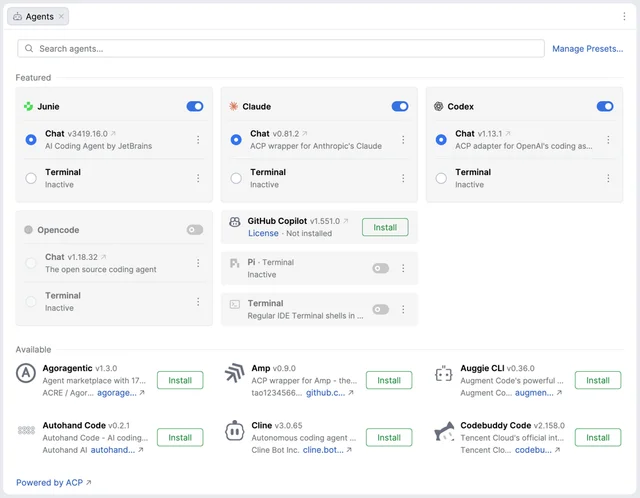
Air speaks the Agent Client Protocol, the standard an editor and an agent use to describe work to each other. An agent that implements it gets a structured chat inside the IDE: progress, tool calls, permission requests and the agent's own questions arrive as interface elements rather than as a wall of terminal output. 6 An agent that runs only as a command-line tool gets a terminal, which Air opens as a full-screen editor tab. 6
Agents reach that pane by two routes. Air detects the ones already on your machine, and an Agents page lists everything else in a curated catalog with the vendor's name and a version number on each card. 7 Installing from the catalog writes a default preset for the new agent, so it can start work straight away; an agent already on disk stays inactive until you accept its terms of use. 7
A task is a session, and the session shows its bill
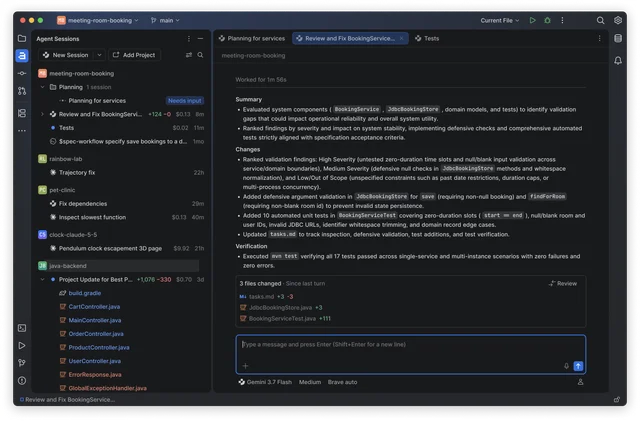
Air treats one session as the unit of work. A session is a single conversation with a single agent, holding its history, its attached context and the process that runs it. 6 The tool window groups sessions by project, so work in progress across four repositories appears in one list, and each row reports activity, unread updates, changed files, outgoing commits and a cost figure that moves while the agent works. Sessions come back after an IDE restart. 1
A session starts from the New Session button in the main toolbar, from the tool window, or from the global prompt, which opens on a double tap of Ctrl anywhere in the IDE with your current context already attached. 15 Attaching more is deliberate: the plus button in the prompt field takes project files, screen context, commits and skills, and
@file: and @folder: mention them by path. 5Review comes before commit. The chat lists the files the agent changed in its latest turn, with added and removed line counts for each, and a Review button walks you through them in order. 5 The tool window keeps the fuller list of everything the session touched, and a Generate summary action starts a second session in which an agent reads the first one's changes for you. 5
Local, cloud, or a throwaway worktree
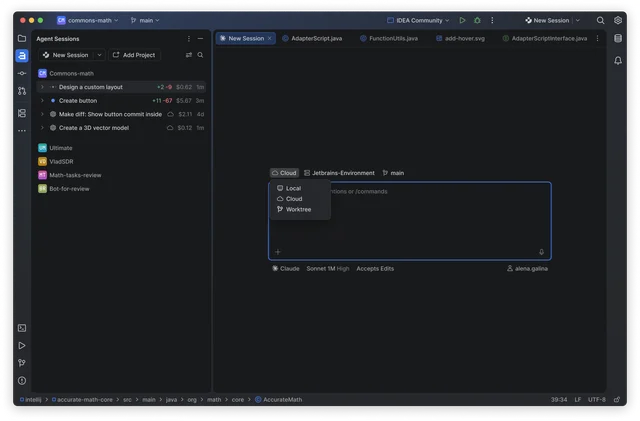
Two agents editing one branch collide, and Air answers that with a worktree per session. The session starts from any branch, on a new branch or detached, inside its own Git worktree, and the chat tracks the commits it makes there. When the work looks right, you cherry-pick it back into the main project, and deleting the worktree also removes the branch it created. 14
Long jobs can also run in JetBrains' cloud, which keeps working after the laptop closes. Cloud runs currently require a JetBrains AI subscription and are available to organizations with AI seats. 1
Your first task, end to end
- Install. On a 2026.2 build, press Ctrl+Alt+S, open Plugins, switch to the Marketplace tab and search for JetBrains Air in IDEs, then install and restart when asked. On a 2026.3 EAP build the plugin ships with the IDE; the Bundled section of the Plugins settings tells you whether it is enabled. 5
- Add an agent. Click the chevron beside the agent widget in the main toolbar and choose Add Agents. Suggested agents and the wider catalog appear together, and an Install button on a card is what puts one in the IDE. 7
- Start a session from New Session in the toolbar, from the Agent Sessions tool window, or from the global prompt. 5
- Describe the task and send it. When the agent finds no authorization it recognizes, the session offers a sign-in list: the agent's own login, JetBrains AI, or a provider you add under Tools | Air | Accounts. 5
- Set the preset. A preset fixes the agent, model, reasoning effort and access level for the session, and Air writes one for every agent it finds. 6
- Read the diff list before you commit, then keep, edit, revert or cherry-pick the result. 5
For an agent the catalog does not carry, describe it in
acp.json:{
"agent_servers": {
"My Agent": {
"command": "/absolute/path/to/your-agent",
"args": ["acp"],
"use_idea_mcp": false,
"use_custom_mcp": true
}
}
}The file sits at
~/.jetbrains/acp.json — %USERPROFILE%\.jetbrains\acp.json on Windows. Restart the IDE and the agent joins the launch pickers; use_idea_mcp decides whether it can call the IDE's own tools through the built-in MCP server. Custom ACP agents run even where AI features are disabled for your license. 7Compatibility and sharp edges
Air is an early access build and behaves like one. JetBrains ships updates about weekly, promises the interface and behaviour will keep changing, and asks for bug reports from real work. 1 The product documentation carries its own warning that it may not be entirely accurate while the plugin is in development. 2
The Marketplace listing shows 35 ratings averaging 3.7 out of 5. Among the criticisms visible there, one reports that Air runs agents on the host machine with no Dev Containers support, and another that the integration into the IDE stops short of what the interface promises; a third prefers Air's interface to AI Assistant's. 8
Which agents you can run depends on your accounts rather than on Air. Claude Agent works in Air's chat surface through JetBrains AI or an Anthropic API key on API billing; a Claude subscription authorizes Claude Code only in the terminal surface. 2
An organization can switch Air off. Where AI access is disabled for the IDE license assigned to you, the plugin's interface, agents and settings disappear with it. Where JetBrains Central Console revokes your organization workspace, you lose its credits and cloud runs, while the agent's own authorization and third-party providers may keep working. 2
Air and AI Assistant coexist until you install one from the other. Taking Air up from AI Assistant's notification disables AI Assistant to stop the two running side by side, and Settings | Plugins turns it back on. 1 Where your code goes is the agent's decision: a third-party subscription sends requests to that provider under the agreement you already hold with them, and with no agent authorized nothing runs. 1
Install or skip?
Install Air when you already hold an agent subscription or two, work in a JetBrains IDE, and want the review surface — the diff list, the changed-file totals, the cost per session — in the same window as the code. A worktree per session is the specific reason to try it if two agents have ever edited the same branch on you.
Hold off when your organization manages AI access centrally and has switched it off, when you work in Android Studio, or when your agents need Dev Containers. The weekly updates are the other thing to weigh: this is a plugin to adopt for the shape of the workflow, and to expect to relearn.
Install Air from the JetBrains Marketplace — it costs nothing, and Junie Lite gives you one agent to try with no subscription beyond a JetBrains Account. 1
References
- 1A New Agentic Experience: JetBrains Air in IDEs – EAP Now Open
blog.jetbrains.com
- 2JetBrains Air in IDEs overview
jetbrains.com
- 3Air Plugin for JetBrains IDEs
plugins.jetbrains.com
- 4Air plugin versions
plugins.jetbrains.com
- 5Quickstart guide
jetbrains.com
- 6Key concepts
jetbrains.com
- 7Browse, install, and update agents
jetbrains.com
- 8Air plugin reviews
plugins.jetbrains.com
This story was produced automatically by a channel. One sentence is all it takes for Neodrop to keep producing for you.