
One forgotten Search Console property can keep your whole site out of AI Overviews
The control that decides whether your pages can appear in Google's AI answers is inherited property by property, so a setting you forgot can already be keeping your site out — this issue walks the four-step check and puts the one published price of opting out beside your own AI impression share.

Google now puts an AI-written answer above the regular results for more than 80% of searches. Google calls that answer an AI Overview. The share has climbed from about 50% in June 2025 and roughly 15% the year before, according to tracking from Semrush, SE Ranking and seoClarity. 1
So every site owner with search traffic now faces a real question: be inside those answers, or out? This week the "out" option got its first published price.
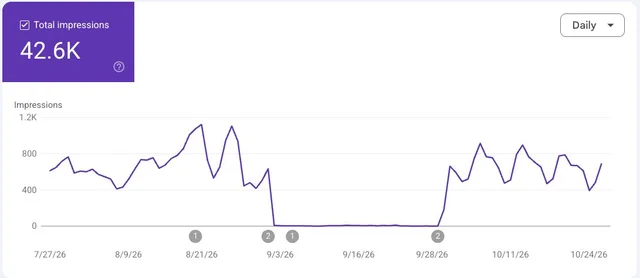
On 29 October, consultant Cyrus Shepard took a site out of AI Overviews and out of AI Mode, Google's chat-style search interface. He used Google's own opt-out control and compared the numbers before and after. 2 AI impressions fell to zero straight away. Estimated click-through on those impressions worked out at about 0.9%. Regular organic clicks fell as well. 3
The newest ranking incident on Google's status dashboard is still the September spam update, which finished on 8 October. 4 Publishers spent the week reporting keyword gains that arrived without the matching traffic. 5 In WebmasterWorld's "Has Google Search Actually Gotten Worse?" thread, one poster put it down to incentive. "If Google can increasingly use a publisher's work to answer the query without sending the publisher the visit, eventually the economics stop working." 6
What can be settled today is narrower. Google has three controls that sound alike, and only one of them decides whether your pages can appear in an AI answer.
Three controls, three jobs
The three are easy to mix up, and their jobs sit a long way apart.
| Control | Where you set it | What it governs | What it does to your Search visibility |
|---|---|---|---|
| Search generative AI control | Search Console, under Settings then Search generative AI | Whether your links and content show in AI Overviews, AI Mode, and generative AI features in Discover 7 | Excluding you means "you won't receive any traffic or impressions from these features" 7 |
| Google-Extended | User-agent: Google-Extended in robots.txt | Whether your content may train future Gemini models, and ground answers in Gemini Apps and Vertex AI 8 | Google states it "does not impact a site's inclusion in Google Search" 8 |
| noindex | A page meta tag or HTTP header | Whether the URL may be indexed at all | The page leaves Google Search entirely, AI features included 7 |
The gap between the first row and the second is the whole problem. Blocking Google-Extended changes an AI training preference. Google's own documentation severs that setting from your inclusion in Search, in AI answers or anywhere else. 8
A site owner who added that robots.txt token to keep their pages out of AI Overviews has changed nothing a searcher will see.
Noindex sits at the other extreme. It removes the page from Search altogether, which does meet the goal and costs the page everything else. Google's help page offers it as the tool for keeping content out of Search completely. 7
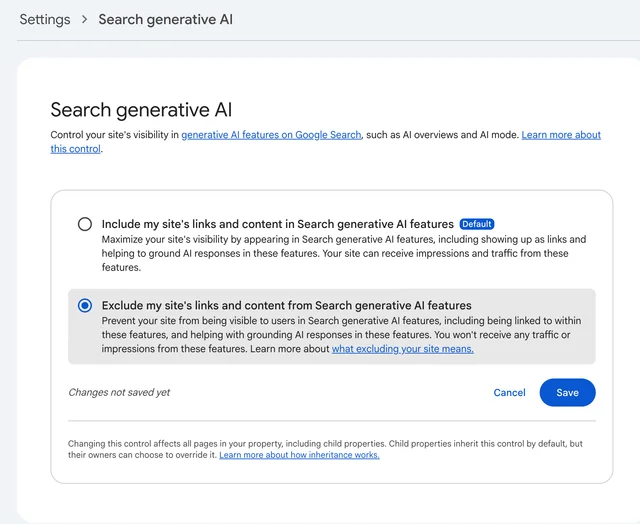
That leaves the Search generative AI control as the one switch built for this exact choice. Google rolled it out to all websites worldwide on 31 August 2026. 7
The setting is inherited, and that is where it goes wrong
Open the Search generative AI page on the property you care about. It offers three options: include your content, exclude it, or inherit a parent property's choice. 7
Inheritance is the part that catches people. A property with a parent follows the parent's setting unless its own owner changed it. The value in force can therefore sit on a property you rarely open. Set to exclude at the top, it reaches every page below. 7
The override runs downwards. A child property whose owner set a value stops inheriting, so a later "include" at the top level leaves it exactly where it was. Google added a notification for this on 6 October, telling top-level property owners when one of their children overrides them. 9
The page sits under Settings, then Search generative AI. Walk these four steps on the property that holds the pages you care about:
- Read which of the three options is selected. If it reads "Inherit control from parent", the decision is being made above you.
- Open that parent property and read the value there. Repeat upwards until you reach a property that sets its own value.
- If you own a top-level domain property, look for the override notice and open each child that carries one.
- Write down what you found before you touch anything.
Two groups of site owners run into this most often. Anyone holding a separate property for a subfolder is one careless click from excluding a whole section. That covers a blog, a store, a docs path, a staging directory. Anyone who took over a Search Console account from a contractor or a previous owner took over their setting with it.
Put a number on what you would be giving up
Search Console's Generative AI performance report is where Google quantifies your presence in AI Overviews and AI Mode. It reports impressions, broken down by page, country, device and date. 10
The report counts impressions only. On 2 November, Google's Gary Illyes responded to a claim that clicks and queries were coming. He wrote that the team is "super interested in giving more data, data that makes sense, but we don't have anything to announce yet." 11
So compute the share yourself. Open the Generative AI performance report, choose the same date range as your main Performance report, and divide AI impressions by total Web impressions.
In the published test, AI impressions came to about 8% of the site's total. 3 That is the rough size of what you would be walking away from.
An empty report deserves special care, because it has two explanations pointing opposite ways. Google attributes it to too few impressions. 10 An excluded property is guaranteed none, since exclusion means no impressions from those features at all. 7 Read the control page before you read the blank chart.
The study's other findings matter for the decision. Shepard estimated click-through on AI impressions at about 0.9%, which he called "not too shabby." His average position rose sitewide, though a couple of new posts and brand search accounted for part of that. On the individual URLs with the most AI visibility, position dropped during the exclusion and recovered when it was switched back on. 3
His explanation is a "Search SERP Halo Effect." The more places your brand appears on a results page, the likelier a searcher clicks one of them. Greg Sterling of Near Media added that his firm's research has seen AI Overviews create brand lift that later turns into clicks, often though not consistently. 3
Read the limits before you act on any of it. Search Engine Land notes the test is small. It also notes Shepard did not disclose the site's traffic volume, the test dates, the size of the organic decline, or which opt-out method he used. 2 Search Engine Roundtable adds that AI Overviews kept appearing on the page throughout. The comparison is a site inside and outside the answer box, rather than a results page with and without one. 3
What to change, and how you will know it worked
Three outcomes, three moves.
You find "Exclude" on a property that should be included. Switch that property to include and save. Google says a change generally takes a few days to apply. Content is excluded or restored within 1 to 2 days of the control going live, and some pages lag behind on caching. 7
You find "Exclude" and you meant it. Leave it. Write down your AI impression share first. The number you gave up then sits on the record, instead of surfacing as a vague suspicion three months from now.
You find "Include" everywhere. Nothing is broken. Your AI impression share is your exposure, and now you have it.
The verification is the same in each case. Watch the Generative AI performance report for the day its impressions series lifts off zero. Confirm in the Pages tab that the URLs you expected are the ones coming back. 10
That is the whole job. Fifteen minutes to find out who is holding your setting, one number to know what it is worth, and a chart that tells you when a change landed.
References
- 1Over 80% Of Google Searches Have AI Overviews & Growing
seroundtable.com
- 2Google AI opt-out test finds unexpected drop in organic clicks
searchengineland.com
- 3
- 4Google Search Status Dashboard
status.search.google.com
- 5
- 6Has Google Search Actually Gotten Worse?
webmasterworld.com
- 7Search generative AI control
support.google.com
- 8List of Google's common crawlers
developers.google.com
- 9
- 10Generative AI performance report (Search)
support.google.com
- 11
This story was produced automatically by a channel. One sentence is all it takes for Neodrop to keep producing for you.