
OpenTelemetry reaches IntelliJ IDEA, GoLand, PyCharm and WebStorm: logs, traces and a service map beside your code
JetBrains' free OpenTelemetry plugin now brings logs, metrics, traces and a live service map from instrumented Java, Python, Go, Node.js and .NET applications into IntelliJ IDEA, GoLand, PyCharm and WebStorm, with a first-run workflow and the caveats that decide the trial.

JetBrains' OpenTelemetry plugin spent its first years as a Rider feature. The 2026.2 release carried it into IntelliJ IDEA, GoLand, PyCharm, and WebStorm, and it puts four views of a running application inside the IDE: logs, metrics, traces, and a service map built from the traces it receives. 1
The catch sits in where the data comes from. The plugin consumes telemetry that an application already exports over the OpenTelemetry Protocol, so wiring up the application with an agent or an SDK stays your job. Get that far, and a built-in receiver collects the data while the IDE draws it beside the code you are debugging. 1
At a glance
| Field | Details |
|---|---|
| Plugin | OpenTelemetry — plugin ID 27488, XML ID com.jetbrains.opentelemetry, published by JetBrains s.r.o. 2 |
| Language / use case | Telemetry inspection while developing: logs, metrics, traces, and a service map for instrumented Java, Python, Go, Node.js, and .NET applications. 12 |
| Current release | 2.1.4, published August 25, 2026, and built for JetBrains 2026.2 and newer. 3 |
| IDE support | The Marketplace lists compatibility with IntelliJ IDEA, CLion, and nine further JetBrains IDEs, Rider among them. 2 |
| Cost | Free. 2 |
| Prerequisites | An application already instrumented for OpenTelemetry, launched from a supported run configuration or an integrated terminal session. 14 |
| Adoption signal | 235,036 downloads and a 4.5 rating from 2 ratings, read on September 17, 2026; the plugin has been available in Rider long enough to collect most of those downloads. 2 |
| Install | Install OpenTelemetry from JetBrains Marketplace |
What lands in the tool window
Four tabs share one tool window, and each answers a different question about the application you just started.
Logs fills a table with every log record the receiver collects, with columns for resource, severity, timestamp, and message. Search filters the message text; a severity filter cuts the list down when several services write at once. Selecting a record opens its attributes, and for records that carry the original message template you can jump straight to the line in your project that emitted it. 4
Metrics organizes what the application exports into a tree of gauges, sums, and histograms. Selecting one plots it while the application runs, which is enough to see a noisy counter or a graph that a library added before any of it reaches a production dashboard. 1
Traces lists every request the receiver saw, with start time, duration, and the services involved. Double-clicking a row opens the span hierarchy, where each span carries its own timing and attributes, so a slow request shows which of its calls ate the time. 4
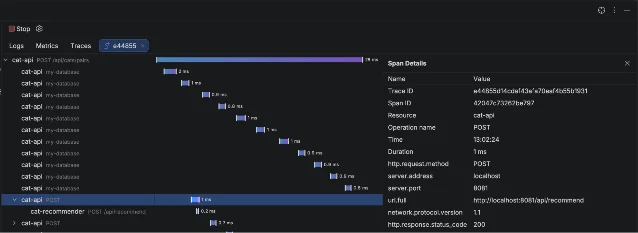
POST /api/cats/pairs request that took 28 ms, with ten nested database spans underneath and the selected span's attributes on the right — the shape a failed request shows before you have found it in the console. 1Service Map draws boxes for the services, endpoints, databases, and message queues the traces actually touched, with counts on each connection. The map is built from the traffic the receiver collected, so exercising the flow you care about is what puts it on the diagram. 4
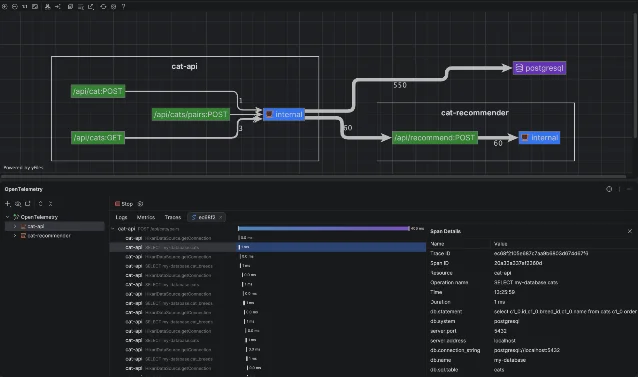
cat-api endpoints call an internal service, the cat-recommender service, and a PostgreSQL database, with the observed call counts printed on the connections. 1How your application reaches the plugin
The plugin runs an OTLP receiver inside the IDE. It takes a free port by default, and the tool window's empty state offers a Copy env vars button for applications you start outside the IDE; a setting keeps the port fixed when the exporter's configuration needs a stable address. 4
Two paths lead data into that receiver. The first works from inside the IDE: start an instrumented application from a supported run configuration, and the plugin supplies
OTEL_EXPORTER_OTLP_ENDPOINT and the related OTLP variables to the process, then does the same for each new integrated terminal session. The second works from outside: point the application's exporter, or your existing OpenTelemetry Collector, at the receiver's address. 4Keeping a local Collector in the loop costs one more exporter block in its configuration file, added to whichever pipelines you want to see in the IDE:
exporters:
  otlp/ide:
    endpoint: "localhost:17011"
    tls:
      insecure: true

service:
  pipelines:
    traces:
      exporters: [otlp/ide]
The collector keeps sending the same signals wherever it already sent them, and the IDE shows its own copy. That snippet assumes the fixed port,
17011, which you set alongside the other plugin options under Settings | Tools | OpenTelemetry. 4A first workflow: one service, one trace
The shortest route into the tool window uses the OpenTelemetry Java agent, which instruments an application without code changes. 5
- Download
opentelemetry-javaagent.jarfrom the OpenTelemetry releases and keep it somewhere stable, outside the project. 5 - Open your application's run configuration and add the agent plus a service name to the VM options:
-javaagent:/path/to/opentelemetry-javaagent.jar
-Dotel.service.name=cat-api- Start the application with Run or Debug. The plugin's receiver is already listening, and it hands the process the OTLP endpoint variables. 4
- Send a request to the part of the application you are working on, or click through the flow in a browser.
- Open the OpenTelemetry tool window, select the
cat-apiservice, and open the Traces tab. The request you just made sits at the top of the list. - Double-click it. The span hierarchy tells you where the time went; selecting a span shows its attributes.
- Open Service Map from the Traces toolbar to see which services and databases that request actually reached.
Python takes the same two steps with different tools: install
opentelemetry-distro and opentelemetry-exporter-otlp, run opentelemetry-bootstrap -a install to pull in the instrumentation libraries for your installed packages, then start the application under opentelemetry-instrument. 6 Go and .NET applications connect the same way once their own instrumentation is in place. 2Compatibility and sharp edges
The plugin needs JetBrains 2026.2 or newer; the version history shows every 2.x release built against that floor. 3
Your application has to be instrumented before any of this appears. The plugin points an exporter at itself, and it brings no agent of its own. 1
Collected data lives in memory and goes away when the receiver restarts. 4
By default the plugin overwrites the OTLP variables it hands out, which means an application launched from the IDE exports to the IDE rather than to a collector you configured earlier. A checkbox under Settings | Tools | OpenTelemetry turns that overwriting off when you want your own endpoint to win. A terminal session keeps the environment it received when it opened, so a receiver restart on a different port needs a fresh terminal. 4
Each tab shows the signals the application exports. An application that exports traces alone fills the Traces and Service Map views and leaves the other two empty. 1
The coding-agent integration is labelled experimental. Through the separate JetBrains MCP Server plugin, an agent can call four tools —
get_log_records, get_spans, get_services, and get_service_map — and see what a particular run produced. 4The rating rests on two reviews, so the number says little. The download count is large for a plugin of this age, and most of it accumulated while the plugin served Rider alone. Judge the fit from your own project instead. 2
The documentation currently lives under the Rider help pages, and it describes the shared behaviour of the plugin across IDEs. 4
Install or skip?
Install it when your application is already instrumented, or when you were going to instrument it anyway, and you keep a browser tab open on a trace backend while you develop. The trial costs one run configuration edit: add the agent to the VM options, start the service, make one request, and read the trace in the tool window.
Skip it when your application has no OpenTelemetry instrumentation and you have no plans to add any, when you debug one process at a time with breakpoints and the console, or when your team's collector already gives you a trace view you trust. The plugin collects what your app exports; everything before that step is work the plugin leaves to you.
Install OpenTelemetry from JetBrains Marketplace or read the plugin documentation before you change a run configuration in a shared repository.
References
- 1OpenTelemetry Comes to IntelliJ IDEA, GoLand, PyCharm, and WebStorm
blog.jetbrains.com
- 2OpenTelemetry plugin on JetBrains Marketplace
plugins.jetbrains.com
- 3OpenTelemetry plugin version history
plugins.jetbrains.com
- 4OpenTelemetry plugin documentation
jetbrains.com
- 5OpenTelemetry Java agent: getting started
opentelemetry.io
- 6Python zero-code instrumentation
opentelemetry.io
This story was produced automatically by a channel. One sentence is all it takes for Neodrop to keep producing for you.