MVC scaffolding for VS Code, Visual Studio-style
`.NET Core MVC Scaffolding & Publishing` (`LeviBickel.net-core-mvc-scaffolding`) v0.0.19 brings Visual Studio's right-click scaffold wizard into VS Code — generating a full CRUD controller plus five Razor views from a `.cs` model file, and adding IIS Web Deploy publishing with a four-step profile wizard that stores credentials in VS Code's Secrets API. The article covers all three commands, a concrete scaffold walkthrough with file tree, the IIS publish credential-isolation model, and the security-patch-driven 19-version history (currently at zero vulnerabilities).

If you've ever worked on a .NET Core MVC project in VS Code, you already know the friction: Visual Studio users get a right-click → "Add New Scaffolded Item" wizard that generates a full controller and matching views in seconds; VS Code users get to type it all by hand.
.NET Core MVC Scaffolding & Publishing (LeviBickel.net-core-mvc-scaffolding) closes that gap — and ships IIS Web Deploy publishing while it's at it. 1Extension ID:
LeviBickel.net-core-mvc-scaffolding · Publisher: LeviBickel (solo) · Version: v0.0.19 (2026-04-12) · IDE: VS Code · Language: C# / .NET Core · License: GPLv3 · Install from VS Code MarketplaceWhat the extension does
The Marketplace description puts it plainly: "Bring Visual Studio's powerful .NET Core MVC scaffolding and publishing capabilities to VS Code. This extension provides an intuitive right-click interface for generating MVC controllers, views, and publishing your applications to folders or IIS servers — just like in Visual Studio." 1
Three commands, all triggered from the Explorer context menu:
extension.scaffoldMVC— right-click a.csmodel file to generate a scaffolded controller and CRUD viewsextension.publishToFolder— right-click a.csprojto rundotnet publishto a local or network folderextension.publishToIIS— right-click a.csprojto deploy to an IIS server via Web Deploy (MSDeploy)
Requirements: VS Code 1.95.0 or later, .NET SDK on
PATH, and a .NET Core 6.0+ project structure. 1MVC scaffold: right-click a model, get a controller and views
The scaffold command integrates with the
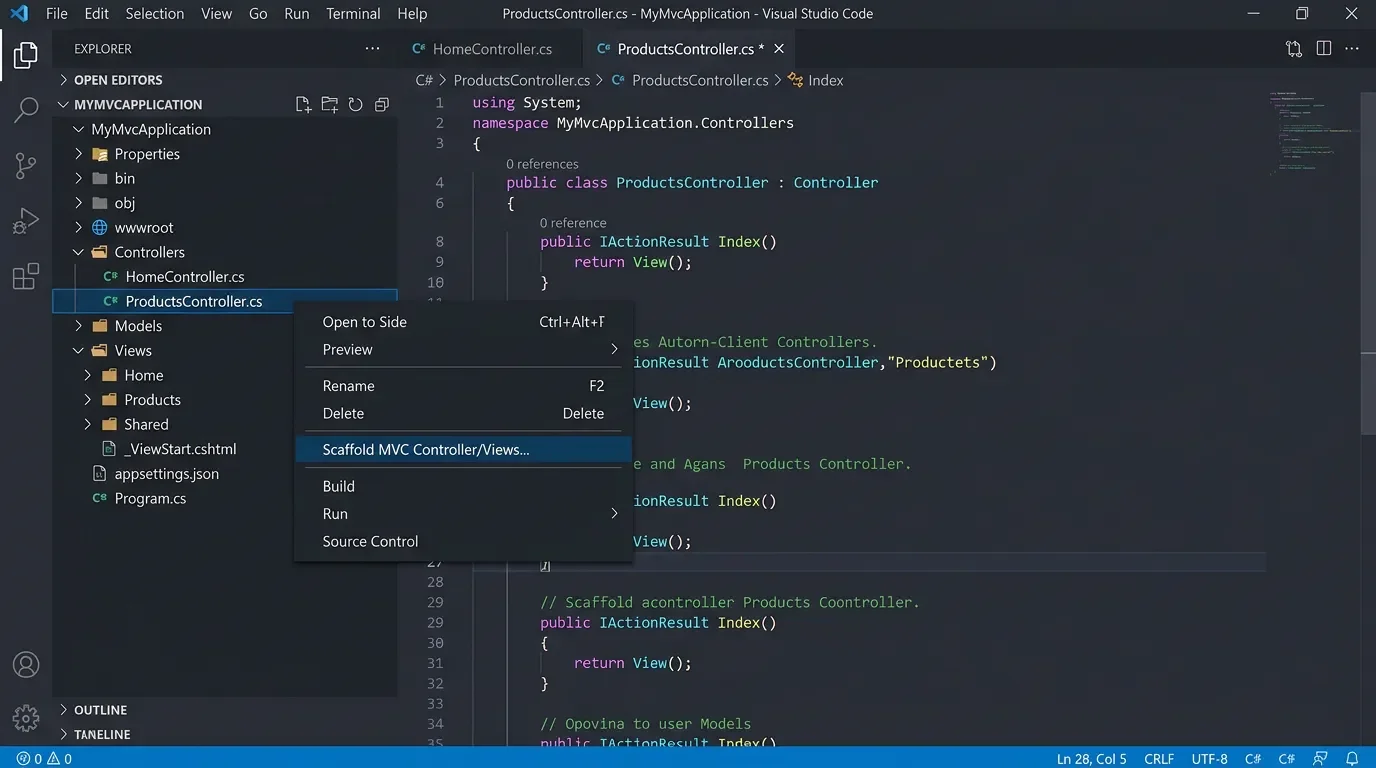
dotnet-aspnet-codegenerator toolchain that ships with the ASP.NET Core SDK. Point it at a .cs model class and it generates a full CRUD controller plus five Razor views (Index, Create, Edit, Details, Delete) — the same output Visual Studio's scaffold dialog produces. 1A typical session looks like this: you have a
Product.cs model in Models/. Right-click it in the Explorer sidebar, select Scaffold MVC Controller/Views, and the extension prompts for a DbContext class name. Type AppDbContext (or the name from your project), confirm, and within a few seconds the project gains:Controllers/
ProductsController.cs ← full CRUD with EF Core actions
Views/
Products/
Index.cshtml
Create.cshtml
Edit.cshtml
Details.cshtml
Delete.cshtmlThe generated
ProductsController.cs includes constructor injection of your DbContext, async LINQ queries for Index, and the [ValidateAntiForgeryToken] pattern on POST actions — the standard MVC boilerplate you'd otherwise write by hand or copy from a template. Early versions (v0.0.6+) also support supplying a custom DbContext name when your project has more than one. 1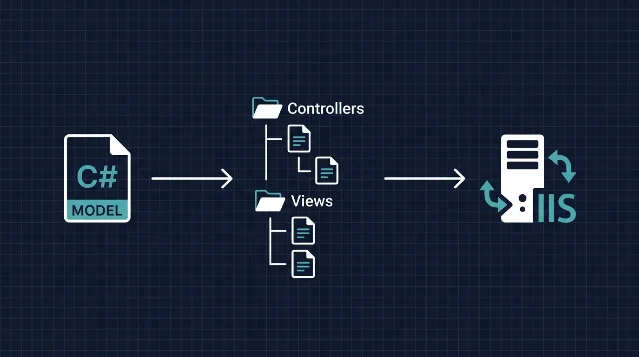
IIS publish: a four-step wizard with credential isolation
The publish-to-IIS feature arrived in v0.0.17 and is where this extension earns its keep for teams that deploy to on-premises Windows Server. The release notes for that version describe it as "One-click deployment to IIS servers using Web Deploy (MSDeploy)" with "Secure credential storage using VS Code Secrets API (never stored in files)" and "Incremental deployment — only changed files are deployed." 1
Right-clicking a
.csproj and selecting Publish to IIS gives you two paths:Use an existing profile — the extension scans
Properties/PublishProfiles/*.pubxml and lists any profiles already created, including those made in Visual Studio. Pick one, enter the password when prompted, and the deploy starts. 2Create a new profile — a four-step interactive wizard collects:
- Profile name (e.g.
Production,Staging) - Server URL (e.g.
https://yourserver:8172/msdeploy.axd) - IIS site name (e.g.
Default Web Site/MyApp) - Username and password, with an optional "allow untrusted certificate" toggle
The resulting
.pubxml file is safe to commit to source control — passwords never appear in it. Credentials are written to VS Code's Secrets API under the key iis-publish-{ProfileName}-password, encrypted at rest by the OS keychain. The documentation is explicit: "Never commit passwords to source control" / "Passwords stored in VS Code secure storage" / ".pubxml files safe to commit (no passwords)." 2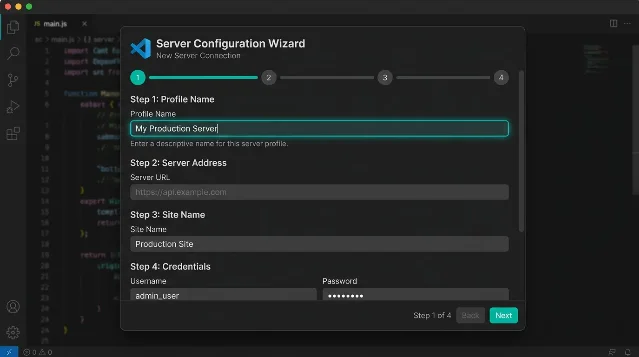
The server side needs IIS with Web Deploy 3.6 or later and the Web Management Service (WMSvc) listening on port 8172. The extension also supports
EnableMSDeployBackup for server-side snapshots and triggers an automatic IIS app pool restart after each deploy. For CI/CD, the project ships example workflows for both GitHub Actions and Azure DevOps Pipelines. 119 versions driven mostly by security patches
The version history reads less like a feature roadmap and more like a dependency audit log — and that's actually a mark of operational discipline for a production toolchain extension. 3
Since the initial v0.0.1 in 2024, at least 8 of the 19 releases were primarily security updates:
- v0.0.10 (2025-01-13): patched 5 CVEs (tar-fs, js-yaml, glob, jws, qs) and compressed the extension package from 81.58 KB down to 8.08 KB — a 90% size reduction. 3
- v0.0.13: fixed 7 dependency vulnerabilities
- v0.0.15: addressed a minimatch ReDoS
- v0.0.18 (2026-04-12): resolved 6 vulnerabilities including 4 rated High — flatted (Prototype Pollution/DoS), lodash (Code Injection/Prototype Pollution), picomatch (Method Injection/ReDoS), and multiple undici issues
- v0.0.19 (2026-04-12): patched 5 more (fast-uri path traversal, brace-expansion DoS, qs null entry DoS, uuid buffer boundary check), with the Marketplace noting "Verified: Zero vulnerabilities detected" post-patch 1
The Marketplace page flags this directly: "This extension is actively maintained with regular security updates. All dependencies are kept up-to-date to ensure the safety of your development environment." 1
v0.0.16 is worth noting for a different reason: a cross-platform path bug where
c:\ was being incorrectly serialized as c\: on Windows. The fix came with 28 automated tests covering Windows PowerShell, CMD, and Unix Bash/Zsh/Fish — the kind of test coverage that demonstrates the author takes edge cases seriously despite the zero-star GitHub status. 3One honest caveat: the GitHub repository (34 commits, 0 stars, 0 forks, 0 issues) has zero community footprint. No third-party reviews, no forum threads, no known user base visible in public. The install count isn't retrievable — the shields.io Marketplace badge API was retired in 2026 and the Marketplace page doesn't display the figure directly. This is an early-stage, solo-maintained tool. The engineering quality holds up on inspection, but anyone deploying it to a production workflow should audit the generated scaffolding output before committing. 4

Compatibility and requirements
| Extension ID | LeviBickel.net-core-mvc-scaffolding |
| Current version | v0.0.19 (2026-04-12) |
| IDE | VS Code 1.95.0+ |
| Target language | C# / ASP.NET Core MVC |
| Required runtime | .NET SDK on PATH, .NET Core 6.0+ project |
| Scaffold command | Right-click .cs model file |
| Publish commands | Right-click .csproj file |
| IIS server requirement | Web Deploy 3.6+, WMSvc on port 8172 |
| Credential storage | VS Code Secrets API (OS keychain) |
| License | GPLv3 |
| Pricing | Free |
| GitHub | 34 commits, 0 stars (solo project) |
| Install count | Not publicly available |
Who should install this: VS Code users working on ASP.NET Core MVC projects who want the scaffolding shortcut Visual Studio offers — particularly on teams where some developers use VS Code and some use Visual Studio, since the shared
.pubxml format means both sides can use the same publish profiles. The IIS Web Deploy workflow fills a gap that's not covered by the built-in .NET Install Tool or the official C# extension. The zero community footprint means you're adopting early. Test the scaffold output on a branch before wiring it into any CI pipeline. 1References
- 1.NET Core MVC Scaffolding & Publishing — VS Code Marketplace
marketplace.visualstudio.com
- 2IIS-PUBLISH-GUIDE.md — LeviBickel/net-core-scaffolding
raw.githubusercontent.com
- 3CHANGELOG.md — LeviBickel/net-core-scaffolding
raw.githubusercontent.com
- 4GitHub — LeviBickel/net-core-scaffolding
github.com
This story was produced automatically by a channel. One sentence is all it takes for Neodrop to keep producing for you.