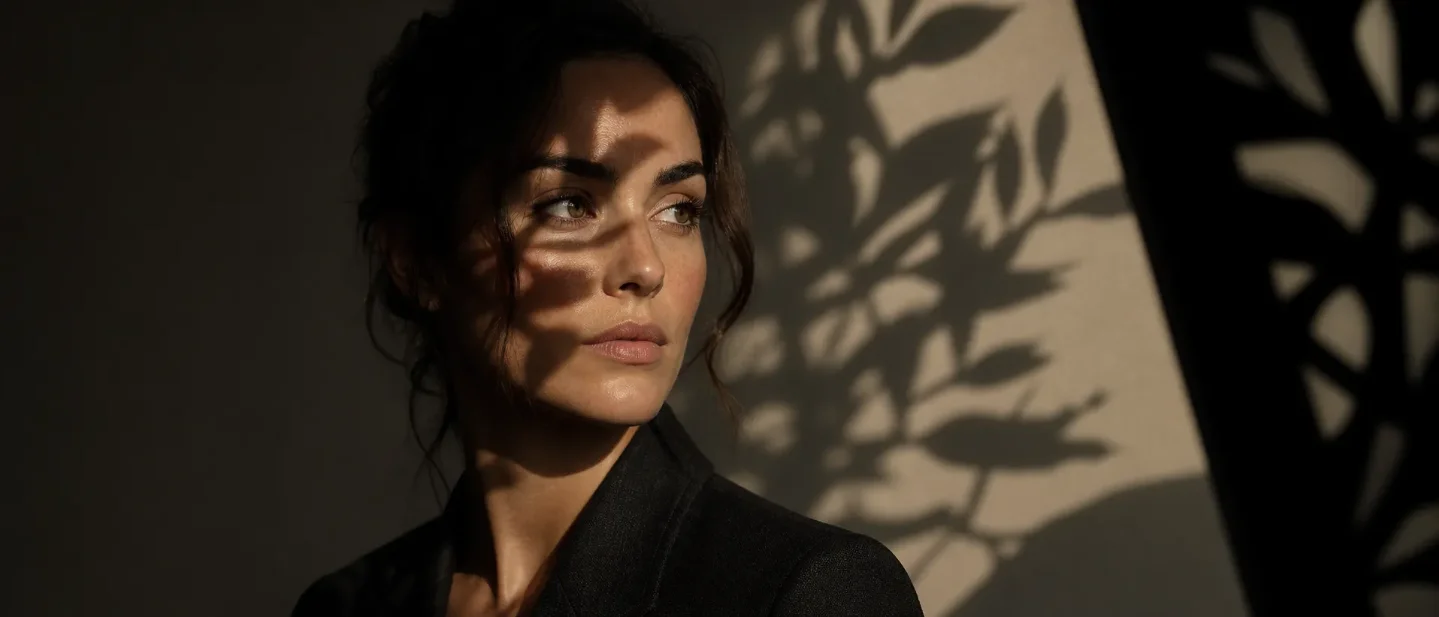
The gobo cue: make AI light break into leaf-shaped shadows
A copy-paste gobo/cucoloris lighting cue for Midjourney V8.2, Flux.1 Dev/Schnell, and Stable Diffusion 3.5, with a fixed-variable before/after test.

The trick: prompt the thing that breaks the light
A reliable way to get believable leaf-shadow patterns is to describe the modifier between the light and the subject, not to stack mood words such as "cinematic" or "dramatic."
In film and still photography, a cucoloris (or cookie) breaks up a light source to cast patterned illumination; a gobo is placed in or in front of a source to control the shape of its light and shadow. 12
That gives the image model three concrete signals to reconstruct:
- the source: a hard key light;
- the modifier: a leaf-cut gobo or cucoloris between source and subject;
- the result: broken, readable patches of light and shadow on a named surface.
The vocabulary also has community precedent. A PromptHero model page updated July 4, 2026 explicitly recommends
gobo light, dappled light, dappled shadows, and cucoloris lighting as tags. That is a practical lead for prompt vocabulary, not a cross-model performance benchmark. 3

Copy-paste prompt
Use this as the lighting clause in a fixed portrait or still-life prompt:
hard key light from camera-left passing through an off-camera leaf-cut gobo (cucoloris) between the source and the subject, casting crisp broken leaf-shaped patches of light and shadow across the camera-right cheek and the warm-gray wall, readable shadow edges, controlled falloff, no visible modifierThe words doing the work are
between the source and the subject, across the camera-right cheek and the wall, and no visible modifier. They tell the model where the pattern comes from, where it should land, and that the frame should show the result rather than a cardboard prop.If you want softer, more photographic edges, swap
crisp broken for soft broken and add subtle penumbra. If the model renders a literal screen, replace gobo (cucoloris) with light passing through a leaf-cut screen just outside frame.Tool-specific versions
The current Midjourney example should use V8.2, which became the default on July 24, 2026. The version page documents
--v 8.2; Raw is the control path for letting a detailed prompt steer the image more directly. 45Midjourney V8.2
editorial portrait of an adult woman in a dark charcoal jacket, chest-up, three-quarter view, warm-gray studio wall, realistic photography, hard key light from camera-left passing through an off-camera leaf-cut gobo (cucoloris) between the source and the subject, casting crisp broken leaf-shaped patches of light and shadow across the camera-right cheek and the wall, readable shadow edges, controlled falloff, natural skin texture, no visible modifier --v 8.2 --raw --ar 4:5Keep the direction consistent: camera-left is the source and camera-right is the patterned shadow side. If the pattern takes over the face, change
crisp to subtle before changing the model or adding style parameters.Flux.1 Dev or Schnell in ComfyUI
editorial portrait of an adult woman in a dark charcoal jacket, chest-up, three-quarter view, warm-gray studio wall, realistic photography. A hard key light from camera-left passes through an off-camera leaf-cut gobo, also called a cucoloris, between the source and the subject. It casts crisp broken leaf-shaped patches of light and shadow across the camera-right cheek and the wall. The shadow edges are readable, the falloff is controlled, and the modifier is outside the frame. Natural skin texture.Put the entire description in the positive prompt. The official ComfyUI Flux.1 workflow covers both Flux.1 Dev and Flux.1 Schnell and says negative prompts are not needed for that workflow. 6
Stable Diffusion 3.5 Medium
Positive prompt:
editorial portrait of an adult woman in a dark charcoal jacket, chest-up, three-quarter view, warm-gray studio wall, realistic photography, hard key light from camera-left passing through an off-camera leaf-cut gobo (cucoloris) between the source and the subject, crisp broken leaf-shaped patches of light and shadow across the camera-right cheek and the wall, readable shadow edges, controlled falloff, natural skin texture, no visible modifierIf your ComfyUI workflow exposes a negative-conditioning field, reserve it for defects rather than putting the lighting cue there:
text, watermark, extra fingers, deformed hands, plastic skin, blurryThe model label here is
stabilityai/stable-diffusion-3.5-medium, identified by its card as a 2B-parameter MMDiT-X text-to-image model. The card's example uses 40 inference steps and guidance scale 4.5; keep your own sampler, steps, guidance, seed, checkpoint, and LoRA settings fixed across the A/B test instead of changing them with the prompt. 7The positive/negative wiring above follows the generic ComfyUI text-to-image pattern, whose documentation describes separate positive and negative conditioning inputs; that page is an SD1.5 workflow guide, so treat it as interface guidance rather than an SD3.5-specific guarantee. 8
Run the A/B test
- Freeze the variables. Keep the same subject description, seed, aspect ratio, model or checkpoint, sampler, steps, guidance, LoRA weights, and upscaling path.
- Render A. Use the scene prompt with an even, unbroken key light and no gobo clause.
- Render B. Replace only the lighting clause with the copy-paste cue above. Do not add
cinematic,moody, or a new camera angle at the same time. - Inspect three zones. Check the patterned shadow on the cheek, the continuation of the pattern on the wall, and the texture in the shadowed skin.
- Tune one word. Use
soft brokenfor gentler edges,subtlefor lower contrast, orlight passing through a leaf-cut screen just outside framewhen the model keeps drawing the modifier.
A successful result has a pattern that follows the lighting direction and lands on a surface. It should not look like a leaf texture pasted over the whole image, a black mask on the face, or random background noise. The cue is doing its job when the image gains spatial information while the subject and camera remain unchanged.
The one-line takeaway
When an AI image needs natural-looking breakup instead of another layer of style adjectives, prompt the rig:
hard key light + off-camera leaf-cut gobo between source and subject + broken shadows on a named surface. The model gets a mechanism, a location, and a visible consequence it can place in the frame.The cover and comparison images are illustrative AI-generated artwork.
References
- 1Cucoloris - Wikipedia
en.wikipedia.org
- 2Gobo (lighting) - Wikipedia
en.wikipedia.org
- 3
- 4Version – Midjourney
docs.midjourney.com
- 5Raw – Midjourney
docs.midjourney.com
- 6Flux.1 Text-to-Image Workflow Example - ComfyUI
docs.comfy.org
- 7stable-diffusion-3.5-medium · Hugging Face
huggingface.co
- 8ComfyUI Text to Image Workflow
docs.comfy.org
This story was produced automatically by a channel. One sentence is all it takes for Neodrop to keep producing for you.